
The zigzag arrow indicator turns the usual priority around. Most ZigZag tools draw a line and leave you to read the corners. This one puts an arrow at every confirmed pivot and keeps the section line faint behind them. `MinSwingPoints` then throws away the legs too small to bother with.
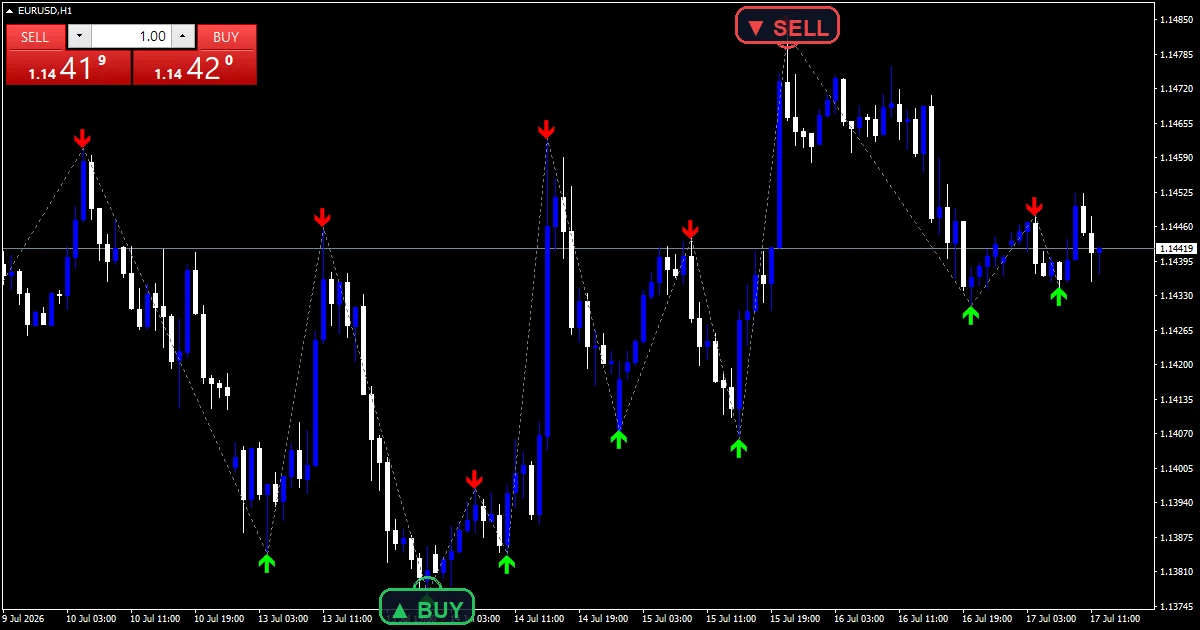
This build ships as a compiled .ex4 for MT4 and .ex5 for MT5; the screenshots below come from EURUSD H1.
| Platforms | MT4 (.ex4) + MT5 (.ex5) |
|---|---|
| Chart window | Main price chart |
| Plots | 3: ZZ Buy Arrow, ZZ Sell Arrow, ZZ Skeleton |
| Alerts | popup, push notification, email, sound |
| Inputs | 11 |
Chart elements
ZZ Buy Arrow places a lime mark at each confirmed swing low.
ZZ Sell Arrow places a red mark at each confirmed swing high.
ZZ Skeleton is the slate gray section line joining those pivots.
`ShowSkeleton` turns that line off when you want the marks alone.
- ZZ Buy Arrow: arrow, lime, width 2, arrow code 233
- ZZ Sell Arrow: arrow, red, width 2, arrow code 234
- ZZ Skeleton: section, slate gray, width 1
What the code actually computes
The pivot rule
A swing low needs its low at or below every low in the `LeftBars` `6` bars before it, and strictly below every low in the `RightBars` `3` bars after. The high test mirrors that. Those three right-hand bars are the confirmation delay.
Forcing alternation
Two pivots of the same type in a row collapse into the more extreme one, and the weaker mark disappears. Highs and lows therefore alternate. That single rule is what separates a ZigZag from a scattered fractal cloud.
The size filter
dev takes `MinSwingPoints` `120` times Point. A new pivot of the opposite type must travel at least that far from the previous one before the code accepts it. Small legs never reach the chart at all.
How to work with it
Every mark is a confirmed turn of at least `MinSwingPoints`.
The code never tests bar 0, so the newest leg stays provisional until it confirms.
Read the faint line as context and the arrows as the information.
Raise `LeftBars` when the chart still shows turns you consider minor.
Alert channels in this build: popup, push notification, email and sound, one message per closed bar.
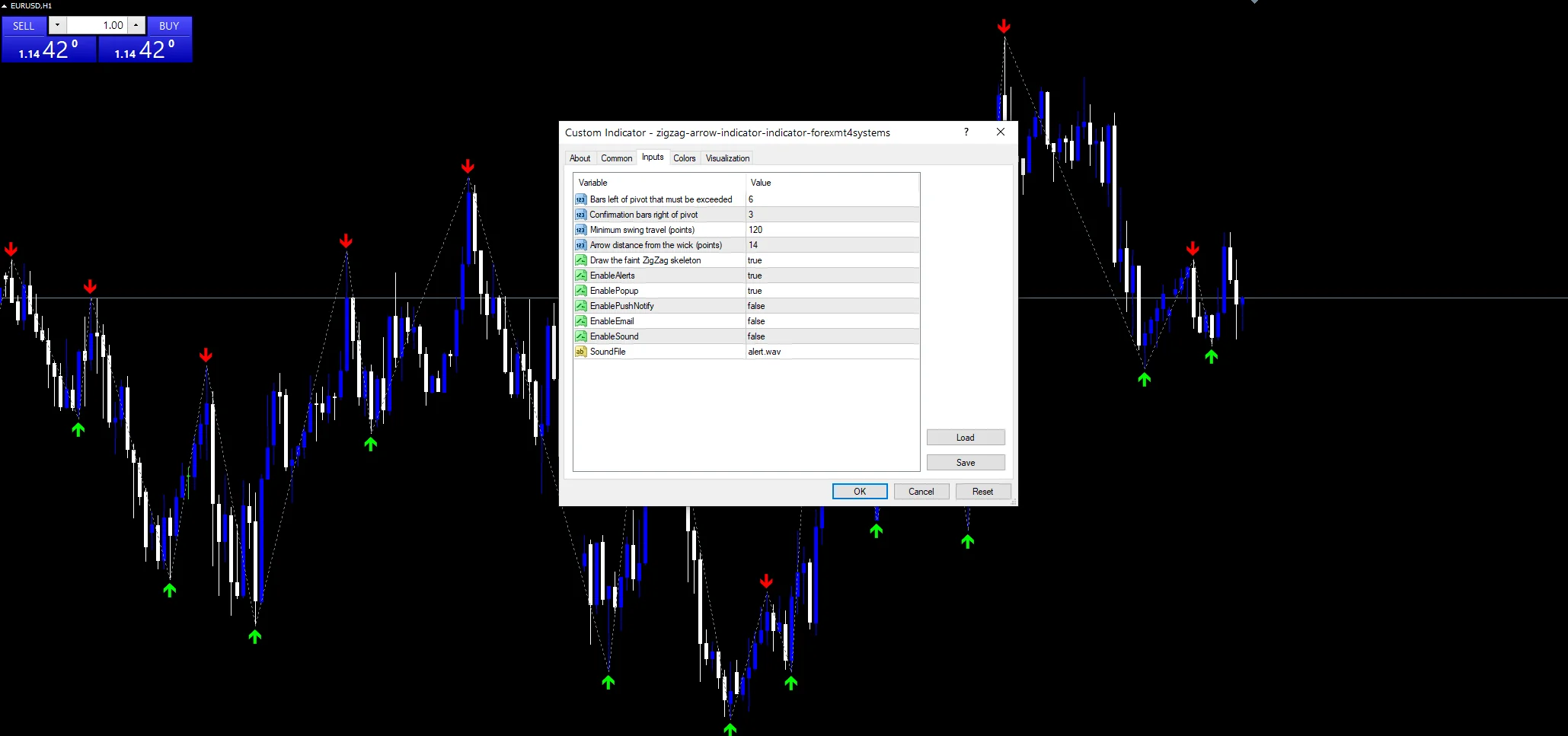
`EnableAlerts` starts on and `EnablePopup` carries the text. `EnablePushNotify`, `EnableEmail` and `EnableSound` begin false. `SoundFile` picks the clip. A pivot confirms on a closed bar, and the guard permits one message for it.
Every ZigZag Arrow Indicator input
Core settings
| Setting | What it does | Default |
|---|---|---|
LeftBars |
Bars left of pivot that must be exceeded. Bars to the left a pivot must beat, default `6`. | 6 |
RightBars |
Confirmation bars right of pivot. Bars to the right that confirm a pivot, default `3`. | 3 |
MinSwingPoints |
Minimum swing travel (points). Smallest accepted leg in points, default `120`. | 120 |
Display settings
| Setting | What it does | Default |
|---|---|---|
ArrowOffsetPoints |
Arrow distance from the wick (points). Mark distance from the wick in points, default `14`. | 14 |
ShowSkeleton |
Draw the faint ZigZag skeleton. Draws the faint section line, default `true`. | on |
Alert settings
| Setting | What it does | Default |
|---|---|---|
EnableAlerts |
Master switch for the ZigZag pivot alerts, default `true`. | on |
EnablePopup |
Terminal dialog once a ZigZag pivot confirms, default `true`. | on |
EnablePushNotify |
Phone push on a confirmed pivot, default `false`. | off |
EnableEmail |
Mail delivery on a confirmed pivot, default `false`. | off |
EnableSound |
Sound playback on a confirmed pivot, default `false`. | off |
SoundFile |
Wav clip for the ZigZag alert, default `alert.wav`. | alert.wav |
Placing it well
A point-based filter needs setting per instrument, unlike an ATR one. EURUSD H1 is the reference chart, where `MinSwingPoints` at `120` means twelve pips. On M5 that threshold removes most of the noise. On gold or an index the same number is far too small and needs raising sharply.
Known limits
The newest leg can still move, which is true of every ZigZag ever written.
`MinSwingPoints` counts points, so one setting cannot travel between instruments.
Three confirmation bars means the arrow always lands after the turn it marks.
Copy the compiled ZigZag Arrow Indicator file into your MQL4/Indicators folder, and the MT5 build into MQL5/Indicators, then restart the terminal and drag it onto a chart. The step-by-step guide with screenshots is at how to install MT4 and MT5 indicators.
Background reading on the method behind the ZigZag Arrow Indicator: Cadre (company) on Wikipedia, Price Relative Relative Strength at StockCharts ChartSchool.
Download the ZigZag Arrow Indicator for MT4 and MT5
The zip holds the compiled ZigZag Arrow Indicator build for MT4 and MT5, plus a short README. Compiled files only, no source. Enter your email below and the download link arrives in your inbox.
Download this indicator free
Enter your email and the file is yours. You also get the full MT4 and MT5 library.
FAQ
What does MinSwingPoints at 120 filter?
Any leg shorter than 120 points from the previous pivot. On a five-digit EURUSD feed that is twelve pips. Legs below it never produce a mark, which keeps the chart readable during a quiet range. Raise it sharply on gold or an index.
What separates LeftBars from RightBars here?
Because they do different jobs. `LeftBars` `6` sets how much history a pivot must beat, which controls how significant it is. `RightBars` `3` is pure confirmation delay, and every bar you add there is a bar of lateness in the mark.
What does the ZZ Skeleton plot add?
The familiar ZigZag shape, which the code draws in slate gray behind the arrows. It exists for context rather than signal, which is why the colour stays deliberately faint. Set `ShowSkeleton` to false and only the two arrow plots remain.
Does the last leg repaint on H1?
The last leg stays provisional, as in any ZigZag. On EURUSD H1 that means the newest pivot can move for up to three hours until `RightBars` bars have closed. Every earlier arrow is fixed and will not change.
Are results guaranteed?
No. Trading involves risk. Results are not guaranteed; past performance is not indicative of future results. Use the ZigZag Arrow Indicator as one input. Always backtest before trading live.
Category: this is part of our Support and Resistance collection. Browse more Support and Resistance for MetaTrader, or explore every MT4 indicator and MT5 indicator on the site.
External references
- The core method is documented in Cadre (company) on Wikipedia.
- Additional market context is at Price Relative Relative Strength at StockCharts ChartSchool.

About the author
Written by Dominic Walsh, a Forex trader and MT4/MT5 indicator, Expert Advisor and script developer. Every tool on forexmt4systems.com is tested on live charts before release and ships with ready-to-use compiled MT4 (.ex4) and MT5 (.ex5) files. Learn more about the trader and developer behind this site.
How we build, test and correct every tool: Editorial & Testing Policy. Trading carries risk; see the disclaimer.