
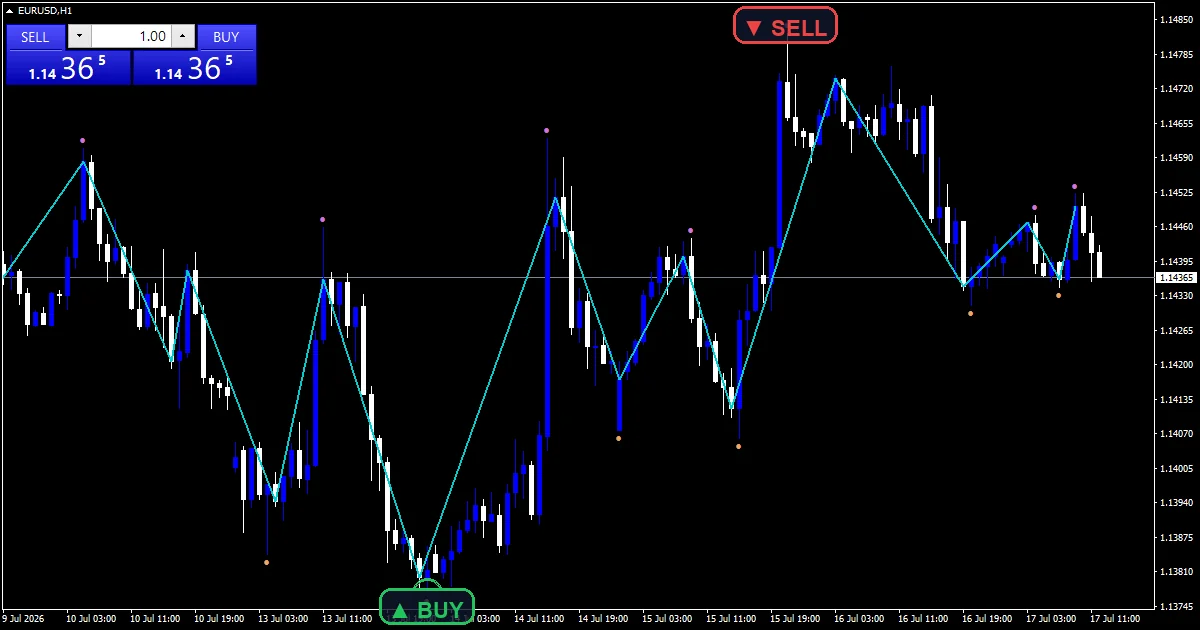
The zigzag close indicator moves the whole calculation onto closes. Depth, deviation and backstep all read the close series rather than the highs and lows. The result marks closing-basis structure and ignores wick noise entirely. Optional dots show what the wick version would have found.
This build ships as a compiled .ex4 for MT4 and .ex5 for MT5; the screenshots below come from EURUSD H1.
| Platforms | MT4 (.ex4) + MT5 (.ex5) |
|---|---|
| Chart window | Main price chart |
| Plots | 3: ZigZag Close, Wick Pivot High, Wick Pivot Low |
| Alerts | popup, push notification, email, sound |
| Inputs | 12 |
Colours, widths and shapes
ZigZag Close is the dark turquoise section line joining closing pivots.
Wick Pivot High and Wick Pivot Low are orchid and sandy brown dots.
Those dots come from the same algorithm run on highs and lows instead.
`ShowWickPivots` turns the comparison off when you only want the line.
- ZigZag Close: section, dark turquoise, width 2
- Wick Pivot High: arrow, orchid, width 1, arrow code 159
- Wick Pivot Low: arrow, sandy brown, width 1, arrow code 159
How the plots get their values
Three passes over the closes
Pass one finds the lowest and highest close over a `Depth` `9` window. Pass two keeps only the most extreme candidate per leg, so highs and lows alternate. Pass three applies the size gate.
Pruning near neighbours
`Backstep` `3` removes weaker candidates already mapped within three bars of a stronger one. Without that step a shallow stretch produces a cluster of near-identical pivots, and the line turns into a scribble.
The size gate
dev takes `Deviation` `8` times Point. A new pivot of the opposite type must span at least that distance on a close-to-close basis. Legs below it never join the line.
How to take a reading
The turquoise line marks where closes turned, not where wicks did.
Dots away from the line show you exactly what the wick version would add.
A close-based ZigZag is steadier through spiky sessions.
Raise `Depth` for a coarser line covering only the larger structure.
Alert channels in this build: popup, push notification, email and sound, one message per closed bar.
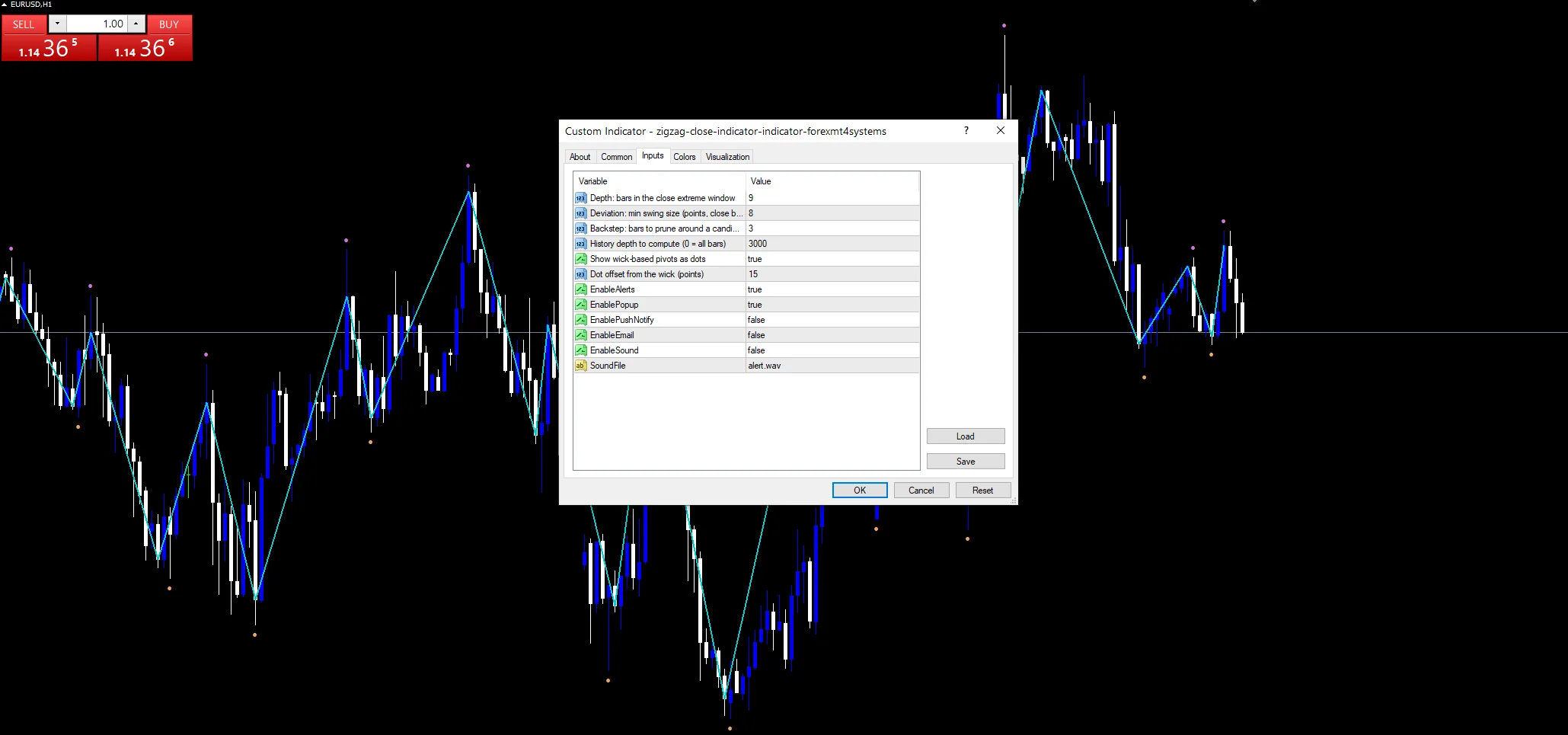
`EnableAlerts` starts on and `EnablePopup` carries the text. `EnablePushNotify`, `EnableEmail` and `EnableSound` begin false. `SoundFile` picks the clip. Pivots confirm on closed bars, and the guard allows one message per bar.
Every Zigzag Close Indicator input
Core settings
| Setting | What it does | Default |
|---|---|---|
Depth |
Depth: bars in the close extreme window. Bars in the close extreme window, default `9`. | 9 |
Deviation |
Deviation: min swing size (points, close basis). Smallest accepted leg in points, close to close, default `8`. | 8 |
Backstep |
Backstep: bars to prune around a candidate. Bars pruned around a stronger candidate, default `3`. | 3 |
WickDotOffsetPoints |
Dot offset from the wick (points). Dot distance from the wick in points, default `15`. | 15 |
Display settings
| Setting | What it does | Default |
|---|---|---|
ShowWickPivots |
Show wick-based pivots as dots. Draws the wick-based comparison dots, default `true`. | on |
Alert settings
| Setting | What it does | Default |
|---|---|---|
MaxBars |
History depth to compute (0 = all bars). History depth computed, default `3000`. | 3000 |
EnableAlerts |
Master switch for the closing pivot alerts, default `true`. | on |
EnablePopup |
Terminal dialog on a confirmed closing pivot, default `true`. | on |
EnablePushNotify |
Phone push on a closing pivot, default `false`. | off |
EnableEmail |
Mail delivery on a closing pivot, default `false`. | off |
EnableSound |
Sound playback on a closing pivot, default `false`. | off |
SoundFile |
Wav clip for the pivot alert, default `alert.wav`. | alert.wav |
Suitable charts
Closing-basis structure matters most where wicks are long and misleading. EURUSD H1 is the reference chart, where `Depth` at `9` covers most of a session. On M5 closes and wicks rarely differ much. On H4 and daily the two versions can disagree noticeably.
What it gets wrong
Ignoring wicks also ignores where price genuinely traded during a bar.
`Deviation` `8` counts points, so it needs resetting for each instrument.
The newest leg stays provisional, as with any ZigZag construction.
Copy the compiled Zigzag Close Indicator file into your MQL4/Indicators folder, and the MT5 build into MQL5/Indicators, then restart the terminal and drag it onto a chart. The step-by-step guide with screenshots is at how to install MT4 and MT5 indicators.
Background reading on the method behind the Zigzag Close Indicator: Capital market on Wikipedia, Median Price at StockCharts ChartSchool.
Download the Zigzag Close Indicator for MT4 and MT5
The zip holds the compiled Zigzag Close Indicator build for MT4 and MT5, plus a short README. Compiled files only, no source. Enter your email below and the download link arrives in your inbox.
Download this indicator free
Enter your email and the file is yours. You also get the full MT4 and MT5 library.
FAQ
Why build a ZigZag from closes?
Because a wick can set a pivot at a price nobody closed near. Running `Depth` `9` over the close series marks structure that survived to the end of the bar. On instruments with long tails the two versions look quite different.
What does Backstep at 3 prune?
Weaker candidates that already sit within three bars of a stronger one. In a shallow stretch several bars can each look like a pivot. The backstep keeps the best and discards the rest, which stops the line scribbling.
What are the Wick Pivot High dots for?
Comparison. They run the same algorithm on highs and lows instead of closes, so the difference between the two views is visible at a glance. Turn them off with `ShowWickPivots` once you have made up your mind.
How is Deviation at 8 measured?
In points, close to close. On a five-digit EURUSD feed that is eight tenths of a pip, which is a small gate. Raise it substantially on gold or an index, where eight points is nothing at all.
Are results guaranteed?
No. Trading involves risk. Results are not guaranteed; past performance is not indicative of future results. Use the Zigzag Close Indicator as one input. Always backtest before trading live.
Category: this is part of our Support and Resistance collection. Browse more Support and Resistance for MetaTrader, or explore every MT4 indicator and MT5 indicator on the site.
External references
- The core method is documented in Capital market on Wikipedia.
- Additional market context is at Median Price at StockCharts ChartSchool.

About the author
Written by Dominic Walsh, a Forex trader and MT4/MT5 indicator, Expert Advisor and script developer. Every tool on forexmt4systems.com is tested on live charts before release and ships with ready-to-use compiled MT4 (.ex4) and MT5 (.ex5) files. Learn more about the trader and developer behind this site.
How we build, test and correct every tool: Editorial & Testing Policy. Trading carries risk; see the disclaimer.