
The adaptive renko indicator fixes the awkward part of Renko. A classic brick is a fixed pip count, which suits one market on one day. Here the brick takes its size from range on every bar, so it breathes with conditions.
This build ships as a compiled .ex4 for MT4 and .ex5 for MT5; the screenshots below come from EURUSD H1.
| Platforms | MT4 (.ex4) + MT5 (.ex5) |
|---|---|
| Chart window | Main price chart |
| Plots | 5: Adaptive Renko level, Next brick top, Next brick bottom, BUY (brick turned up), SELL (brick turned down) |
| Alerts | popup, push notification, email, sound |
| Inputs | 19 |
What lands on your chart
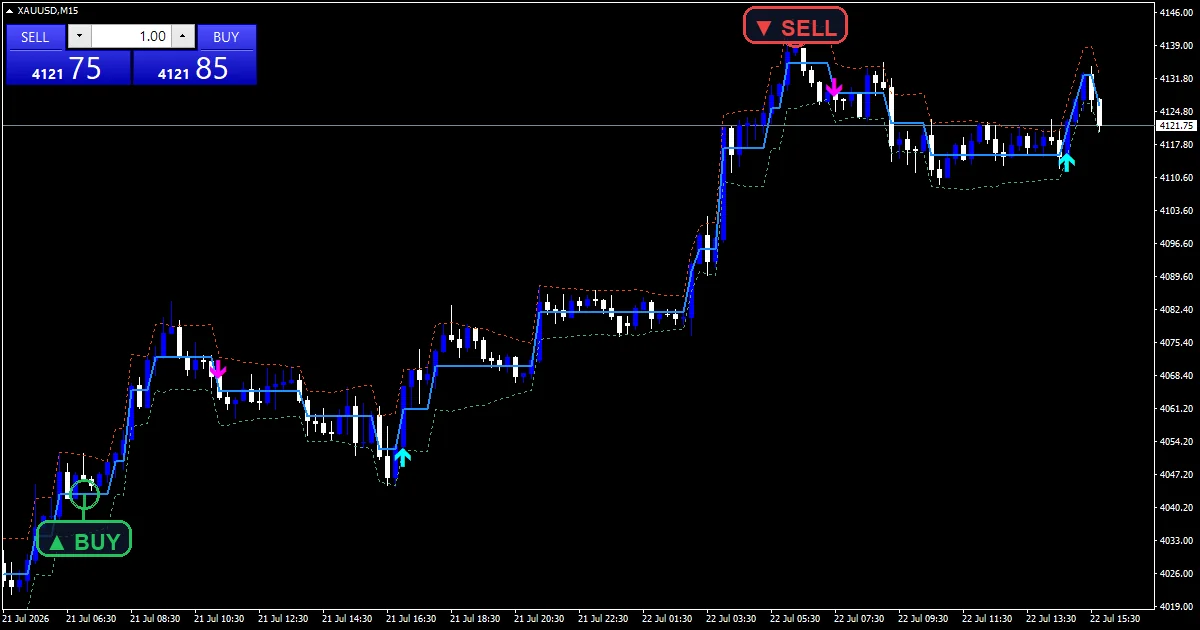
An `Adaptive Renko level` section traces the staircase of brick levels.
`Next brick top` and `Next brick bottom` show the boundaries either side.
`BUY (brick turned up)` uses arrow 233 and the sell plot uses 234.
`ShowBoundaries` and `ShowSignals` switch either layer off.
- Adaptive Renko level: section, width 2
- Next brick top: line, width 1
- Next brick bottom: line, width 1
- BUY (brick turned up): arrow, width 2, arrow code 233
- SELL (brick turned down): arrow, width 2, arrow code 234
The computation
Brick size comes from range
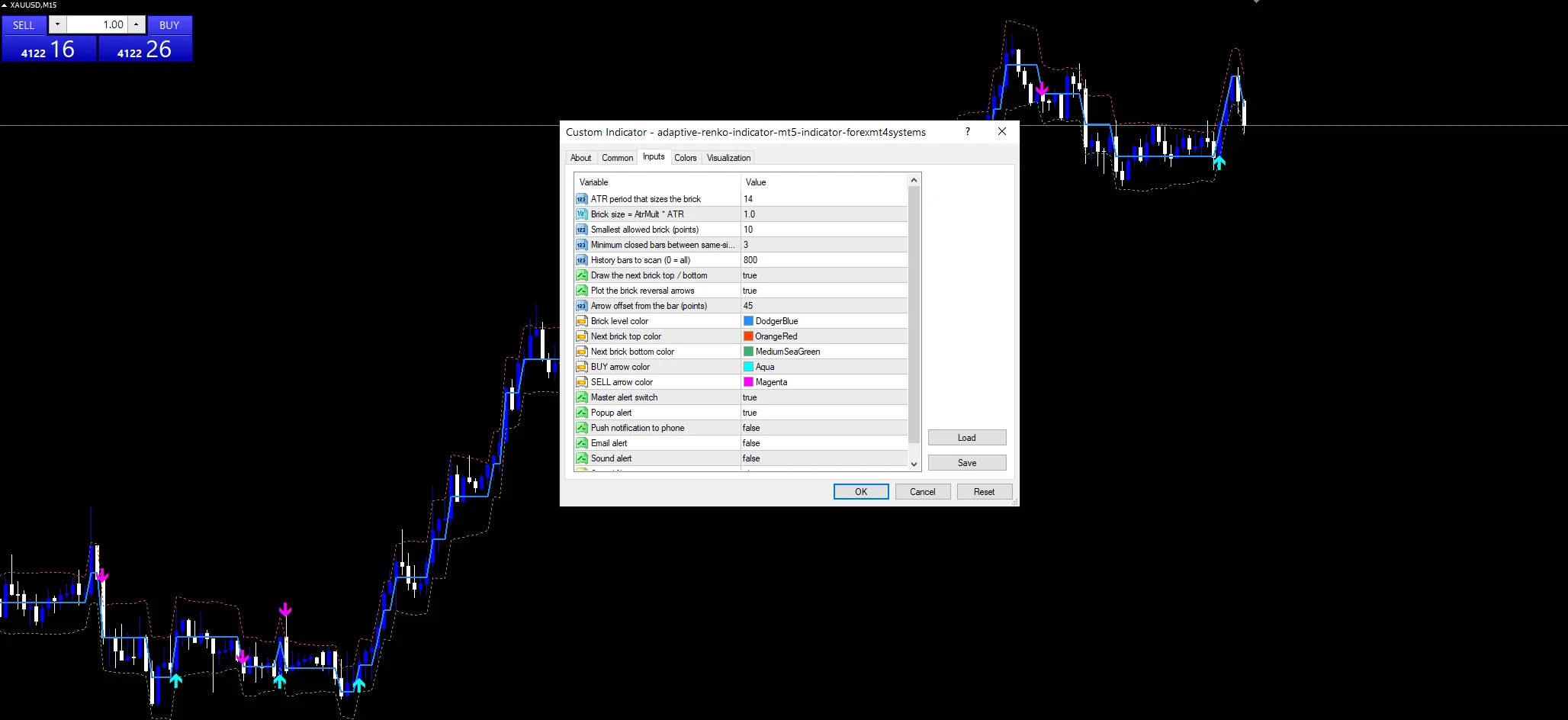
`AtrMult` `1.0` times the reading from `AtrPeriod` `14` sets the brick. `MinBrickPoints` `10` puts a floor under it, so a dead session cannot produce a stream of micro bricks.
The level holds until pierced
While a close sits between the top and bottom boundaries, the level does not move. That hold is what creates the staircase. A close beyond a boundary steps the level by whole bricks.
Only a direction change marks
An arrow prints where up bricks become down bricks or the reverse. `MinBarsBetween` `3` then blocks another mark on the same side for three bars.
Reading the result
Flat stretches on the level line mean price stayed inside one brick.
The two boundary lines show what price must reach to step the level.
Brick size changes as conditions change, so the staircase is uneven.
Marks sit `ArrowOffsetPts` `45` points from the bar.
Alert channels in this build: popup, push notification, email and sound, one message per closed bar.
`EnableAlerts` is the parent switch and arrives true beside `EnablePopup`. `EnablePushNotify` covers a phone, `EnableEmail` covers mail and `EnableSound` plays `SoundFile`. Those three start off. A brick turn reports once per closed bar.
Every Adaptive Renko Indicator input
Core settings
| Setting | What it does | Default |
|---|---|---|
AtrPeriod |
ATR period that sizes the brick. Bars in the range reading, default `14`. | 14 |
AtrMult |
Brick size = AtrMult * ATR. Brick size as a multiple of that reading, default `1.0`. | 1.0 |
MinBrickPoints |
Smallest allowed brick (points). Smallest brick the tool will use, in points, default `10`. | 10 |
MinBarsBetween |
Minimum closed bars between same-side arrows. Bars before another same-side mark, default `3`. | 3 |
Display settings
| Setting | What it does | Default |
|---|---|---|
ShowBoundaries |
Draw the next brick top / bottom. Draw the next brick top and bottom, default `true`. | on |
ShowSignals |
Plot the brick reversal arrows. Draw the direction change marks, default `true`. | on |
ArrowOffsetPts |
Arrow offset from the bar (points). Points between a mark and the bar, default `45`. | 45 |
LevelColor |
Brick level color. | dodger blue |
TopColor |
Next brick top color. | orange red |
BottomColor |
Next brick bottom color. | medium sea green |
BuyColor |
BUY arrow color. | aqua |
SellColor |
SELL arrow color. | magenta |
Alert settings
| Setting | What it does | Default |
|---|---|---|
MaxBars |
History bars to scan (0 = all). History the scan covers, default `800`. | 800 |
EnableAlerts |
Master alert switch. Parent switch across the routes, default `true`. | on |
EnablePopup |
Popup alert. Terminal alert on a brick turn, default `true`. | on |
EnablePushNotify |
Push notification to phone. | off |
EnableEmail |
Email alert. | off |
EnableSound |
Sound alert. | off |
SoundFile |
Sound file. | alert.wav |
Best home for this one
An adaptive brick travels between instruments better than a fixed one. EURUSD H1 is the reference chart, where `AtrMult` `1.0` gives bricks that step every few bars. On M5 the floor does most of the work. Daily bars give large, rare steps.
What it gets wrong
A changing brick size means the staircase does not compare across time.
`MinBrickPoints` `10` can dominate on quiet instruments, which makes it fixed again.
The level only moves on a close, so an intrabar spike leaves no trace.
Copy the compiled Adaptive Renko Indicator file into your MQL4/Indicators folder, and the MT5 build into MQL5/Indicators, then restart the terminal and drag it onto a chart. The step-by-step guide with screenshots is at how to install MT4 and MT5 indicators.
Download the Adaptive Renko Indicator for MT4 and MT5
The zip holds the compiled Adaptive Renko Indicator build for MT4 and MT5, plus a short README. Compiled files only, no source. Enter your email below and the download link arrives in your inbox.
Download this indicator free
Enter your email and the file is yours. You also get the full MT4 and MT5 library.
FAQ
What does AtrMult 1.0 set?
The brick size as one full range reading. Raising it makes bricks larger, so the level steps less often and the staircase gets coarser. Lowering it produces more steps and more direction changes.
Why does MinBrickPoints 10 exist?
To stop a quiet session producing a flood of tiny bricks. When range collapses, the brick calculation can approach zero, and every small wiggle would step the level. The floor keeps that bounded.
How is this different from a Renko chart?
A Renko chart replaces time entirely, so bars appear only when a brick completes. This draws brick levels on a normal time chart, which keeps your candles and other indicators on one time axis.
What does MinBarsBetween 3 block?
A second mark in the same direction within three bars. Direction changes can cluster when price sits near a boundary, and the cooldown keeps one decisive turn from printing as several.
Are results guaranteed?
No. Trading involves risk. Results are not guaranteed; past performance is not indicative of future results. Use the Adaptive Renko Indicator as one input. Always backtest before trading live.
Authoritative references
- Learn more about technical indicators.

About the author
Written by Dominic Walsh, a Forex trader and MT4/MT5 indicator, Expert Advisor and script developer. Every tool on forexmt4systems.com is tested on live charts before release and ships with ready-to-use compiled MT4 (.ex4) and MT5 (.ex5) files. Learn more about the trader and developer behind this site.
How we build, test and correct every tool: Editorial & Testing Policy. Trading carries risk; see the disclaimer.