
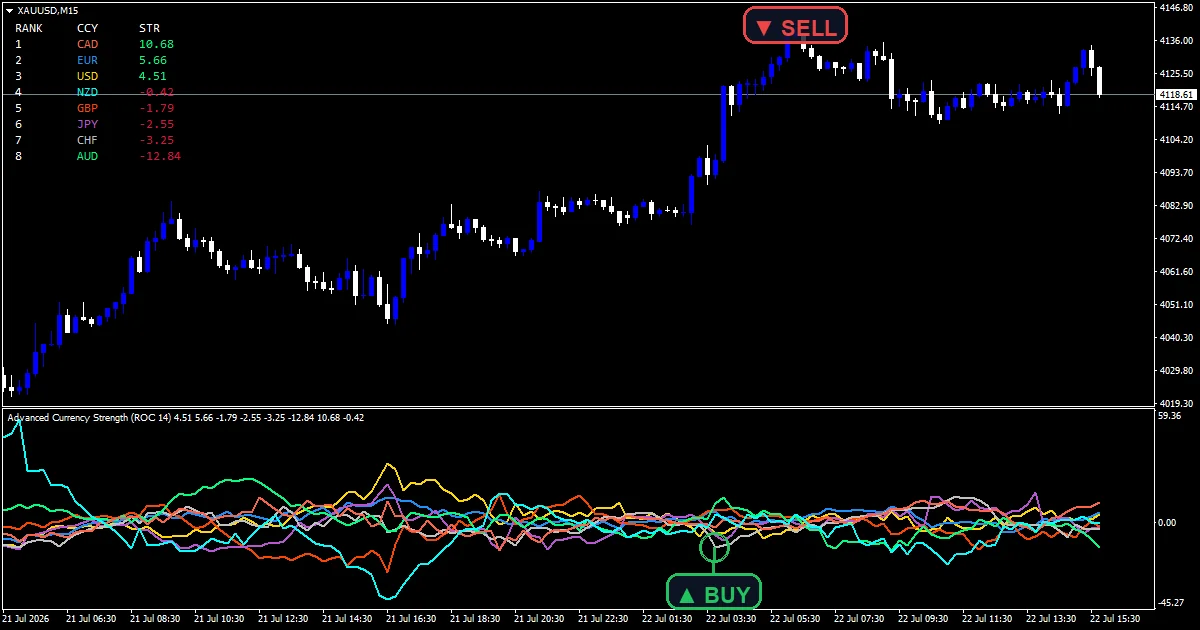
The advanced currency strength indicator reads every one of the 28 crosses that eight major currencies can form. Each move gets credited to the base currency and debited from the quote, so both sides of a pair inform the score. Eight lines and a ranking table show the result.
This build ships as a compiled .ex4 for MT4 and .ex5 for MT5; the screenshots below come from EURUSD H1.
| Platforms | MT4 (.ex4) + MT5 (.ex5) |
|---|---|
| Chart window | Separate window (levels 0) |
| Plots | 8: USD, EUR, GBP, JPY, CHF, AUD, CAD, NZD |
| Alerts | popup, push notification, email, sound |
| Inputs | 25 |
What you get on the chart
USD, EUR, GBP, JPY, CHF, AUD, CAD and NZD each get a line in the pane, in the colour set by their own input.
A zero line splits the currencies being bought from the ones being sold.
ShowTable adds a label object ranking the eight from strongest to weakest, with positive scores in StrongColor and negative ones in WeakColor.
- USD: line, width 2
- EUR: line, width 2
- GBP: line, width 2
- JPY: line, width 2
- CHF: line, width 2
- AUD: line, width 2
- CAD: line, width 2
- NZD: line, width 2
How the Advanced Currency Strength Indicator calculates its values
Reading all 28 crosses
Eight currencies form 28 unique pairs, from EURUSD through to CHFJPY. Every one gets read on each calculation pass rather than a subset.
For each pair the code takes the close now against the close StrengthPeriod bars ago, expressed as a percentage of the older price. Percentages are what make a yen cross comparable with a euro cross, since raw point distances are not.
Crediting base, debiting quote
A rise in EURUSD says something about both currencies. The move gets added to the base score and subtracted from the quote score, so one reading feeds two currencies with opposite signs.
Each currency then divides by the number of pairs it appeared in. That leaves all eight lines as averages on one common scale rather than raw sums that would favour whichever currency appears most.
Broker symbol suffixes
The 28 names are not assumed to be plain six letter symbols. Brokers add suffixes, and the code resolves the real symbol names rather than failing quietly on a feed that uses them.
That matters because a pair silently missing from the calculation would skew every currency it belongs to.
Reading it on a live chart
Rank order carries the information. The top line is the currency being bought most broadly over the lookback.
Trading the top against the bottom is the usual way to use a reading like this.
A currency crossing zero has flipped from bought to sold across the board, which is a stronger signal than one line moving alone.
The table gives the same ranking as the lines, in a form you can read without tracing colours.
Alert channels in this build: popup, push notification, email and sound, one message per closed bar.
Alerts cover popup, push, email and sound. A bar time check keeps it to one alert per closed bar.
Every Advanced Currency Strength Indicator input
Core settings
| Setting | What it does | Default |
|---|---|---|
StrengthPeriod |
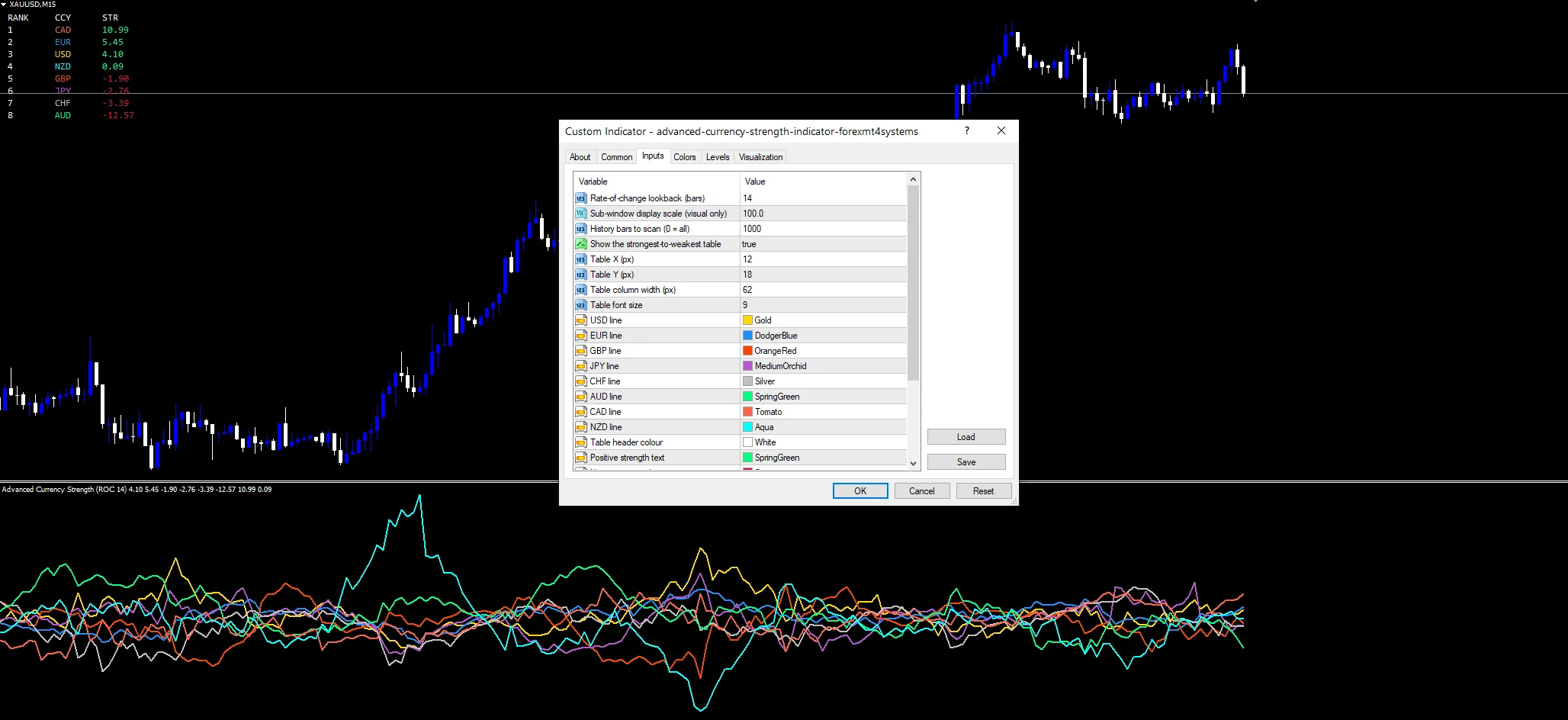
Rate-of-change lookback (bars). StrengthPeriod is the rate of change lookback in bars. It defaults to 14. A longer setting gives a steadier ranking. | 14 |
TableX |
Table X (px). TableX positions the table horizontally in pixels, 12 by default. | 12 |
TableY |
Table Y (px). TableY does the same vertically at 18. | 18 |
Display settings
| Setting | What it does | Default |
|---|---|---|
DisplayScale |
Sub-window display scale (visual only). DisplayScale multiplies the plotted values for readability only, 100.0 by default. It changes nothing about the ranking. | 100.0 |
ShowTable |
Show the strongest-to-weakest table. ShowTable draws the strongest to weakest ranking. It defaults to true. | on |
TableColWidth |
Table column width (px). | 62 |
TableFontSize |
Table font size. | 9 |
UsdColor |
USD line. | gold |
EurColor |
EUR line. | dodger blue |
GbpColor |
GBP line. | orange red |
JpyColor |
JPY line. | medium orchid |
ChfColor |
CHF line. | silver |
AudColor |
AUD line. | spring green |
CadColor |
CAD line. | tomato |
NzdColor |
NZD line. | aqua |
HeaderColor |
Table header colour. | white |
StrongColor |
Positive strength text. StrongColor is the text colour for a positive score and defaults to spring green. | spring green |
WeakColor |
Negative strength text. WeakColor is the matching negative colour, crimson by default. | crimson |
Alert settings
| Setting | What it does | Default |
|---|---|---|
MaxBars |
History bars to scan (0 = all). MaxBars limits how much history gets scanned, 1000 by default, and 0 means the whole chart. | 1000 |
EnableAlerts |
Master alert switch. | on |
EnablePopup |
Popup alert. | on |
EnablePushNotify |
Push notification to mobile. | off |
EnableEmail |
Email alert. | off |
EnableSound |
Sound alert. | off |
SoundFile |
Sound file. | alert.wav |
Setting it up somewhere useful
The screenshot uses EURUSD H1. The chart it sits on only sets the timeframe, since the calculation reads all 28 crosses regardless. H1 and H4 give a ranking that holds long enough to act on. On M1 the ordering reshuffles constantly and the table becomes hard to use.
When it will mislead you
Rate of change over a fixed lookback treats a gap and a steady trend the same way.
Every one of the 28 pairs has to exist in Market Watch. A symbol the terminal cannot resolve drops out and skews both currencies it belongs to.
Reading 28 symbols on each pass costs far more than a single pair calculation, which is why MaxBars defaults to 1000 rather than the whole chart.
A ranking says which currencies are moving, never where to enter. Two currencies can sit far apart for days with no clean setup between them.
Copy the compiled Advanced Currency Strength Indicator file into your MQL4/Indicators folder, and the MT5 build into MQL5/Indicators, then restart the terminal and drag it onto a chart. The step-by-step guide with screenshots is at how to install MT4 and MT5 indicators.
Download the Advanced Currency Strength Indicator for MT4 and MT5
The zip holds the compiled Advanced Currency Strength Indicator build for MT4 and MT5, plus a short README. Compiled files only, no source. Enter your email below and the download link arrives in your inbox.
Download this indicator free
Enter your email and the file is yours. You also get the full MT4 and MT5 library.
FAQ
Why does StrengthPeriod get applied to all 28 crosses?
Because a currency is only strong relative to others, and a partial sample biases that comparison. Reading all 28 gives each of the eight currencies seven readings, one against every other. Dividing by that count puts all the lines on one common scale.
How does one EURUSD move affect both the USD and EUR lines?
It extracts two pieces of information from one pair. A rise in EURUSD is euro strength and dollar weakness at the same time, so the move gets added to one score and subtracted from the other. Ignoring the quote side would waste half the reading.
Does DisplayScale change the ranking at all?
No. It multiplies every plotted value by the same number, 100.0 by default, purely so the lines occupy a readable part of the pane. Rank order, zero crossings and the table all behave identically whatever you set it to.
Will the USD line break if my broker adds a symbol suffix?
The code resolves the real symbol names rather than assuming plain six letter tickers, so a suffixed feed still works. That matters because a pair the terminal cannot find would silently drop out and distort both currencies it belongs to.
Are results guaranteed?
No. Trading involves risk. Results are not guaranteed; past performance is not indicative of future results. Use the Advanced Currency Strength Indicator as one input. Always backtest before trading live.
Authoritative references
- Learn more about technical indicators.

About the author
Written by Dominic Walsh, a Forex trader and MT4/MT5 indicator, Expert Advisor and script developer. Every tool on forexmt4systems.com is tested on live charts before release and ships with ready-to-use compiled MT4 (.ex4) and MT5 (.ex5) files. Learn more about the trader and developer behind this site.
How we build, test and correct every tool: Editorial & Testing Policy. Trading carries risk; see the disclaimer.