
Perry Kaufman argued that one fixed speed cannot suit every market. The ama bands indicator centres on his adaptive average, which measures how directly price travelled and adjusts its own smoothing to match, running fast in a clean move and slowing to a crawl in chop.
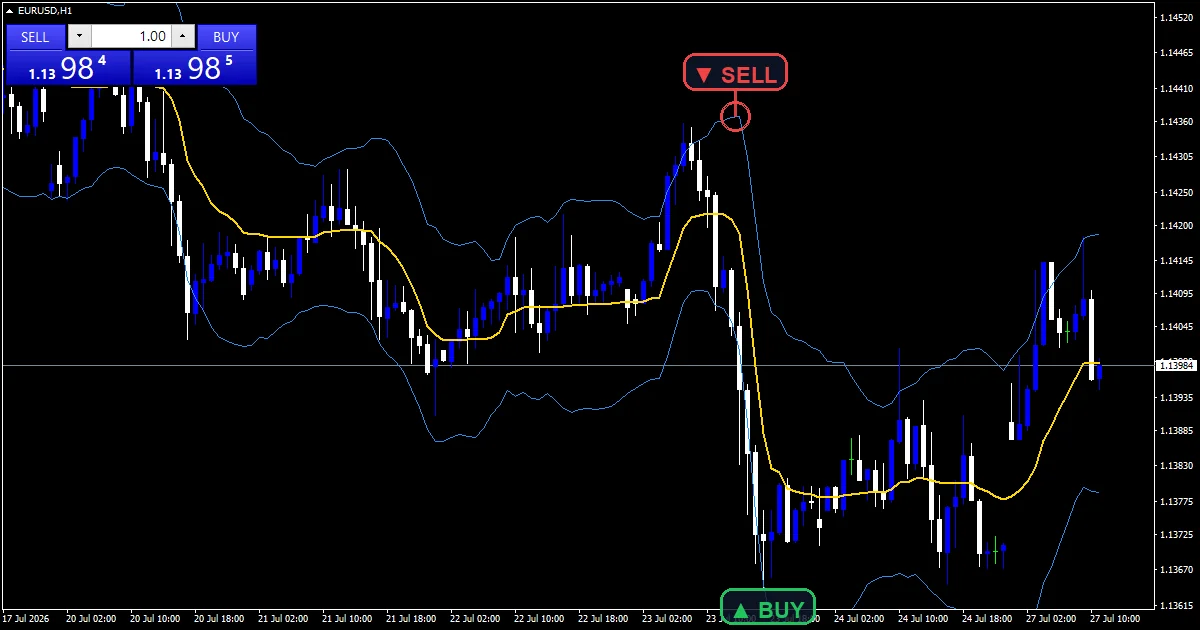
This build ships as a compiled .ex4 for MT4 and .ex5 for MT5; the screenshots below come from EURUSD H1.
| Platforms | MT4 (.ex4) + MT5 (.ex5) |
|---|---|
| Chart window | Main price chart |
| Plots | 3: KAMA, Upper Band, Lower Band |
| Alerts | popup, push notification, email, sound |
| Inputs | 11 |
Plots this indicator declares
Three lines over price.
`KAMA` traces gold at width 2.
`Upper Band` traces dodger blue above it.
`Lower Band` traces the same colour below.
No arrows or marks get placed.
The pane under price stays empty.
- KAMA: line, gold, width 2
- Upper Band: line, dodger blue, width 1
- Lower Band: line, dodger blue, width 1
Inside the calculation
How direct was the move
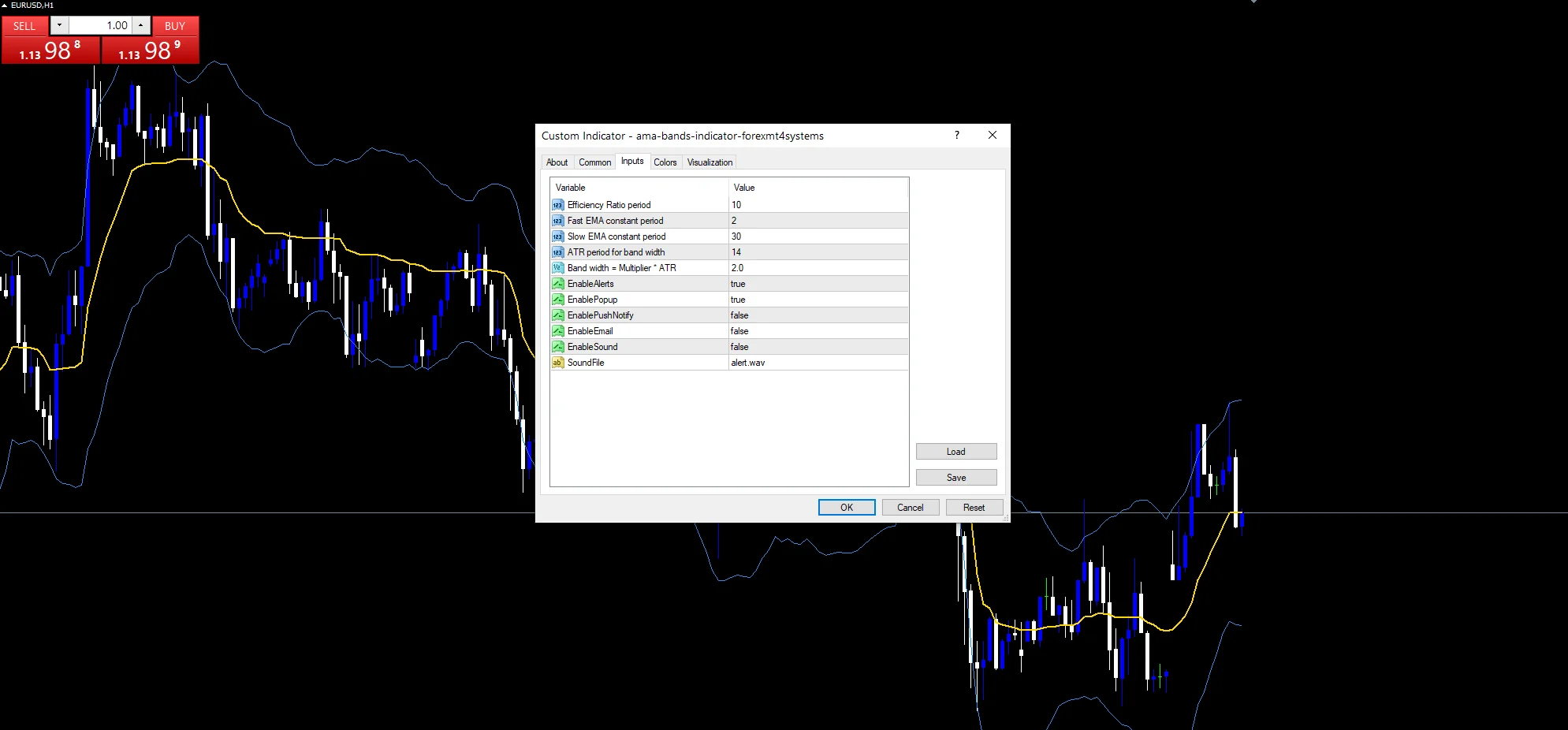
`ErPeriod` `10` answers it. Net travel across those bars divided by the total distance covered gives a ratio near one for a clean move and near zero for chop.
Turning that into speed
The ratio slides between two constants. `FastPeriod` `2` sets the quickest smoothing and `SlowPeriod` `30` the slowest, and the result gets squared to sharpen the effect.
The bands
`AtrPeriod` `14` measures range and `BandMult` `2.0` sets the distance. Both bands sit that far from the adaptive centre rather than from a fixed average.
How to work with it
The gold line flattens hard in a range.
It tracks price closely once a move gets going.
That flattening is the point of an adaptive average.
Bands widen with range, not with the centre’s speed.
A close beyond a band is a stretch worth noticing.
Nothing marks a signal, so you read the lines.
Alert channels in this build: popup, push notification, email and sound, one message per closed bar.
A band cross is reported only while `EnableAlerts` stays true, and it is the single event this tool watches. `EnablePopup` arrives on. The mobile push, the mail route and the desktop audio behind `SoundFile` do not.
Every AMA Bands Indicator input
Core settings
| Setting | What it does | Default |
|---|---|---|
ErPeriod |
Efficiency Ratio period. Ten bars decide how direct the recent move was. | 10 |
FastPeriod |
Fast EMA constant period. At its quickest the centre smooths like a two-bar average. | 2 |
SlowPeriod |
Slow EMA constant period. At its slowest it behaves like a thirty-bar one. | 30 |
AtrPeriod |
ATR period for band width. Fourteen bars set the range that sizes the bands. | 14 |
BandMult |
Band width = Multiplier * ATR. Each band sits two of those ranges off the centre. | 2.0 |
Alert settings
| Setting | What it does | Default |
|---|---|---|
EnableAlerts |
A band cross is reported only while this stays true. | on |
EnablePopup |
That cross raises a MetaTrader dialog, on by default. | on |
EnablePushNotify |
It reaches the mobile app, off by default. | off |
EnableEmail |
It goes out as mail, off by default. | off |
EnableSound |
(see inputs panel) | off |
SoundFile |
Any audio comes from alert.wav. | alert.wav |
Which timeframe to use
An adaptive centre earns its keep where conditions actually change. EURUSD H1 is the reference chart, where the line alternates between flat and fast within a week. Drop to M5 and it spends most of the day flat.
When it will mislead you
The ratio reacts after conditions have already changed.
A flat centre in chop still gets crossed repeatedly.
Two constants and a ratio is a lot to tune blind.
The bands measure range, so they say nothing about direction.
Copy the compiled AMA Bands Indicator file into your MQL4/Indicators folder, and the MT5 build into MQL5/Indicators, then restart the terminal and drag it onto a chart. The step-by-step guide with screenshots is at how to install MT4 and MT5 indicators.
Background reading on the method behind the AMA Bands Indicator: Moving average on Wikipedia, Moving Average at Investopedia.
Download the AMA Bands Indicator for MT4 and MT5
The zip holds the compiled AMA Bands Indicator build for MT4 and MT5, plus a short README. Compiled files only, no source. Enter your email below and the download link arrives in your inbox.
Download this indicator free
Enter your email and the file is yours. You also get the full MT4 and MT5 library.
FAQ
How does ErPeriod judge whether a move was direct?
It divides net travel across ten bars by the total distance covered. A straight move gives a ratio near one, while a wandering one gives a ratio near zero.
How do FastPeriod and SlowPeriod bound the speed?
They are the two extremes the smoothing slides between. At a ratio near one it approaches the two-bar constant and tracks price closely; near zero it falls back toward thirty and barely moves.
Why does the KAMA line square its smoothing constant?
To sharpen the difference. Squaring pushes middling ratios toward the slow end, so the average only speeds up when a move is genuinely direct rather than merely leaning one way.
Do the bands adapt as well as the centre?
Only to range, not to directness. `BandMult` `2.0` times the ATR reading sets their distance, so they widen in a volatile market while the centre separately decides its own speed.
Are results guaranteed?
No. Trading involves risk. Results are not guaranteed; past performance is not indicative of future results. Use the AMA Bands Indicator as one input. Always backtest before trading live.
External references
- For background on this concept, see Financial services on Wikipedia.
- For broader market context, see MACD Zero Line Crosses With Swing Points at StockCharts ChartSchool.

About the author
Written by Dominic Walsh, a Forex trader and MT4/MT5 indicator, Expert Advisor and script developer. Every tool on forexmt4systems.com is tested on live charts before release and ships with ready-to-use compiled MT4 (.ex4) and MT5 (.ex5) files. Learn more about the trader and developer behind this site.
How we build, test and correct every tool: Editorial & Testing Policy. Trading carries risk; see the disclaimer.