
The all divergence indicator compares two pivots and the reading underneath them. Price makes a lower low while the RSI makes a higher one, and that disagreement is what earns a mark on the chart.
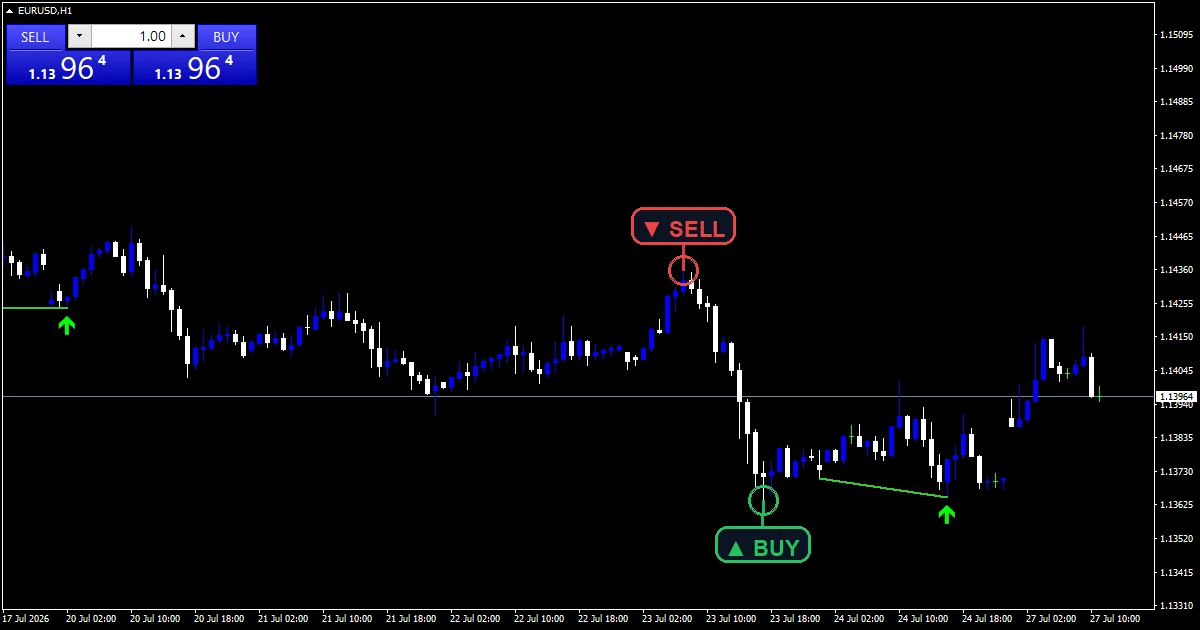
This build ships as a compiled .ex4 for MT4 and .ex5 for MT5; the screenshots below come from EURUSD H1.
| Platforms | MT4 (.ex4) + MT5 (.ex5) |
|---|---|
| Chart window | Main price chart |
| Plots | 2: BUY (bullish divergence), SELL (bearish divergence) |
| Alerts | popup, push notification, email, sound |
| Inputs | 17 |
What the build shows
`BUY (bullish divergence)` uses arrow 233 in lime.
`SELL (bearish divergence)` uses arrow 234 in red.
Trend objects join the two pivots that produced each reading.
Marks sit `ArrowOffsetPts` `45` points from the candle.
- BUY (bullish divergence): arrow, lime, width 2, arrow code 233
- SELL (bearish divergence): arrow, red, width 2, arrow code 234
Under the hood
Pivots need both sides
`LeftBars` `5` and `RightBars` `5` set how many bars a pivot must beat either side. The right side is the delay, since those five bars have to close before anything confirms.
The pair has to be sensibly spaced
`MinGap` `3` and `MaxGap` `60` bound how far apart two pivots may sit. Too close and the comparison is noise. Too far and the two swings belong to different moves.
Then price and reading must disagree
A bullish mark needs a lower price low against a higher RSI low at `RsiPeriod` `14`. The bearish case mirrors it exactly.
What the states mean
The drawn line shows exactly which two pivots produced the reading.
Every mark confirms five bars after its pivot, without exception.
`SignalOnClosedBarsOnly` `true` keeps a mark from appearing mid-bar.
Divergence can persist for a long time before price responds.
Alert channels in this build: popup, push notification, email and sound, one message per closed bar.
`EnableAlerts` is the master switch and starts true with `EnablePopup`. `EnablePushNotify` reaches a mobile device, `EnableEmail` posts mail and `EnableSound` plays `SoundFile`. Those three arrive false. Marks report on closed bars.
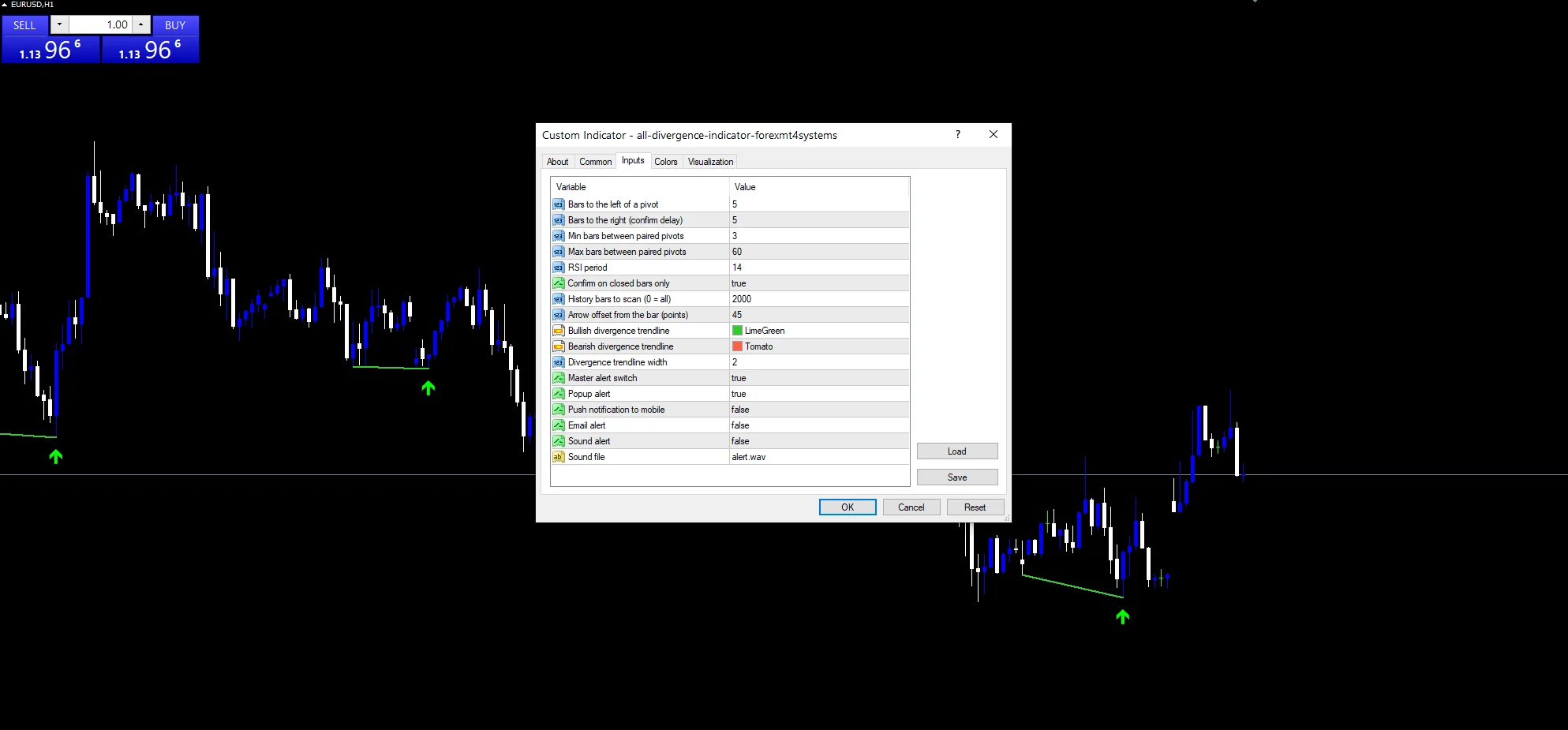
Every All Divergence Indicator input
Core settings
| Setting | What it does | Default |
|---|---|---|
LeftBars |
Bars to the left of a pivot. Bars a pivot must beat on the older side, default `5`. | 5 |
RightBars |
Bars to the right (confirm delay). Bars it must beat on the newer side, default `5`. | 5 |
MinGap |
Min bars between paired pivots. Closest two paired pivots may sit, default `3`. | 3 |
MaxGap |
Max bars between paired pivots. Furthest apart they may sit, default `60`. | 60 |
RsiPeriod |
RSI period. Bars in the reading behind the comparison, default `14`. | 14 |
SignalOnClosedBarsOnly |
Confirm on closed bars only. Confirm only on completed bars, default `true`. | on |
Display settings
| Setting | What it does | Default |
|---|---|---|
ArrowOffsetPts |
Arrow offset from the bar (points). Points between a mark and the candle, default `45`. | 45 |
BullLineColor |
Bullish divergence trendline. Colour joining a bullish pair, default `clrLimeGreen`. | lime green |
BearLineColor |
Bearish divergence trendline. Colour joining a bearish pair, default `clrTomato`. | tomato |
LineWidth |
Divergence trendline width. | 2 |
Alert settings
| Setting | What it does | Default |
|---|---|---|
MaxBars |
History bars to scan (0 = all). History the scan covers, default `2000`. | 2000 |
EnableAlerts |
Master alert switch. | on |
EnablePopup |
Popup alert. | on |
EnablePushNotify |
Push notification to mobile. | off |
EnableEmail |
Email alert. | off |
EnableSound |
Sound alert. | off |
SoundFile |
Sound file. | alert.wav |
Timeframes worth trying
Divergence needs swings worth pairing. EURUSD H1 is the reference chart, where `MaxGap` `60` reaches two and a half days back. On M5 the pairs come thick and most mean little. H4 gives fewer and better ones.
What it misses
A five-bar right side means every mark is five bars late.
Divergence can run for weeks before price agrees, or never resolve at all.
The reading pairs only pivots, so a slow drift apart goes unnoticed.
Copy the compiled All Divergence Indicator file into your MQL4/Indicators folder, and the MT5 build into MQL5/Indicators, then restart the terminal and drag it onto a chart. The step-by-step guide with screenshots is at how to install MT4 and MT5 indicators.
Background reading on the method behind the All Divergence Indicator: Financial Information eXchange on Wikipedia, Price Channels at StockCharts ChartSchool.
Download the All Divergence Indicator for MT4 and MT5
The zip holds the compiled All Divergence Indicator build for MT4 and MT5, plus a short README. Compiled files only, no source. Enter your email below and the download link arrives in your inbox.
Download this indicator free
Enter your email and the file is yours. You also get the full MT4 and MT5 library.
FAQ
Why does RightBars 5 delay every mark?
A pivot cannot confirm until five newer bars have closed without beating it. That is five hours on an hourly chart, so the divergence is always visible in hindsight before the tool draws it.
What does MaxGap 60 rule out?
Pairs more than sixty bars apart. Beyond that the two swings usually belong to different moves, so comparing their readings says little. Narrowing it makes each pair more closely related.
Does MinGap 3 matter much?
It stops two pivots three bars apart being treated as a meaningful pair. Adjacent swings produce readings so similar that any difference between them is noise rather than divergence.
What do the BullLineColor lines show?
The two pivots behind each bullish reading, joined so you can check the comparison yourself. Seeing the pair is what separates a real divergence from a mark you have to take on trust.
Are results guaranteed?
No. Trading involves risk. Results are not guaranteed; past performance is not indicative of future results. Use the All Divergence Indicator as one input. Always backtest before trading live.
External references
- The core method is documented in Financial Information eXchange on Wikipedia.
- Additional market context is at Price Channels at StockCharts ChartSchool.

About the author
Written by Dominic Walsh, a Forex trader and MT4/MT5 indicator, Expert Advisor and script developer. Every tool on forexmt4systems.com is tested on live charts before release and ships with ready-to-use compiled MT4 (.ex4) and MT5 (.ex5) files. Learn more about the trader and developer behind this site.
How we build, test and correct every tool: Editorial & Testing Policy. Trading carries risk; see the disclaimer.