
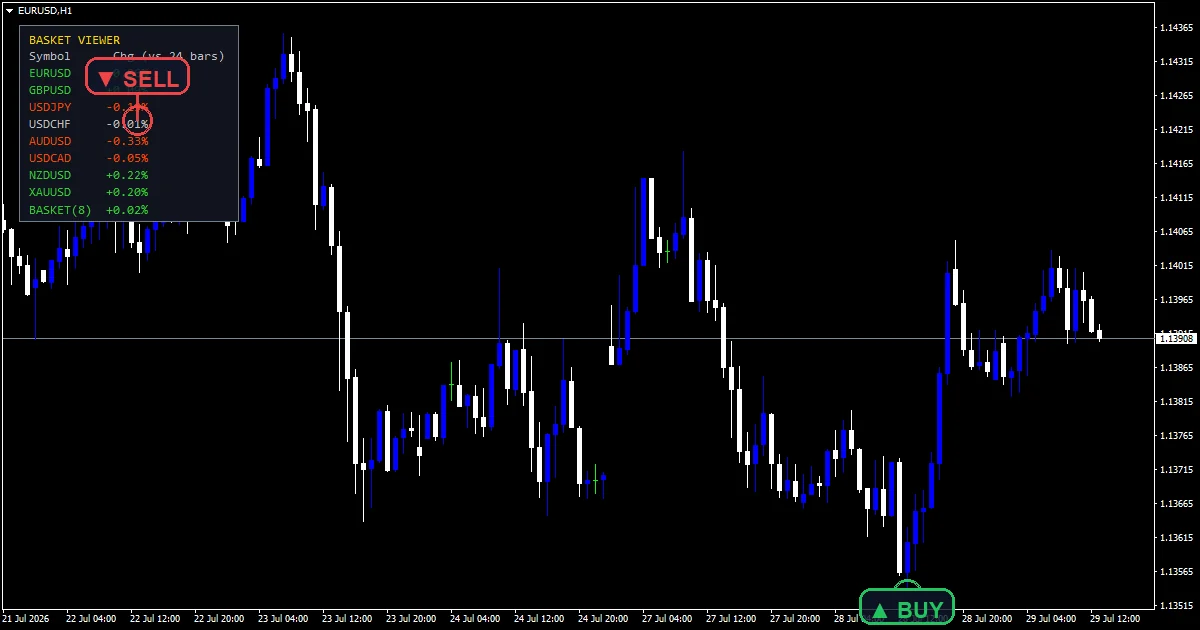
The basket viewer indicator answers a single question. Is the market broadly risk-on or risk-off right now? It prices the symbols in `InpSymbols` and shows each as a percent change. A final row averages them, so you read the whole set at once.
This build ships as a compiled .ex4 for MT4 and .ex5 for MT5; the screenshots below come from EURUSD H1.
| Platforms | MT4 (.ex4) + MT5 (.ex5) |
|---|---|
| Chart window | Main price chart |
| Plots | 0 |
| Alerts | popup, push notification, email, sound |
| Inputs | 21 |
What the Basket Viewer Indicator renders
A corner panel built from OBJ_LABEL and OBJ_RECTANGLE_LABEL objects.
One row per symbol with its percentage change, green for up and orange red for down.
A final BASKET row carrying the equal-weight average of every valid row.
No price buffers exist, so the candles stay untouched.
The steps it takes
Two ways to measure change
`InpChangeMode` `0` compares the current close with the close `InpBars` `24` bars back. That count runs on the chart timeframe. Mode 1 compares against today’s daily open instead. The first says what has moved lately. The second says what has moved today.
Averaging the basket
The final row takes the mean of every symbol that returned a figure. Equal weighting is deliberate. A weighted basket would need position sizes, and the tool cannot know yours.
Handling missing symbols
Broker suffixes get detected automatically. A symbol with no data yet prints n slash a. It fills in on the next refresh rather than reporting a zero. A zero in a change column would read as unchanged, which is a different claim entirely.
Interpreting what you see
Rows moving together point at dollar strength rather than at one pair.
The basket average is the quickest read on the whole set.
Mode 1 resets every day, so early sessions show small figures.
Gold sits in the default list because it often moves against the rest.
Alert channels in this build: popup, push notification, email and sound, one message per closed bar.
`EnableAlerts` starts on and `EnablePopup` carries the text. `EnablePushNotify`, `EnableEmail` and `EnableSound` begin false. `SoundFile` picks the clip. The guard allows one basket message per closed bar.
Every Basket Viewer Indicator input
Core settings
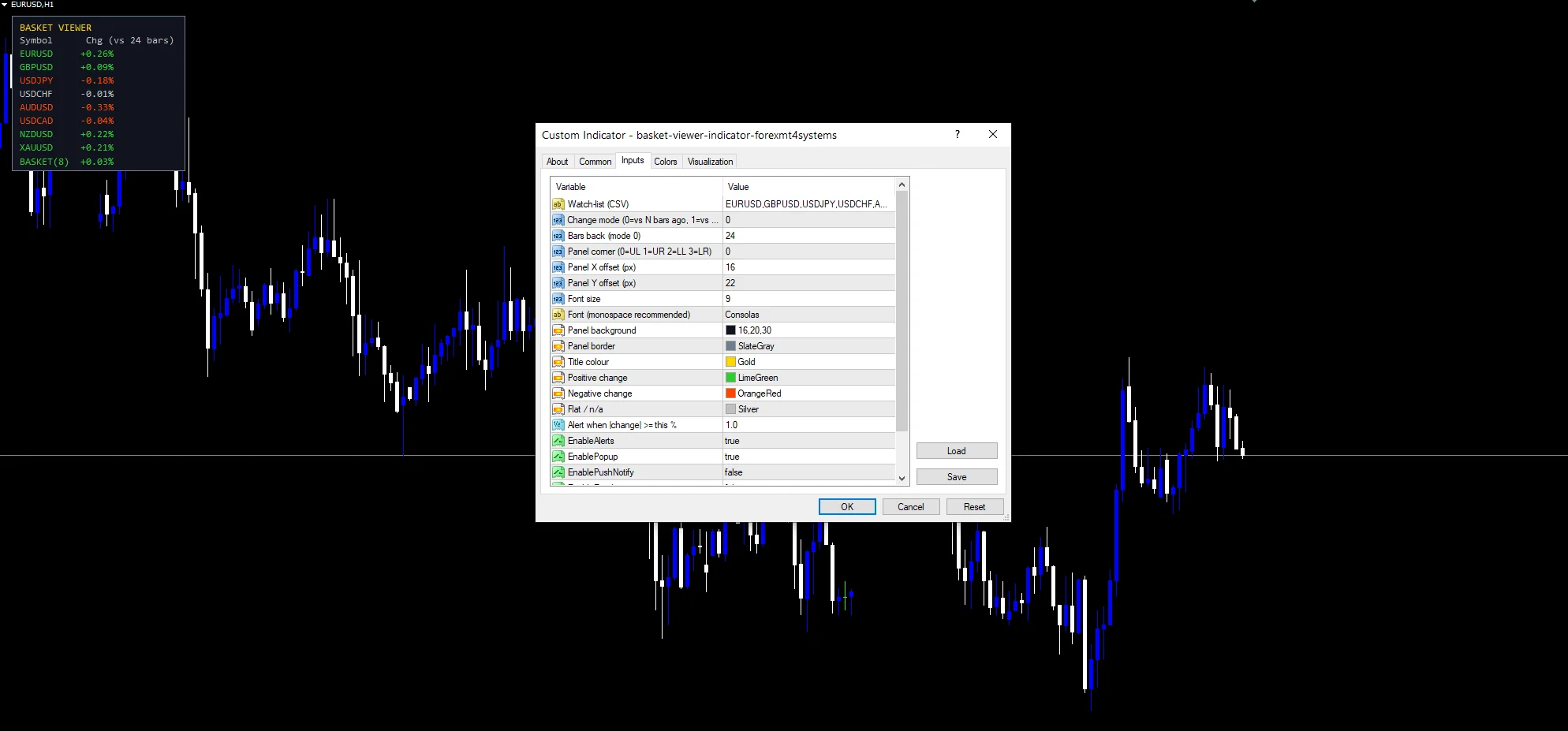
| Setting | What it does | Default |
|---|---|---|
InpSymbols |
Watch-list (CSV). Watch list as comma separated names, defaulting to the majors plus gold. | EURUSD,GBPUSD,USDJPY,USDCHF,AUDUSD,USDCAD,NZDUSD,XAUUSD |
InpChangeMode |
Change mode (0=vs N bars ago, 1=vs day open). Change basis, `0` for bars ago and 1 for the daily open. | 0 |
InpBars |
Bars back (mode 0). Bars back when mode `0` is active, default `24`. | 24 |
InpX |
Panel X offset (px). Panel horizontal offset, default `16`. | 16 |
InpY |
Panel Y offset (px). Panel vertical offset, default `22`. | 22 |
Display settings
| Setting | What it does | Default |
|---|---|---|
InpCorner |
Panel corner (0=UL 1=UR 2=LL 3=LR). Panel corner, default `0` for upper left. | 0 |
InpFontSize |
Font size. Panel font size, default `9`. | 9 |
InpFont |
Font (monospace recommended). Panel font, default Consolas so the columns line up. | Consolas |
InpBgColor |
Panel background. | RGB 16,20,30 |
InpBorder |
Panel border. | slate gray |
InpTitleColor |
Title colour. | gold |
InpUpColor |
Positive change. Colour for a positive change, default lime green. | lime green |
InpDownColor |
Negative change. Colour for a negative change, default orange red. | orange red |
InpFlatColor |
Flat / n/a. | silver |
Alert settings
| Setting | What it does | Default |
|---|---|---|
InpAlertPct |
Alert when |change| >= this %. | 1.0 |
EnableAlerts |
Master switch for the basket move alerts, default `true`. | on |
EnablePopup |
Terminal dialog on a basket move, default `true`. | on |
EnablePushNotify |
Phone push on a basket move, default `false`. | off |
EnableEmail |
Mail delivery on a basket move, default `false`. | off |
EnableSound |
Sound playback on a basket move, default `false`. | off |
SoundFile |
Wav clip for the basket alert, default `alert.wav`. | alert.wav |
Suitable markets
Mode `0` reads the chart timeframe. So the same setting means different things on different charts. EURUSD H1 is the reference chart, where `InpBars` at `24` covers a day. On M5 that becomes two hours. Mode 1 ignores the chart period and always measures from the daily open.
What it misses
A percent change says nothing about direction from here.
An equal-weight basket treats gold and a currency pair alike, which they rarely are.
Rows depend on the broker carrying the symbol. An exotic name simply prints as not available.
Copy the compiled Basket Viewer Indicator file into your MQL4/Indicators folder, and the MT5 build into MQL5/Indicators, then restart the terminal and drag it onto a chart. The step-by-step guide with screenshots is at how to install MT4 and MT5 indicators.
Background reading on the method behind the Basket Viewer Indicator: Market basket on Wikipedia, the foreign exchange market at Britannica.
Download the Basket Viewer Indicator for MT4 and MT5
The zip holds the compiled Basket Viewer Indicator build for MT4 and MT5, plus a short README. Compiled files only, no source. Enter your email below and the download link arrives in your inbox.
Download this indicator free
Enter your email and the file is yours. You also get the full MT4 and MT5 library.
FAQ
What does InpChangeMode change?
The reference point for every percent figure. At `0` the code compares the current close with the close `InpBars` `24` bars back on this chart. At 1 it compares against today’s daily open. That second mode resets the panel each session.
Why does InpBars at 24 depend on the chart?
Because mode `0` counts bars on the chart timeframe. Twenty-four bars is a day on H1, two hours on M5 and nearly a month on H4. Set it against the timeframe you actually run, or switch to mode 1 and forget it.
How is the BASKET row calculated?
As a plain average of every symbol row that returned a figure. Rows showing n slash a drop out of the mean rather than counting as zero. Equal weighting is intended, since the tool cannot know your exposure.
Why is XAUUSD in the default InpSymbols list?
Because gold often moves against the dollar pairs. That makes the panel more useful than the majors alone. Remove it if you would rather read a pure currency basket, or add whatever else your broker carries.
Are results guaranteed?
No. Trading involves risk. Results are not guaranteed; past performance is not indicative of future results. Use the Basket Viewer Indicator as one input. Always backtest before trading live.
External references
- The core method is documented in Market basket on Wikipedia.
- Additional market context is at the foreign exchange market at Britannica.

About the author
Written by Dominic Walsh, a Forex trader and MT4/MT5 indicator, Expert Advisor and script developer. Every tool on forexmt4systems.com is tested on live charts before release and ships with ready-to-use compiled MT4 (.ex4) and MT5 (.ex5) files. Learn more about the trader and developer behind this site.
How we build, test and correct every tool: Editorial & Testing Policy. Trading carries risk; see the disclaimer.