
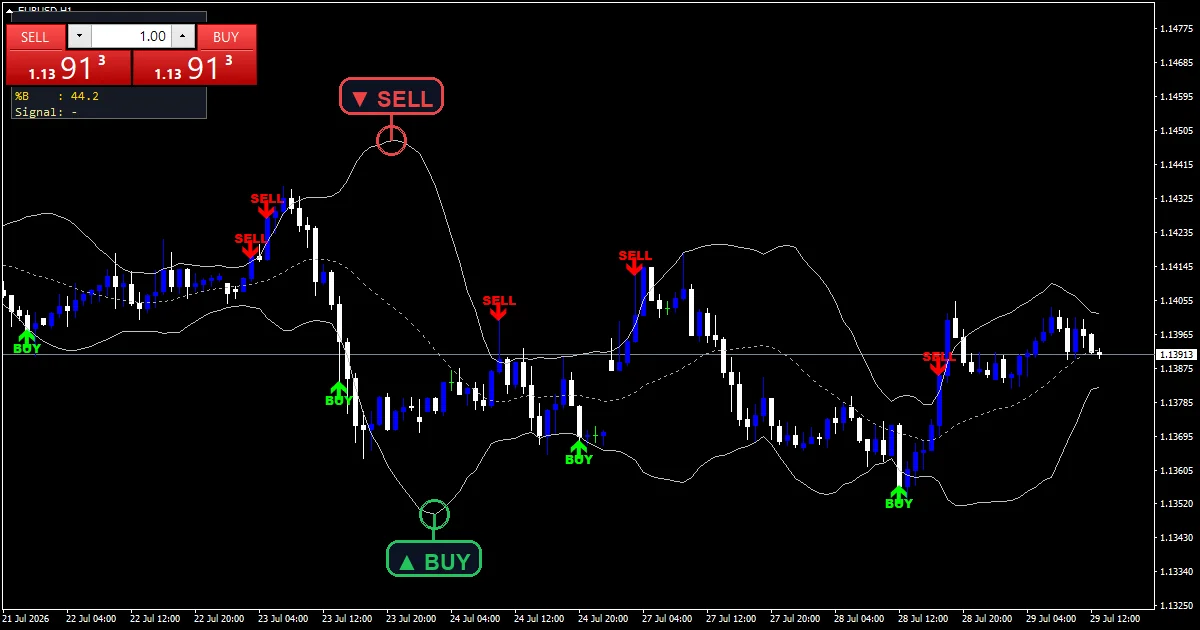
Wicks lie; closes commit. The bb alert arrows indicator only cares about the latter. A mark appears when a close finishes outside a band having been inside on the bar before, and for the last six hundred bars it writes the word beside the arrow rather than leaving you to guess.
This build ships as a compiled .ex4 for MT4 and .ex5 for MT5; the screenshots below come from EURUSD H1.
| Platforms | MT4 (.ex4) + MT5 (.ex5) |
|---|---|
| Chart window | Main price chart |
| Plots | 5: BB Upper, BB Basis, BB Lower, BB Buy, BB Sell |
| Alerts | popup, push notification, email, sound |
| Inputs | 15 |
What each plot looks like
Three lines, two marks and text labels.
`BB Upper` and `BB Lower` trace silver.
`BB Basis` traces dark gray between them.
`BB Buy` prints lime at width 2.
`BB Sell` prints red at the same width.
`ShowPanel` puts a status box in a corner.
- BB Upper: line, silver, width 1
- BB Basis: line, dark gray, width 1
- BB Lower: line, silver, width 1
- BB Buy: arrow, lime, width 2, arrow code 233
- BB Sell: arrow, red, width 2, arrow code 234
How the calculation works
Built in the file
No platform call is involved. `InpPeriod` `20` averages closes and the standard deviation across the same window is worked out line by line in this source.
Where the bands sit
`InpDeviation` `2.0` multiplies that deviation figure. Wider scatter among recent closes pushes both bands further out, and a quiet stretch pulls them in.
The crossing test
Two closes decide a mark. The previous one inside a band and the current one outside it, which makes this a break reading rather than a rejection one.
What it is telling you
Wicks outside a band count for nothing here.
A mark means the close committed.
`ArrowOffsetPts` `10` sets a tight gap from the bar.
Text labels sit twice that distance away.
`InpMaxLabelBars` `600` limits how far back text draws.
The panel reports where price sits in the band.
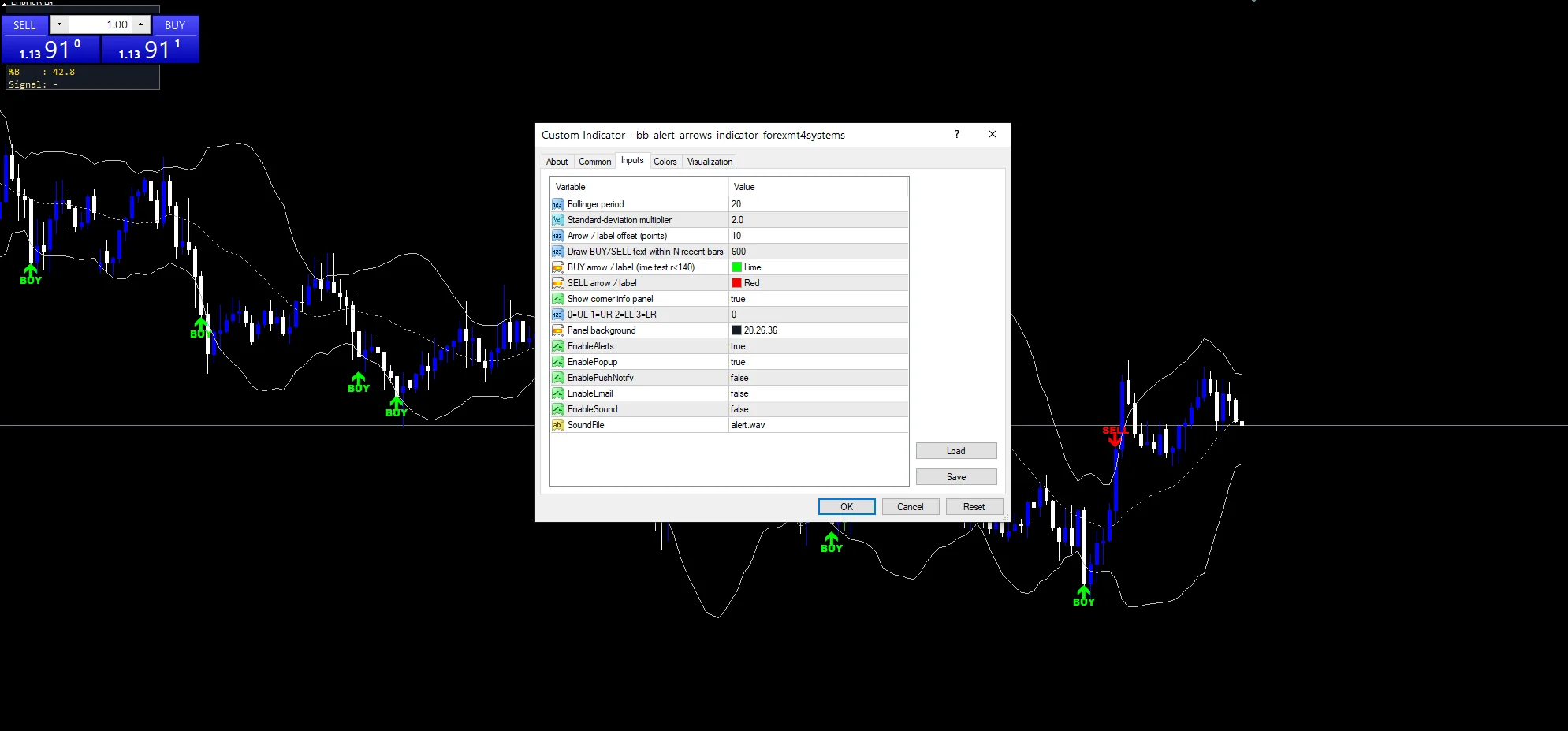
Alert channels in this build: popup, push notification, email and sound, one message per closed bar.
A close finishing outside a band is what speaks. `EnableAlerts` decides whether it goes anywhere and it lands as a terminal dialog already. A phone, mail and the speaker file named by `SoundFile` all start closed.
Every Bb Alert Arrows Indicator input
Core settings
| Setting | What it does | Default |
|---|---|---|
InpPeriod |
Bollinger period. Bars in the average and the deviation, `20`. | 20 |
InpDeviation |
Standard-deviation multiplier. Standard-deviation multiplier on the width, `2.0`. | 2.0 |
Display settings
| Setting | What it does | Default |
|---|---|---|
ArrowOffsetPts |
Arrow / label offset (points). Points between a mark and its bar, `10`. | 10 |
InpMaxLabelBars |
Draw BUY/SELL text within N recent bars. Recent bars that also get text, `600`. | 600 |
BuyColor |
BUY arrow / label (lime test r<140). | lime |
SellColor |
SELL arrow / label. | red |
ShowPanel |
Show corner info panel. Show the corner info panel, `true`. | on |
PanelCorner |
0=UL 1=UR 2=LL 3=LR. Which corner it sits in, `0`. | 0 |
PanelBg |
Panel background. | RGB 20,26,36 |
Alert settings
| Setting | What it does | Default |
|---|---|---|
EnableAlerts |
Whether a close outside the band speaks, `true`. | on |
EnablePopup |
It lands as a terminal dialog, `true`. | on |
EnablePushNotify |
It lands on a phone, `false`. | off |
EnableEmail |
(see inputs panel) | off |
EnableSound |
(see inputs panel) | off |
SoundFile |
Speaker file, `”alert.wav”`. | alert.wav |
Picking a chart for it
Closes outside a two-deviation band are rare by definition, which suits a slower chart. EURUSD H1 is the reference chart and gives a few marks a week. On M5 you get more but most reverse. On H4 each one is worth a look.
The downsides
A close outside a band often marks a move’s end.
Bands widen after volatility, so marks come late.
Six hundred labels is a lot of chart objects.
A twenty-bar window adapts slowly to a regime change.
Copy the compiled Bb Alert Arrows Indicator file into your MQL4/Indicators folder, and the MT5 build into MQL5/Indicators, then restart the terminal and drag it onto a chart. The step-by-step guide with screenshots is at how to install MT4 and MT5 indicators.
Download the Bb Alert Arrows Indicator for MT4 and MT5
The zip holds the compiled Bb Alert Arrows Indicator build for MT4 and MT5, plus a short README. Compiled files only, no source. Enter your email below and the download link arrives in your inbox.
Download this indicator free
Enter your email and the file is yours. You also get the full MT4 and MT5 library.
FAQ
Why does BB Buy need the prior close inside?
So each move outside gets marked once. Without that test a run of closes beyond the band would mark every single bar, turning one event into a cluster and telling you nothing extra.
Does InpPeriod 20 call the built-in bands?
No. The average and the standard deviation are both worked out inside this source, so you can read every step rather than trusting the platform’s own implementation of the calculation.
What does InpMaxLabelBars 600 limit?
How far back the written BUY and SELL text is drawn, not the arrows. Each label is a chart object, so capping them keeps a long history from filling up with hundreds of text items.
Which fraction does the ShowPanel box display?
Where price currently sits between the two bands. Zero puts it on the lower band, one puts it on the upper, and a half places it exactly on the basis line running between them.
Are results guaranteed?
No. Trading involves risk. Results are not guaranteed; past performance is not indicative of future results. Use the Bb Alert Arrows Indicator as one input. Always backtest before trading live.
External references
- Learn more about the underlying method in Lender option borrower option on Wikipedia.
- For wider market background, see the investor corner at ESMA.

About the author
Written by Dominic Walsh, a Forex trader and MT4/MT5 indicator, Expert Advisor and script developer. Every tool on forexmt4systems.com is tested on live charts before release and ships with ready-to-use compiled MT4 (.ex4) and MT5 (.ex5) files. Learn more about the trader and developer behind this site.
How we build, test and correct every tool: Editorial & Testing Policy. Trading carries risk; see the disclaimer.