
A band gets pierced often; a pierce that gets rejected is rarer. The bands sniper indicator waits for that second thing. It wants the low below the lower band, the close back above it, and a fourteen-bar reading agreeing the market already looked stretched.
This build ships as a compiled .ex4 for MT4 and .ex5 for MT5; the screenshots below come from EURUSD H1.
| Platforms | MT4 (.ex4) + MT5 (.ex5) |
|---|---|
| Chart window | Main price chart |
| Plots | 5: Upper Band, Basis, Lower Band, Sniper Buy, Sniper Sell |
| Alerts | popup, push notification, email, sound |
| Inputs | 16 |
What the build actually draws
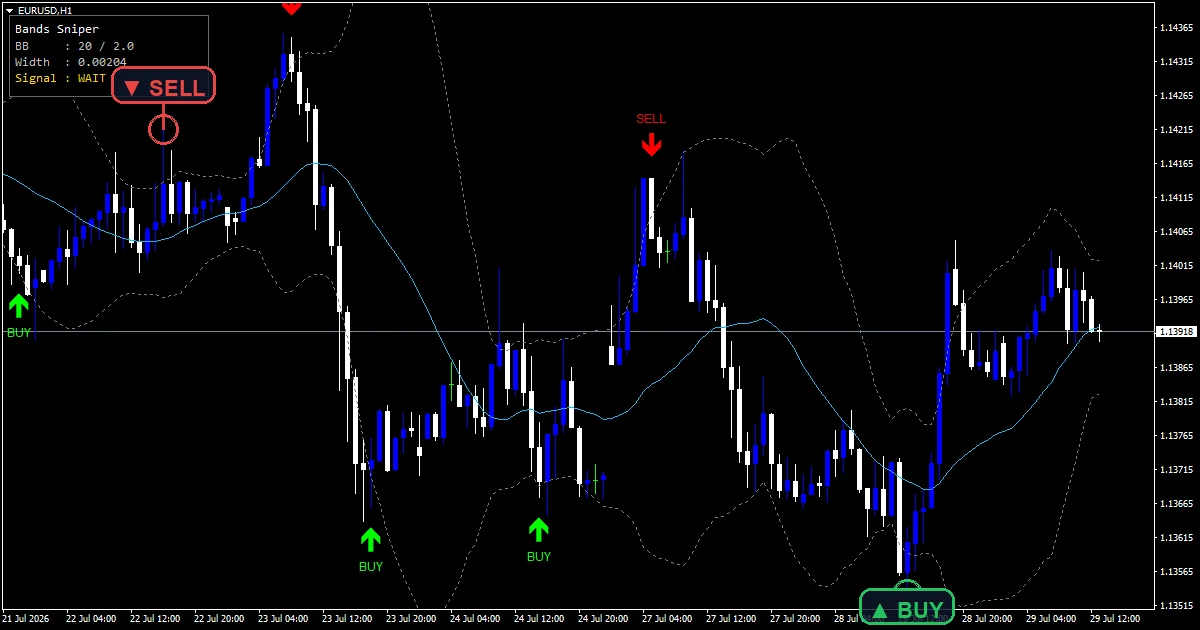
Three lines and two marks on price.
`Upper Band` and `Lower Band` trace slate gray.
`Basis` traces deep sky blue between them.
`Sniper Buy` prints lime at width 3.
`Sniper Sell` prints red at the same width.
`ShowPanel` adds a status box in a corner.
- Upper Band: line, slate gray, width 1
- Basis: line, deep sky blue, width 1
- Lower Band: line, slate gray, width 1
- Sniper Buy: arrow, lime, width 3, arrow code 233
- Sniper Sell: arrow, red, width 3, arrow code 234
What the build works out
The envelope
`InpBBPeriod` `20` sets a simple average of closes and `InpBBDev` `2.0` puts each band that many standard deviations out. Width therefore tracks how scattered recent closes were.
Pierce then reject
Two prices from the same bar decide it. The low must sit below the lower band while the close finishes above it, which is a rejection rather than a break.
The exhaustion gate
`InpRsiPeriod` `14` supplies a reading and `InpRsiBuyGate` `40.0` is the ceiling a buy needs. A sell needs `InpRsiSellGate` `60.0` or higher.
Reading the result
Marks report a failed break, not a break.
Both conditions come from one closed bar.
Forty is a loose gate, not a deeply oversold one.
`InpCooldown` `5` keeps repeat marks apart.
`InpArrowOffset` `45` sets the gap from the candle.
Current band width shows in the corner panel.
Alert channels in this build: popup, push notification, email and sound, one message per closed bar.
A snapback, meaning a pierce that closes back inside, is what speaks. `EnableAlerts` is the master switch and a terminal dialog opens for it already. A handset, mail and the desktop announcement behind `SoundFile` all begin closed.
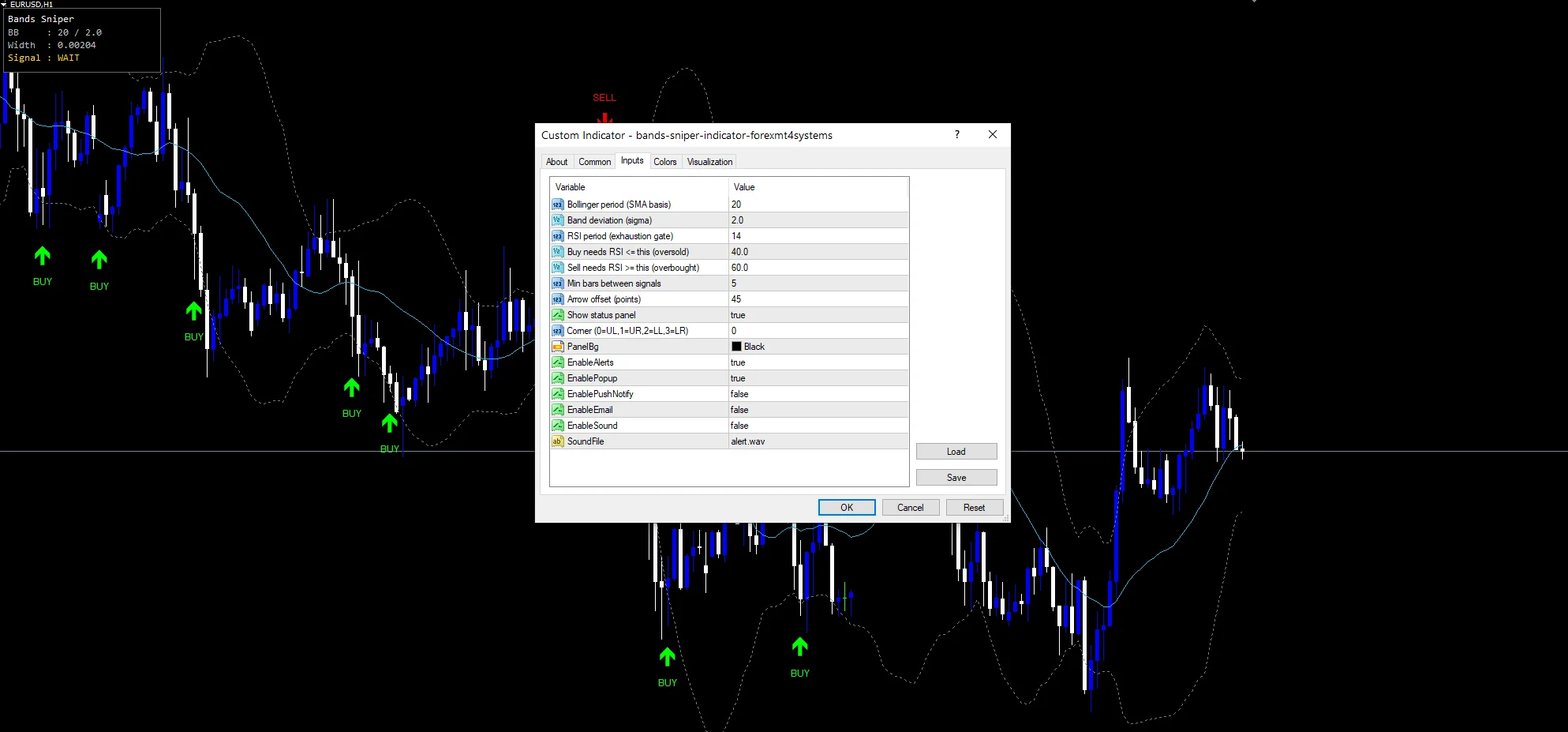
Every Bands Sniper Indicator input
Core settings
| Setting | What it does | Default |
|---|---|---|
InpBBPeriod |
Bollinger period (SMA basis). Bars in the average behind the basis, `20`. | 20 |
InpBBDev |
Band deviation (sigma). Deviations each band sits out, `2.0`. | 2.0 |
InpRsiPeriod |
RSI period (exhaustion gate). Bars in the gate reading, `14`. | 14 |
InpRsiBuyGate |
Buy needs RSI <= this (oversold). Ceiling the reading must be under for a buy, `40.0`. | 40.0 |
InpRsiSellGate |
Sell needs RSI >= this (overbought). Floor it must be over for a sell, `60.0`. | 60.0 |
InpCooldown |
Min bars between signals. Bars held between marks, `5`. | 5 |
Display settings
| Setting | What it does | Default |
|---|---|---|
InpArrowOffset |
Arrow offset (points). Points between a mark and its candle, `45`. | 45 |
ShowPanel |
Show status panel. Draw the corner status box, `true`. | on |
PanelCorner |
Corner (0=UL,1=UR,2=LL,3=LR). | 0 |
PanelBg |
(see inputs panel) | black |
Alert settings
| Setting | What it does | Default |
|---|---|---|
EnableAlerts |
Master switch over the snapback message, `true`. | on |
EnablePopup |
A terminal dialog opens for it, `true`. | on |
EnablePushNotify |
(see inputs panel) | off |
EnableEmail |
(see inputs panel) | off |
EnableSound |
(see inputs panel) | off |
SoundFile |
(see inputs panel) | alert.wav |
Where it earns its keep
Rejections at a band need a market that ranges rather than runs. EURUSD H1 is the reference chart and gives a handful of marks a week. On M5 the marks multiply and most fail. On H4 they become genuinely uncommon.
What it misses
A rejection can be the pause before a break.
Forty and sixty are loose gates, not extremes.
Bands widen after a move, so the pierce comes late.
In a strong trend price rides a band for days.
Copy the compiled Bands Sniper Indicator file into your MQL4/Indicators folder, and the MT5 build into MQL5/Indicators, then restart the terminal and drag it onto a chart. The step-by-step guide with screenshots is at how to install MT4 and MT5 indicators.
Background reading on the method behind the Bands Sniper Indicator: Bollinger Bands on Wikipedia, Bollinger Bands at Investopedia.
Download the Bands Sniper Indicator for MT4 and MT5
The zip holds the compiled Bands Sniper Indicator build for MT4 and MT5, plus a short README. Compiled files only, no source. Enter your email below and the download link arrives in your inbox.
Download this indicator free
Enter your email and the file is yours. You also get the full MT4 and MT5 library.
FAQ
Why does a Sniper Buy need the close back inside?
Because that is what separates a rejection from a break. The low poking below the lower band happens constantly; the close finishing back above it says the move outside failed within the same bar.
Is InpRsiBuyGate 40.0 really oversold?
Not by the usual standard, no. Forty is a mild reading rather than an extreme, which makes this a filter that removes obviously wrong-sided setups instead of demanding a genuinely exhausted market.
What does the Basis line show?
The twenty-bar simple average that sets the centre of the envelope. Both bands sit a fixed number of deviations from it, so price crossing the basis is a separate observation from the pierces this tool marks.
Why does InpCooldown 5 block repeat marks?
Price working along a band can satisfy the pierce-and-reject test on several bars running. Five bars of spacing keeps the chart showing one event rather than a cluster of nearly identical marks.
Are results guaranteed?
No. Trading involves risk. Results are not guaranteed; past performance is not indicative of future results. Use the Bands Sniper Indicator as one input. Always backtest before trading live.
External references
- For background on this concept, see Intermarket analysis on Wikipedia.
- For broader market context, see istochastic (STOCHASTIC) at the MQL5 Documentation.

About the author
Written by Dominic Walsh, a Forex trader and MT4/MT5 indicator, Expert Advisor and script developer. Every tool on forexmt4systems.com is tested on live charts before release and ships with ready-to-use compiled MT4 (.ex4) and MT5 (.ex5) files. Learn more about the trader and developer behind this site.
How we build, test and correct every tool: Editorial & Testing Policy. Trading carries risk; see the disclaimer.