
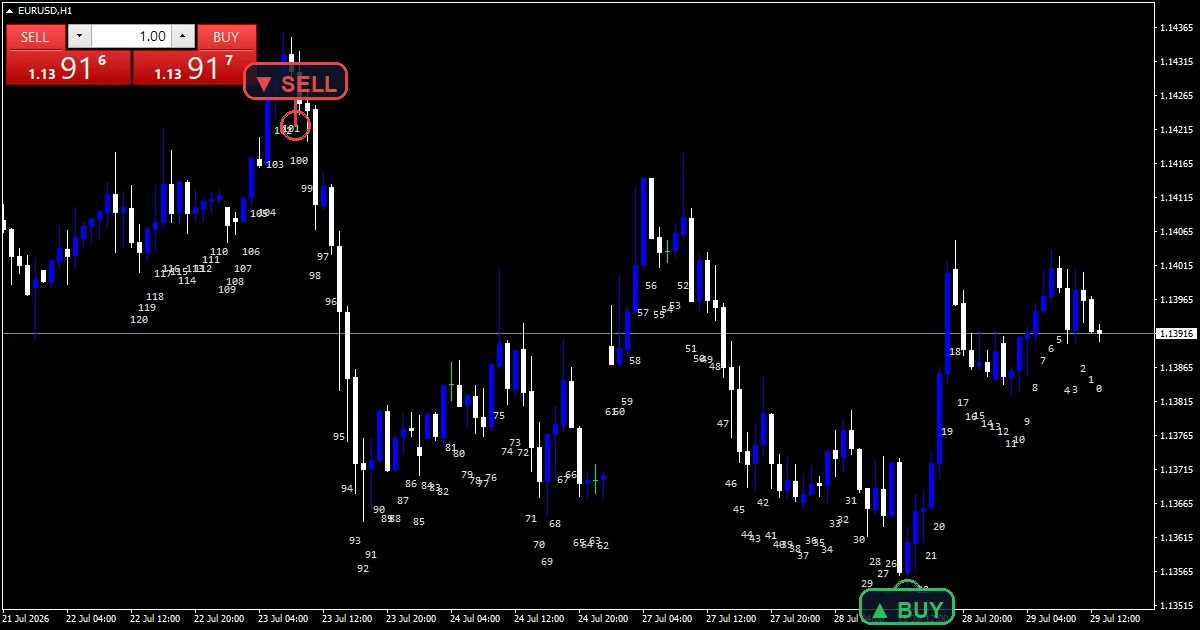
The bar numbers indicator is a utility rather than a signal tool. It prints a small number under each of the last `InpNumBars` bars. `InpMode` decides what that number means: distance from the current bar, or position inside the trading day.
This build ships as a compiled .ex4 for MT4 and .ex5 for MT5; the screenshots below come from EURUSD H1.
| Platforms | MT4 (.ex4) + MT5 (.ex5) |
|---|---|
| Chart window | Main price chart |
| Plots | 0 |
| Alerts | none |
| Inputs | 8 |
What the Bar Numbers Indicator draws on the chart
OBJ_TEXT objects carry each number, in `InpColor` and `InpFont`.
Numbers sit below the bar by default, `InpOffsetPts` from the low.
`InpPlaceBelow` moves them above the high instead.
Nothing else appears, and no buffer exists at all.
Following the source
The two counting modes
`InpMode` `0` numbers each bar by its distance from the current one, so the newest bar reads 0. Mode 1 restarts the count at every trading day boundary, giving the intraday bar index instead.
Placing the text
off takes `InpOffsetPts` `60` times Point. price then takes the low minus that offset, or the high plus it when `InpPlaceBelow` is false. Anchor points keep the text aligned as the chart scales.
Keeping it cheap
`InpNumBars` `120` limits how many bars carry a number. `InpStep` `1` can skip bars entirely, labelling every second or third one. Both settings exist so a long chart does not slow the terminal.
How to take it
Mode `0` is useful for describing a bar to someone else precisely.
Mode 1 tells you how far into the trading day a bar sits.
Raise `InpStep` when the numbers crowd each other on a zoomed-out chart.
The count in mode `0` shifts every time a new bar forms.
This build raises no alerts at all. There is no popup, no push, no mail and no sound, because the tool only draws text. Nothing here watches for an event, so no channel exists to configure.
Every Bar Numbers Indicator input
Core settings
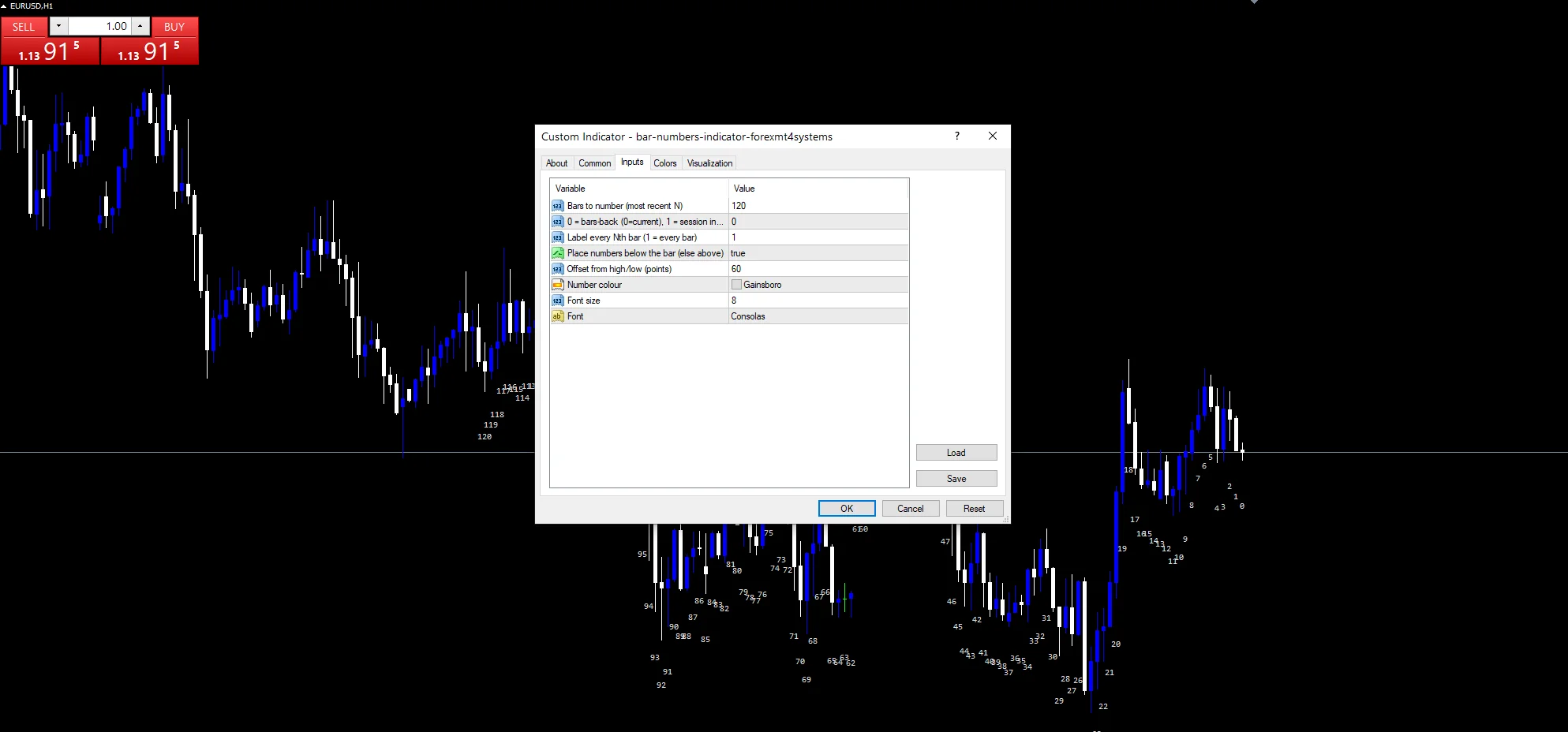
| Setting | What it does | Default |
|---|---|---|
InpNumBars |
Bars to number (most recent N). How many recent bars carry a number, default `120`. | 120 |
InpMode |
0 = bars-back (0=current), 1 = session index. Counting mode, `0` for bars back and 1 for session index. | 0 |
InpStep |
Label every Nth bar (1 = every bar). Label every Nth bar, default `1` for every bar. | 1 |
InpPlaceBelow |
Place numbers below the bar (else above). Places numbers below the bar, default `true`. | on |
InpOffsetPts |
Offset from high/low (points). Distance from the high or low in points, default `60`. | 60 |
Display settings
| Setting | What it does | Default |
|---|---|---|
InpColor |
Number colour. Number colour, default gainsboro. | gainsboro |
InpFontSize |
Font size. Font size, default `8`. | 8 |
InpFont |
Font. Font, default Consolas so the digits line up. | Consolas |
Where the defaults suit
A bar index means the same thing on any instrument. EURUSD H1 is the reference chart, where `InpNumBars` at `120` covers five days. On M5 the same count covers ten hours. Mode 1 is most useful on intraday charts, since a session index has no meaning on a daily one.
Known limits
Mode `0` renumbers everything on each new bar, so a number written down goes stale.
A hundred and twenty text objects slow a busy chart, especially with other tools running.
Session mode depends on the broker day boundary, which shifts between brokers.
Copy the compiled Bar Numbers Indicator file into your MQL4/Indicators folder, and the MT5 build into MQL5/Indicators, then restart the terminal and drag it onto a chart. The step-by-step guide with screenshots is at how to install MT4 and MT5 indicators.
Background reading on the method behind the Bar Numbers Indicator: Investment incentive on Wikipedia, itrix (TRIX) at the MQL5 Documentation.
Download the Bar Numbers Indicator for MT4 and MT5
The zip holds the compiled Bar Numbers Indicator build for MT4 and MT5, plus a short README. Compiled files only, no source. Enter your email below and the download link arrives in your inbox.
Download this indicator free
Enter your email and the file is yours. You also get the full MT4 and MT5 library.
FAQ
What does InpMode 0 count?
Distance from the current bar. The newest bar reads 0, the one before it reads 1, and so on backwards. Every number shifts when a new bar forms, which is worth remembering before quoting one to someone.
When is InpMode 1 more useful than 0?
On intraday charts. Mode 1 restarts the count at each trading day boundary, so the number tells you how far into the day a bar sits. On a daily chart that reading has no meaning.
How do I stop the numbers crowding?
Raise `InpStep`. At `1` every bar carries a number, which gets dense when you zoom out. Setting it to 5 labels every fifth bar and keeps the chart readable while still giving you a reference.
Does InpOffsetPts need changing per instrument?
Usually yes. Sixty points is six pips on a five-digit feed, which sits nicely under a EURUSD candle. On gold or an index the same offset puts the number almost on top of the bar.
Are results guaranteed?
No. Trading involves risk. Results are not guaranteed; past performance is not indicative of future results. Use the Bar Numbers Indicator as one input. Always backtest before trading live.
External references
- Learn more about the underlying method in Investment incentive on Wikipedia.
- For wider market background, see itrix (TRIX) at the MQL5 Documentation.

About the author
Written by Dominic Walsh, a Forex trader and MT4/MT5 indicator, Expert Advisor and script developer. Every tool on forexmt4systems.com is tested on live charts before release and ships with ready-to-use compiled MT4 (.ex4) and MT5 (.ex5) files. Learn more about the trader and developer behind this site.
How we build, test and correct every tool: Editorial & Testing Policy. Trading carries risk; see the disclaimer.