
Two conditions, and both have to agree. The be forex guru indicator wants a weighted moving average sloping in the trade direction, and a stochastic crossing its signal line while leaving an extreme zone. Trend plus reversal, on the same bar. A dashboard panel reports what each leg is currently reading, so you can see why an arrow did or did not appear.
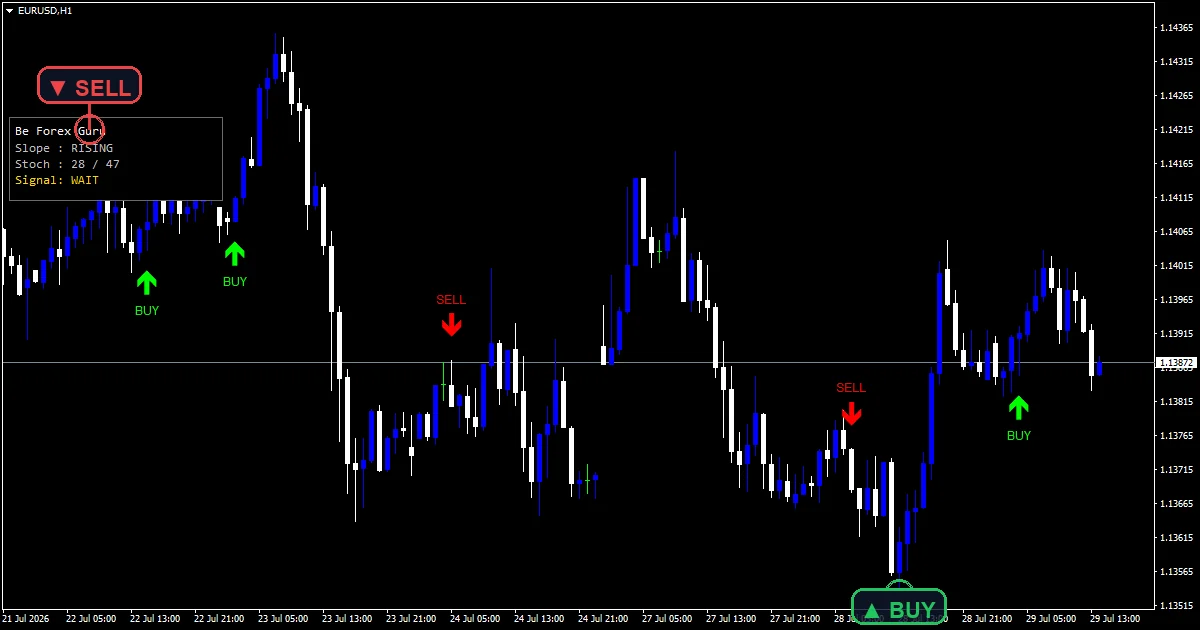
This build ships as a compiled .ex4 for MT4 and .ex5 for MT5; the screenshots below come from EURUSD H1.
| Platforms | MT4 (.ex4) + MT5 (.ex5) |
|---|---|
| Chart window | Main price chart |
| Plots | 2: Guru Buy, Guru Sell |
| Alerts | popup, push notification, email, sound |
| Inputs | 18 |
What gets drawn, and where
Guru Buy places a wide lime arrow beneath a bar where both legs agree upward.
Guru Sell places the red counterpart above it.
A dashboard panel reports the LWMA slope, the current %K and %D, and the live bias.
Neither the moving average nor the stochastic appears on the chart, so the panel is where you read them.
- Guru Buy: arrow, lime, width 3, arrow code 233
- Guru Sell: arrow, red, width 3, arrow code 234
How the calculation works
The trend leg
maNow reads a linear weighted moving average over `InpMaPeriod` at the current bar, and maPrev reads the same average `InpSlopeLb` bars back. slopeUp holds when maNow sits above maPrev. LWMA weights recent bars more heavily than a simple average, so the slope reacts sooner to a change of direction.
The reversal leg
crossUp needs three things together: kPre at or below dPre, kNow above dNow, and kPre below `InpOSLevel`. That last clause matters most. It insists the cross happened while the stochastic still sat in oversold territory, so the tool catches a turn leaving an extreme rather than an ordinary mid-range crossing. crossDn mirrors it against `InpOBLevel`.
Confluence, then a cooldown
Only when the trend leg and the reversal leg agree does an arrow print, `InpArrowOffset` points clear of the candle. `InpCooldown` at `4` then blocks a second arrow for a few bars. The header states that every cross reads closed bars, which is why a printed arrow does not move.
How to work with it
Both legs must agree, so arrows are infrequent by design.
The panel is the diagnostic. It shows slope and stochastic separately, which explains the silences.
A cross that happens mid-range never counts, however clean it looks on a separate stochastic.
Since the chart plots neither input, the arrows sit against bare candles.
Alert channels in this build: popup, push notification, email and sound, one message per closed bar.
Four channels sit beneath `EnableAlerts`: popup, push notification, email and sound, with `SoundFile` naming the clip. Popup ships enabled and the rest ship off. The header confirms the message follows a closed bar, and the guard allows one per bar.
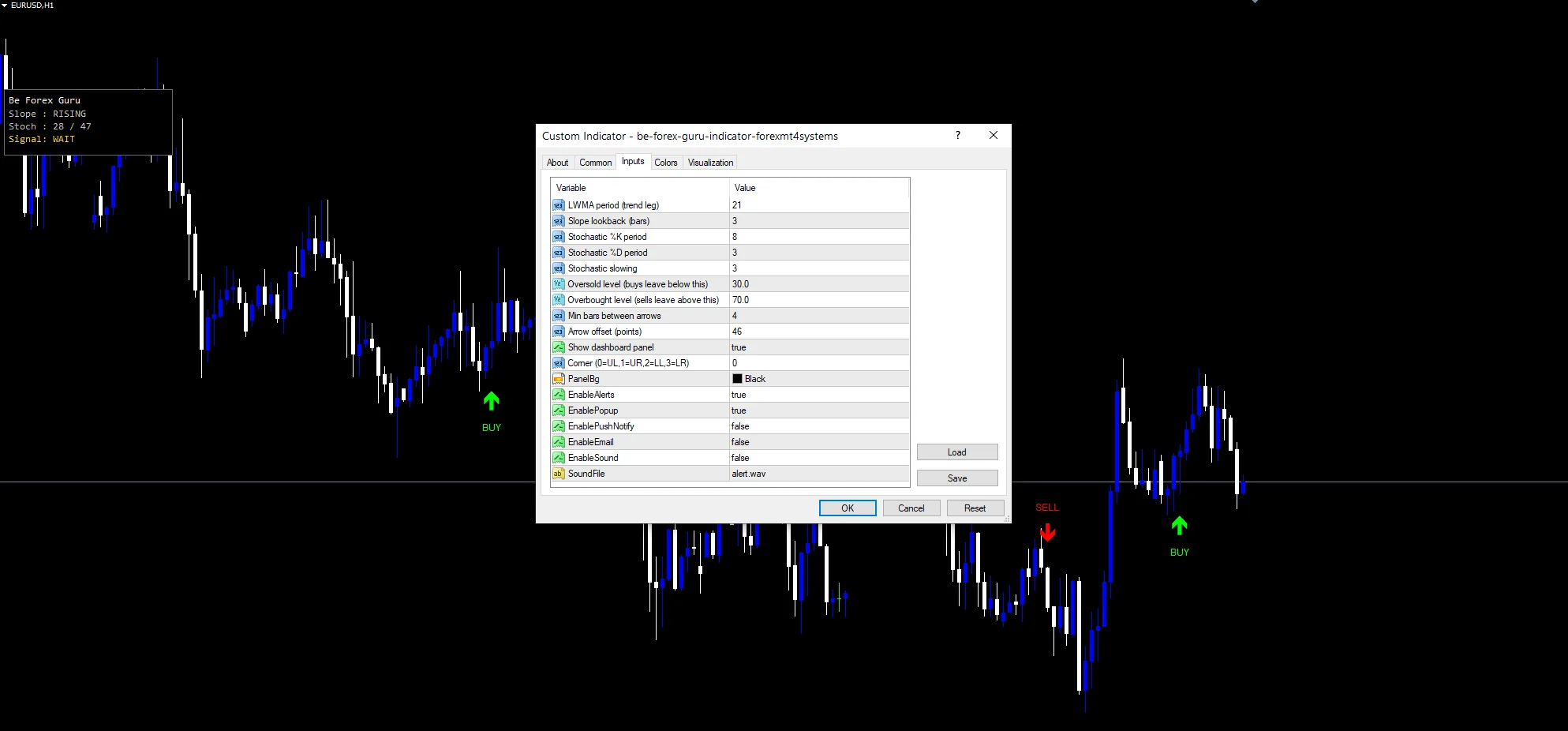
Every Be Forex Guru Indicator input
Core settings
| Setting | What it does | Default |
|---|---|---|
InpMaPeriod |
LWMA period (trend leg). LWMA length for the trend leg, default `21`. | 21 |
InpSlopeLb |
Slope lookback (bars). Bars back the slope is measured over, default `3`. Raise it to demand a steadier trend. | 3 |
InpStochK |
Stochastic %K period. Stochastic %K period, default `8`, with `InpStochD` at `3` and `InpStochSlow` at `3`. | 8 |
InpStochD |
Stochastic %D period. | 3 |
InpStochSlow |
Stochastic slowing. | 3 |
InpOSLevel |
Oversold level (buys leave below this). Oversold line a buy cross must leave from, default `30.0`, with `InpOBLevel` at `70.0` above. | 30.0 |
InpOBLevel |
Overbought level (sells leave above this). | 70.0 |
InpCooldown |
Min bars between arrows. Minimum bars between arrows, default `4`. | 4 |
Display settings
| Setting | What it does | Default |
|---|---|---|
InpArrowOffset |
Arrow offset (points). | 46 |
ShowPanel |
Show dashboard panel. Turns the dashboard on and off; `PanelCorner` picks which corner it uses. | on |
PanelCorner |
Corner (0=UL,1=UR,2=LL,3=LR). | 0 |
PanelBg |
(see inputs panel) | black |
Alert settings
| Setting | What it does | Default |
|---|---|---|
EnableAlerts |
(see inputs panel) | on |
EnablePopup |
(see inputs panel) | on |
EnablePushNotify |
(see inputs panel) | off |
EnableEmail |
(see inputs panel) | off |
EnableSound |
(see inputs panel) | off |
SoundFile |
(see inputs panel) | alert.wav |
Symbols and timeframes
A 21 LWMA with a fast stochastic suits intraday charts. The screenshot note calls for EURUSD H1, where the two legs align a few times a week. On M5 the stochastic reaches its zones constantly, so the slope leg does most of the filtering. On H4 and daily the combination becomes a swing tool and arrows turn rare.
What to be wary of
Trend and reversal legs pull against each other by nature, so the pair can stay silent through moves you would have wanted marked.
LWMA slope over three bars is a short read. One large candle can flip it without any real change of direction.
The zone requirement means a good reversal that begins from mid-range never registers at all.
Copy the compiled Be Forex Guru Indicator file into your MQL4/Indicators folder, and the MT5 build into MQL5/Indicators, then restart the terminal and drag it onto a chart. The step-by-step guide with screenshots is at how to install MT4 and MT5 indicators.
Download the Be Forex Guru Indicator for MT4 and MT5
The zip holds the compiled Be Forex Guru Indicator build for MT4 and MT5, plus a short README. Compiled files only, no source. Enter your email below and the download link arrives in your inbox.
Download this indicator free
Enter your email and the file is yours. You also get the full MT4 and MT5 library.
FAQ
What does InpOSLevel add to the stochastic cross?
It requires the cross to happen inside the extreme zone. crossUp needs kPre below `30.0` as well as the %K crossing above %D. Without that clause any mid-range crossing would count, and those happen constantly. The zone test is what turns a common event into an occasional one.
Why use an LWMA rather than an EMA for the trend leg?
A linear weighted average puts more weight on recent bars than an exponential one does at a comparable length, so its slope turns sooner. For a tool that pairs trend with a reversal signal, catching the trend change quickly matters more than smoothness.
What is InpSlopeLb measuring?
How far back the slope comparison reaches. The code reads maNow at the current bar and maPrev at `InpSlopeLb` bars earlier, then holds slopeUp when the first exceeds the second. At `3` that is a short read. Raise it to 5 or 8 and the leg demands a steadier trend.
What does the ShowPanel dashboard actually report?
The LWMA slope, the current %K and %D readings, and the live bias. Since the chart plots neither input, the panel gives you your only view of what the two legs are doing. It is also the quickest way to understand why arrows have gone quiet.
Are results guaranteed?
No. Trading involves risk. Results are not guaranteed; past performance is not indicative of future results. Use the Be Forex Guru Indicator as one input. Always backtest before trading live.
External references
- The core method is documented in Margin (finance) on Wikipedia.
- Additional market context is at MACD at Investopedia.

About the author
Written by Dominic Walsh, a Forex trader and MT4/MT5 indicator, Expert Advisor and script developer. Every tool on forexmt4systems.com is tested on live charts before release and ships with ready-to-use compiled MT4 (.ex4) and MT5 (.ex5) files. Learn more about the trader and developer behind this site.
How we build, test and correct every tool: Editorial & Testing Policy. Trading carries risk; see the disclaimer.