
The best buy sell signal indicators do one job well: they condense several chart conditions into a single mark at the moment those conditions line up. That saves screen time. It does not replace judgment. Also, a signal is a prompt, not a decision — your filters and risk rules make the decision. This page ranks the ten strongest signal tools from the 1,380+ free guides on this site, split into three groups: arrow-based tools, alert-first tools, and pressure or structure tools. Indeed, every pick signals on closed bars, ships as compiled MT4 and MT5 files behind one email opt-in, and links to a full guide with settings and chart examples. Where a tool has a weak spot, I name it.
Arrow-based buy sell signals
Arrow tools print a mark directly on the bar where entry conditions complete. Still, they are the fastest to read and the easiest to backtest by eye: scroll left, count the arrows, and judge the tool against its own history. All four below lock their arrows at bar close, so the record you scroll through is the record a live viewer saw. Thus, the differences between them come down to how much confirmation each demands before it prints, and how fast a chart they suit.
| Tool | Signal logic | Signal style | Best timeframes | Alerts |
|---|---|---|---|---|
| Arrow Signal | Momentum shift confirmed on a closed bar | Single arrow above or below the bar | M15–H1 | Popup, push, email, sound |
| Buy Sell Signal | Trend direction and momentum agreement | Colored arrow at the signal bar | M30–H4 | Popup, push, email, sound |
| Better Buy Sell | Smoothed swing-shift filter over price | Arrow plus trend color cue | H1–H4 | Popup, push, email, sound |
| Buy Sell Arrow Scalper | Fast momentum trigger tuned for short bars | Tight arrow close to price | M1–M15 | Popup, push, email, sound |
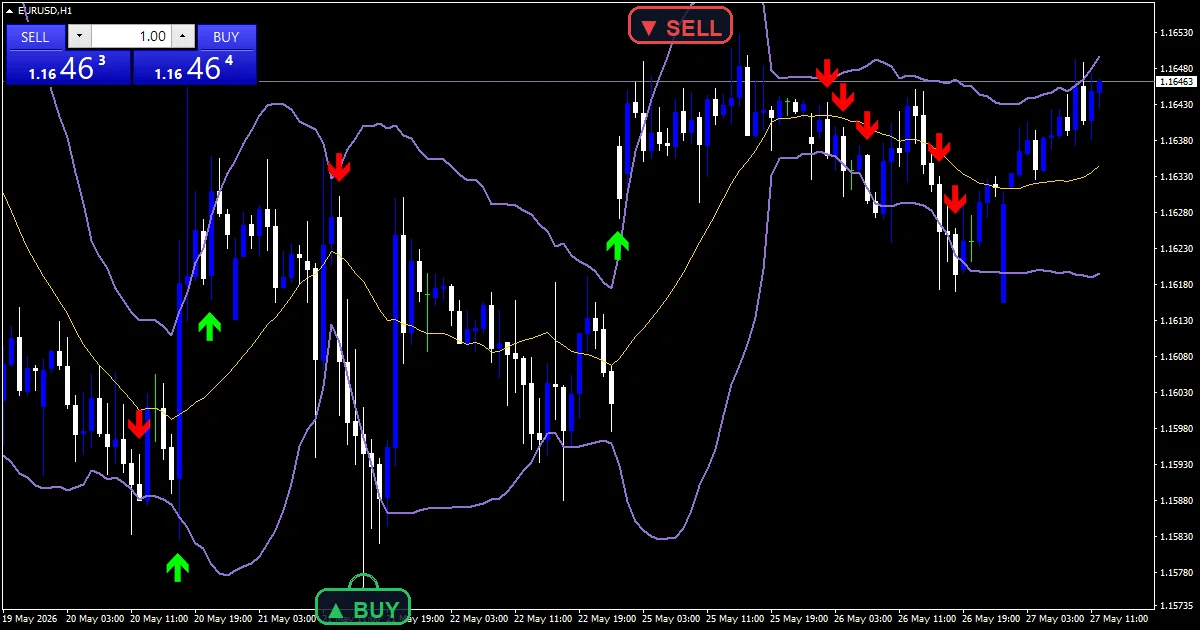
Verdicts on the arrow tools
Arrow Signal — My default starter pick, and the one I hand to traders moving off bare candlestick reading. Hence, one arrow, one direction, no clutter, and the mark stays where it printed. It teaches the core habit this whole page depends on: see the prompt, then check the context before acting. Next, its limitation is range-bound price. In a sideways market it fires both ways, so run it only when a higher-timeframe trend filter agrees.
Buy Sell Signal — This one asks for more before it prints, since trend and momentum must both agree on the same closed bar. Then, fewer arrows, better placed, and far fewer of the coin-flip marks that plague single-condition tools. The trade-off is lag: it often marks the third or fourth bar of a move, not the first, so pair it with a wider stop than you would use on a faster tool.
Better Buy Sell — The smoothed filter cuts whipsaw arrows on H1 and H4, and the color cue tells you the leaning between signals, which makes it useful even on bars where nothing prints. Its weakness is speed. On fast news bars the smoothing keeps it quiet, so it can sit out sharp reversals entirely. Yet, swing traders will call that a feature; breakout traders will not.
Buy Sell Arrow Scalper — Built for M1 to M15 work, where signal density matters more than signal patience. Truly, the arrows hug price, so entries and stops stay tight. Printing often is also its flaw: spread and slippage eat thin scalp targets, so it only makes sense on a low-cost account during liquid sessions. Plainly, outside London and New York hours, leave it off the chart.
How to choose an arrow tool
Pick by holding time, not by look. Also, scalpers should take the Arrow Scalper on M5 and skip every arrow that fights the H1 direction. Intraday traders get the cleanest read from Arrow Signal on M15 with a moving-average filter behind it. Indeed, swing traders should take Better Buy Sell on H4, because fewer, later arrows suit wider stops. Buy Sell Signal is the compromise pick when you want one tool across several pairs and can accept some lag. Still, whichever you choose, demo it for two weeks first and log every arrow against the outcome.
Alert-first signal indicators
Alert-first tools assume you are away from the screen. Thus, the chart mark matters less than the push, email, or popup that reaches you when conditions complete. That changes what a good tool looks like: it must fire once per closed bar, never per tick, and the message must match what the chart later shows. Hence, these three lead the group, and each earns its place a different way — one through discipline, one through selectivity, one through standing bias.
| Tool | Signal logic | Signal style | Best timeframes | Alerts |
|---|---|---|---|---|
| Buy Sell Alert | Direction change confirmed at bar close | Arrow plus one alert per closed bar | M30–H4 | Popup, push, email, sound |
| ADX Buy Sell | ADX trend strength plus DI line cross | Arrow only when the trend has strength | H1–D1 | Popup, push, email, sound |
| Buy Sell Trend | Trend-state flip on the working timeframe | Arrow at the flip bar plus color state | H1–H4 | Popup, push, email, sound |

Verdicts on the alert tools
Buy Sell Alert — The discipline pick. Next, one alert per closed bar means your phone never floods, and the arrow you see later matches the alert you received, which builds trust in the tool over time. Its limitation is that it reports direction only. Then, it says nothing about how far the move might carry, so target selection stays entirely on you.
ADX Buy Sell — My favorite filter-and-trigger combo in one file. Yet, it stays silent when ADX reads a weak market, which removes the worst class of signals — trend entries into no-trend conditions — before they ever reach your phone. The cost is patience: on quiet weeks it may not fire for days, and traders who need action will be tempted to override it. Do not.
Buy Sell Trend — Best used as the standing bias behind a faster entry tool from the arrow group above. Truly, the color state answers “which side am I allowed to trade?” at a glance, and the flip alert tells you when that answer changes. Its flaw is turn points, where the flip arrives after a chunk of the reversal is already gone. Plainly, accept the late entry; that is the price of confirmation.
How to choose an alert tool
Decide what you want your phone to tell you. Also, if you want every confirmed direction change, run Buy Sell Alert on H1 and act only when your filter agrees. If you want fewer, stronger calls, ADX Buy Sell is the pick, since it mutes weak-trend noise by design. Indeed, if you mainly need standing bias for a manual strategy, Buy Sell Trend on H4 does that with the least chart clutter. Start with one; add a second only if their jobs differ.
Download the complete indicator database
Every signal tool on this page ships in one download. One email unlocks the full library of 1,380+ tools with compiled MT4 and MT5 files, plus my TradingView scripts. No paywall, no spam, unsubscribe any time.
Get free access to my indicator database
One email unlocks 1,380+ free MT4, MT5 and TradingView indicators — the complete library. No single-tool download; you get the whole database.
Pressure and structure signal tools
This group reads market context first and prints signals second. Thus, pressure tools weigh buying against selling inside the bars, so you see the force behind a move rather than just its direction. Structure tools anchor signals to pivots and breakout levels, so each arrow has a reference price behind it — a level to place the stop beyond, and a level to measure the target from. Hence, that anchor is what separates these three from the pure arrow generators above.
| Tool | Signal logic | Signal style | Best timeframes | Alerts |
|---|---|---|---|---|
| Buy Sell Pressure | Buying versus selling pressure balance per bar | Pressure reading plus signal mark on shift | M30–H4 | Popup, push, email, sound |
| Buy Sell Pivots | Price reaction at calculated pivot levels | Arrow at the pivot touch bar | H1–D1 | Popup, push, email, sound |
| Breakout Signal | Close beyond a tracked range boundary | Arrow at the confirmed breakout bar | M30–H4 | Popup, push, email, sound |

Verdicts on the pressure and structure tools
Buy Sell Pressure — The most informative tool on this page, because it shows the tug-of-war behind each candle rather than a bare arrow. Next, when an arrow from another tool fires and pressure leans the same way, the setup deserves attention; when they disagree, you just saved a trade. Its limitation is exactly that depth: it needs interpretation, so pure signal-followers will find it slow to act on.
Buy Sell Pivots — Signals anchored to pivot levels come with a built-in stop reference, which makes position sizing straightforward before you ever click buy. Then, it shines in range conditions where price respects the levels repeatedly. The weak spot is trend days. Yet, when price runs through pivot after pivot without pausing, its reversal-leaning marks fight the tape, so stand down when a strong trend is obvious.
Breakout Signal — Waiting for a confirmed close beyond the range filters out most fake pokes through a level, which is the failure mode that ruins manual breakout trading. Truly, the honest cost is entry price: confirmation means you buy the breakout late, and a deep retest can shake you out before the move resumes. Size smaller and give the stop room beyond the broken level.
How to choose a pressure or structure tool
Match the tool to the session you trade. Plainly, range-heavy Asian hours favor Buy Sell Pivots, since price respects levels more often there. London and New York opens favor Breakout Signal, because that is when ranges actually resolve. Also, buy Sell Pressure works across sessions as a second opinion: before you act on any arrow from this page, check whether pressure leans the same way. If the two disagree, skip the trade and wait for the next setup. Indeed, passing on a mixed signal costs nothing; forcing one costs real money.
Which indicator shows buy and sell signals on MT4?
The direct answer: the Buy Sell Signal Indicator is the tool built for exactly that job. Still, it prints a colored arrow on the chart when trend and momentum agree — up arrow to buy, down arrow to sell — and fires a popup, push, or email alert at the same bar. If you want the alert side emphasized, use the Buy Sell Alert Indicator instead. Thus, both install like any custom indicator and work on every pair and timeframe MT4 offers. Neither one is a full system on its own. Hence, treat the arrow as a prompt to check your filter and your risk plan, then decide. The full guides above cover settings and chart examples for each.
How I test the best buy sell signal indicators
Every pick on this page passes the same bench before it ships. First, the source compiles clean in MetaEditor for both MT4 and MT5 — zero errors, zero warnings. Second, I load the compiled file on a live EURUSD H1 chart and watch it through real ticks, not just history. Third, the closed-bar lock check: I note each signal as it prints, then compare the chart hours later. A mark that moved or vanished disqualifies the tool. Next, fourth, I trigger every alert channel — popup, push notification, email, and sound — and confirm each fires once per closed bar, not once per tick. The full procedure, including what gets a tool rejected, is in my editorial and testing policy.
Install and explore further
Setup takes about two minutes per tool: copy the compiled file into the Indicators folder, restart the terminal, and drag the indicator onto a chart. Then, enable “Allow DLL imports” only if a tool asks for it — none of the ten above do. The step-by-step walkthrough with screenshots for both platforms is in the MT4 and MT5 installation guide. For more tools in this family, browse the signal and forecast indicators hub, or zoom out to the full ranked list on the best MT4 indicators page. Each guide there follows the same format as this one: settings, chart examples, honest limits, and a free download.
Want every tool above in one zip? Get the complete database.
FAQ
Can I trade the signals without any confirmation?
No. Yet, an arrow marks the moment conditions completed; it does not weigh news, session, or nearby levels. Pair every signal tool with one independent filter and fixed risk rules that cap the cost of any trade. Truly, the filter and the plan decide; the arrow only prompts.
Do the signal arrows repaint?
No. Plainly, every tool here evaluates on the closed bar, so an arrow prints once the bar completes and then stays fixed. History shows the same marks a live viewer saw. Also, that closed-bar lock is part of the test bench above; a tool that fails it is not listed.
How many signal tools should I run at once?
One primary signal tool plus one filter is the sweet spot. Indeed, two arrow tools on one chart mostly duplicate or contradict each other. A third should be contextual — pressure or pivots — not another arrow generator.
Do these indicators also work on MT5?
Yes. Still, every download includes the compiled MT4 file (.ex4) and MT5 file (.ex5) in one zip. Settings and signal logic match on both platforms; the installation guide above covers folder paths.
Will these signal tools make my trading profitable?
No tool can promise that. Signal indicators speed up chart reading and enforce consistent entries, but outcomes depend on your filters, risk control, and the market; results are not guaranteed; past performance is not indicative of future results.
External references
- Learn more about the underlying method in Convergence trade on Wikipedia.
- For wider market background, see Typical Price at StockCharts ChartSchool.
Background reading: leading versus lagging indicators explained.

About the author
Written by Dominic Walsh, a Forex trader and MT4/MT5 indicator, Expert Advisor and script developer. Every tool on forexmt4systems.com is tested on live charts before release and ships with ready-to-use compiled MT4 (.ex4) and MT5 (.ex5) files. Learn more about the trader and developer behind this site.
How we build, test and correct every tool: Editorial & Testing Policy. Trading carries risk; see the disclaimer.