
Every tool in this library ships as a compiled .ex5 file built from the same logic as its .ex4 twin. Also, so this list of the best MT5 indicators is not a port of someone else’s rankings. Each pick below is a tool I coded, compiled, and chart-tested on MetaTrader 5 before release. Indeed, MT5 changes a few things that matter for indicator traders: 21 timeframes instead of 9, a faster multi-threaded strategy tester, and netting accounts at some brokers. The picks below hold up under those conditions. Still, this page ranks my strongest tools across four categories, drawn from the 1,380 indicator guides in the full library. Every entry links to a complete guide with settings, chart examples, and a free download. Thus, where a tool has a weakness, I say so. Honest limits beat inflated promises.
Best MT5 trend indicators
Trend tools answer the first question of any trade: which way does the market lean? Hence, these two lead the trend indicators hub on MT5.
| Tool | What it plots | Signal style | Best timeframes | Alerts |
|---|---|---|---|---|
| Supertrend | ATR trailing line above or below price | Line color flip on close | M15–H4 | Popup, push, email, sound |
| Adaptive Moving Average | Moving average that adjusts speed to market noise | Slope and price cross | H1–D1 | Popup, push, email, sound |
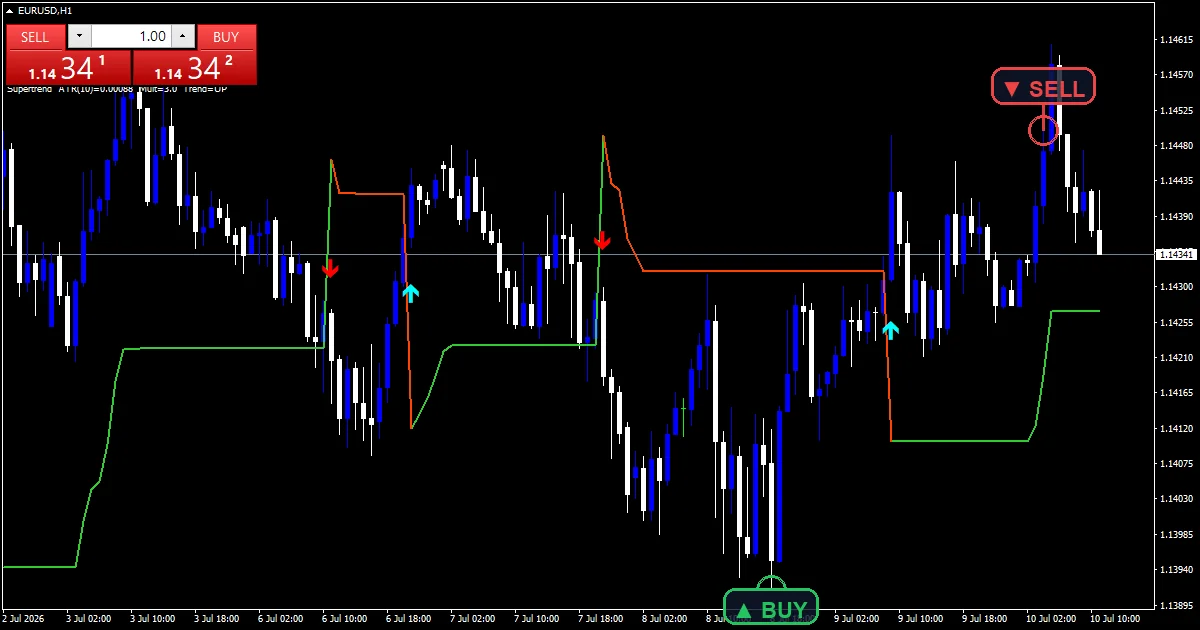
Supertrend — I keep this on more MT5 charts than any other tool because the rule fits in one sentence: trade with the line, exit on the flip. Next, the line trails price at an ATR multiple, so your stop inherits a volatility-aware home without extra math. The .ex5 build renders on every MT5 timeframe, including H2 and H8, which MT4 never offered. Then, its limitation is choppy markets, where repeated flips stack small losses. When the line flips twice within ten bars, stand aside — the market has no lean worth trading.
Adaptive Moving Average — It speeds up when price trends cleanly and flattens in noise. Yet, that behavior kills most of the false crossovers that wreck fixed-period averages. I read it two ways: slope for direction, price cross for late confirmation. On MT5 I run it on H2 as a middle read between H1 and H4, and that extra resolution genuinely helps. Its weak spot is sudden news spikes, where the adaptive formula needs a few bars to catch up. Truly, sit out the first candles after a release.
How to choose a trend tool
Scalpers should take Supertrend on M15 for its instant color flips, then filter entries with an oscillator reading from the section below. Plainly, swing traders should run the Adaptive Moving Average on H2–D1 and trade only in the direction of its slope. Run either behind any arrow tool as a directional filter: arrows that fight the higher-timeframe trend fail most often, so let the trend tool veto them. Also, if you want speed and audit-proof history at once, the non-repainting Supertrend build in the next section locks every flip at bar close.
Whatever your style, run one trend tool per chart and no more. Indeed, two trend lines that disagree produce hesitation, not insight. Pick one, learn how it behaves on your pair across a few weeks of demo charts, and only then judge whether it earns a live role.
Best MT5 signal and arrow indicators
Arrow tools compress several conditions into one mark on the chart. Still, the full set lives in the signal and forecast hub.
| Tool | What it plots | Signal style | Best timeframes | Alerts |
|---|---|---|---|---|
| Arrow Signal | Buy and sell arrows at momentum-trend confluence | Arrow on closed bar | M15–H4 | Popup, push, email, sound |
| Non-Repainting Supertrend | ATR trailing line, locked at bar close, with flip arrows | Confirmed flip plus arrow | M30–D1 | Popup, push, email, sound |
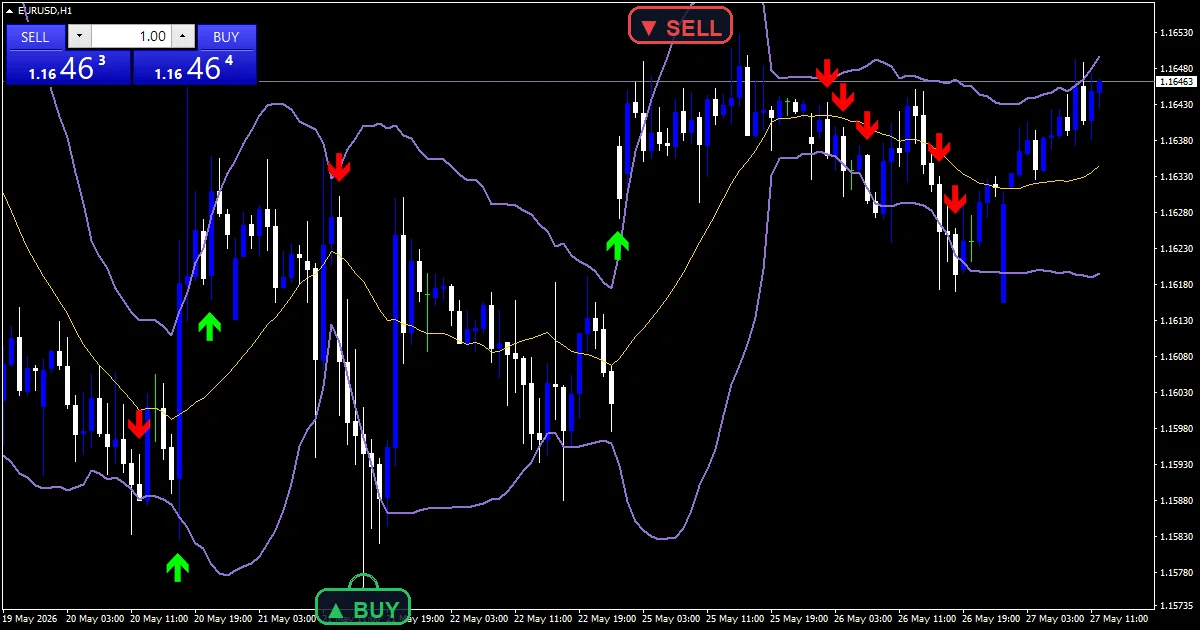
Arrow Signal — I like that it waits for momentum and trend to agree before printing. Thus, that keeps the chart quiet between real setups, and the MT5 push alerts reach my phone within seconds of the bar close. Its limitation is context blindness: an arrow into a major level is still a bad trade, so check nearby structure before you click. Hence, I treat each arrow as a prompt to evaluate, never as an order to execute.
Non-Repainting Supertrend — What you see in history matches what you would have seen live. Next, that honesty makes it my default for rule-based entries, and it is the build I trust in the MT5 tester, because past arrows never move. The trade-off is speed: confirmed signals arrive one closed bar later than the standard version, so entries sit deeper into the move. On higher timeframes that costs a few pips. In return you get history you can actually audit.
How to choose a signal tool
Match the tool to your holding time. Then, arrow Signal suits intraday traders who want one clean prompt instead of three stacked windows. The Non-Repainting Supertrend suits slower traders who review charts in the evening, because a signal you see at night must still be there in the morning. Yet, whichever you pick, add one trend filter above it, then let the alert channels do the watching. A phone push on a closed-bar signal beats an hour of staring at candles.
Download the complete indicator database
Every MT5 tool on this page ships in one download. One email unlocks the full library of 1,380+ tools with compiled MT4 and MT5 files, plus my TradingView scripts. No paywall, no spam, unsubscribe any time.
Get free access to my indicator database
One email unlocks 1,380+ free MT4, MT5 and TradingView indicators — the complete library. No single-tool download; you get the whole database.
Best MT5 oscillator and volume indicators
Oscillators time entries; volume shows where traders commit real orders. Plainly, the two families cover each other’s blind spots, which is why I group them. Dozens more builds sit in the oscillators hub and the volume hub.
| Tool | What it plots | Signal style | Best timeframes | Alerts |
|---|---|---|---|---|
| RSI Alert | RSI line with adjustable overbought and oversold levels | Level entry and exit alerts | M15–D1 | Popup, push, email, sound |
| Stochastic RSI | Stochastic formula applied to RSI values | Cross in extreme zones | M15–H4 | Popup, push, email, sound |
| Volume Profile | Horizontal volume histogram by price level | High-volume node zones | M30–D1 | Popup, push, email, sound |
| On Balance Volume | Cumulative volume line | Divergence and trend of the line | H1–D1 | Popup, push, email, sound |

The oscillator picks
RSI Alert — It turns a passive gauge into an active screener. Also, set your overbought and oversold levels per pair, then let MT5 push notifications monitor ten charts you never open. I keep 70/30 on the majors and widen the levels on gold, where momentum runs hotter. Indeed, its known weakness: strong trends pin RSI in the overbought zone for days, so never fade a trend just because the alert fired.
Stochastic RSI — It reacts faster than either parent indicator, which is exactly what you want at range edges. Still, a cross back out of the extreme zone times entries inside consolidations better than anything else I ship. Speed cuts both ways, though. Thus, it produces more false crosses than plain RSI, so demand a level or a trend filter behind every signal before you act.
The volume picks
Volume Profile — Its high-volume nodes act as magnets and reaction zones, and node reactions on EURUSD H1 test cleanly in my chart checks. Hence, the MT5 build handles deep history without dragging the chart. One honest caveat: forex feeds supply tick volume, not exchange volume, on MT5 just as on MT4. Next, treat the profile as a liquidity map rather than a precise order count and it earns its chart space.
On Balance Volume — One line, one message: when OBV climbs while price stalls, someone is accumulating. Then, divergence at range extremes is the highest-value read, and it takes one glance. It shares the tick-volume caveat above, and divergence marks conditions rather than entry bars. Yet, pair it with a signal tool from the section above for timing.
How to choose from these four
Range traders should start with Stochastic RSI for entries inside consolidations, backed by RSI Alert as the watchlist workhorse. Truly, swing traders get more from the volume pair: Volume Profile shows where the market cares, On Balance Volume shows whether a move has participation behind it. In a strong trend, flip your oscillator reading — treat oversold in an uptrend as a pullback cue at a high-volume node, not as a reversal call. Plainly, one rule covers all four: an oscillator signal at a meaningful level outweighs three signals in the middle of nowhere.
If you only have room for two indicator windows on screen, take RSI Alert plus Volume Profile. Also, one watches momentum for you across the whole watchlist; the other marks the exact levels where that momentum is most likely to matter.
Best MT5 smart money and ICT indicators
Smart money tools map where large orders likely rest. Indeed, the whole family lives in the smart money hub.
| Tool | What it plots | Signal style | Best timeframes | Alerts |
|---|---|---|---|---|
| Order Block | Institutional candle zones extended forward | Zone retest | M15–H4 | Popup, push, email, sound |
| CISD CSD + FVG IFVG | Change-in-state-of-delivery levels with gap and inversion-gap boxes | Level break plus gap retest | M1–M15 | Popup, push, email, sound |
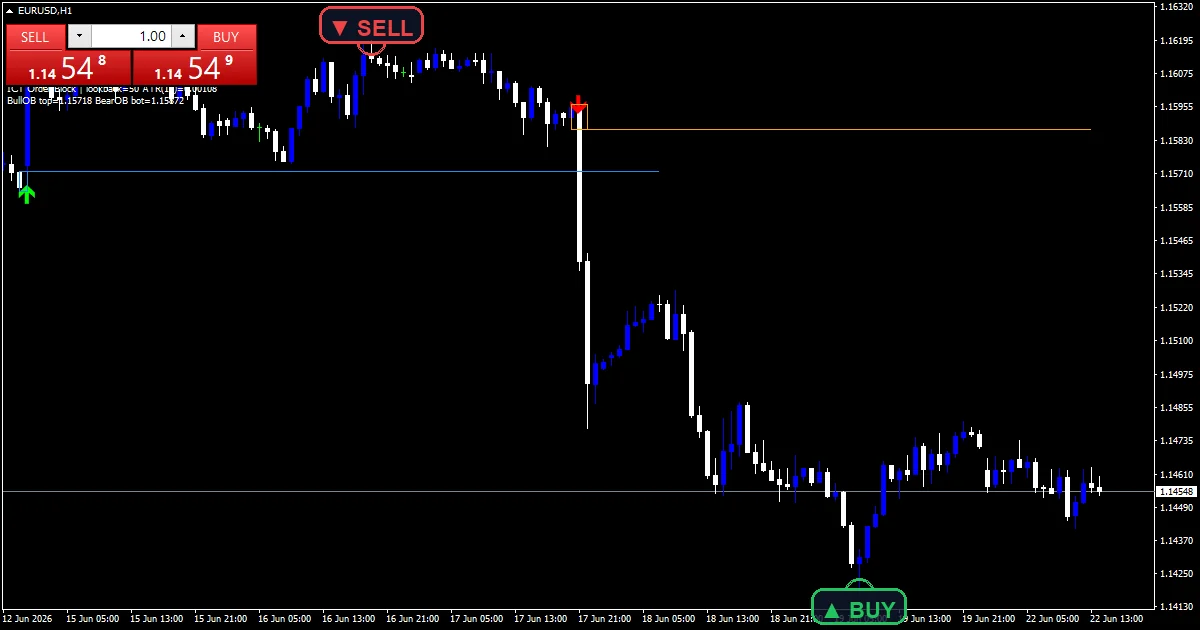
Order Block — It automates the most tedious part of smart money charting: finding the last opposing candle before displacement and projecting the zone forward. On MT5 the boxes redraw fast even with deep history loaded, and the retest alert means you stop babysitting zones. Not every retest reacts, though. Still, the indicator finds the zones; you still judge which ones sit with the trend before you commit.
CISD CSD + FVG IFVG — Delivery-state flips plus inversion gaps give low-timeframe traders a mechanical read on intent, and MT5’s M2–M12 charts add resolution MT4 could never show. Thus, it is session-dependent by nature: in quiet Asian ranges it draws levels that mean little, so I run it only through the London and New York windows, where the delivery logic has real order flow to read.
How to choose a smart money tool
Start with Order Block if you are new to this school — one concept, clearly drawn, workable on M15–H4 without screen-watching. Hence, move to the CISD build once you trade the London or New York windows on fast charts and want the full delivery-state picture. Both pair naturally with Volume Profile: a zone that overlaps a high-volume node carries far more weight than either signal alone. Next, keep position size modest while you learn these tools, because zone trading rewards patience over frequency.
A practical drill helps here. Then, mark the zones each morning, set the retest alerts, and walk away. At the end of the week, review which zones reacted and which broke clean through. Yet, that review teaches this style faster than any session of live clicking.
What actually changes on MT5
Three differences matter in practice. First, account mode. Many MT5 brokers default to netting, where all trades on one symbol merge into a single position. Truly, the indicators signal identically either way, but if you scale in and out, confirm your account is hedging before you fund it. Second, timeframes. Plainly, MT5 offers 21 against MT4’s 9, and the extra H2, H8, and M2–M12 charts are genuinely useful — every pick above computes natively on all of them. Third, the strategy tester. Also, MT5’s multi-threaded tester with real-tick modeling runs far faster than MT4’s, which makes checking a tool’s historical signals much less painful. The logic inside each indicator is identical across platforms; only the compiled file differs. Indeed, if you still trade the older terminal, the best MT4 indicators guide mirrors this page tool for tool.
How I test the best MT5 indicators
Every tool on this page passes the same gate before release, documented in the Editorial and Testing Policy. First, the MQL5 source compiles in MetaEditor with zero errors and zero warnings. Second, I load the .ex5 on a live EURUSD H1 chart and check the render: no spikes, no gaps, lines starting only where the math has enough data. Third, I verify the closed-bar lock by comparing signals on closed bars against the same bars after new ticks arrive; any signal that moves fails the tool. Fourth, I fire every alert channel — popup, push, email, sound — and confirm exactly one alert per closed bar, not a stream of duplicates. Still, tools that fail any step go back to development, not into the library.
The same gate applies to updates. Thus, when I revise a tool, the new build re-runs every check before the download zip changes. Installation takes about two minutes per the step-by-step installation guide, and the full catalog for this platform sits in the MT5 indicators hub.
Want every tool above in one zip? Get the complete database.
FAQ
Are MT4 indicators compatible with MT5?
No. Hence, the platforms run different languages and runtimes, so a compiled .ex4 will not load in MT5. That is why every download here includes a separate .ex5, compiled from MQL5 code with the same logic as the MT4 build.
What is the difference between netting and hedging accounts?
On a netting account, all trades on one symbol merge into one net position; a new sell reduces an existing buy. On a hedging account, opposite positions coexist, as on MT4. Indicators behave the same on both; only trade management changes.
Can I backtest these indicators in the MT5 strategy tester?
Yes. Next, attach any indicator in the tester’s visual mode and watch its signals replay on historical bars, including real-tick data. An indicator alone places no trades; profit statistics would need an EA coded around its rules.
Do I need different settings than on MT4?
No. Then, each MT5 build compiles from the same logic with the same defaults, so the tested settings listed on each indicator page apply to both platforms. Just re-check inputs on MT5-only timeframes such as H2 or H8.
Do these indicators predict the market?
No indicator predicts anything. Yet, these tools organize price information so your decisions follow rules instead of impulses. Test every tool on a demo account first: results are not guaranteed; past performance is not indicative of future results.
External references
- For background on this concept, see Commodity product Markup Language on Wikipedia.
- For broader market context, see Ultimate Oscillator at StockCharts ChartSchool.
Background reading: leading versus lagging indicators explained.

About the author
Written by Dominic Walsh, a Forex trader and MT4/MT5 indicator, Expert Advisor and script developer. Every tool on forexmt4systems.com is tested on live charts before release and ships with ready-to-use compiled MT4 (.ex4) and MT5 (.ex5) files. Learn more about the trader and developer behind this site.
How we build, test and correct every tool: Editorial & Testing Policy. Trading carries risk; see the disclaimer.