
Most “repainting” complaints start the same way. A trader spots a perfect arrow on a chart, trades the next one live, and watches it vanish. The signal never existed at decision time. It was redrawn after the fact. This guide collects the best non repaint indicators MT4 traders can actually verify: sixteen tools I compiled, loaded on live charts, and checked candle by candle to confirm that closed-bar values never change. Each one ships as a ready-to-use compiled file for both MT4 and MT5. Below you will find what each tool plots, the honest limitation of each, and the exact test method I use. That verification step is the part most top-ranking lists skip entirely.
Last updated: July 2026. Every pick below was re-checked on live EURUSD H1 charts against the close-only rule before this update.
What repainting actually is, in plain English
An indicator repaints when it recalculates values on bars that have already closed. On the live chart it looks like magic: every arrow sits at a perfect swing high or swing low. The history looks flawless because losing signals were erased or moved after price made the outcome obvious.
Why does it happen? Some algorithms, such as raw ZigZag or unconfirmed fractals, need future bars to decide where a swing really was. Others smooth data with centered filters that shift as new candles arrive. The code is not always malicious. Still, the result is the same: the historical chart shows signals no live trader could have taken.
Why repainting ruins a backtest
This is why repainting makes backtests lie. If closed-bar values change, your manual backtest measures signals that appeared only in hindsight. The fix is the close-only rule. A signal counts only if it appears on a closed candle and stays in the same place forever after. Every tool below was checked against that rule, bar by bar, before release. For a wider primer, Investopedia explains how technical indicators work.
The best non repaint indicators MT4 at a glance
Here is the full shortlist in one view. Use it to jump to the tool that fits your style. Every row passed the same close-only check, so none of them redraw a confirmed signal.
| # | Indicator | Type | Best timeframes | Signal style | Repaint check |
|---|---|---|---|---|---|
| 1 | Non Repainting Supertrend | Trend | H1, H4 | Line flip on close | Verified |
| 2 | Dai Trend Non Repaint | Trend | M30, H1, H4 | Arrow on close | Verified |
| 3 | Archer Non Repaint | Trend | M15, H1 | Arrow on close | Verified |
| 4 | Assembly Non Repaint | Trend | H1, H4, D1 | Filtered arrow on close | Verified |
| 5 | Nadaraya-Watson Non Repaint | Trend envelope | H1, H4 | Band touch on close | Verified |
| 6 | Fractal ZigZag No Repaint | Structure | H1, H4, D1 | Leg confirms on close | Verified |
| 7 | Double ZigZag No Repaint | Structure | H4, D1 | Dual-leg confirm on close | Verified |
| 8 | Non Repaint Supply and Demand | Zones | H1, H4 | Zone print on close | Verified |
| 9 | Fisher No Repainting | Oscillator | H1, H4 | Turn on close | Verified |
| 10 | TMA Non Repaint | Band | M30, H1 | Band edge on close | Verified |
| 11 | Non Repaint RSI | Oscillator | H1, H4 | Level cross on close | Verified |
| 12 | 10 Non Repaint | Channel breakout | M15, H1 | Arrow on close | Verified |
| 13 | 100 Non Repaint | SAR arrows | M15, H1 | Flip arrow on close | Verified |
| 14 | Non Repaint Arrow | Signal | M15, H1 | Arrow on close | Verified |
| 15 | Gold Non Repaint | Gold arrows | M15, H1 | Arrow on close | Verified |
| 16 | Non Repaint Order Block | Smart money | M15, H1 | Block print on close | Verified |
Trend non-repaint indicators for MT4
These five tools track direction and only commit to a signal once the candle closes. They suit traders who want to hold a move rather than scalp every tick. Each one passed the same closed-bar check: I logged live signals as they printed, then compared them against the chart hours later. Nothing here redrew a single confirmed bar during testing.
Non Repainting Supertrend

My verdict: this is the tool I hand to traders who ask where to start. The Non Repainting Supertrend draws one ATR-based line that flips sides only on a closed candle. Once the flip prints, it stays. I rode it through several EURUSD H1 sessions and the flips never moved. The line doubles as a trailing-stop guide, which is why so many trend followers keep it on every chart. The honest limitation: it whipsaws in tight ranges, because ATR lines flip back and forth when price goes sideways.
Dai Trend Non Repaint

My verdict: the Dai Trend Non Repaint is the clearest of the group visually. The colored line makes the current bias obvious at a glance, and arrows confirm on close. During testing on M30 and H1 it held its color through normal pullbacks instead of flickering, which keeps you in trends longer. That stability is exactly what a repainting trend tool fakes and this one earns. The limitation is lag at reversals. The color change arrives a few candles after the actual turn, so you give back part of each move.
Archer Non Repaint

My verdict: the Archer Non Repaint gives the earliest arrows in this section, which makes it useful on M15. Arrows lock in at candle close and never redraw. I watched a full London session with a screenshot log open beside the chart. Every arrow that printed at close was still in the same place at the end of the day. Its limitation is choppy markets: in sideways price it fires arrows in both directions, so it needs a higher-timeframe filter.
Assembly Non Repaint

My verdict: the Assembly Non Repaint stacks several filters and only prints when they agree at the close. That makes it the most selective trend tool here. I like it best on H4, where a single arrow often marks the start of a multi-day move. Because each filter is evaluated on closed data, the combined signal cannot be rewritten later. The trade-off is frequency. On D1 it can stay silent for a long stretch, which frustrates active traders.
Nadaraya-Watson Non Repaint

My verdict: the classic Nadaraya-Watson envelope is one of the most shared repainters on TradingView, so a fixed MT4 build is genuinely useful. The Nadaraya-Watson Non Repaint freezes each value at the close, so the smooth band you study never gets redrawn. I read the band edges as dynamic support and resistance and the slope as bias. The limitation is honest: reversals still lag, so treat a band touch as context rather than an instant trigger.
ZigZag and structure non-repaint indicators
Classic ZigZag repaints by design: its last leg moves until a swing is confirmed. That makes raw ZigZag one of the worst offenders for misleading backtests, because every historical leg looks like it caught the exact top or bottom. These three tools fix the problem by anchoring structure to confirmed swings only, so what you see on closed bars is final. They are analysis tools more than entry tools, and that is how I use them.
Fractal ZigZag No Repaint
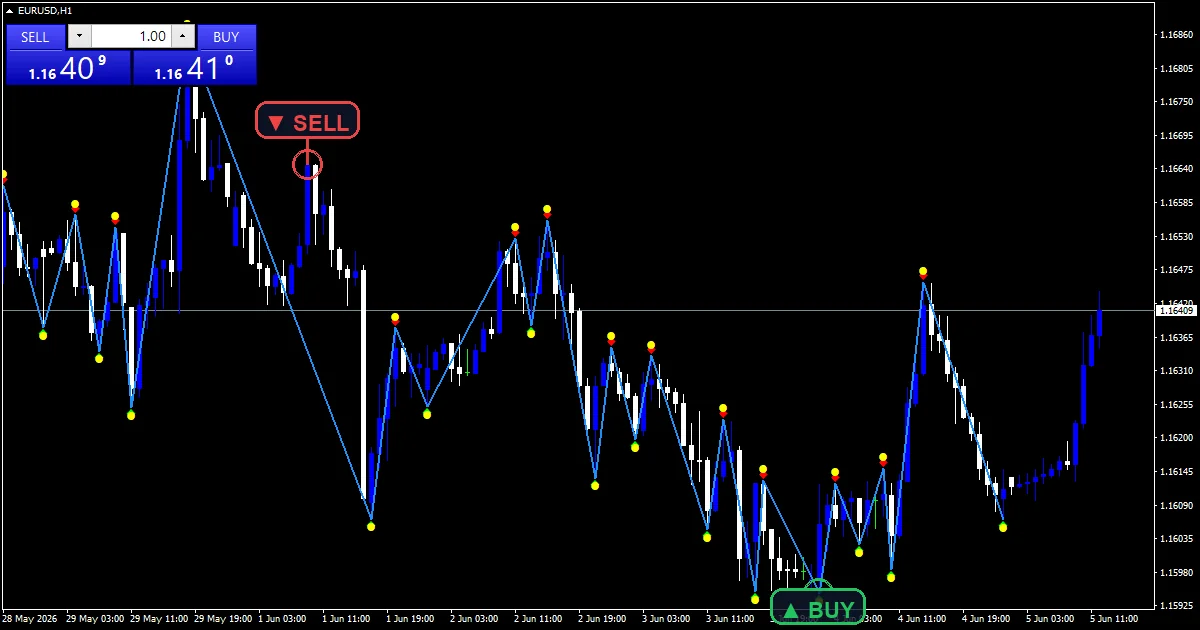
My verdict: the Fractal ZigZag No Repaint is my pick for mapping swing structure honestly. Legs only draw once the underlying fractal is confirmed, so past swings never shift. I use it to mark higher highs and higher lows for trend reading, and to frame support and resistance from real, settled swing points. During the verification pass I reloaded it repeatedly on H4; the historical legs matched the live-logged ones every time. The limitation is confirmation delay: a swing point is only marked a few bars after price actually turned, so it labels structure late by design.
Double ZigZag No Repaint

My verdict: the Double ZigZag No Repaint runs a fast and a slow structure map at once. When both agree, the swing read is much stronger, and nothing redraws once confirmed. The fast line catches minor swings while the slow line keeps the bigger structure honest, which makes divergences between the two easy to spot. Its limitation is pace. Waiting for two ZigZags to align means few signals, so it works better as a context tool than an entry trigger.
Non Repaint Supply and Demand
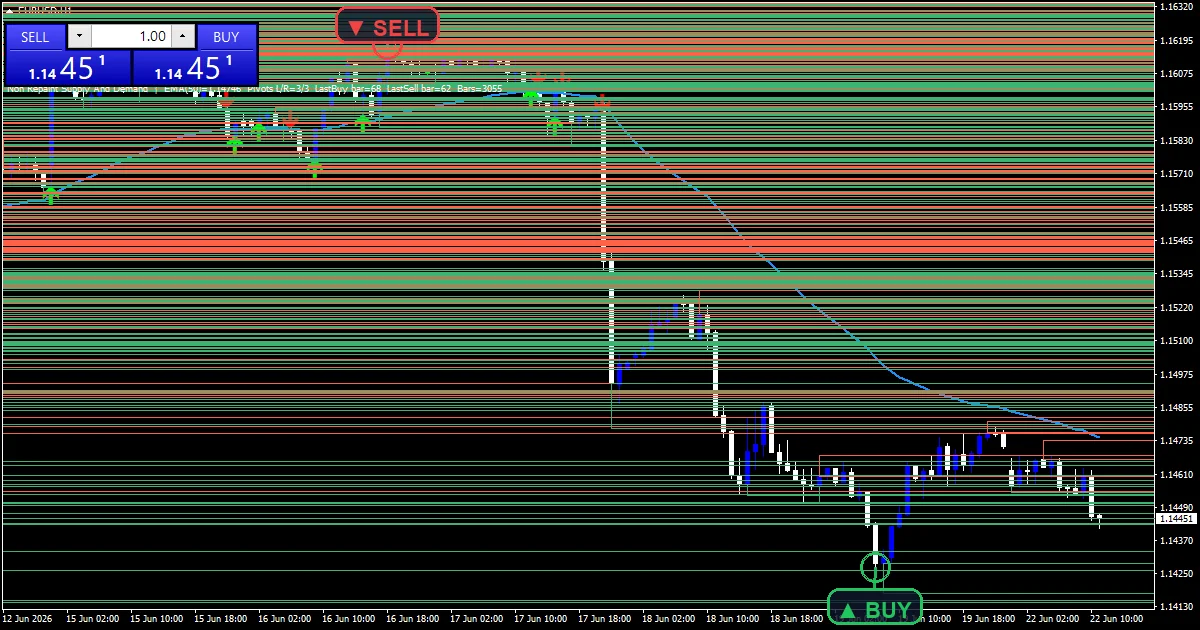
My verdict: many supply-and-demand tools quietly redraw their boxes as new candles arrive, which ruins any honest backtest. The Non Repaint Supply and Demand draws its zones from settled structure and then leaves them alone. So a zone you marked yesterday is still in the same place today. I use the boxes as decision areas and wait for an arrow tool to time the entry. Fewer zones print on higher timeframes, which is usually a feature rather than a fault.
Download the complete indicator database
Every non-repaint tool on this page ships in one download. One email unlocks the full library of 1,380+ tools with compiled MT4 and MT5 files, plus my TradingView scripts. No paywall, no spam, unsubscribe any time.
Get free access to my indicator database
One email unlocks 1,380+ free MT4, MT5 and TradingView indicators — the complete library. No single-tool download; you get the whole database.
Oscillator and band non-repaint indicators
Oscillators are where repainting hides in plain sight. A smoothed line can shift its last few values on every tick, so a divergence looks perfect in hindsight. These three tools lock their readings to the close, so what you backtest is what you trade.
Fisher No Repainting

My verdict: the Fisher No Repainting brings the Fisher Transform into a locked, close-only form. Standard Fisher versions are notorious for redrawing their last values. This one freezes each bar at close, which I confirmed candle by candle over multiple sessions. The sharp turns of the transform still show up early relative to price, so you keep the speed that makes Fisher popular without the redrawn history. Its limitation: near the zero line it flips often, so it needs a trend filter to be tradable.
TMA Non Repaint
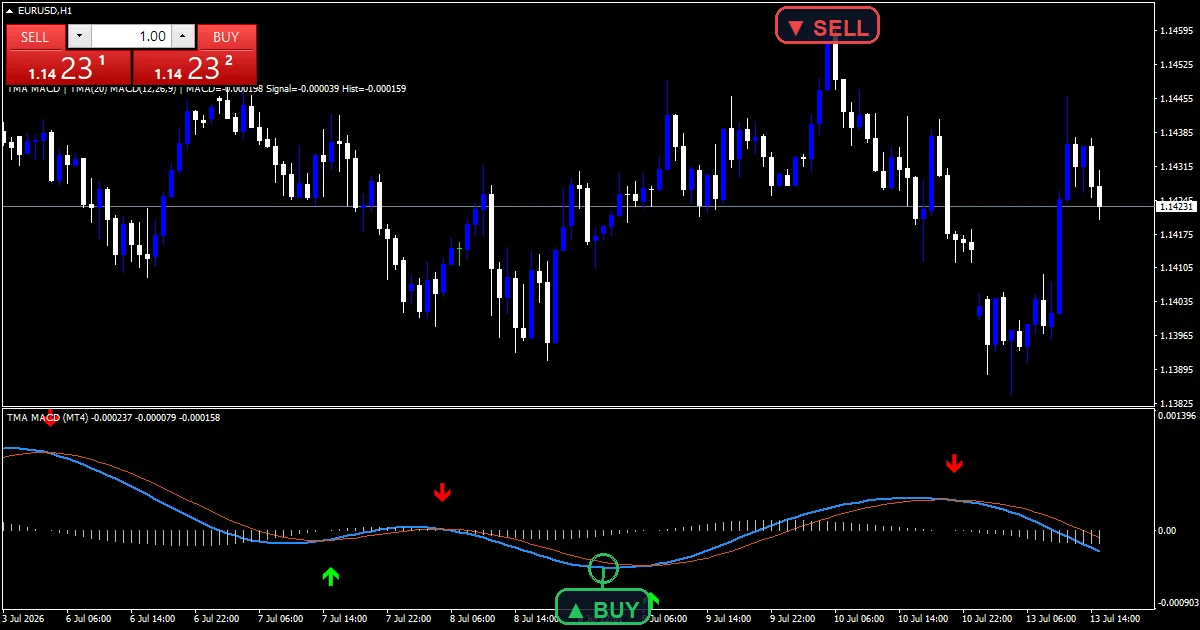
My verdict: the TMA Non Repaint plots a triangular moving-average band that hugs price. The standard TMA band is a classic repainter, because it recenters as new ticks arrive. This build commits the band edges on the close instead. Range traders fade the edges, while trend traders read the slope for bias. Its limitation is the same as any band: in a strong trend price can ride the outer edge for a long time, so a touch is not a reversal on its own.
Non Repaint RSI

My verdict: the Non Repaint RSI takes a familiar oscillator and locks its level crosses to the close. So an overbought or oversold flag stays exactly where it printed. I use it as a momentum filter under a trend tool from higher up this page. The limitation is inherent to RSI: near the midline it flips often, so it works best when a clear trend is already in place.
Arrow and signal non-repaint indicators, including gold
This is the category where repainting scams are most common, because arrow indicators sell on the strength of a flawless-looking history. Each tool here commits to its signal at candle close, and each was checked bar by bar before release. Every arrow you see in the charts below printed on a closed candle and stayed put.
10 Non Repaint

My verdict: the 10 Non Repaint is the most active arrow tool here. It prints often, which short-timeframe traders like, and every arrow stays where it first appeared. On M5 during active sessions you rarely wait long for a setup. If you want a ranked starting point, it also anchors our fuller 10 non repaint indicators shortlist. The limitation follows from the frequency: in choppy conditions it produces many signals in both directions, so you must filter by session or trend.
100 Non Repaint

My verdict: the 100 Non Repaint is the stricter, low-noise sibling. Its Parabolic SAR flip suppresses much of the chop the 10 version shows, and the surviving arrows land closer to real turns. It also opens the door to our full 100 non repaint indicators directory, where the whole collection is grouped by type. The cost is missed moves. When price runs fast without a pullback, the SAR lags and the move leaves without you.
Non Repaint Arrow

My verdict: the Non Repaint Arrow is the plainest entry tool on this page, and that is the point. It prints a buy or sell arrow at the close and locks it there, with nothing else to read. I keep it on M15 and H1 with a higher-timeframe trend as the filter. On its own in a range it signals too often, so it is a timing layer, not a full system.
Gold Non Repaint

My verdict: the Gold Non Repaint is my specialty pick. Gold moves in larger, sharper swings than most forex pairs, and this tool scales its signal distance to that volatility. Generic arrow indicators either fire constantly on gold or go silent; this one stays usable because the thresholds breathe with the market. Arrows confirm on close and hold, which I verified across several XAUUSD sessions. The limitation is scope. It is tuned for XAUUSD, and its settings do not transfer well to quiet currency pairs.
Smart-money non-repaint indicators
Smart-money tools are the newest home for repainting, because order blocks and fair-value gaps are easy to redraw after the fact. The pick below marks its zones from confirmed structure only, so the levels stay anchored.
Non Repaint Order Block

My verdict: the Non Repaint Order Block brings a popular smart-money concept into a fixed form. It marks the last candle before a strong move and holds that box, so your order blocks stop drifting between refreshes. I treat a block as a decision area and wait for a lower-timeframe arrow to time the entry. Like any zone tool, it only matters once price actually returns to the level, so patience is part of the method.
How I test the best non repaint indicators MT4 offers
Every tool above went through the same sequence before release. First, I compile the source in MetaEditor and require a clean build. Then I load the compiled file on a live EURUSD H1 chart and let it run through real sessions.
The core step is the candle-by-candle closed-bar check. I record where each signal sits when its bar closes. Then I keep watching. If any arrow, line, or leg on a closed bar moves, appears, or disappears afterward, the tool fails and does not ship. I also scroll back and compare historical signals against the recorded live ones. Finally, I confirm alerts fire once per closed bar, not on every tick. The full method is documented in my editorial and testing policy.
Where to go next
All sixteen downloads arrive as compiled .ex4 and .ex5 files, so there is nothing to build and nothing to configure beyond the input settings. Setup takes about two minutes per tool: the guide on how to install MT4 and MT5 indicators walks through the data folder steps with screenshots.
Want a shorter starting point? The ranked 10 non repaint indicators list is the fastest way in. Prefer to browse everything? The full 100 non repaint indicators directory groups the whole collection by type. For more verified tools in this category, open the non-repaint indicators hub. And if you want the broader picture across every category, the pillar on the best MT4 indicators ranks my top picks across trend, momentum, and volume tools.
Want every tool above in one zip? Get the complete database.
FAQ
Is any indicator truly non repaint?
Honestly, only on closed bars. Every indicator updates its still-forming bar until it closes. That is normal. True non-repaint behavior means closed-bar values never change afterward. Some tools offer an intra-bar mode for earlier signals; treat those as provisional until the candle closes.
How do I check if an indicator repaints?
Take a screenshot when a signal appears on a closed bar. Note the bar time. Come back hours later and compare. If the signal moved or vanished, it repaints. Reloading the indicator also helps, since repainters often show a different history after a refresh.
Do non repaint indicators lag more?
Usually, yes. That is the honest trade-off. Waiting for the close means the signal arrives one bar later than a repainter appears to signal. You give up a few pips of entry for signals you can trust and backtest.
What is the best non repaint indicator for MT4?
There is no single winner for every trader. For trend, I start people on the Non Repainting Supertrend. For arrows, the 100 Non Repaint is the calm, low-noise choice. Match the tool to your timeframe and style, then confirm it on your own demo account.
Do these indicators work on MT5?
Yes. Every download here includes a compiled MT4 file (.ex4) and a compiled MT5 file (.ex5). Install steps are nearly identical on both platforms; the linked guide covers each.
Can I rely on these signals alone?
No indicator should carry a trading decision by itself. Combine signals with structure, risk limits, and a written plan, and test everything on a demo account first; results are not guaranteed; past performance is not indicative of future results.
Background reading: what backtesting is and why it matters.

About the author
Written by Dominic Walsh, a Forex trader and MT4/MT5 indicator, Expert Advisor and script developer. Every tool on forexmt4systems.com is tested on live charts before release and ships with ready-to-use compiled MT4 (.ex4) and MT5 (.ex5) files. Learn more about the trader and developer behind this site.
How we build, test and correct every tool: Editorial & Testing Policy. Trading carries risk; see the disclaimer.