
This is the full directory of 100 non repaint indicator downloads for MT4 and MT5. We build, test and maintain every one. Each tool keeps its closed-bar signals fixed. So a signal you see in history is one a live trader could have taken. You get tested hero picks with example charts first. A grouped index of the whole collection follows. Finally, a plain table shows whether the famous standard indicators repaint.
First, a word on the name. Traders search for the “100% non repaint indicator” hoping for a tool that is always right. That is the wrong promise. “Non repaint” only means a closed-bar signal never moves, appears or disappears afterwards. It says nothing about the win or loss that follows. So treat this list as 100 honest tools, not 100 shortcuts.
How this 100 non repaint indicator directory is organised
The picks are grouped by job: arrows and signals, trend, structure, oscillators and bands, smart-money zones, gold and Renko. Each tested hero pick below has an example chart. It also links to its own page with a free MT4 and MT5 download. The index tables further down cover every remaining tool. The full check we run on each one sits in our editorial and testing policy.
Tested hero picks
These are the tools I reach for first. I loaded each one on a live chart. Then I checked it candle by candle before it earned a spot here.
100 Non Repaint

The tool that gives this directory its name. The 100 Non Repaint is a Parabolic SAR build. Cyan dots sit under an uptrend and magenta dots sit above a downtrend. A fixed arrow prints when the dots flip on the close. It is the free download attached to this page.
10 Non Repaint

A Donchian channel breakout. The 10 Non Repaint draws the prior-bar high and low as two lines. It then prints an arrow when a candle closes outside them. It signals often, so it suits short timeframes with a filter.
Non Repaint Arrow

A clean, general-purpose entry tool. The Non Repaint Arrow prints a buy or sell arrow on the close and locks it there. Use it as a base layer under a higher-timeframe trend filter.
Non Repaint Buy Sell

A two-colour arrow system. The Non Repaint Buy Sell marks buys and sells from closed bars only. So the arrow you act on is the arrow that stays.
Non Repaint Signal

A broad signal layer. The Non Repaint Signal confirms each entry on the close and holds it. It pairs well with any structure tool below.
Super Non Repaint Arrow
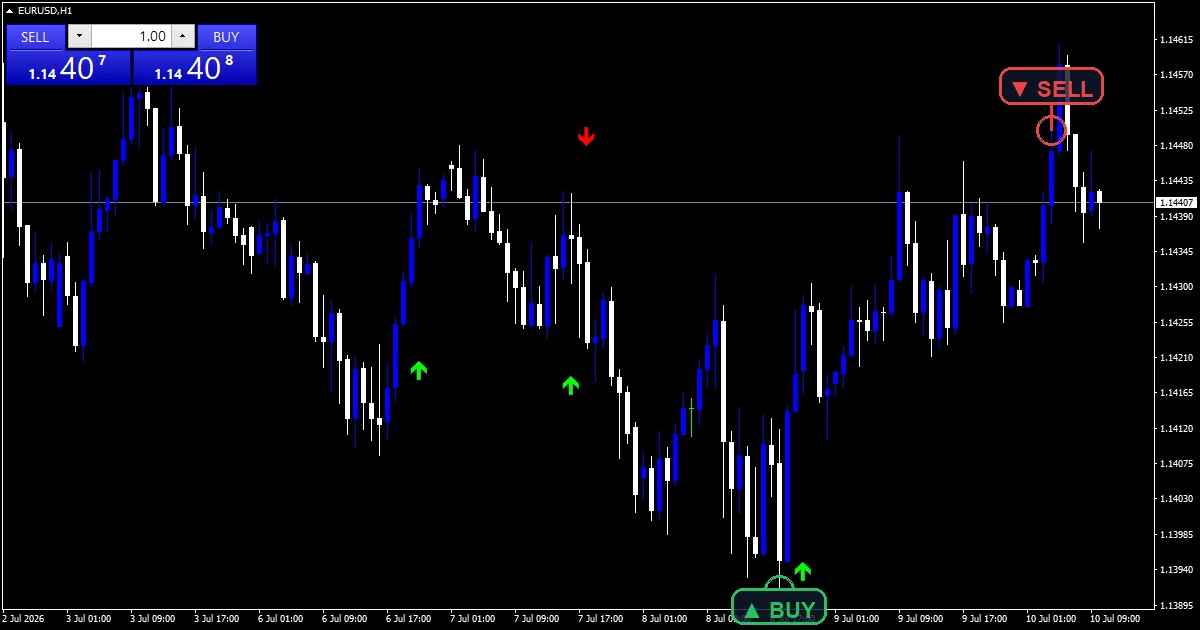
A stronger-filter arrow build. The Super Non Repaint Arrow waits for more agreement before it prints. You get fewer arrows and calmer charts than a raw arrow tool.
No Repaint Arrow

A minimal arrow tool. The No Repaint Arrow does one job well. It prints a fixed buy or sell marker on the close, with nothing else to read.
Non Repainting Supertrend

The trend workhorse. The Non Repainting Supertrend draws one ATR line that flips only on a closed candle. Once it flips, it holds. The line also works as a trailing-stop guide.
Non Repaint Trend

A plain trend-direction tool. The Non Repaint Trend colours the trend and commits that colour on the close. So it keeps you in a move instead of flickering out.
Dai Trend Non Repaint

A readable colour-line trend. The Dai Trend Non Repaint makes the current bias obvious at a glance. Entry arrows confirm on the close.
Non Repaint Semafor

A multi-level swing tool. The Non Repaint Semafor drops dots at minor, medium and major swing points. Each dot fixes once the pivot confirms.
Nadaraya Watson Non Repaint

A fixed version of a famous repainter. The Nadaraya Watson Non Repaint freezes the smooth Nadaraya-Watson envelope at the close. So the band you study never gets redrawn.
Fractal ZigZag No Repaint
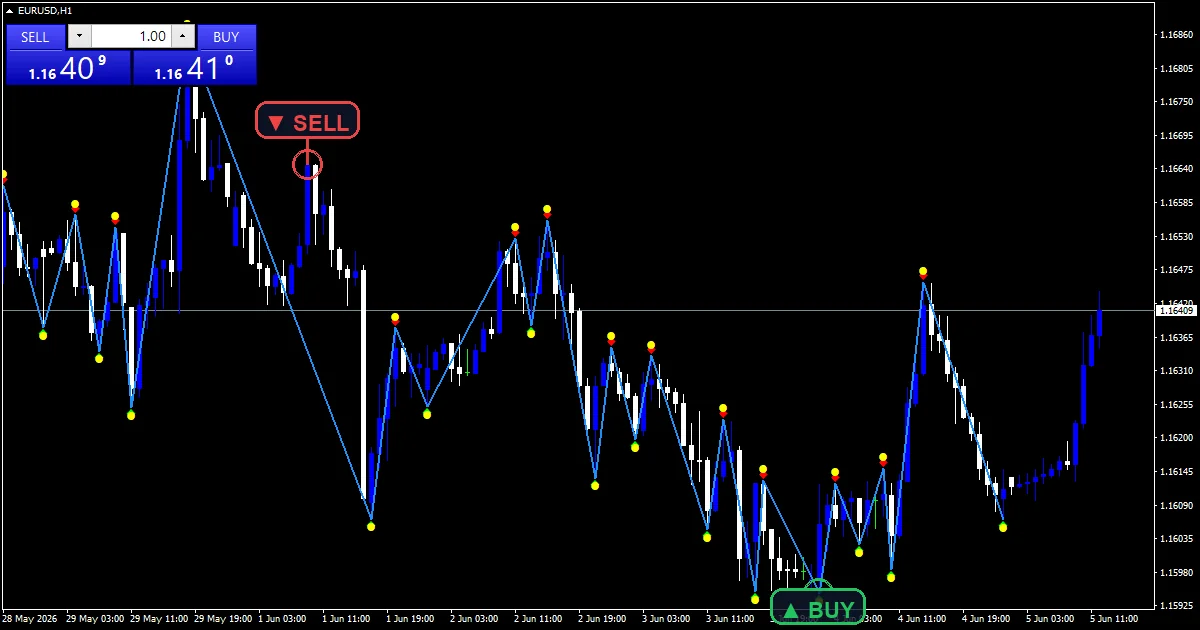
Honest swing structure. The Fractal ZigZag No Repaint anchors every ZigZag leg to a confirmed fractal. Past swings never shift, so your support and resistance stay real.
Double ZigZag No Repaint

Two structure maps at once. The Double ZigZag No Repaint runs a fast and a slow ZigZag together. A swing read is strongest when both agree.
Non Repaint ZigZag

A single clean ZigZag. The Non Repaint ZigZag draws legs only from settled structure. That makes it a tidy base for Elliott or supply-and-demand work.
Non Repaint Support and Resistance

Levels you can trust. The Non Repaint Support and Resistance draws support and resistance from confirmed swings. The lines stay fixed, so they mean the same thing later.
Non Repaint Harmonic Pattern

Patterns that stay put. The Non Repaint Harmonic Pattern confirms Gartley, Bat and similar shapes on the close. They do not morph as new bars arrive.
Non Repaint Supply and Demand
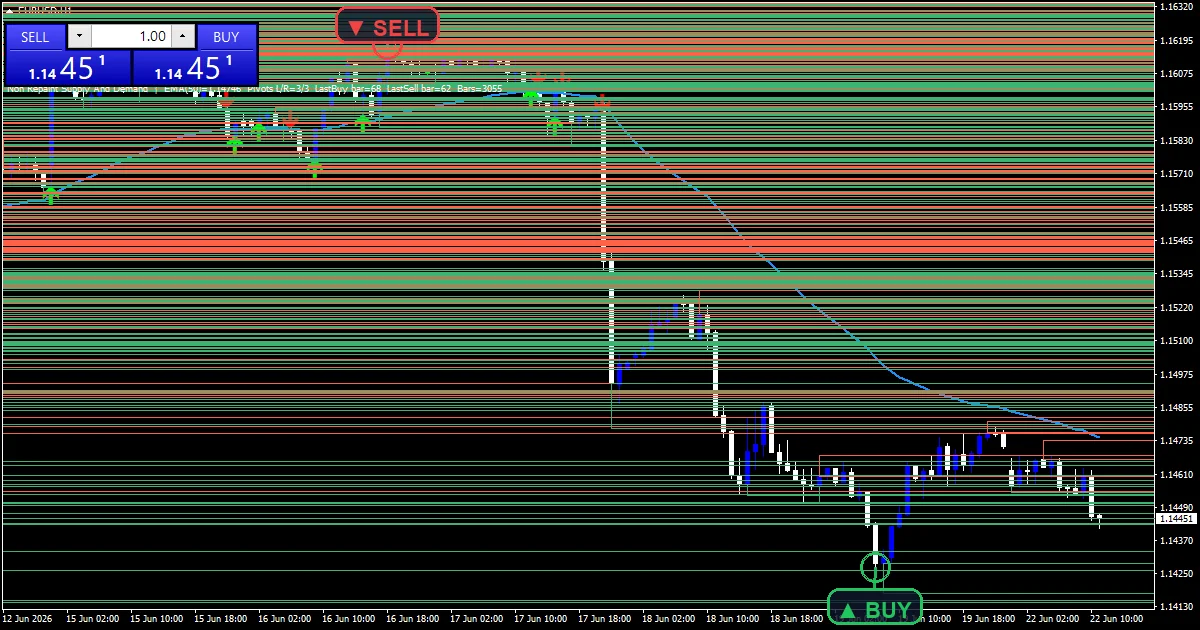
Zones that do not slide. The Non Repaint Supply and Demand maps supply and demand boxes from settled structure. So you can wait for price to return to a real level.
Fisher No Repainting

A locked Fisher Transform. The Fisher No Repainting freezes each bar at the close. That fixes the redraw problem the standard Fisher is known for.
TMA Non Repaint
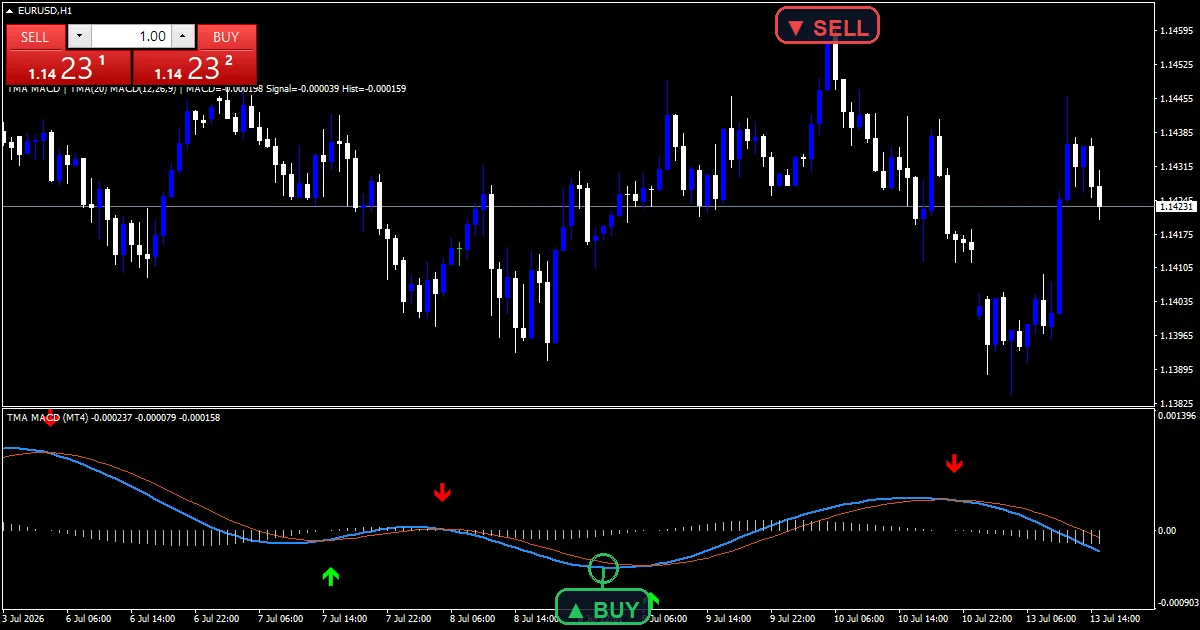
A stable mean-reversion band. The TMA Non Repaint plots a triangular moving-average band and commits its edges on the close. Range fades then line up with your backtest.
Non Repaint RSI

Momentum you can backtest. The Non Repaint RSI logs RSI level crosses on the close. An overbought or oversold flag stays exactly where it printed.
BB MACD NRP with Alerts

Bands plus momentum in one pane. The BB MACD NRP with Alerts blends a Bollinger-style band with MACD. Both fix on the close, with alerts on the confirmed bar.
Non Repaint Stochastic

A fixed stochastic. The Non Repaint Stochastic marks its crosses on the close. That turns a noisy oscillator into something you can journal.
Non Repaint Order Block

Smart-money zones, fixed. The Non Repaint Order Block marks the last candle before a strong move and holds that block. Your order blocks stop drifting between refreshes.
Gold Non Repaint

Built for XAUUSD. The Gold Non Repaint scales its signal distance to gold’s larger swings. It stays usable where generic arrow tools spam or go silent.
Download the non repaint indicators collection
One email unlocks the full library. Every tool in this directory sits behind a single opt-in. That includes the other 1,380+ free MT4, MT5 and TradingView indicators we publish and maintain. No paywall, no upsell, unsubscribe any time.
Download this indicator free
Enter your email and the file is yours. You also get the full MT4 and MT5 library.
Enter your email and the files land in your inbox. Each tool listed below also has its own page with a direct download.
The full non-repaint indicator index
Every tool below ships as a compiled MT4 and MT5 file and keeps its closed-bar signals fixed. Open any name for the chart, settings and free download.
Arrows, signals and entries
| Indicator | What it plots | Free download |
|---|---|---|
| Assembly Non Repaint | Non-repainting signal tool for MT4 and MT5 | Free download |
| Best NON Repaint | Non-repainting signal tool for MT4 and MT5 | Free download |
| Non Repaint Binary Options | Fixed up/down calls for the close | Free download |
| Indicator | What it plots | Free download |
| Non Repaint High Low | Prior high and low levels, fixed | Free download |
| Non Repaint Team | General signal tool, non-repainting | Free download |
| Non Repaint Trading | General signal tool, non-repainting | Free download |
| Non Repainting Buy Sell | Buy and sell arrows fixed on the close | Free download |
| Repaint vs Non Repaint | Non-repainting signal tool for MT4 and MT5 | Free download |
| Super Arrow Non Repaint Alert | Buy and sell arrows fixed on the close | Free download |
Trend
| Indicator | What it plots | Free download |
|---|---|---|
| Non Repaint Supertrend | ATR trend line that flips only on the close | Free download |
| Indicator | What it plots | Free download |
| Non Repaint ZigZag Arrow | Swing legs anchored to confirmed structure | Free download |
Oscillators, bands and MACD
| Indicator | What it plots | Free download |
|---|---|---|
| Indicator | What it plots | Free download |
| Non Repaint FVG | Fair-value gaps marked from closed bars | Free download |
Gold and metals
| Indicator | What it plots | Free download |
|---|---|---|
| Indicator | What it plots | Free download |
| Non Repaint Renko | Renko-style signals without repaint | Free download |
| Renko No Repaint | Renko-style signals without repaint | Free download |
Do the famous indicators repaint?
Most standard MT4 indicators do not repaint at all. The confusion usually comes from the live, unclosed bar, or from add-ons drawn on top of them. Here is the honest summary, with a link to each tool.
| Indicator | Repaints? | Notes |
|---|---|---|
| RSI | No | The core RSI reading is fixed once a bar closes. Watch out for divergence tools drawn on it, which can redraw. |
| Ichimoku | Partly | The cloud is shifted forward, but past cloud values do not change. The Chikou span is plotted in the past by design. |
| Supertrend | Mostly | The line only flips on the close. The current, unclosed bar can still flip back, so judge it on the close. |
| Bollinger Bands | No | Bands are computed from closed prices and do not redraw history. |
| ADX | No | ADX and the DI lines settle on the close and do not rewrite earlier values. |
How to install on MT4 and MT5
Every download arrives as a compiled .ex4 and .ex5, so there is nothing to build. Setup takes about two minutes. The guide on how to install MT4 and MT5 indicators walks through the data-folder steps with screenshots. For background, Investopedia explains technical indicator basics. Wikipedia also covers the Parabolic SAR behind our lead tool.
Where to go next
Want a shorter, ranked shortlist? See the best non repaint indicators MT4 pillar, or the tighter 10 non repaint indicators top-ten list. You can also open the full non-repaint indicators hub for every release in this category.
FAQ
What is a 100% non repaint indicator?
It is a tool whose closed-bar signals never change afterwards. The “100%” refers to the non-repainting behaviour, not to accuracy. A fixed signal can still be a losing trade, so always confirm with structure and risk limits.
Are all 100 non repaint indicators here really non-repainting?
Yes, on closed bars. We load each one on a live chart and log its signals as the bar closes. Then we check hours later that nothing moved. The live, unclosed bar can still update until it finishes, which is normal.
Which non repaint indicator should I download first?
Start with one that matches your style. The 100 Non Repaint SAR build and the Non Repainting Supertrend are calm and easy to read. Add an arrow tool only once you can filter it by trend or session.
Do these indicators work on MT5 as well as MT4?
Yes. Every download here includes a compiled MT4 file and a compiled MT5 file. The install steps are almost identical on both platforms.
Are results guaranteed?
No. Trading involves risk. Results are not guaranteed; past performance is not indicative of future results. Use these tools as one input, and always test on a demo account first.
Background reading: leading versus lagging indicators explained.

About the author
Written by Dominic Walsh, a Forex trader and MT4/MT5 indicator, Expert Advisor and script developer. Every tool on forexmt4systems.com is tested on live charts before release and ships with ready-to-use compiled MT4 (.ex4) and MT5 (.ex5) files. Learn more about the trader and developer behind this site.
How we build, test and correct every tool: Editorial & Testing Policy. Trading carries risk; see the disclaimer.