
The binary options fast scalping indicator has exactly one rule and one setting to change. A 14-bar Commodity Channel Index runs internally. When the reading comes back inside the plus or minus 100 boundary, having sat outside it on the previous bar, an arrow goes on the chart.
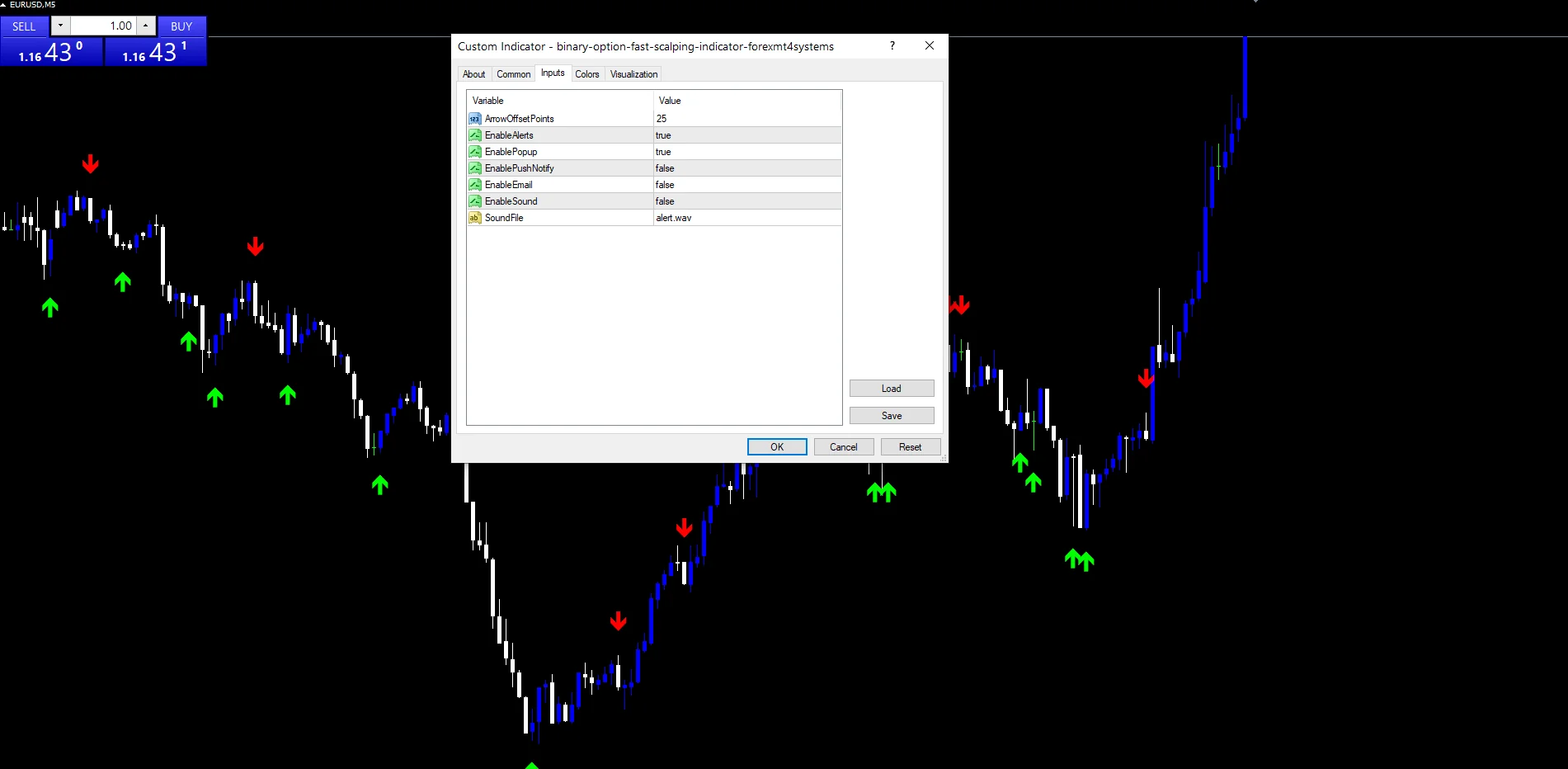
This build ships as a compiled .ex4 for MT4 and .ex5 for MT5; the screenshots below come from EURUSD M5.
| Platforms | MT4 (.ex4) + MT5 (.ex5) |
|---|---|
| Chart window | Main price chart |
| Plots | 2: Buy, Sell |
| Alerts | popup, push notification, email, sound |
| Inputs | 7 |
What gets drawn, and where
Buy places a lime arrow where the reading came back above minus 100.
Sell places a red arrow where it came back below plus 100.
Both sit `ArrowOffsetPoints` `25` from the candle.
The index itself stays internal, so the price chart carries only the marks.
- Buy: arrow, lime, width 3, arrow code 233
- Sell: arrow, red, width 3, arrow code 234

Under the hood
Reading the index
iCCI supplies the value at fourteen bars on the close, for the current bar and the one before it. The code fixes that length rather than offering it as a setting, which keeps the tool to a single decision.
The exit rule
buy needs the previous reading at or below minus 100 and the current one above it. sell mirrors that against plus 100. So the mark records a return from an extreme, not the arrival at one.
Where the marks land
A buy writes low minus the offset and a sell writes high plus it. off takes `ArrowOffsetPoints` times Point. Warmup covers the first 28 bars, so nothing appears before the index has settled.
What you act on
A mark means momentum has already turned back from an extreme.
Returns from beyond 100 happen often on fast charts, which is what the name expects.
There is no trend filter, so marks appear against the larger move as readily as with it.
Widen `ArrowOffsetPoints` on instruments with big candles.
Alert channels in this build: popup, push notification, email and sound, one message per closed bar.
`EnableAlerts` starts on and `EnablePopup` carries the text. `EnablePushNotify`, `EnableEmail` and `EnableSound` begin false. `SoundFile` picks the clip. The rule reads two completed bars, and the guard allows one message per closed bar.
Every Binary Options Fast Scalping Indicator input
Display settings
| Setting | What it does | Default |
|---|---|---|
ArrowOffsetPoints |
Mark distance from the candle in points, default `25`. | 25 |
Alert settings
| Setting | What it does | Default |
|---|---|---|
EnableAlerts |
Master switch for the CCI exit alerts, default `true`. | on |
EnablePopup |
Terminal dialog on a CCI exit, default `true`. | on |
EnablePushNotify |
Phone push on a CCI exit, default `false`. | off |
EnableEmail |
Mail delivery on a CCI exit, default `false`. | off |
EnableSound |
Sound playback on a CCI exit, default `false`. | off |
SoundFile |
Wav clip for the CCI alert, default `alert.wav`. | alert.wav |
Markets that suit it
EURUSD M5 is the reference chart, where the frequency balances signal against noise. A fourteen-bar index there covers just over an hour. On M1 the reading crosses the boundary constantly. On H1 and above the marks turn rare, and the tool stops matching what its name suggests.
When it misleads
A return inside the boundary can happen mid-trend and mean nothing at all.
The code fixes the index length, so the only tuning left is the offset.
Marks fire against strong moves, because the rule has no directional filter.
Copy the compiled Binary Options Fast Scalping Indicator file into your MQL4/Indicators folder, and the MT5 build into MQL5/Indicators, then restart the terminal and drag it onto a chart. The step-by-step guide with screenshots is at how to install MT4 and MT5 indicators.
Download the Binary Options Fast Scalping Indicator for MT4 and MT5
The zip holds the compiled Binary Options Fast Scalping Indicator build for MT4 and MT5, plus a short README. Compiled files only, no source. Enter your email below and the download link arrives in your inbox.
Download this indicator free
Enter your email and the file is yours. You also get the full MT4 and MT5 library.
FAQ
Why does the Buy plot mark the exit, not the extreme?
Because a reading beyond 100 can keep going for many bars. Waiting for it to come back inside means momentum has already turned. The cost is timing, since price has usually moved by the time the mark appears.
Is the CCI length exposed like ArrowOffsetPoints?
No. The code holds it at fourteen bars. `ArrowOffsetPoints` is the only setting anywhere near the calculation. If you want a different length, read the marks alongside a standard index pane using whatever length you prefer.
What does ArrowOffsetPoints at 25 give on M5?
About two and a half pips of clearance on a five-digit feed. That suits EURUSD M5 candles, which are small. On a fast index or on gold the same offset puts the mark inside the bar, so raise it there.
Does it filter for trend at all?
No. Every boundary return prints, whichever way the larger move is going. That is why the tool works best as a timing marker inside a plan you already have, rather than as a standalone rule.
Are results guaranteed?
No. Trading involves risk. Results are not guaranteed; past performance is not indicative of future results. Use the Binary Options Fast Scalping Indicator as one input. Always backtest before trading live.
Category: this is part of our Signal and Forecast collection. Also, truly, browse more Signal and Forecast for MetaTrader, or explore every MT4 indicator and MT5 indicator on the site.
External references
- Learn more about the underlying method in Binary betting on Wikipedia.
- For wider market background, see Scalping at Investopedia.

About the author
Written by Dominic Walsh, a Forex trader and MT4/MT5 indicator, Expert Advisor and script developer. Every tool on forexmt4systems.com is tested on live charts before release and ships with ready-to-use compiled MT4 (.ex4) and MT5 (.ex5) files. Learn more about the trader and developer behind this site.
How we build, test and correct every tool: Editorial & Testing Policy. Trading carries risk; see the disclaimer.