
Underneath the name is a trailing stop. The brain trend indicator hangs a band two average ranges from the close and ratchets it one way until price crosses. What makes this build different is the gate: the stochastic reading has to agree before a flip counts.
This build ships as a compiled .ex4 for MT4 and .ex5 for MT5; the screenshots below come from EURUSD H1.
| Platforms | MT4 (.ex4) + MT5 (.ex5) |
|---|---|
| Chart window | Main price chart |
| Plots | 4: BrainTrend Up, BrainTrend Down, Trend Flip Buy, Trend Flip Sell |
| Alerts | popup, push notification, email, sound |
| Inputs | 14 |
The plots this build puts on screen
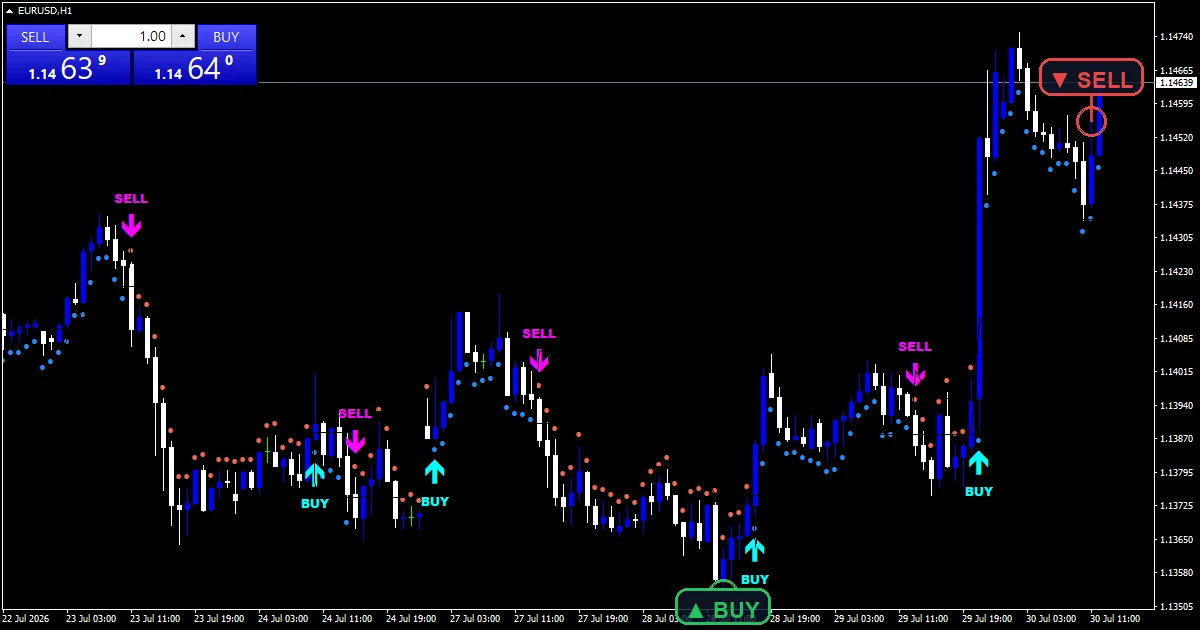
Four arrow plots on the price chart.
`BrainTrend Up` dots each bar dodger blue.
`BrainTrend Down` dots it tomato instead.
`Trend Flip Buy` uses arrow 233 in aqua.
`Trend Flip Sell` uses arrow 234 in magenta.
Dots sit `InpDotOffset` `25` points off the bar.
- BrainTrend Up: arrow, dodger blue, width 1, arrow code 159
- BrainTrend Down: arrow, tomato, width 1, arrow code 159
- Trend Flip Buy: arrow, aqua, width 3, arrow code 233
- Trend Flip Sell: arrow, magenta, width 3, arrow code 234
How the Brain Trend Indicator does its maths
The band
iATR at `InpAtrPeriod` `7` measures the range. `InpAtrMult` `2.0` sets the distance. The long stop sits that far under the close, the short stop that far above.
Ratcheting
A stop only moves one way. While the trend is up, the long stop rises with price and never falls. That is what makes it a trailing level rather than a band.
The gate
A cross alone does not flip it. `InpStochK` `9` with `InpStochD` `3` and `InpStochSlow` `3` gives a reading, and it must sit the right side of `InpStochMid` `50.0`.
What to look for
Dot colour is the current trend state.
A big arrow marks where that state flipped.
Dots run every bar, so a colour run is a trend leg.
A cross without stochastic agreement changes nothing.
Seven bars of range makes the band react quickly.
The stop never moves against the trend.
Alert channels in this build: popup, push notification, email and sound, one message per closed bar.
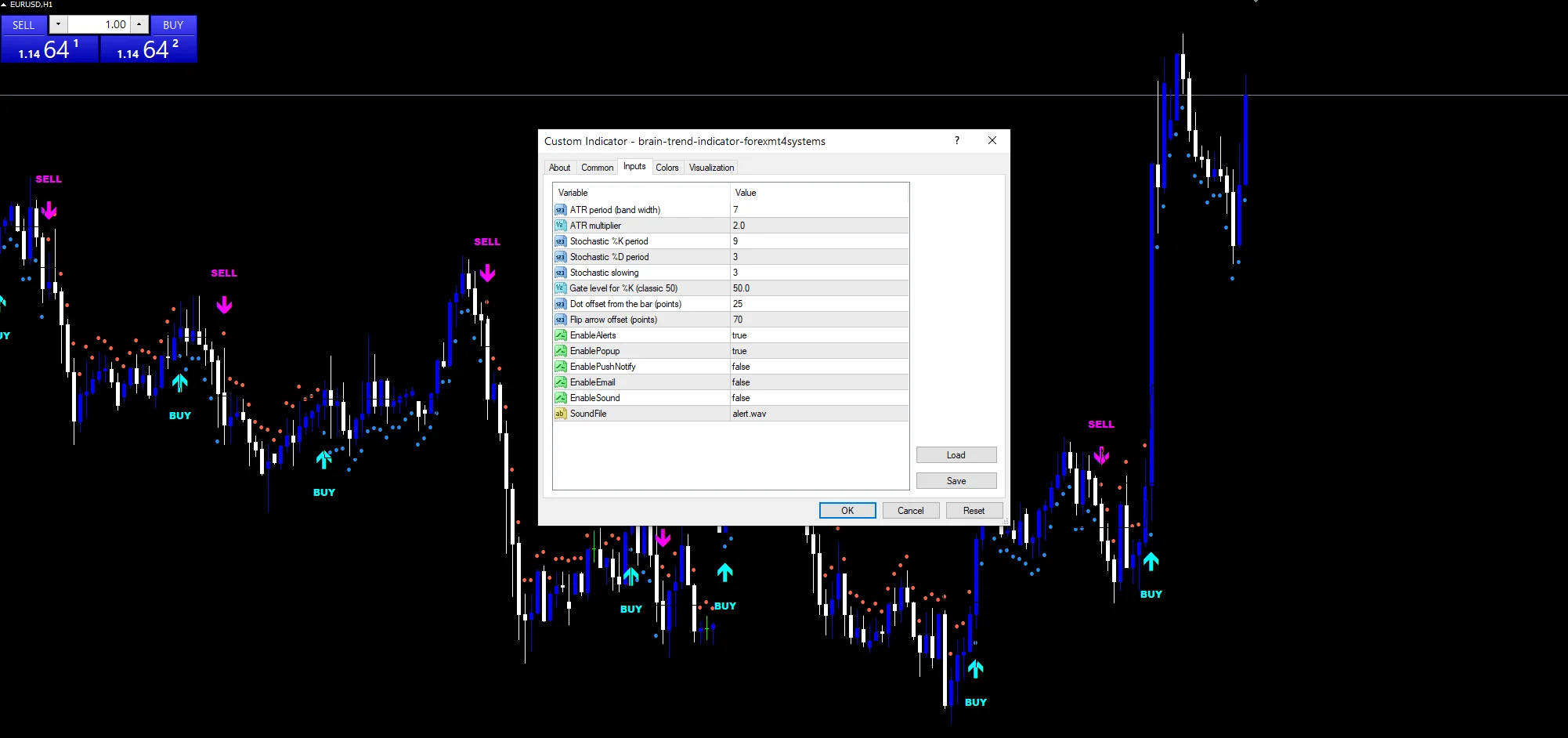
`EnableAlerts` governs the flip alerts and ships true with `EnablePopup`. Set `EnablePushNotify` for a phone, `EnableEmail` for mail, or `EnableSound` to sound `SoundFile`. Those three arrive off and flips report on a closed bar.
Every Brain Trend Indicator input
Core settings
| Setting | What it does | Default |
|---|---|---|
InpAtrPeriod |
ATR period (band width). Bars behind the range figure, `7`. | 7 |
InpAtrMult |
ATR multiplier. Ranges of distance for the stop, `2.0`. | 2.0 |
InpStochK |
Stochastic %K period. Main stochastic window, `9`. | 9 |
InpStochD |
Stochastic %D period. Signal length, `3`. | 3 |
InpStochSlow |
Stochastic slowing. Slowing pass, `3`. | 3 |
InpStochMid |
Gate level for %K (classic 50). Gate level the reading must clear, `50.0`. | 50.0 |
InpDotOffset |
Dot offset from the bar (points). Points from dot to bar, `25`. | 25 |
Display settings
| Setting | What it does | Default |
|---|---|---|
InpArrowOffset |
Flip arrow offset (points). Points from flip arrow to bar, `70`. | 70 |
Alert settings
| Setting | What it does | Default |
|---|---|---|
EnableAlerts |
Master switch, `true`. | on |
EnablePopup |
(see inputs panel) | on |
EnablePushNotify |
(see inputs panel) | off |
EnableEmail |
(see inputs panel) | off |
EnableSound |
(see inputs panel) | off |
SoundFile |
Which clip plays, `”alert.wav”`. | alert.wav |
Choosing where it lives
A seven-bar range with a two times multiplier is a fairly tight stop. EURUSD H1 is the reference chart. Flips come a few times a week there. On M5 the stop gets hit constantly. On H4 each flip marks a real change.
When the Brain Trend Indicator fails
A tight trailing stop flips often in a range.
The gate can block a genuine early turn.
Seven bars of range reacts hard to one big bar.
Dots on every bar make a busy chart busier.
Copy the compiled Brain Trend Indicator file into your MQL4/Indicators folder, and the MT5 build into MQL5/Indicators, then restart the terminal and drag it onto a chart. The step-by-step guide with screenshots is at how to install MT4 and MT5 indicators.
Download the Brain Trend Indicator for MT4 and MT5
The zip holds the compiled Brain Trend Indicator build for MT4 and MT5, plus a short README. Compiled files only, no source. Enter your email below and the download link arrives in your inbox.
Download this indicator free
Enter your email and the file is yours. You also get the full MT4 and MT5 library.
FAQ
What does InpStochMid 50.0 gate?
The flip itself. Price crossing the trailing stop is only the trigger; the stochastic reading also has to sit on the matching side of fifty. That second test removes a share of the flips that a stop alone would produce.
Why does the InpAtrMult band never retreat?
Because it is a trailing level. While the trend is up the long stop ratchets higher with price and never falls back, which means a flip needs a real move against the trend rather than a pause.
Is InpAtrMult 2.0 tight or loose?
Fairly tight for a trailing stop. Two average ranges from the close gets touched regularly on a ranging chart, and raising it to three gives fewer flips at the cost of reacting later to a real turn.
What do the BrainTrend Up dots add?
State at a glance. The big arrows only mark flips, so without the dots you would have to remember which side you were on; the dots repeat that answer on every bar.
Are results guaranteed?
No. Trading involves risk. Results are not guaranteed; past performance is not indicative of future results. Use the Brain Trend Indicator as one input. Always backtest before trading live.
External references
- Learn more about the underlying method in Performance attribution on Wikipedia.
- For wider market background, see Momentum Investing at Investopedia.

About the author
Written by Dominic Walsh, a Forex trader and MT4/MT5 indicator, Expert Advisor and script developer. Every tool on forexmt4systems.com is tested on live charts before release and ships with ready-to-use compiled MT4 (.ex4) and MT5 (.ex5) files. Learn more about the trader and developer behind this site.
How we build, test and correct every tool: Editorial & Testing Policy. Trading carries risk; see the disclaimer.