
The change in state of delivery cisd indicator marks one precise event. Take the most recent run of down candles. The open of its first candle is the price sellers started delivering from. While price stays under that open, the down delivery holds. A close above it changes the state.
This build ships as a compiled .ex4 for MT4 and .ex5 for MT5; the screenshots below come from EURUSD H1.
| Platforms | MT4 (.ex4) + MT5 (.ex5) |
|---|---|
| Chart window | Main price chart |
| Plots | 2: Bullish CISD, Bearish CISD |
| Alerts | popup, push notification, email, sound |
| Inputs | 29 |
The visible output
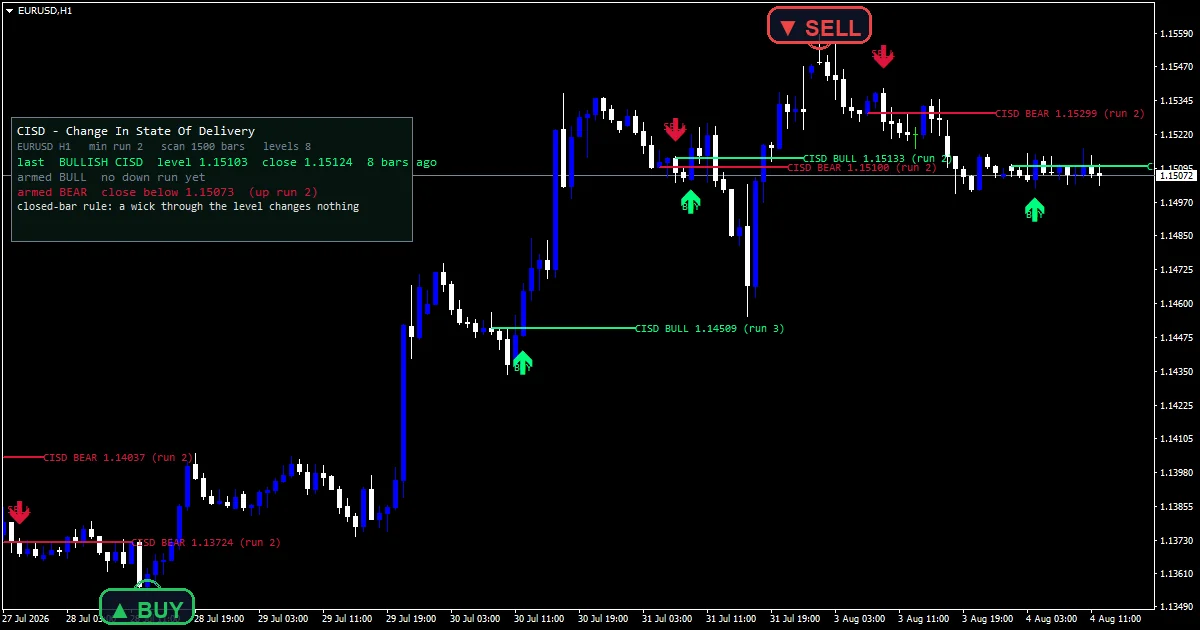
Bullish CISD places a spring green arrow on the candle that closes back above a down-run origin.
Bearish CISD places a crimson arrow for the mirror case.
An OBJ_TREND ray marks each level, running from the origin bar past the confirming close.
A corner panel names the last event and the two levels it currently holds armed.
- Bullish CISD: arrow, spring green, width 3, arrow code 233
- Bearish CISD: arrow, crimson, width 3, arrow code 234
The inner steps
Finding the run and its origin
A run is a maximal sequence of same-direction candles. `InpMinRun` `2` sets how many it must contain. The origin is the open of the first candle in that run, not its high or low. downLevel and upLevel hold those two prices.
Requiring a close, never a wick
The trigger needs a candle to close past the origin by at least `InpBufferPoints`. A wick through it leaves delivery unchanged. `InpRequireOpposite` adds one more demand, that the confirming candle itself be the opposite colour to the run.
Firing once and rearming
A level fires exactly once. Only a fresh run of the opposite colour arms a new one. `InpLookback` `1500` sets how far back the scan reaches, and `InpMaxDraw` `8` caps how many level rays stay on the chart.
Making it useful
The ray marks the origin price, which is where the run began delivering.
An arrow means price has closed back past every candle in that run.
The panel names the two prices that would flip delivery next.
A wick past the level is not an event here, however dramatic it looks.
Alert channels in this build: popup, push notification, email and sound, one message per closed bar.
`EnableAlerts` ships on and `EnablePopup` carries the message. `EnablePushNotify`, `EnableEmail` and `EnableSound` stay off by default. `SoundFile` names the clip. The scan runs on closed bars only, and the guard allows one message per bar.
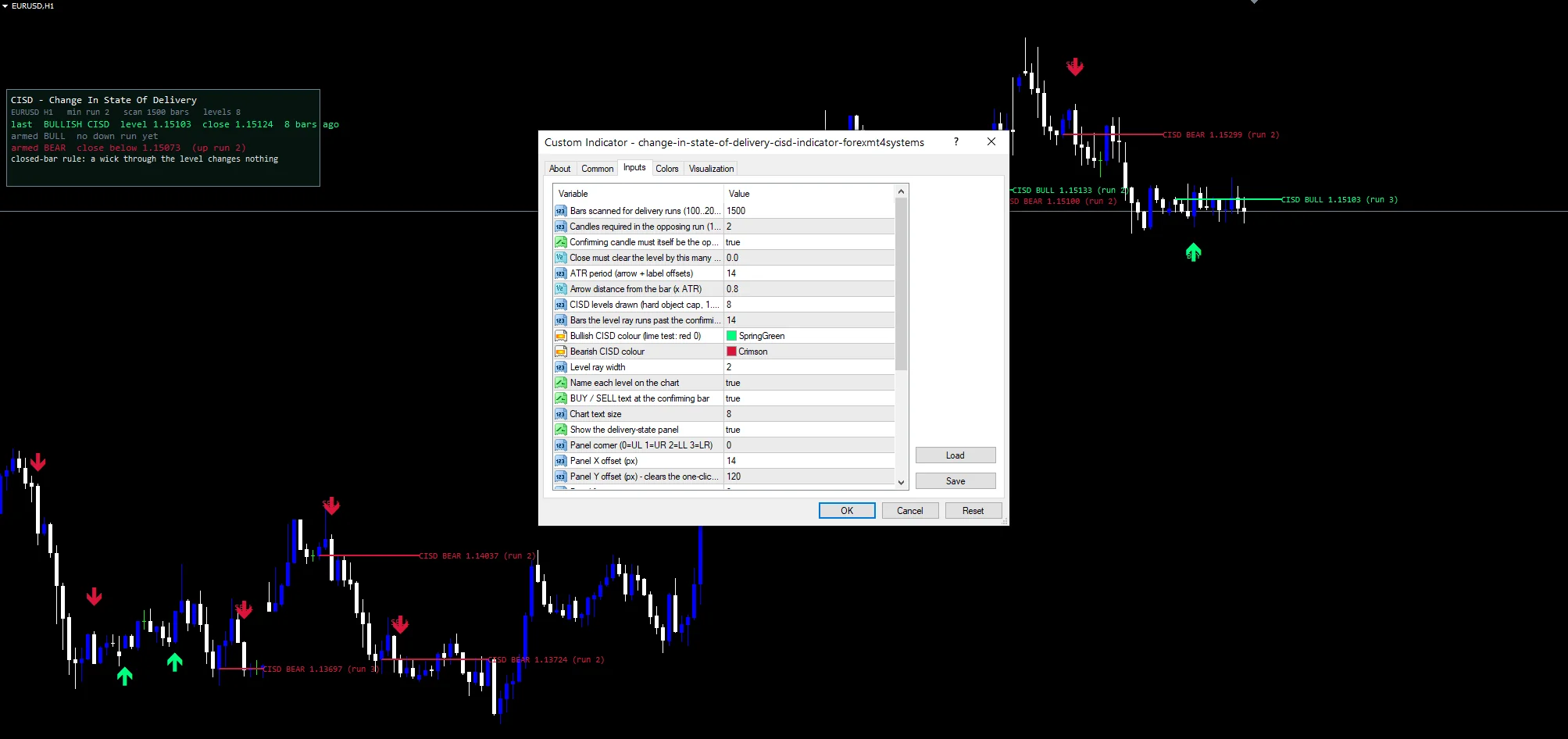
Every Change In State Of Delivery Cisd Indicator input
Core settings
| Setting | What it does | Default |
|---|---|---|
InpLookback |
Bars scanned for delivery runs (100..20000). How far back the scan reaches for delivery runs, default `1500` bars. | 1500 |
InpMinRun |
Candles required in the opposing run (1..10). Candles the opposing run must contain, default `2`. | 2 |
InpRequireOpposite |
Confirming candle must itself be the opposite colour. Demands the confirming candle be the opposite colour, default `true`. | on |
InpBufferPoints |
Close must clear the level by this many points. Points the close must clear the level by, default `0.0`. | 0.0 |
InpAtrPeriod |
ATR period (arrow + label offsets). ATR length behind the arrow and label offsets, default `14`. | 14 |
InpRayBars |
Bars the level ray runs past the confirming close. Bars the ray runs past the confirming close, default `14`. | 14 |
InpX |
Panel X offset (px). Panel horizontal offset, default `14`. | 14 |
InpY |
Panel Y offset (px) – clears the one-click panel. Panel vertical offset, default `120` so it clears the trade panel. | 120 |
Display settings
| Setting | What it does | Default |
|---|---|---|
InpArrowATR |
Arrow distance from the bar (x ATR). Arrow distance from the bar in ATR units, default `0.80`. | 0.80 |
InpMaxDraw |
CISD levels drawn (hard object cap, 1..40). Hard cap on the level rays drawn, default `8`. | 8 |
InpBullColor |
Bullish CISD colour (lime test: red 0). Bullish colour, default spring green. | spring green |
InpBearColor |
Bearish CISD colour. Bearish colour, default crimson. | crimson |
InpLevelWidth |
Level ray width. Level ray width, default `2`. | 2 |
InpShowLevelText |
Name each level on the chart. Names each level on the chart, default `true`. | on |
InpShowSignalText |
BUY / SELL text at the confirming bar. Draws BUY and SELL text at the confirming bar, default `true`. | on |
InpTextSize |
Chart text size. Chart text size, default `8`. | 8 |
InpShowPanel |
Show the delivery-state panel. Draws the delivery-state panel, default `true`. | on |
InpCorner |
Panel corner (0=UL 1=UR 2=LL 3=LR). Panel corner, default `0` for upper left. | 0 |
InpFontSize |
Panel font size. Panel font size, default `9`. | 9 |
InpFont |
Panel font. Panel font, default Consolas. | Consolas |
InpPanelBg |
Panel background. Panel background colour, a dark green by default. | RGB 6,20,16 |
InpBorderColor |
Panel border. Panel border colour, default slate gray. | slate gray |
InpTextColor |
Panel text. Panel text colour, default gainsboro. | gainsboro |
Alert settings
| Setting | What it does | Default |
|---|---|---|
EnableAlerts |
Switches the delivery alerts on as a group, default `true`. | on |
EnablePopup |
Raises the terminal dialog on a state change, default `true`. | on |
EnablePushNotify |
Sends the state change to your phone, default `false`. | off |
EnableEmail |
Mails the state change through the terminal, default `false`. | off |
EnableSound |
Plays a file on a state change, default `false`. | off |
SoundFile |
Name of the wav file the delivery alert uses, default `alert.wav`. | alert.wav |
Symbols and timeframes
Delivery runs read best where candles have body and structure. EURUSD H1 is the reference chart. On M5 runs of two candles form constantly and the levels stack up fast. On H4 a run origin can hold for days, which makes the close through it a much larger event.
Where it comes unstuck
A run of two candles is a low bar. Raise `InpMinRun` if the chart fills with levels.
The rule is mechanical. It cannot tell a meaningful origin from an incidental one.
Levels fire once and then retire, so a price that matters repeatedly picks up a mark only the first time.
Copy the compiled Change In State Of Delivery Cisd Indicator file into your MQL4/Indicators folder, and the MT5 build into MQL5/Indicators, then restart the terminal and drag it onto a chart. The step-by-step guide with screenshots is at how to install MT4 and MT5 indicators.
Background reading on the method behind the Change In State Of Delivery Cisd Indicator: Bureau de change on Wikipedia, Cboe Indices And Indicators at StockCharts ChartSchool.
Download the Change In State Of Delivery Cisd Indicator for MT4 and MT5
The zip holds the compiled Change In State Of Delivery Cisd Indicator build for MT4 and MT5, plus a short README. Compiled files only, no source. Enter your email below and the download link arrives in your inbox.
Download this indicator free
Enter your email and the file is yours. You also get the full MT4 and MT5 library.
FAQ
Why does a Bullish CISD use the run open?
Because the open of the first candle in a run is the price that side started delivering from. Using the run high or low would measure the extreme instead. A close back through that open means price has taken back every candle in the run.
What does InpMinRun at 2 require?
At least two consecutive same-direction candles before a level exists. A single candle is not a run. Raise it to 3 or 4 when the chart fills with levels, since longer runs produce origins that matter more and appear far less often.
Does InpBufferPoints ever let a wick count?
No. The rule is a close-through rule, and that is deliberate. A wick past the origin that closes back inside leaves delivery unchanged. `InpBufferPoints` can demand the close clear the level by a margin as well, though it defaults to zero.
What does InpRequireOpposite change?
With it true, the candle that closes through the level must itself be the opposite colour to the run. That rules out a doji or a same-colour bar drifting through. Set it false for a looser test that catches more events.
Are results guaranteed?
No. Trading involves risk. Results are not guaranteed; past performance is not indicative of future results. Use the Change In State Of Delivery Cisd Indicator as one input. Always backtest before trading live.
External references
- For background on this concept, see Bureau de change on Wikipedia.
- For broader market context, see Cboe Indices And Indicators at StockCharts ChartSchool.

About the author
Written by Dominic Walsh, a Forex trader and MT4/MT5 indicator, Expert Advisor and script developer. Every tool on forexmt4systems.com is tested on live charts before release and ships with ready-to-use compiled MT4 (.ex4) and MT5 (.ex5) files. Learn more about the trader and developer behind this site.
How we build, test and correct every tool: Editorial & Testing Policy. Trading carries risk; see the disclaimer.