
The cross line phone alert indicator predicts nothing. It is a monitoring utility. You put lines on the chart, it reads them on every tick, and when a closed bar crosses one it sends a single push to your phone. Six typed prices can stand in when you have drawn nothing.
This build ships as a compiled .ex4 for MT4 and .ex5 for MT5; the screenshots below come from EURUSD H1.
| Platforms | MT4 (.ex4) + MT5 (.ex5) |
|---|---|
| Chart window | Main price chart |
| Plots | 2: Cross up, Cross down |
| Alerts | popup, push notification, email, sound |
| Inputs | 54 |
What the build shows
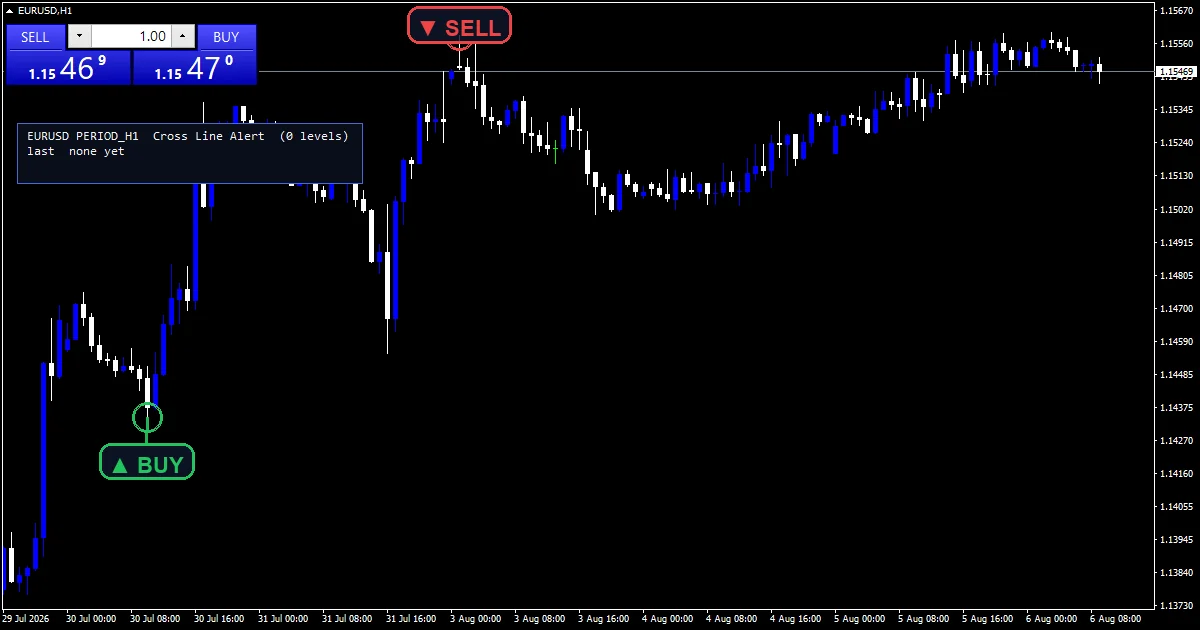
Cross up places a lime arrow on the bar that closed through a level from below.
Cross down places a red arrow for the opposite crossing.
OBJ_HLINE and OBJ_TREND objects carry the levels, in the armed colour or the triggered one.
A corner panel lists every armed level with its distance in pips and its state.
- Cross up: arrow, lime, width 2, arrow code 233
- Cross down: arrow, red, width 2, arrow code 234
What happens behind it
Where the levels come from
Three sources feed the watch list. Up to six prices typed into `InpLevel1` through `InpLevel6`. Every horizontal line and trendline you drew. The code re-reads those on each tick, so dragging one re-arms it. An auto-seed fallback wakes only when the first two find nothing.
What counts as a cross
`InpCrossMode` `0` demands a close through the level, using the previous close and the current one. Mode 1 accepts a wick touch instead, taking direction from the bar body. A trendline supplies its own sloping value at each bar, so the code tests a rising line against the price it actually held there.
Two guards against noise
`InpRequireExtreme` demands the crossing bar also be a local high or low. `InpMinBarsApart` `6` keeps two marks on the same side apart. Without both, six levels and a loose touch test paint a wall of overlapping tags.
Reading it on a live chart
Green marks an armed level and orange-red one that has already fired.
The panel distance column tells you which level price is heading for.
One message covers every crossing on the same bar, so the phone gets one push.
Auto-seeded levels stand down the moment you type a price or draw a line.
Alert channels in this build: popup, push notification, email and sound, one message per closed bar.
`EnableAlerts` ships on, and unusually so does `EnablePushNotify`, because pushing to a phone is the whole job. `EnablePopup` and `EnableSound` are also true, while `EnableEmail` is false. `SoundFile` picks the clip. Alerts run on the last closed bar, once per bar, and the code folds every crossing into one message.
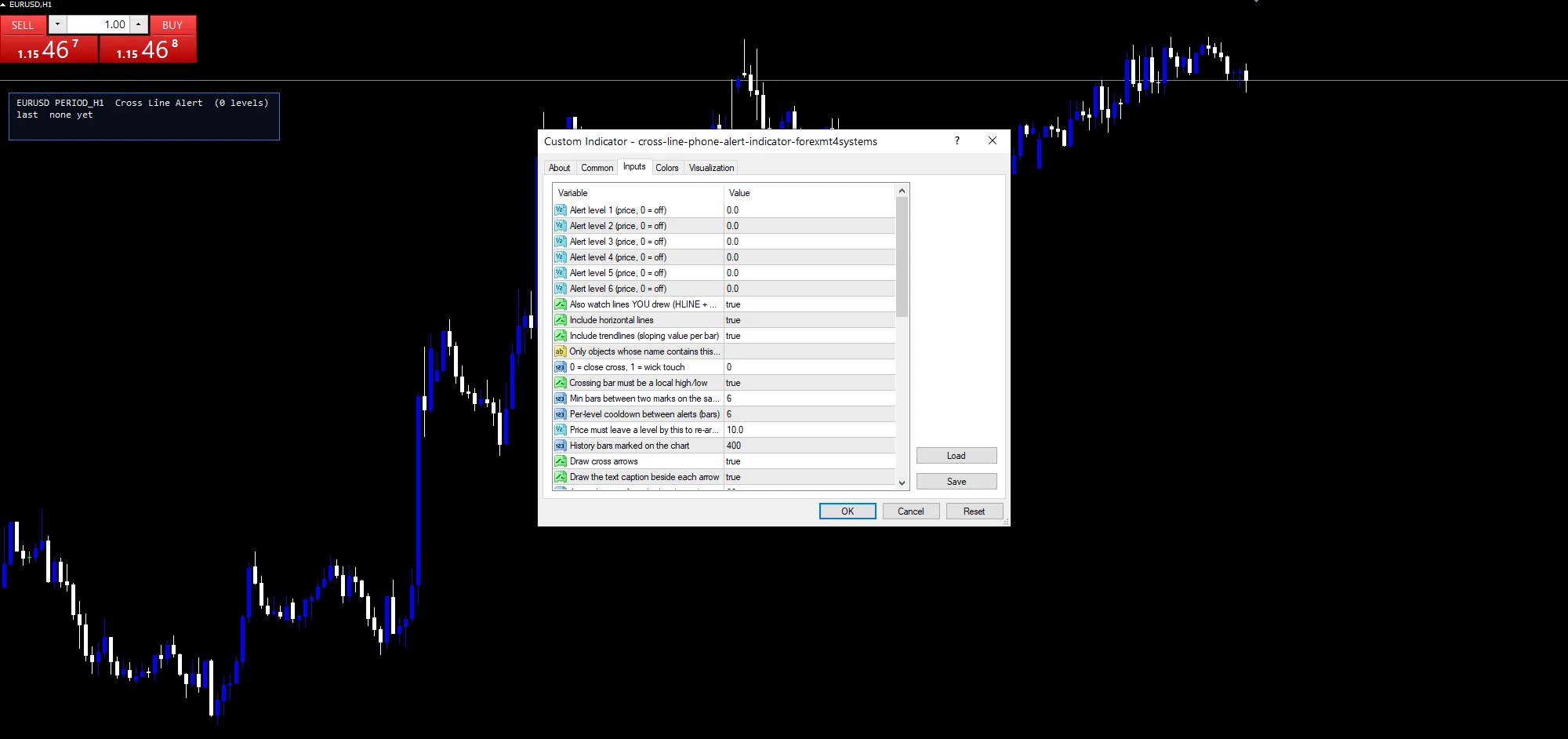
Every Cross Line Phone Alert Indicator input
Core settings: Fixed price levels
| Setting | What it does | Default |
|---|---|---|
InpLevel1 |
Alert level 1 (price, 0 = off). First typed alert price, default `0.0` which means off. | 0.0 |
InpLevel2 |
Alert level 2 (price, 0 = off). Second typed alert price, default `0.0`. | 0.0 |
InpLevel3 |
Alert level 3 (price, 0 = off). | 0.0 |
InpLevel4 |
Alert level 4 (price, 0 = off). | 0.0 |
InpLevel5 |
Alert level 5 (price, 0 = off). | 0.0 |
InpLevel6 |
Alert level 6 (price, 0 = off). | 0.0 |
Core settings: User-drawn objects
| Setting | What it does | Default |
|---|---|---|
InpUseChartObjects |
Also watch lines YOU drew (HLINE + TREND). Watches the lines you drew as well, default `true`. | on |
InpUseHLines |
Include horizontal lines. Includes horizontal lines in the watch list, default `true`. | on |
InpUseTrendLines |
Include trendlines (sloping value per bar). Includes trendlines, reading their sloping value per bar, default `true`. | on |
InpObjectFilter |
Only objects whose name contains this (blank = all). Only watches objects whose name contains this text, blank by default. |
Core settings: Auto-seed
| Setting | What it does | Default |
|---|---|---|
InpAutoSeedLevels |
Seed levels from recent swings when none are set. Seeds levels from recent swings when you supply none, default `true`. | on |
InpAutoSeedLookback |
Bars scanned for the auto-seed swings. How far back the auto-seed scan reaches, default `100` bars. | 100 |
InpAutoSeedBars |
Bars each side that confirm an auto-seed swing. | 3 |
InpAutoSeedRound |
Also seed the nearest round numbers. | on |
InpRoundStepPips |
Round-number grid step (pips). Round-number grid step for auto-seeding, default `50.0` pips. | 50.0 |
Core settings: Cross definition and noise guards
| Setting | What it does | Default |
|---|---|---|
InpCrossMode |
0 = close cross, 1 = wick touch. Close cross at `0`, wick touch at 1. | 0 |
InpRequireExtreme |
Crossing bar must be a local high/low. Demands the crossing bar be a local high or low, default `true`. | on |
InpMinBarsApart |
Min bars between two marks on the same side. Gap the code keeps between two marks on the same side, default `6`. | 6 |
InpCooldownBars |
Per-level cooldown between alerts (bars). Quiet period for a level that just fired, default `6` bars. | 6 |
InpRearmPips |
Price must leave a level by this to re-arm (pips). Distance price must travel from a level to re-arm it, default `10.0` pips. | 10.0 |
InpScanBars |
History bars marked on the chart. How many history bars carry marks, default `400`. | 400 |
Core settings: Marks
| Setting | What it does | Default |
|---|---|---|
InpTagGapPx |
Caption gap from the arrow (pixels). | 38 |
InpUpTag |
Caption on an upward cross. | BUY cross up |
InpDnTag |
Caption on a downward cross. | SELL cross dn |
Core settings: Text fencing
| Setting | What it does | Default |
|---|---|---|
InpMaxTags |
Hard cap on captions drawn at once. | 12 |
InpMaxLevelTags |
Hard cap on right-edge level tags drawn at once. | 4 |
InpPriceScalePx |
Right margin owned by the price scale (px). | 62 |
InpOneClickWpx |
Width of the one-click trade zone, top-left (px). | 260 |
InpOneClickHpx |
Height of the one-click trade zone, top-left (px). | 100 |
Core settings: Readout
| Setting | What it does | Default |
|---|---|---|
InpX |
Panel X offset (px). | 14 |
InpY |
Panel Y offset (px) – clears one-click panel. | 120 |
Display settings
| Setting | What it does | Default |
|---|---|---|
InpDrawArrows |
Draw cross arrows. | on |
InpShowTags |
Draw the text caption beside each arrow. | on |
InpArrowOffset |
Arrow distance from the bar (points). Mark distance from the bar in points, default `22`. | 22 |
InpLabelEdgePadPx |
Padding kept clear at the chart edges (px). | 10 |
InpAvoidPanel |
Keep captions clear of the info panel. | on |
InpColourUserLines |
Recolour YOUR lines by state (restored on exit). | on |
InpArmedColor |
Armed level colour. Colour for an armed level, default spring green. | spring green |
InpTriggerColor |
Triggered level colour. Colour for a level that has fired, default orange red. | orange red |
InpLineWidth |
Level line width. | 1 |
InpLineStyle |
Level line style. | STYLE_DASH |
InpShowPanel |
Show the level watch panel. Draws the level watch panel, default `true`. | on |
InpCorner |
Panel corner (0=UL 1=UR 2=LL 3=LR). | 0 |
InpFontSize |
Panel font size. | 9 |
InpFont |
Panel font. | Consolas |
InpPanelBg |
Panel background (navy dark). | RGB 10,14,26 |
InpBorderColor |
Panel border. | royal blue |
InpTextColor |
Panel text. | white smoke |
Alert settings
| Setting | What it does | Default |
|---|---|---|
EnableAlerts |
Master switch over the watchman, default `true`. | on |
EnablePopup |
Terminal dialog when a level goes, default `true`. | on |
EnablePushNotify |
Phone push – the point of this tool. Phone push, which is the point of the tool, default `true`. | on |
EnableEmail |
Mail delivery when a level goes, default `false`. | off |
EnableSound |
Sound playback when a level goes, default `true`. | on |
SoundFile |
Wav file the watchman plays, default `alert.wav`. | alert.wav |
Where the settings fit
A level watcher works on any chart, because the levels are yours rather than the tool’s. EURUSD H1 is the reference chart. On M5 the cooldown and the bars-apart guard matter most, since price saws across a level repeatedly. On H4 a crossing is a slower and more deliberate event.
What this one cannot tell you
It reports crossings and nothing else. The level still has to be worth watching.
`InpCrossMode` `0` misses a level that price wicked through and left, which is sometimes the move you wanted.
Auto-seeded levels come from a mechanical swing scan, so they carry no judgement at all.
Copy the compiled Cross Line Phone Alert Indicator file into your MQL4/Indicators folder, and the MT5 build into MQL5/Indicators, then restart the terminal and drag it onto a chart. The step-by-step guide with screenshots is at how to install MT4 and MT5 indicators.
Download the Cross Line Phone Alert Indicator for MT4 and MT5
The zip holds the compiled Cross Line Phone Alert Indicator build for MT4 and MT5, plus a short README. Compiled files only, no source. Enter your email below and the download link arrives in your inbox.
Download this indicator free
Enter your email and the file is yours. You also get the full MT4 and MT5 library.
FAQ
What does InpCrossMode change?
How the code judges a crossing. At `0` the bar must close through the level, comparing the previous close and the current one. At 1 a wick touch counts, with direction taken from the bar body. Close mode gives fewer and firmer signals.
Why does InpRearmPips exist?
So a level that just fired stays quiet while price hovers on it. At `10.0` pips price has to travel that far away before the level arms again. Without it a bar oscillating on the line would push a message every bar.
Does InpUseTrendLines handle a sloping line?
Yes, properly. A trendline contributes a different price on every bar, and the code reads that value per bar rather than treating it as flat. So it tests a rising line against the price the line actually held when the bar closed.
What happens if InpAutoSeedLevels finds nothing?
It falls back to the plain highest high and lowest low of the lookback window. The seed only runs at all when no typed level and no drawn line exists, and it stands down as soon as you supply either.
Are results guaranteed?
No. Trading involves risk. Results are not guaranteed; past performance is not indicative of future results. Use the Cross Line Phone Alert Indicator as one input. Always backtest before trading live.
External references
- For background on this concept, see Systemic risk on Wikipedia.
- For broader market context, see Wyckoff Stock Analysis at StockCharts ChartSchool.

About the author
Written by Dominic Walsh, a Forex trader and MT4/MT5 indicator, Expert Advisor and script developer. Every tool on forexmt4systems.com is tested on live charts before release and ships with ready-to-use compiled MT4 (.ex4) and MT5 (.ex5) files. Learn more about the trader and developer behind this site.
How we build, test and correct every tool: Editorial & Testing Policy. Trading carries risk; see the disclaimer.