
The daily dynamic trend multi currency v4 indicator draws no lines at all. It builds a table. One row per symbol. Every figure comes from that symbol’s own daily series. So the table reads the same from an M5 chart as from a D1 one.
This build ships as a compiled .ex4 for MT4 and .ex5 for MT5; the screenshots below come from EURUSD H1.
| Platforms | MT4 (.ex4) + MT5 (.ex5) |
|---|---|
| Chart window | Main price chart |
| Plots | 0 |
| Alerts | popup, push notification, email, sound |
| Inputs | 33 |
What lands on your chart
A corner table built from OBJ_LABEL and OBJ_RECTANGLE_LABEL objects.
Four columns per row: trend state, day-on-day change, distance in ATR units, and days held.
Row shading runs from neutral slate toward green or red as the ATR distance grows.
No price buffers exist, so the chart itself stays completely clean.
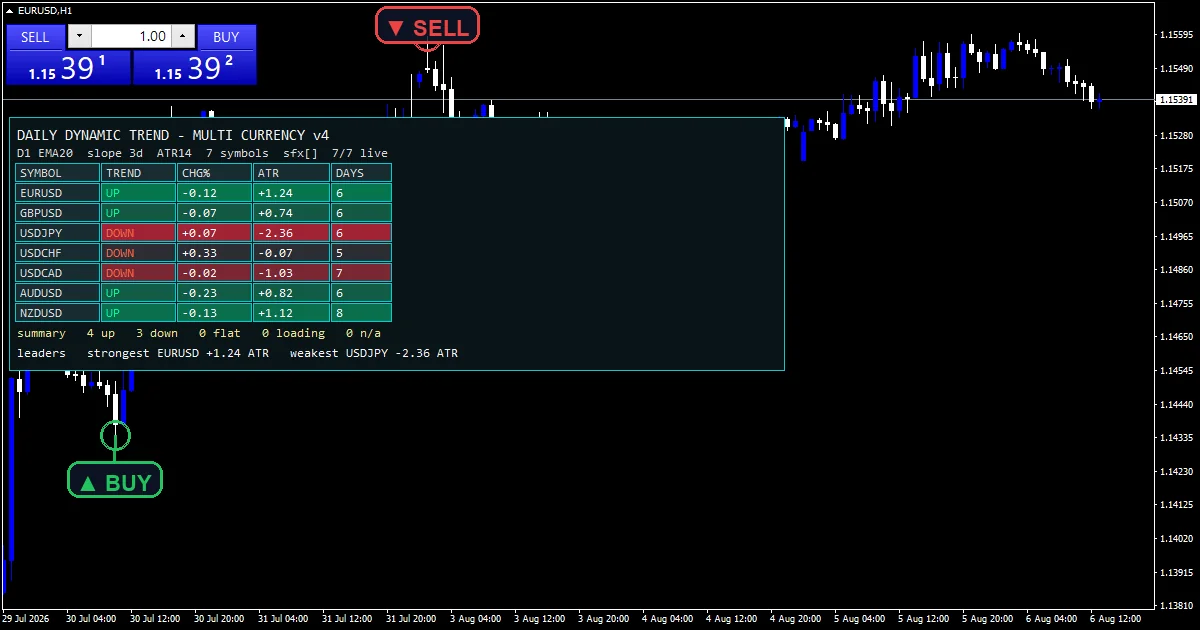
The computation
Classifying the trend state
A daily EMA at `InpEmaPeriod` `20` sets the reference. slope takes that value minus its reading `InpSlopeBars` `3` days earlier. UP needs the close above the average and a non-negative slope. DOWN needs the mirror. Anything else reads FLAT.
Making symbols comparable
The ATR column takes the close minus the daily average, divided by Wilder ATR at `InpAtrPeriod` `14`. Dividing by ATR is what lets a yen pair and a dollar pair sit in the same column. `InpScaleAtr` `1.50` sets where the row shading saturates.
Resolving broker symbol names
The code detects a suffix from the chart symbol. It then probes each requested name both with and without it. A symbol the broker does not carry prints n slash a. One whose history has not arrived prints three dots. A zero there would read as unchanged, which is false.
How to read the signals
The DAYS column tells you how long a state has already held.
A large ATR figure means price has stretched a long way from its daily average.
FLAT is a real answer here, not a gap in the data.
Row colour finds the extremes before you read a single digit.
Alert channels in this build: popup, push notification, email and sound, one message per closed bar.
`EnableAlerts` ships on and `EnablePopup` delivers the text. `EnablePushNotify`, `EnableEmail` and `EnableSound` all start false. `SoundFile` picks the clip. A message goes out once per closed bar, and only when a trend state actually flips.
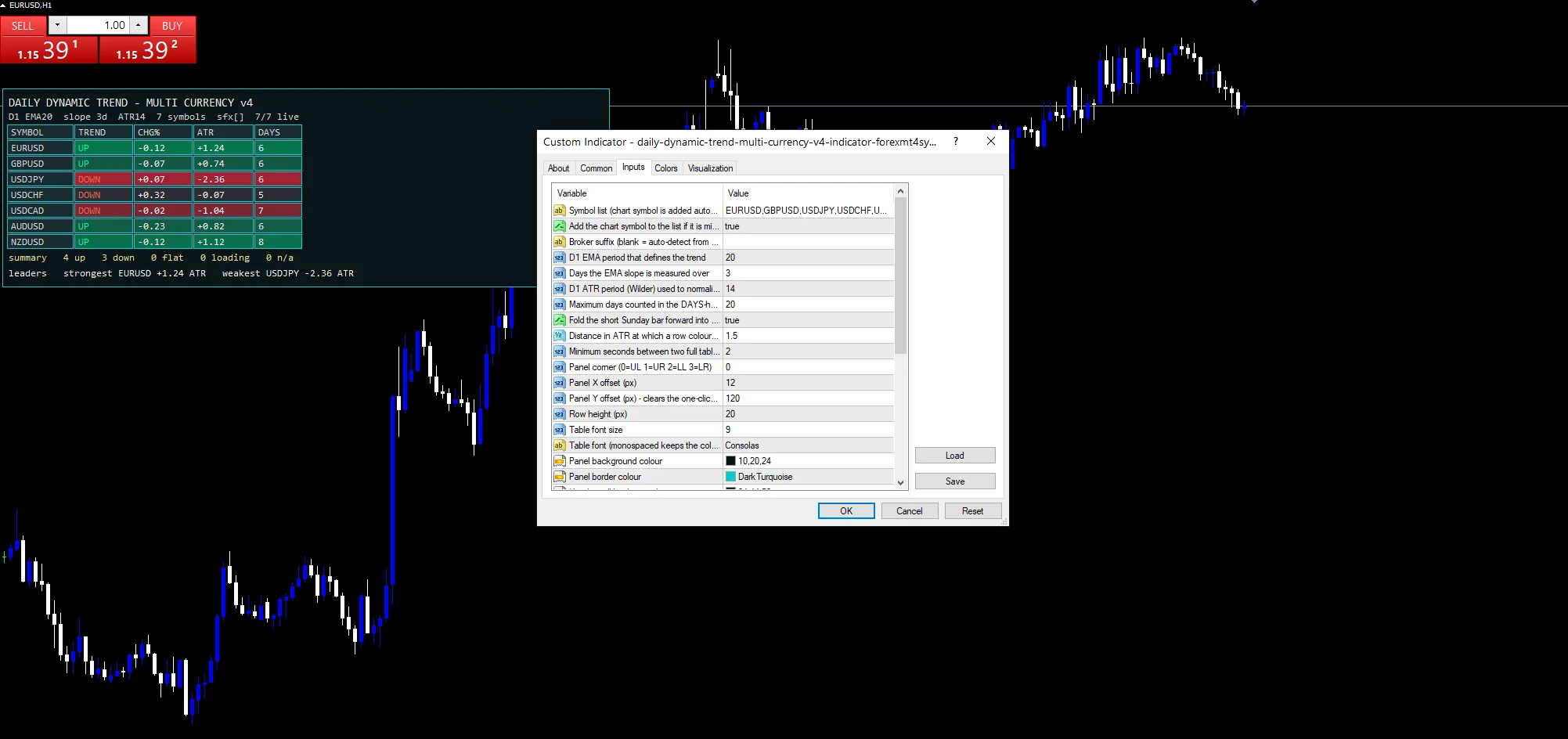
Every Daily Dynamic Trend Multi Currency v4 Indicator input
Core settings: Symbols
| Setting | What it does | Default |
|---|---|---|
InpSymbols |
Symbol list (chart symbol is added automatically). Symbol list, defaulting to the seven majors. The chart symbol joins automatically. | EURUSD,GBPUSD,USDJPY,USDCHF,USDCAD,AUDUSD,NZDUSD |
InpAddChartSym |
Add the chart symbol to the list if it is missing. Adds the chart symbol when the list omits it, default `true`. | on |
InpSuffix |
Broker suffix (blank = auto-detect from the chart symbol). Broker suffix, blank by default so the code detects it. |
Core settings: Daily trend definition
| Setting | What it does | Default |
|---|---|---|
InpEmaPeriod |
D1 EMA period that defines the trend. Daily average that defines the trend, default `20`. | 20 |
InpSlopeBars |
Days the EMA slope is measured over. Days the slope is measured over, default `3`. | 3 |
InpAtrPeriod |
D1 ATR period (Wilder) used to normalise the distance. Daily ATR length behind the distance column, default `14`. | 14 |
InpHoldLookback |
Maximum days counted in the DAYS-held column. Cap on the days-held count, default `20`. | 20 |
InpMergeSunday |
Fold the short Sunday bar forward into Monday. Folds a short Sunday bar forward into Monday, default `true`. | on |
InpScaleAtr |
Distance in ATR at which a row colour saturates. ATR distance where row colour saturates, default `1.50`. | 1.50 |
InpRefreshSec |
Minimum seconds between two full table refreshes. Minimum seconds between two full refreshes, default `2`. | 2 |
Core settings: Table geometry
| Setting | What it does | Default |
|---|---|---|
InpX |
Panel X offset (px). Table horizontal offset, default `12`. | 12 |
InpY |
Panel Y offset (px) – clears the one-click panel. Table vertical offset, default `120` so it clears the trade panel. | 120 |
InpCellH |
Row height (px). | 20 |
InpMaxRows |
Cap on how many symbol rows are drawn. Cap on how many symbol rows are drawn, default `16`. | 16 |
Display settings
| Setting | What it does | Default |
|---|---|---|
InpCorner |
Panel corner (0=UL 1=UR 2=LL 3=LR). Table corner, default `0` for upper left. | 0 |
InpFontSize |
Table font size. | 9 |
InpFont |
Table font (monospaced keeps the columns square). | Consolas |
InpPanelBg |
Panel background colour. | RGB 10,20,24 |
InpBorderColor |
Panel border colour. | dark turquoise |
InpHeaderBg |
Header cell background. | RGB 24,44,50 |
InpFlatBg |
Neutral row background. | RGB 40,46,54 |
InpUpBg |
Saturated up-trend row background. | RGB 0,132,84 |
InpDownBg |
Saturated down-trend row background. | RGB 160,36,52 |
InpTextColor |
Header and label text colour. | gainsboro |
InpValueColor |
Cell value text colour. | white |
InpUpColor |
UP state text colour. | medium spring green |
InpDownColor |
DOWN state text colour. | tomato |
Alert settings
| Setting | What it does | Default |
|---|---|---|
EnableAlerts |
Master alert switch. Master switch over the state-flip alerts, default `true`. | on |
EnablePopup |
Terminal popup alert. Terminal dialog when a state flips, default `true`. | on |
EnablePushNotify |
Push notification to the MetaQuotes ID. Mobile push when a state flips, default `false`. | off |
EnableEmail |
E-mail alert (Tools > Options > Email). Mail delivery when a state flips, default `false`. | off |
EnableSound |
Play a sound file when a state flips. Sound playback when a state flips, default `false`. | off |
SoundFile |
Sound file in the terminal Sounds folder. Wav file the state-flip alert plays, default `alert.wav`. | alert.wav |
Markets that suit it
Every figure comes from the daily series, so the chart timeframe changes nothing. EURUSD H1 is the reference chart, and the table reads identically from M5. What matters is the symbol list. The seven majors in `InpSymbols` give a broad view of dollar direction at a glance.
What it gets wrong
A daily EMA plus a three-day slope is a blunt classifier. It will call a direction inside a range.
The days-held count stops at `InpHoldLookback`, so a long trend reads the same as a very long one.
Rows depend on downloaded daily history, and a fresh terminal shows dots until it arrives.
Copy the compiled Daily Dynamic Trend Multi Currency v4 Indicator file into your MQL4/Indicators folder, and the MT5 build into MQL5/Indicators, then restart the terminal and drag it onto a chart. The step-by-step guide with screenshots is at how to install MT4 and MT5 indicators.
Related on forexmt4systems.com: Heikin Ashi Trend Strategy.
Background reading on the method behind the Daily Dynamic Trend Multi Currency v4 Indicator: Hard currency on Wikipedia, High Low Index at StockCharts ChartSchool.
Download the Daily Dynamic Trend Multi Currency v4 Indicator for MT4 and MT5
The zip holds the compiled Daily Dynamic Trend Multi Currency v4 Indicator build for MT4 and MT5, plus a short README. Compiled files only, no source. Enter your email below and the download link arrives in your inbox.
Download this indicator free
Enter your email and the file is yours. You also get the full MT4 and MT5 library.
FAQ
When does InpSlopeBars make a row read FLAT?
Disagreement between price and slope. UP needs the close above the daily average and `InpSlopeBars` `3` showing a non-negative slope. DOWN needs both pointing the other way. When the two disagree the row says FLAT, which is the honest answer rather than a forced call.
Why does InpAtrPeriod scale the distance column?
So symbols compare. A 200 point move means one thing on a yen pair and another on gold. The code divides the gap from the daily average by ATR at `InpAtrPeriod` `14`. That puts every row on one scale, which is the only way a screen can rank eight instruments.
What does InpMergeSunday fix?
The short Sunday bar many brokers open. Left alone, a Monday row would compare a full day against a two-hour stub and report a nonsense change. With `InpMergeSunday` on, the code folds that stub forward into Monday before it calculates anything.
How does InpSuffix handle broker naming?
It is blank by default, because the code works the suffix out itself from the chart symbol name. The code then probes each requested symbol with and without it. That is how EURUSD.r, EURUSDm and EURUSD_i all resolve without you typing anything.
Are results guaranteed?
No. Trading involves risk. Results are not guaranteed; past performance is not indicative of future results. Use the Daily Dynamic Trend Multi Currency v4 Indicator as one input. Always backtest before trading live.
External references
- Learn more about the underlying method in Hard currency on Wikipedia.
- For wider market background, see High Low Index at StockCharts ChartSchool.

About the author
Written by Dominic Walsh, a Forex trader and MT4/MT5 indicator, Expert Advisor and script developer. Every tool on forexmt4systems.com is tested on live charts before release and ships with ready-to-use compiled MT4 (.ex4) and MT5 (.ex5) files. Learn more about the trader and developer behind this site.
How we build, test and correct every tool: Editorial & Testing Policy. Trading carries risk; see the disclaimer.