
The daily bias trading view indicator answers one question: which way is the day leaning? Four components each vote, each carries a weight, and the total decides the verdict. Every reading comes from the daily series, so the answer is identical whether you attach it to M5 or H4.
This build ships as a compiled .ex4 for MT4 and .ex5 for MT5; the screenshots below come from EURUSD H1.
| Platforms | MT4 (.ex4) + MT5 (.ex5) |
|---|---|
| Chart window | Main price chart |
| Plots | 3: D1 trend – bullish day, D1 trend – bearish day, D1 trend – neutral day |
| Alerts | popup, push notification, email, sound |
| Inputs | 51 |
What you see once it loads
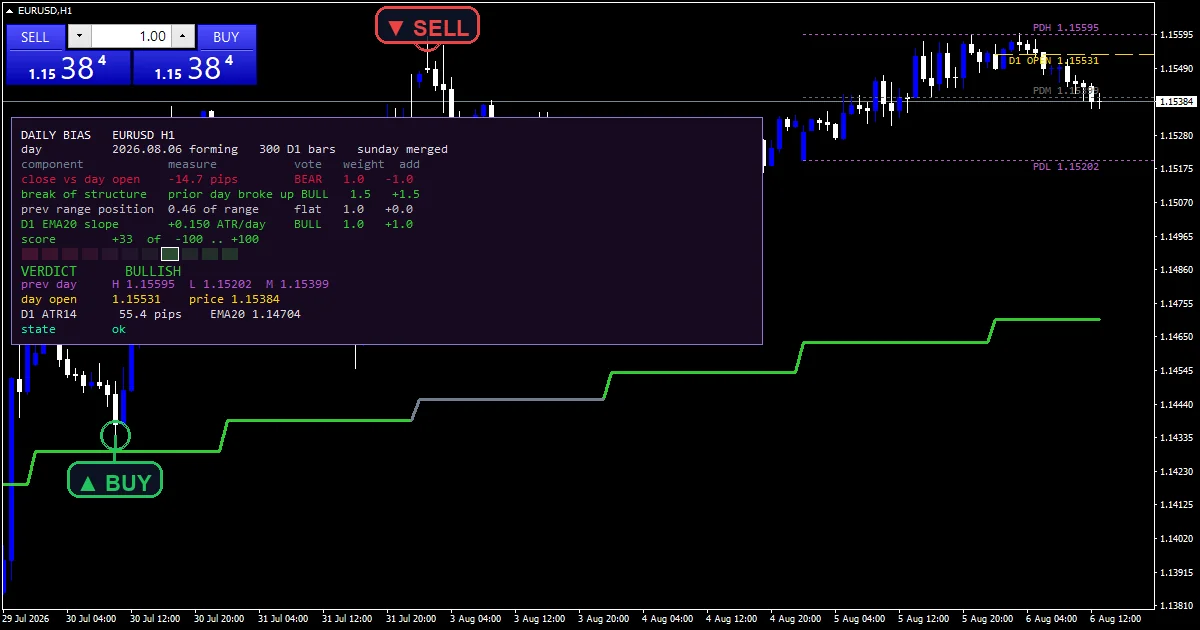
D1 trend – bullish day colours the days the score called upward.
D1 trend – bearish day and D1 trend – neutral day take the other two verdicts.
Trend line objects mark the previous daily high, low and midpoint when InpShowLevels stays on.
A gold line marks the daily open under InpShowD1Open.
A corner panel shows each component score, its weight and the running total.
- D1 trend – bullish day: line, lime green, width 3
- D1 trend – bearish day: line, crimson, width 3
- D1 trend – neutral day: line, slate gray, width 3
Working through the maths
Close against the daily open
The oldest daily bias read there is: where the day closed relative to where it opened. The difference has to clear a dead band before it counts.
InpFlatAtrFrac sets that dead band as a fraction of daily ATR, 0.05 by default, which stops a two pip drift from casting a vote.
Break of structure, and position in yesterday range
A daily close beyond the previous daily high or low scores a break. The current day gets checked first and the day before second, so a fresh break outranks a stale one. This component carries the heaviest weight at 1.5.
Position asks where the close sits inside yesterday envelope as a fraction. Above InpUpperPct votes up and below InpLowerPct votes down, defaulting to 0.60 and 0.40 so the component actually votes rather than sitting on the fence.
Slope, and the verdict
The fourth component measures the slope of a daily average over InpMaPeriod bars, across InpSlopeBars, against the InpSlopeThresh floor.
Each component returns minus one, zero or plus one, gets multiplied by its weight, and the code sums the four. InpVerdictScore sets how large that total has to be before the tool calls the day rather than leaving it neutral.
Making sense of the output
The verdict is a daily object, so it does not change because you switched chart timeframe.
The panel shows which components agreed, which matters more than the headline colour.
A neutral day means the weighted total never cleared InpVerdictScore, not that the components all read zero.
Break of structure carries the largest weight, so a fresh daily break can outvote two other components.
Alert channels in this build: popup, push notification, email and sound, one message per closed bar.
Alerts cover popup, push, email and sound when the verdict changes. A bar time check keeps it to one alert per closed bar.
Every Daily bias trading view Indicator input
Core settings: Daily series
| Setting | What it does | Default |
|---|---|---|
InpD1Bars |
D1 bars pulled for the EMA, the ATR and the history. InpD1Bars is how many daily bars get loaded for the scoring, 300 by default. | 300 |
InpMergeSunday |
Fold the short Sunday bar forward into Monday. InpMergeSunday folds the short Sunday session into Monday. It defaults to true. | on |
InpDayShiftHours |
Hours added to the D1 open when chart bars are mapped. | 0 |
InpUseClosedDay |
Judge the last CLOSED day instead of the forming one. InpUseClosedDay scores the last completed day rather than the forming one. It defaults to false. | off |
InpMaPeriod |
D1 EMA period behind the slope component. InpMaPeriod is the daily average behind the slope component, 20 by default. | 20 |
InpSlopeBars |
Days the EMA slope is measured over. | 3 |
InpAtrPeriod |
D1 ATR period (Wilder) used to normalise everything. | 14 |
Core settings: Component thresholds
| Setting | What it does | Default |
|---|---|---|
InpFlatAtrFrac |
Close-vs-open dead band as a fraction of the D1 ATR. InpFlatAtrFrac is the dead band on the open component, as a fraction of daily ATR. It defaults to 0.05. | 0.05 |
InpUpperPct |
Previous-range position above this counts bullish. InpUpperPct is the fraction of yesterday range above which the position component votes up, 0.60 by default. | 0.60 |
InpLowerPct |
Previous-range position below this counts bearish. InpLowerPct is the matching floor at 0.40. | 0.40 |
InpSlopeThresh |
EMA slope in ATR per day needed to count. | 0.02 |
Core settings: Component weights
| Setting | What it does | Default |
|---|---|---|
InpWeightOpen |
Weight of the close-versus-daily-open component. | 1.0 |
InpWeightBos |
Weight of the break-of-structure component. InpWeightBos weights the break of structure component at 1.5, the heaviest of the four. | 1.5 |
InpWeightRange |
Weight of the previous-range position component. | 1.0 |
InpWeightSlope |
Weight of the D1 EMA slope component. | 1.0 |
InpVerdictScore |
Absolute score needed for a BULLISH / BEARISH verdict. InpVerdictScore sets the weighted total a day must reach before the tool calls it, 25.0 by default. | 25.0 |
Core settings: Touches a component, a weight, a threshold or the verdict)
| Setting | What it does | Default |
|---|---|---|
InpMaxRayTags |
Cap on how many reference captions are drawn. | 4 |
InpTagGapPx |
Caption gap from its ray in PIXELS, never points. | 16 |
InpPriceScalePx |
Right margin owned by the price scale, in pixels. | 62 |
InpOneClickWpx |
Width of the one-click trade panel zone, top-left. | 260 |
InpOneClickHpx |
Height of the one-click trade panel zone, top-left. | 100 |
Core settings: Panel
| Setting | What it does | Default |
|---|---|---|
InpX |
Panel X offset (px). | 14 |
InpY |
Panel Y offset (px) – clears the one-click panel. | 120 |
InpGaugeW |
Score gauge cell width (px). | 20 |
InpGaugeH |
Score gauge cell height (px). | 14 |
InpRefreshSec |
Minimum seconds between two full recalculations. | 2 |
Display settings
| Setting | What it does | Default |
|---|---|---|
InpShowTrendLine |
Paint the D1 EMA on the chart in the verdict colour. | on |
InpShowLevels |
Thin dotted previous-day high / low / mid rays. | on |
InpShowD1Open |
Dashed ray on the daily open of the judged day. | on |
InpLevelColor |
Previous-day high and low ray colour. | medium orchid |
InpMidColor |
Previous-day mid ray colour. | dim gray |
InpOpenColor |
Daily open ray colour. | gold |
InpBullColor |
Bullish verdict colour. | lime green |
InpBearColor |
Bearish verdict colour. | crimson |
InpNeutColor |
Neutral verdict colour. | slate gray |
InpCapFontSize |
Reference caption font size. | 9 |
InpLabelEdgePadPx |
Padding kept clear at the chart edges, in pixels. | 10 |
InpAvoidPanel |
Keep captions clear of the info panel. | on |
InpShowPanel |
Show the bias breakdown panel. | on |
InpCorner |
Panel corner (0=UL 1=UR 2=LL 3=LR). | 0 |
InpFontSize |
Panel font size. | 9 |
InpFont |
Panel font (monospaced keeps the columns square). | Consolas |
InpPanelBg |
Panel background colour. | RGB 22,10,32 |
InpBorderColor |
Panel border colour. | medium purple |
InpTextColor |
Panel body text colour. | gainsboro |
Alert settings
| Setting | What it does | Default |
|---|---|---|
EnableAlerts |
Master alert switch. | on |
EnablePopup |
Terminal popup alert. | on |
EnablePushNotify |
Push notification to the MetaQuotes ID. | off |
EnableEmail |
E-mail alert (Tools > Options > Email). | off |
EnableSound |
Play a sound file when the verdict changes. | off |
SoundFile |
Sound file in the terminal Sounds folder. | alert.wav |
Suitable charts
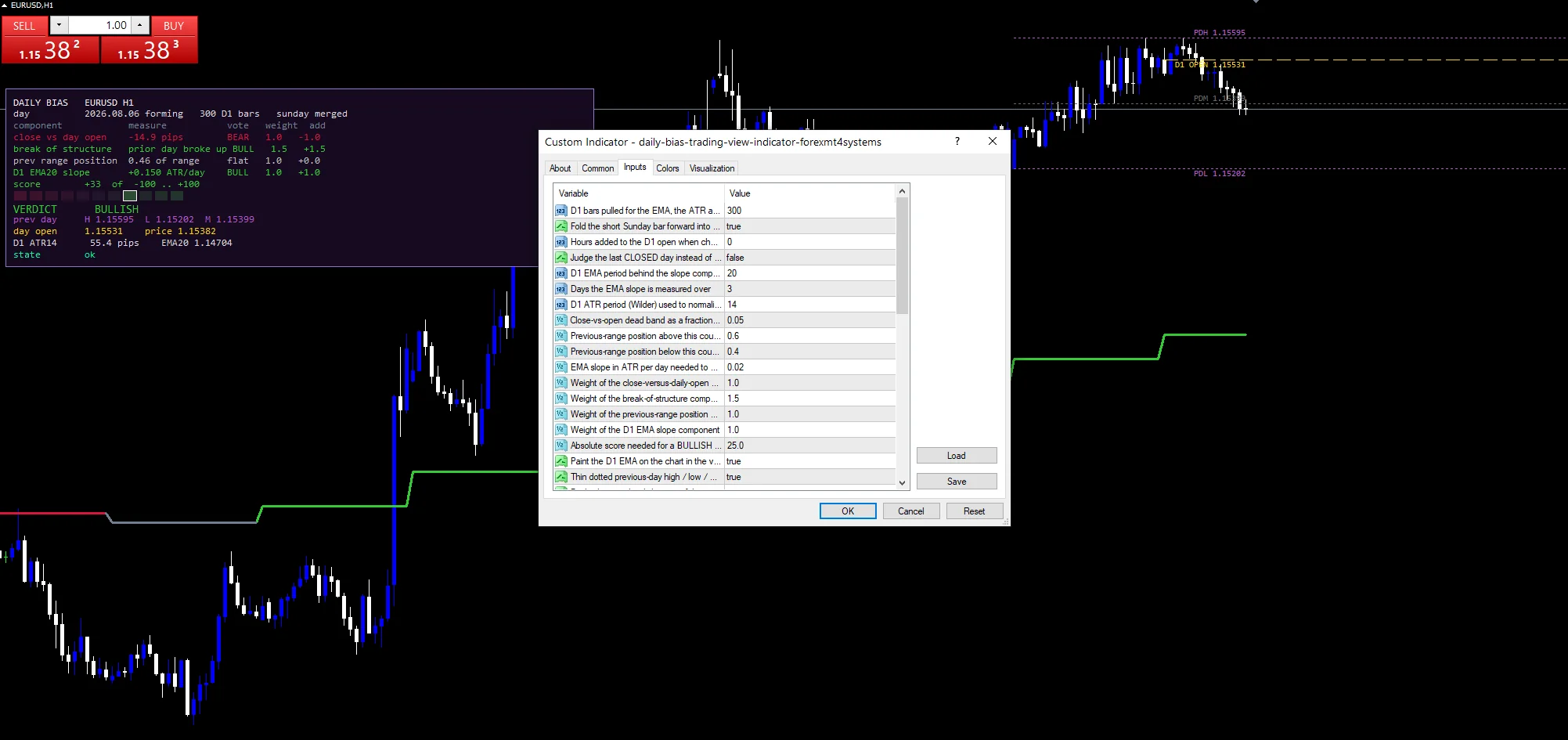
The screenshot uses EURUSD H1. Because every reading comes from the daily series, the chart you attach it to changes nothing about the verdict, only where you happen to be reading it. Intraday charts are the natural home, since that is where a daily view adds context you cannot already see.
Where it breaks down
Four components on one instrument is a narrow sample. They can all agree and still be wrong about the session ahead.
Scoring the forming day means the verdict can change as that day develops. Setting InpUseClosedDay to true trades that for a view that is always one day behind.
Daily boundaries follow the broker clock, so two brokers in different server timezones can score the same market differently unless you match InpDayShiftHours.
The weights hold fixed conventions rather than fitted values. No one tuned them against outcomes.
Copy the compiled Daily bias trading view Indicator file into your MQL4/Indicators folder, and the MT5 build into MQL5/Indicators, then restart the terminal and drag it onto a chart. The step-by-step guide with screenshots is at how to install MT4 and MT5 indicators.
Related on forexmt4systems.com: Range Trading Strategy.
Background reading on the method behind the Daily bias trading view Indicator: Status quo bias on Wikipedia, Decisionpoint Intermediate Term Breadth Momentum Oscillator Itbm at StockCharts ChartSchool.
Download the Daily bias trading view Indicator for MT4 and MT5
The zip holds the compiled Daily bias trading view Indicator build for MT4 and MT5, plus a short README. Compiled files only, no source. Enter your email below and the download link arrives in your inbox.
Download this indicator free
Enter your email and the file is yours. You also get the full MT4 and MT5 library.
FAQ
Does the verdict change if I switch from M5 to H4?
No. Every component reads the daily series explicitly rather than the chart series, so the score is a daily object. Attaching it to a different timeframe changes where you read the verdict and never what it says.
Why does InpWeightBos default higher than the others?
InpWeightBos defaults to 1.5 against 1.0 for the other three. A daily close beyond the previous daily high or low is a harder event to produce than a close on one side of the open, so it earns more say in the total. You can change the weight.
What does InpFlatAtrFrac 0.05 prevent?
A tiny drift from voting. The close against open component only scores once the difference clears five percent of the daily ATR. Without that dead band a day finishing two pips above its open would count as fully bullish, which it plainly is not.
Should I set InpUseClosedDay to true?
It depends on whether you want a verdict that is stable or current. Left false, the score reads the forming day and can change as it develops. Set true, it reads the last completed day, which never changes but is always one day behind the market.
Are results guaranteed?
No. Trading involves risk. Results are not guaranteed; past performance is not indicative of future results. Use the Daily bias trading view Indicator as one input. Always backtest before trading live.
External references
- The core method is documented in Status quo bias on Wikipedia.
- Additional market context is at Decisionpoint Intermediate Term Breadth Momentum Oscillator Itbm at StockCharts ChartSchool.

About the author
Written by Dominic Walsh, a Forex trader and MT4/MT5 indicator, Expert Advisor and script developer. Every tool on forexmt4systems.com is tested on live charts before release and ships with ready-to-use compiled MT4 (.ex4) and MT5 (.ex5) files. Learn more about the trader and developer behind this site.
How we build, test and correct every tool: Editorial & Testing Policy. Trading carries risk; see the disclaimer.