
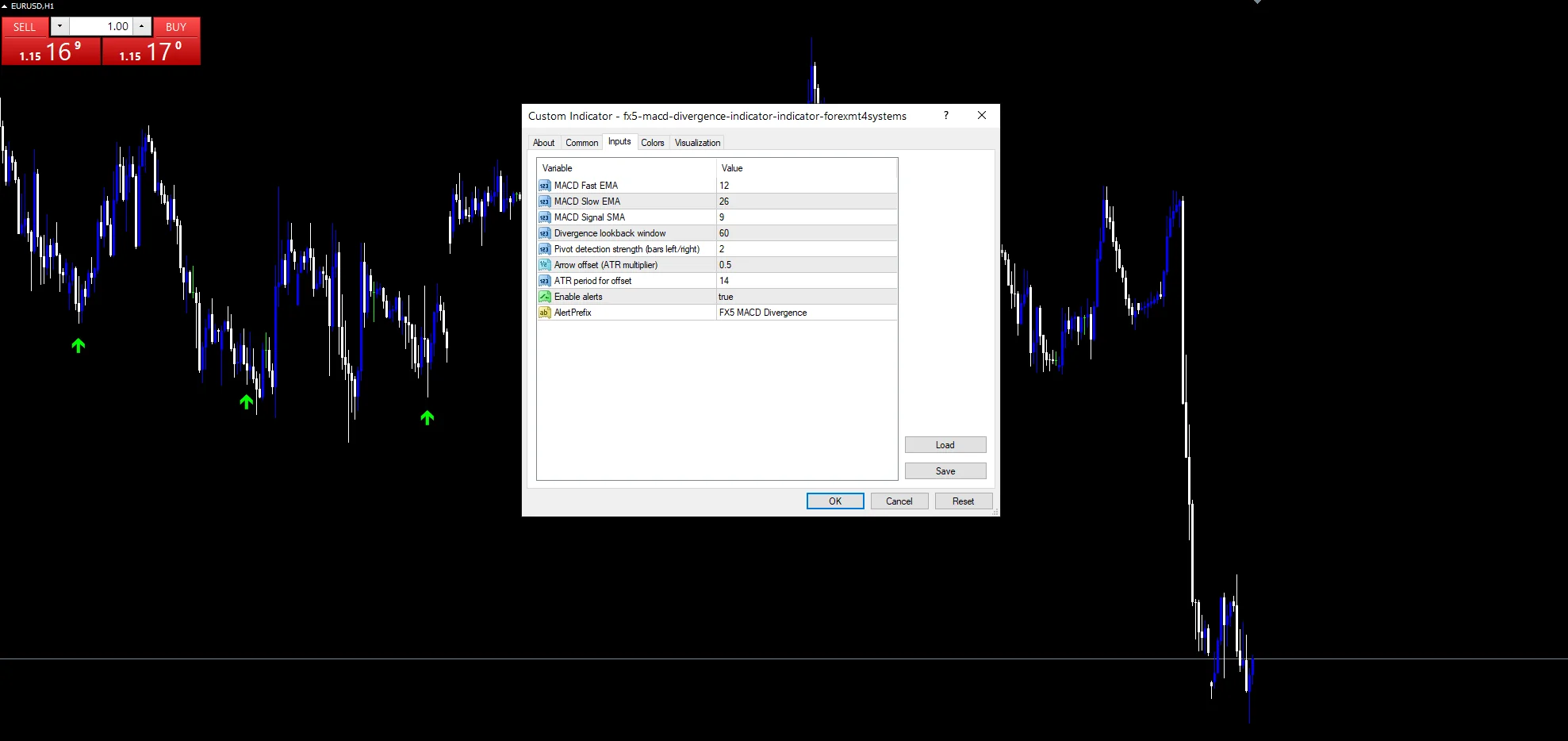
The fx5 macd divergence indicator compares two price pivots and the MACD reading at each. A shallow pivot test at `PivotStrength` keeps the candidates plentiful, while `LookbackBars` bounds how far back the pairing may reach. Marks land on the price chart rather than in a pane.
This build ships as a compiled .ex4 for MT4 and .ex5 for MT5; the screenshots below come from EURUSD H1.
| Platforms | MT4 (.ex4) + MT5 (.ex5) |
|---|---|
| Chart window | Main price chart |
| Plots | 2: Bullish Divergence, Bearish Divergence |
| Alerts | popup |
| Inputs | 9 |
What the build shows
Bullish Divergence places a lime arrow under a lower price low with a stronger reading.
Bearish Divergence places a red arrow above the mirror case.
Mark distance takes `ArrowOffsetATR` `0.5` of an ATR, so it scales with the bar.
The MACD line itself stays internal.
- Bullish Divergence: arrow, lime, width 2, arrow code 233
- Bearish Divergence: arrow, red, width 2, arrow code 234

How each value gets built
Finding the pivots
IsPriceLow and IsPriceHigh test each bar with `PivotStrength` `2` bars on either side. Two is a shallow test on purpose, since the divergence comparison does the real filtering afterwards.
Pairing across the window
For each fresh pivot the code walks back up to `LookbackBars` `60` bars for an earlier one of the same kind. jmax gets clamped so the search never runs past the usable history.
Scaling the mark
atr reads iATR at `ATRPeriod` `14`, with a fallback of ten points when it returns nothing. off then takes `ArrowOffsetATR` times that value. A quiet chart gets a tight mark and a busy one gets a wider gap.
How to work with it
A mark means price made a new extreme and momentum did not follow.
The two-bar pivot test is loose, so read clusters as one observation.
Sixty bars is the furthest the pairing reaches back.
Raise `PivotStrength` when the chart fills with marks.
Alert channels in this build: popup, one message per closed bar.
`EnableAlerts` ships on and raises a terminal popup, with `AlertPrefix` in front of the text. This build carries no push, email or sound channel. The guard permits one message per closed bar.
Every FX5 MACD Divergence Indicator input
Core settings
| Setting | What it does | Default |
|---|---|---|
FastEMA |
MACD Fast EMA. Fast leg of the momentum calculation, default `12`. | 12 |
SlowEMA |
MACD Slow EMA. Slow leg of the momentum calculation, default `26`. | 26 |
SignalSMA |
MACD Signal SMA. Signal smoothing on that calculation, default `9`. | 9 |
LookbackBars |
Divergence lookback window. Furthest the pairing reaches back, default `60` bars. | 60 |
PivotStrength |
Pivot detection strength (bars left/right). How many bars flank a pivot on each side, default `2`. | 2 |
ATRPeriod |
ATR period for offset. Length of the range average behind the offset, default `14`. | 14 |
Display settings
| Setting | What it does | Default |
|---|---|---|
ArrowOffsetATR |
Arrow offset (ATR multiplier). Mark distance in ATR units, default `0.5`. | 0.5 |
Alert settings
| Setting | What it does | Default |
|---|---|---|
EnableAlerts |
Enable alerts. Popup on a fresh divergence, default `true`. | on |
AlertPrefix |
Text at the front of the message, default `FX5 MACD Divergence`. | FX5 MACD Divergence |
Markets that suit it
Divergence wants a market that swings. EURUSD H1 is the reference chart, where `LookbackBars` at `60` covers two and a half days. On M5 the pivot test fires constantly and marks cluster. On H4 the pairings are rare and each spans a genuine swing.
Where it stops working
`PivotStrength` `2` accepts almost any small turn as a pivot.
Momentum can disagree with price through an entire trend without it ending.
The comparison uses one earlier pivot, ignoring everything between them.
Copy the compiled FX5 MACD Divergence Indicator file into your MQL4/Indicators folder, and the MT5 build into MQL5/Indicators, then restart the terminal and drag it onto a chart. The step-by-step guide with screenshots is at how to install MT4 and MT5 indicators.
Download the FX5 MACD Divergence Indicator for MT4 and MT5
The zip holds the compiled FX5 MACD Divergence Indicator build for MT4 and MT5, plus a short README. Compiled files only, no source. Enter your email below and the download link arrives in your inbox.
Download this indicator free
Enter your email and the file is yours. You also get the full MT4 and MT5 library.
FAQ
What does LookbackBars at 60 bound?
How far back the code hunts for the earlier pivot. Sixty bars on EURUSD H1 is two and a half days. Beyond that the pairing stops, because two swings from different weeks rarely say much about each other.
Why is PivotStrength only 2?
It keeps the candidate pool large. Two bars on each side accepts almost any small turn, and the divergence comparison then decides which pairings matter. The cost is a noisier chart, so raise it if that bothers you.
Why measure ArrowOffsetATR against ATRPeriod?
So the mark keeps its distance on any instrument. At `0.5` the arrow always sits about half a typical bar range from the extreme. A fixed point offset would look right on one chart and wrong on the next.
What does AlertPrefix put in the message?
The text you set, defaulting to FX5 MACD Divergence. It matters when several tools raise popups on one terminal, since the message otherwise gives no clue which one fired.
Are results guaranteed?
No. Trading involves risk. Results are not guaranteed; past performance is not indicative of future results. Use the FX5 MACD Divergence Indicator as one input. Always backtest before trading live.
Category: this is part of our Oscillators collection. Also, truly, browse more Oscillators for MetaTrader, or explore every MT4 indicator and MT5 indicator on the site.
External references
- The core method is documented in Privatized foreign currency risk on Wikipedia.
- Additional market context is at Multicollinearity at StockCharts ChartSchool.

About the author
Written by Dominic Walsh, a Forex trader and MT4/MT5 indicator, Expert Advisor and script developer. Every tool on forexmt4systems.com is tested on live charts before release and ships with ready-to-use compiled MT4 (.ex4) and MT5 (.ex5) files. Learn more about the trader and developer behind this site.
How we build, test and correct every tool: Editorial & Testing Policy. Trading carries risk; see the disclaimer.