
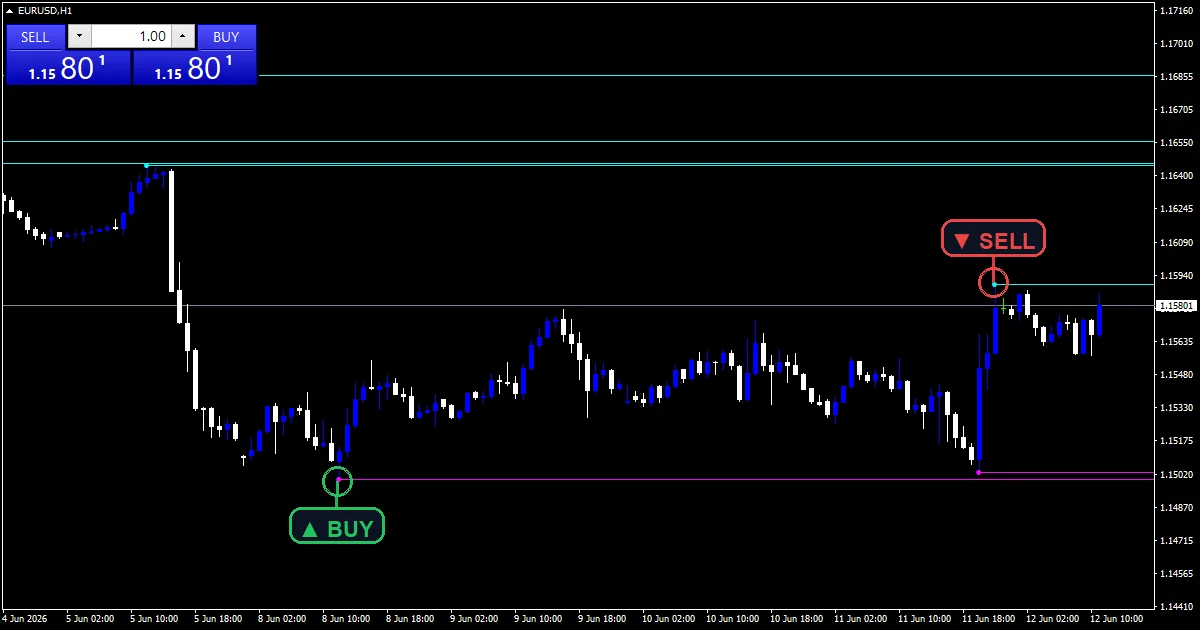
In ICT terms, resting stop orders sit above old highs and below old lows. The liquidity finder indicator draws a dotted line from every swing high that price has not yet traded above, labels it BSL, and does the same for untaken swing lows as SSL. When a bar trades through one, it reports a sweep.
This build ships as a compiled .ex4 for MT4 and .ex5 for MT5; the screenshots below come from EURUSD H1.
| Platforms | MT4 (.ex4) + MT5 (.ex5) |
|---|---|
| Chart window | Main price chart |
| Plots | 2: BSL (Buyside Liquidity), SSL (Sellside Liquidity) |
| Alerts | popup, push notification, email, sound |
| Inputs | 18 |
Plots this indicator declares
Dotted lines, labels and marks on price.
`BSLColor` `clrAqua` draws buyside lines above price.
`SSLColor` `clrMagenta` draws sellside lines below price.
`BSL (Buyside Liquidity)` marks the swing high itself.
`SSL (Sellside Liquidity)` marks the swing low itself.
`ShowLabels` adds BSL and SSL text.
- BSL (Buyside Liquidity): arrow, aqua, width 2, arrow code 234
- SSL (Sellside Liquidity): arrow, magenta, width 2, arrow code 233
How the values come out
The swings
`SwingLookback` `3` bars on each side confirm a swing. `LookbackBars` `600` bars are scanned.
Untaken only
A swing high counts as buyside liquidity only while it sits above the current price. The newest `MaxLevels` `25` on each side are drawn.
The sweep
A bar whose high trades above a line, after the previous close sat at or below it, reports a buyside sweep. Sellside mirrors this.
How to read it
Aqua lines above price are buyside pools.
Magenta lines below price are sellside pools.
Lines vanish once price trades through them.
Clusters of lines show where stops gather.
`ExtendLines` runs each line to the current bar.
The drawing refreshes on every new bar.
Alert channels in this build: popup, push notification, email and sound, one message per closed bar.
A trade through a line reports as BSL SWEEP or SSL SWEEP. `EnableAlerts` covers both, and the popup is the only route on when the file loads.
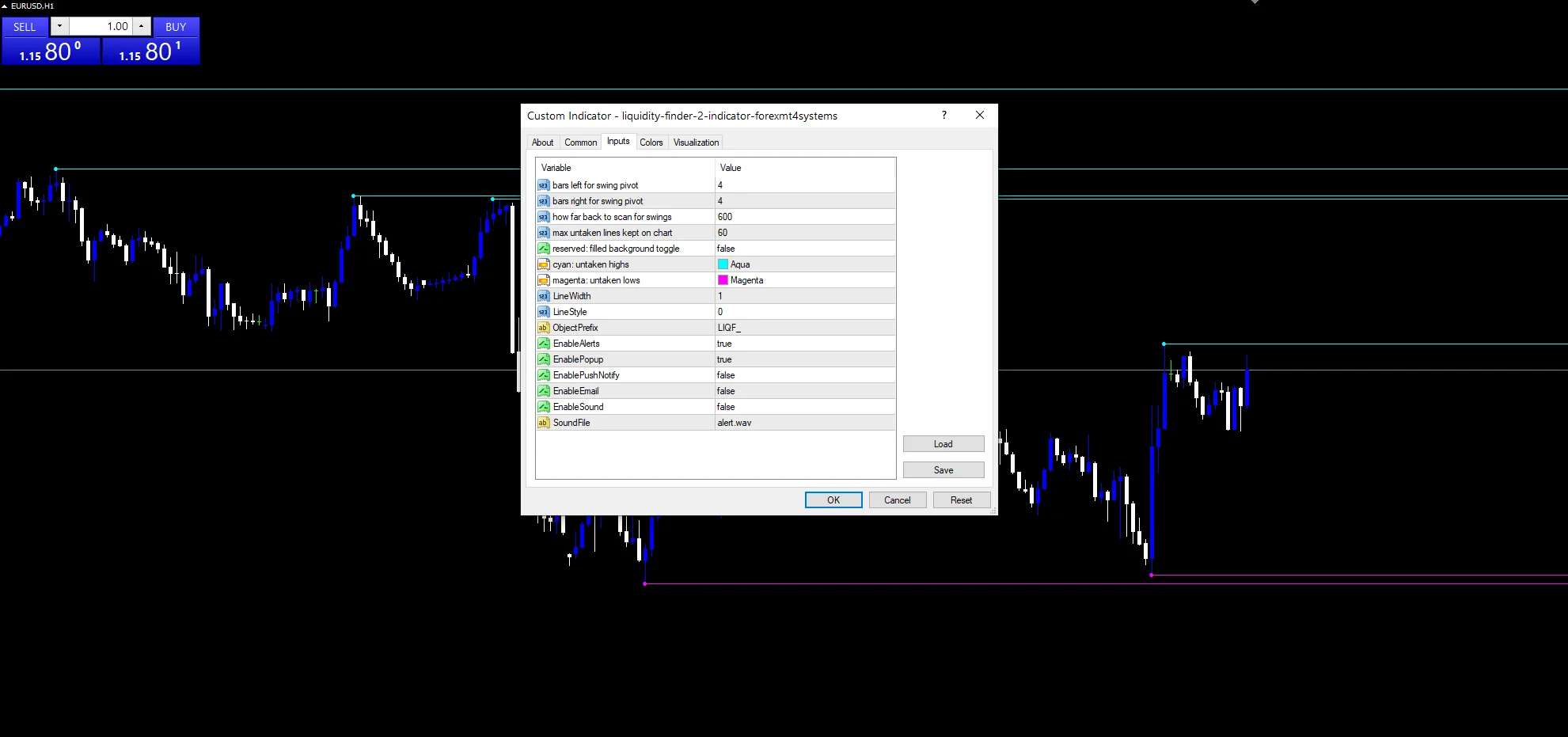
Every Liquidity Finder Indicator input
Core settings
| Setting | What it does | Default |
|---|---|---|
SwingLookback |
swing left/right window. Bars on each side of a swing, `3`. | 3 |
MaxLevels |
max untaken levels to draw. Untaken levels per side, `25`. | 25 |
LookbackBars |
scan window. Bars scanned for swings, `600`. | 600 |
ExtendLines |
extend liquidity lines to current bar. Run lines to the current bar, `true`. | on |
ObjPrefix |
(see inputs panel) | LIQ_ICT_ |
Display settings
| Setting | What it does | Default |
|---|---|---|
ShowLabels |
draw BSL / SSL text labels. Draw BSL and SSL text, `true`. | on |
BSLColor |
BSL line/text color. Buyside colour, `clrAqua`. | aqua |
SSLColor |
SSL line/text color. Sellside colour, `clrMagenta`. | magenta |
LineWidth |
(see inputs panel) | 1 |
LineStyle |
Line style, `STYLE_DOT`. | STYLE_DOT |
LabelFontSize |
Label size, `9`. | 9 |
LabelFontName |
(see inputs panel) | Arial Bold |
Alert settings
| Setting | What it does | Default |
|---|---|---|
EnableAlerts |
Switch for sweep messages, `true`. | on |
EnablePopup |
(see inputs panel) | on |
EnablePushNotify |
(see inputs panel) | off |
EnableEmail |
(see inputs panel) | off |
EnableSound |
(see inputs panel) | off |
SoundFile |
(see inputs panel) | alert.wav |
Which pair, which timeframe
Untaken swings pile up on every chart. EURUSD H1 is the reference chart, with a dozen lines on each side. On M15 the lines crowd heavily. On D1 they match the weekly highs and lows traders watch.
Known weak points
Not every old high holds stops.
A sweep is not a reversal by itself.
Sweep checks read the bar still forming.
Just the popup is live by default.
Copy the compiled Liquidity Finder Indicator file into your MQL4/Indicators folder, and the MT5 build into MQL5/Indicators, then restart the terminal and drag it onto a chart. The step-by-step guide with screenshots is at how to install MT4 and MT5 indicators.
Download the Liquidity Finder Indicator for MT4 and MT5
The zip holds the compiled Liquidity Finder Indicator build for MT4 and MT5, plus a short README. Compiled files only, no source. Enter your email below and the download link arrives in your inbox.
Download this indicator free
Enter your email and the file is yours. You also get the full MT4 and MT5 library.
FAQ
What makes a line BSL (Buyside Liquidity)?
A confirmed swing high that price has not yet traded above. Buy stops from short sellers and breakout orders tend to rest there, which is why ICT calls it buyside.
Why does a BSL line vanish after price trades above it?
Once price trades through a swing, it no longer counts as untaken. The next redraw drops it, so only live pools remain on the chart.
Does an SSL sweep message wait for the bar to close?
No. The sweep check reads the current bar, so a message can arrive while it is still forming. The line itself only goes after the next redraw.
What does MaxLevels 25 limit?
The number of lines per side. The newest twenty-five untaken swings above and below price are drawn; older ones are left off to keep the chart readable.
Are results guaranteed?
No. Trading involves risk. Results are not guaranteed; past performance is not indicative of future results. Use the Liquidity Finder Indicator as one input. Always backtest before trading live.
Category: this is part of our Smart Money collection. Also, browse more Smart Money for MetaTrader, or explore every MT4 indicator and MT5 indicator on the site.
External references
- For background on this concept, see Liquidity at Investopedia.
- For broader market context, see Market liquidity on Wikipedia.

About the author
Written by Dominic Walsh, a Forex trader and MT4/MT5 indicator, Expert Advisor and script developer. Every tool on forexmt4systems.com is tested on live charts before release and ships with ready-to-use compiled MT4 (.ex4) and MT5 (.ex5) files. Learn more about the trader and developer behind this site.
How we build, test and correct every tool: Editorial & Testing Policy. Trading carries risk; see the disclaimer.