
The Super Scalper Indicator pairs a fast EMA cross with a stochastic filter. Both lines draw over the candles. Markers appear only when the cross lands while momentum sits at an extreme. That second test cuts most of the crosses a plain moving average pair would flag. Scalping traders on M5 charts get a tighter set of marks.
This build ships as a compiled .ex4 for MT4 and .ex5 for MT5; the screenshots below come from EURUSD M5.
| Platforms | MT4 (.ex4) + MT5 (.ex5) |
|---|---|
| Chart window | Main price chart |
| Plots | 4: FastEMA, SlowEMA, BuySignal, SellSignal |
| Alerts | popup |
| Inputs | 9 |
A look at the plots
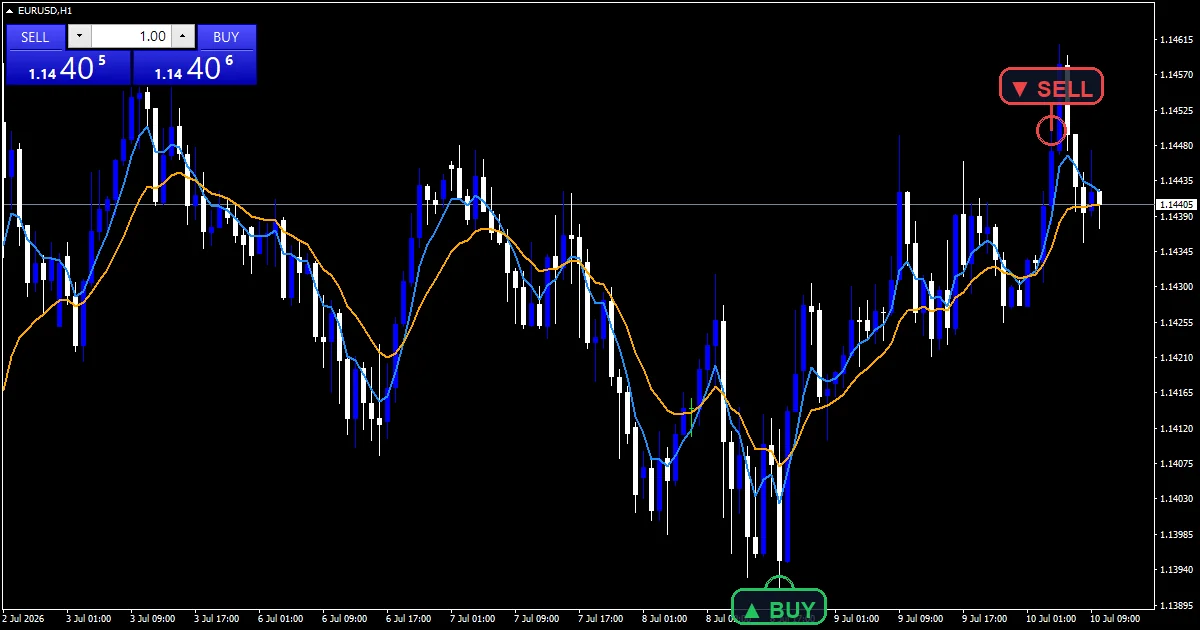
Two lines and two markers make up the display. FastEMA draws in dodger blue over a quick EMA of closes. SlowEMA runs in orange over a longer one. Both sit on the price chart, not in a pane.
BuySignal drops a lime up arrow below the bar. SellSignal puts a red down arrow above it. InpArrowOffset holds both 10 points clear of the candle, so the wick stays readable.
No panels, boxes or text labels appear. The build keeps the chart to four plots. That suits a screen already carrying several instruments.
- FastEMA: line, dodger blue, width 2
- SlowEMA: line, orange, width 2
- BuySignal: arrow, lime, width 2, arrow code 233
- SellSignal: arrow, red, width 2, arrow code 234
How the numbers arrive
The moving average cross
Two EMA lines do the work. InpFastPeriod sets the quick line at 5 bars and InpSlowPeriod sets the slow one at 13. A bull cross needs the fast line at or below the slow one on the prior bar. It must then sit above it now. The bear case reverses both tests.
Stochastic gate on every cross
A cross alone prints nothing. The code reads the main stochastic line. InpStochK, InpStochD and InpStochSlow define it, and the build ships with the classic preset.
A buy needs that reading below InpOversold, which ships at 20.0. The cross has to land while momentum sits low. A sell needs it above InpOverbought, which ships at 80.0. Crosses with momentum mid-range pass without a mark.
Warmup and timing
Early bars stay empty. The loop skips everything within InpSlowPeriod bars of the oldest candle. No half-formed average reaches the chart. Signals run from the newest bar backwards. The rightmost candle is still live and updates on every tick, so only the last closed bar drives the message.
Reading it correctly
Line order sets the bias. FastEMA above SlowEMA points up, and the reverse points down. The gap between them hints at how much momentum backs the move.
Markers show filtered crosses only. A lime BuySignal says the fast line crossed up while the stochastic still sat under InpOversold. That mix usually turns up at the end of a pullback rather than mid-trend.
Treat a missing marker as information. Many crosses print nothing because momentum sat mid-range at the time. That is what the gate exists to do.
Alert channels in this build: popup, one message per closed bar.
InpEnableAlerts drives a single popup message in the terminal. The guard checks the last closed bar, so one signal produces one alert and nothing more.
Every Super Scalper Indicator input
Core settings
| Setting | What it does | Default |
|---|---|---|
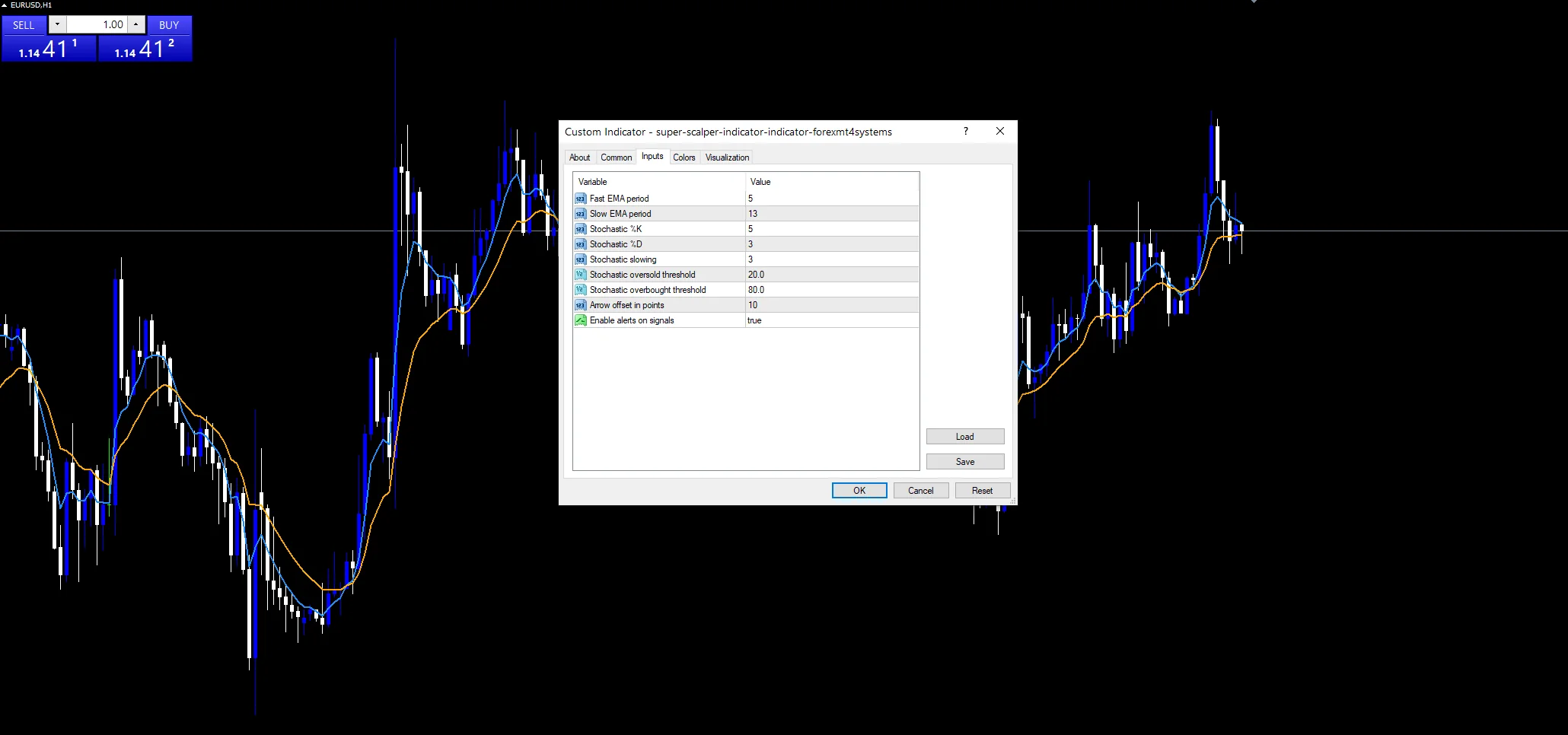
InpFastPeriod |
Fast EMA period. Sets the quick EMA at 5 bars; raise it to calm a jumpy chart. | 5 |
InpSlowPeriod |
Slow EMA period. Sets the slow EMA at 13 bars and also fixes how much warmup the plots skip. | 13 |
InpStochK |
Stochastic %K. Controls the stochastic lookback, which matches the fast line out of the box. | 5 |
InpStochD |
Stochastic %D. Sets the signal smoothing of the stochastic; the build keeps the classic value. | 3 |
InpStochSlow |
Stochastic slowing. Applies the slowing factor to the stochastic before the gate reads it. | 3 |
InpOversold |
Stochastic oversold threshold. Holds the lower gate at 20.0; a higher number lets more buy crosses through. | 20.0 |
InpOverbought |
Stochastic overbought threshold. Holds the upper gate at 80.0 for the sell side. | 80.0 |
Display settings
| Setting | What it does | Default |
|---|---|---|
InpArrowOffset |
Arrow offset in points. Moves each marker ten points off the bar so the candle stays clear. | 10 |
Alert settings
| Setting | What it does | Default |
|---|---|---|
InpEnableAlerts |
Enable alerts on signals. | on |
Markets that suit it
Fast cross tools live on intraday charts. The screenshots come from EURUSD M5, where the shipped pair turns often enough to matter. Majors with tight spreads suit the approach, while exotic crosses rarely repay the cost. M15 and M30 give a slower version of the same picture, with fewer marks. On H4 and above the settings need lengthening or the tool goes quiet for days.
When it will mislead you
The gate cuts both ways. Demanding an extreme reading removes noise. It also removes the cross that starts a fresh trend from mid-range.
Moving averages lag. On M5 the shipped pair still turns a couple of bars after the swing. A marker rarely lands at the low.
Ranges produce clustered marks. Price rolling between two levels keeps momentum at its extremes. Cross after cross then clears the gate and the chart fills.
The newest bar stays live. Values on the rightmost candle update while it forms, so a marker can appear and vanish before the close.
Copy the compiled Super Scalper Indicator file into your MQL4/Indicators folder, and the MT5 build into MQL5/Indicators, then restart the terminal and drag it onto a chart. The step-by-step guide with screenshots is at how to install MT4 and MT5 indicators.
Download the Super Scalper Indicator for MT4 and MT5
The zip holds the compiled Super Scalper Indicator build for MT4 and MT5, plus a short README. Compiled files only, no source. Enter your email below and the download link arrives in your inbox.
Download this indicator free
Enter your email and the file is yours. You also get the full MT4 and MT5 library.
FAQ
Why does a FastEMA cross sometimes print no marker?
The stochastic gate blocks it. A bull cross only draws a mark while the main line sits below InpOversold. A bear cross needs the reading above InpOverbought. Crosses that happen with momentum in the middle of the range pass by with nothing on screen. That is the whole point of the gate.
What do InpFastPeriod and InpSlowPeriod change on the chart?
They set the two EMA lengths behind FastEMA and SlowEMA. The shipped pair reacts fast enough for M5 scalping. It still keeps some space between the lines. Widening the gap between them produces fewer crosses and later ones. Narrowing it does the opposite and fills the chart.
Does this build fire more than one popup per bar?
No. The guard stores the time of the bar that produced the last message and refuses to repeat it. A buy and a sell cannot both alert on the same candle either, since the check stops at the first match. Turn the whole thing off with InpEnableAlerts.
Which stochastic settings does the gate use on EURUSD M5?
InpStochK, InpStochD and InpStochSlow define the calculation, and the build keeps the classic preset. The gate reads the main line only, not its signal line. On M5 that pair hits its extremes several times a session. The cross rule then gets enough chances to matter.
Are results guaranteed?
No. Trading involves risk. Results are not guaranteed; past performance is not indicative of future results. Use the Super Scalper Indicator as one input. Always backtest before trading live.
Category: this is part of our Signal and Forecast collection. Browse more Signal and Forecast for MetaTrader, or explore every MT4 indicator and MT5 indicator on the site.
External references
- For background on this concept, see Chartered Market Technician on Wikipedia.
- For broader market context, see Scalping at Investopedia.

About the author
Written by Dominic Walsh, a Forex trader and MT4/MT5 indicator, Expert Advisor and script developer. Every tool on forexmt4systems.com is tested on live charts before release and ships with ready-to-use compiled MT4 (.ex4) and MT5 (.ex5) files. Learn more about the trader and developer behind this site.
How we build, test and correct every tool: Editorial & Testing Policy. Trading carries risk; see the disclaimer.