
Mean-reversion traders like the TMA CG channel: a centred triangular average with ATR bands. This TMA CG MTF button indicator draws it from your chart or a higher timeframe, adds an on-chart button to hide or show it, and marks bars that tag an outer band. A centred average redraws its newest twelve bars, and this one does too.
This build ships as a compiled .ex4 for MT4 and .ex5 for MT5; the screenshots below come from EURUSD H1.
| Platforms | MT4 (.ex4) + MT5 (.ex5) |
|---|---|
| Chart window | Main price chart |
| Plots | 5: TMA CG Mid, Upper, Lower, Buy, Sell |
| Alerts | popup, push notification, email, sound |
| Inputs | 14 |
What lands on your chart
A centre line, two bands, marks and a button.
`TMA CG Mid` traces dodger blue at width 2.
`Upper` and `Lower` trace tomato, dotted.
`Buy` prints lime on lower-band tags.
`Sell` prints red on upper-band tags.
`ShowButton` adds the on-chart toggle.
- TMA CG Mid: line, dodger blue, width 2
- Upper: line, tomato, width 1
- Lower: line, tomato, width 1
- Buy: arrow, lime, width 2, arrow code 233
- Sell: arrow, red, width 2, arrow code 234

What the file computes
Centred average
`HalfLength` `12` averages twelve bars on each side of every point. That makes a smooth line, but the newest twelve bars have no future bars yet and redraw.
Bands
`BandMult` `2.0` times an `AtrPeriod` `34` range sits above and below the centre line.
Timeframe
`InpTimeframe` `PERIOD_CURRENT` uses your chart. Choose a higher timeframe and the build resamples the channel from it.
What it is telling you
A tag of the lower band shows a downward stretch.
A tag of the upper band shows an upward stretch.
Marks show tags of an outer band.
The last twelve bars of the channel redraw.
`SignalCooldown` `3` spaces the marks.
The button hides the channel without removing it.
Alert channels in this build: popup, push notification, email and sound, one message per closed bar.
Band tags report once per closed bar. `EnableAlerts` controls them, with the popup the only route switched on; because the channel redraws near the edge, treat the newest message as provisional.
Every TMA CG MTF Button Indicator input
Core settings
| Setting | What it does | Default |
|---|---|---|
InpTimeframe |
Applied timeframe (>= chart = MTF). Timeframe the channel uses, `PERIOD_CURRENT`. | PERIOD_CURRENT |
HalfLength |
TMA half length (centered). Bars on each side of the centre, `12`. | 12 |
AtrPeriod |
ATR period for CG bands. Range window for the bands, `34`. | 34 |
BandMult |
Band width (x ATR). Band width in ranges, `2.0`. | 2.0 |
SignalCooldown |
Min bars between arrows. Bars between marks, `3`. | 3 |
BtnX |
Button X (px). Button position from the left, `12`. | 12 |
BtnY |
Button Y (px). Button position from the top, `22`. | 22 |
Display settings
| Setting | What it does | Default |
|---|---|---|
ShowButton |
Show MTF toggle button. Show the toggle button, `true`. | on |
Alert settings
| Setting | What it does | Default |
|---|---|---|
EnableAlerts |
Master alert switch, `true`. | on |
EnablePopup |
Popup, `true`. | on |
EnablePushNotify |
(see inputs panel) | off |
EnableEmail |
(see inputs panel) | off |
EnableSound |
(see inputs panel) | off |
SoundFile |
(see inputs panel) | alert.wav |
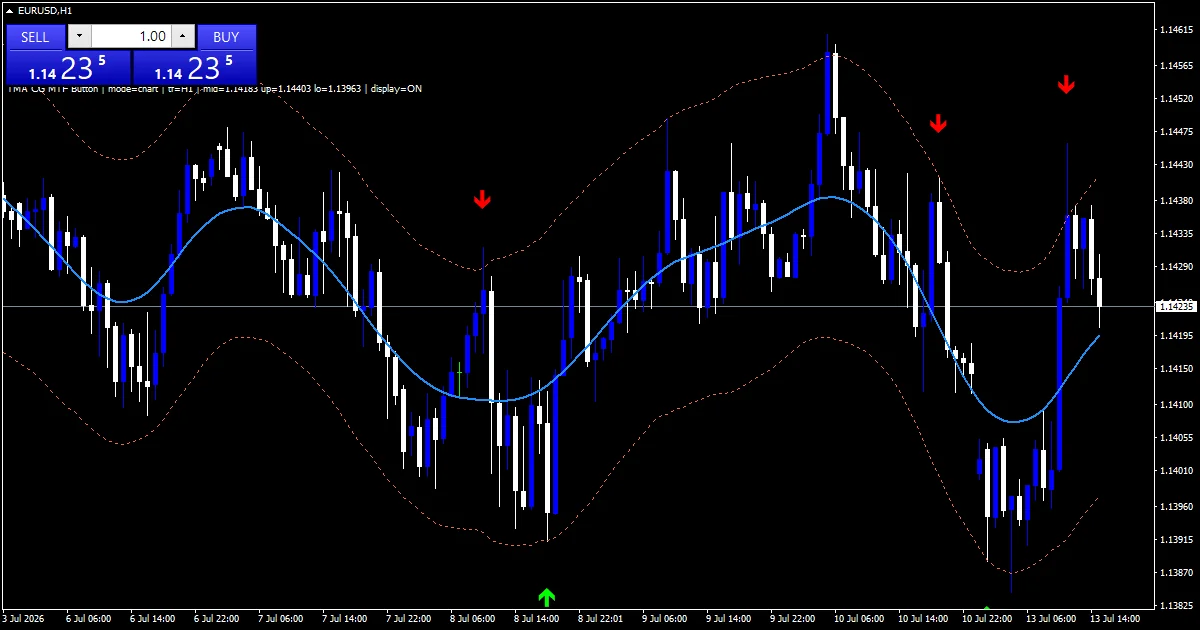
Chart choice
A centred channel suits ranging markets. On the hourly EURUSD screenshot price tags a band a few times a day. On M15 set `InpTimeframe` to H1 for a steadier channel, and on H4 tags mark larger swings.
Where the TMA CG MTF Button Indicator struggles
The newest twelve bars redraw, and marks on them can change.
Strong trends ride one band for days.
Mean-reversion marks fight breakouts.
Only popups report by default.
Copy the compiled TMA CG MTF Button Indicator file into your MQL4/Indicators folder, and the MT5 build into MQL5/Indicators, then restart the terminal and drag it onto a chart. The step-by-step guide with screenshots is at how to install MT4 and MT5 indicators.
Background reading on the method behind the TMA CG MTF Button Indicator: Moving average on Wikipedia, Average True Range at Investopedia.
Download the TMA CG MTF Button Indicator for MT4 and MT5
The zip holds the compiled TMA CG MTF Button Indicator build for MT4 and MT5, plus a short README. Compiled files only, no source. Enter your email below and the download link arrives in your inbox.
Download this indicator free
Enter your email and the file is yours. You also get the full MT4 and MT5 library.
FAQ
Why does the TMA CG Mid line redraw?
Each point averages twelve bars before it and twelve after it. The newest twelve bars do not have future bars yet, so their values change as new bars arrive.
Can a TMA CG Buy mark disappear later?
Yes, on the newest twelve bars. If the redrawn band moves away from a bar that tagged it, that mark can go. Marks older than twelve bars stay where they are.
What does the ShowButton toggle do?
It places a small button on the chart that hides or shows the channel with one click. The indicator and its settings stay loaded while the channel is hidden.
What happens with InpTimeframe set to H4 on an H1 chart?
The channel is built from H4 bars and stretched across your hourly chart. It moves more slowly and redraws over twelve H4 bars instead of twelve hourly ones.
Are results guaranteed?
No. Trading involves risk. Results are not guaranteed; past performance is not indicative of future results. Use the TMA CG MTF Button Indicator as one input. Always backtest before trading live.
Category: this is part of our Signal and Forecast collection. Browse more Signal and Forecast for MetaTrader, or explore every MT4 indicator and MT5 indicator on the site.
External references
- For background on this concept, see Currency substitution on Wikipedia.
- For broader market context, see Kagi Charts at StockCharts ChartSchool.

About the author
Written by Dominic Walsh, a Forex trader and MT4/MT5 indicator, Expert Advisor and script developer. Every tool on forexmt4systems.com is tested on live charts before release and ships with ready-to-use compiled MT4 (.ex4) and MT5 (.ex5) files. Learn more about the trader and developer behind this site.
How we build, test and correct every tool: Editorial & Testing Policy. Trading carries risk; see the disclaimer.