
A ribbon earns its keep by showing agreement at a glance. The trend ribbon indicator spreads six exponential averages evenly from eight bars out to forty-eight, shades them from pale aqua to navy, and marks the bar where the fastest line crosses the slowest one.
This build ships as a compiled .ex4 for MT4 and .ex5 for MT5; the screenshots below come from EURUSD H1.
| Platforms | MT4 (.ex4) + MT5 (.ex5) |
|---|---|
| Chart window | Main price chart |
| Plots | 8: Ribbon 1, Ribbon 2, Ribbon 3, Ribbon 4, Ribbon 5, Ribbon 6, Ribbon Buy, Ribbon Sell |
| Alerts | popup, push notification, email, sound |
| Inputs | 11 |
What you see once it loads
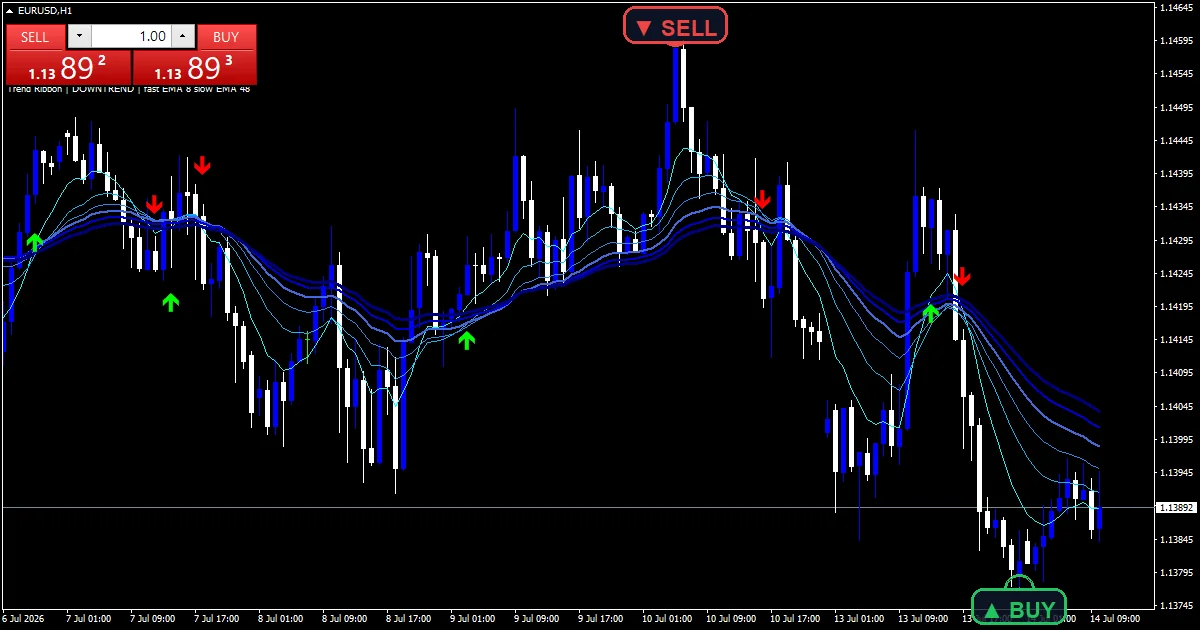
Six ribbon lines and two marks.
`Ribbon 1` traces aqua as the quickest line.
`Ribbon 6` traces navy at width 3 as the slowest.
Widths grow from one to three as the lines slow.
`Ribbon Buy` prints lime using arrow 233.
`Ribbon Sell` prints red using arrow 234.
- Ribbon 1: line, aqua, width 1
- Ribbon 2: line, deep sky blue, width 1
- Ribbon 3: line, dodger blue, width 1
- Ribbon 4: line, royal blue, width 2
- Ribbon 5: line, medium blue, width 2
- Ribbon 6: line, navy, width 3
- Ribbon Buy: arrow, lime, width 2, arrow code 233
- Ribbon Sell: arrow, red, width 2, arrow code 234
What the code actually computes
Spreading the lengths
`FastPeriod` `8` and `SlowPeriod` `48` bound the ribbon. Four more lines sit at even steps between them, so the band widens smoothly as a trend builds.
Flip on the outer pair
Only the outer pair decides a mark. When the quickest line crosses above the slowest, the buy prints; the lines between are there for you to read by eye.
Spacing the marks
`ATRPeriod` `14` gives a range figure, and `ArrowOffsetATR` `0.6` sets each mark that fraction of it away from the candle.
What the output means
Lines fanned wide mean the pace is steady.
Lines pinched together mean the trend is stalling.
Pale over dark means the short end leads upward.
The mark only fires on the outer pair.
`ShowArrows` hides the marks and keeps the ribbon.
Warm-up needs forty-eight bars.
Alert channels in this build: popup, push notification, email and sound, one message per closed bar.
The outer pair flipping is what gets reported. `EnableAlerts` decides whether it goes out and a popup handles it by default, while the handset, mail and desktop clip behind `SoundFile` wait.
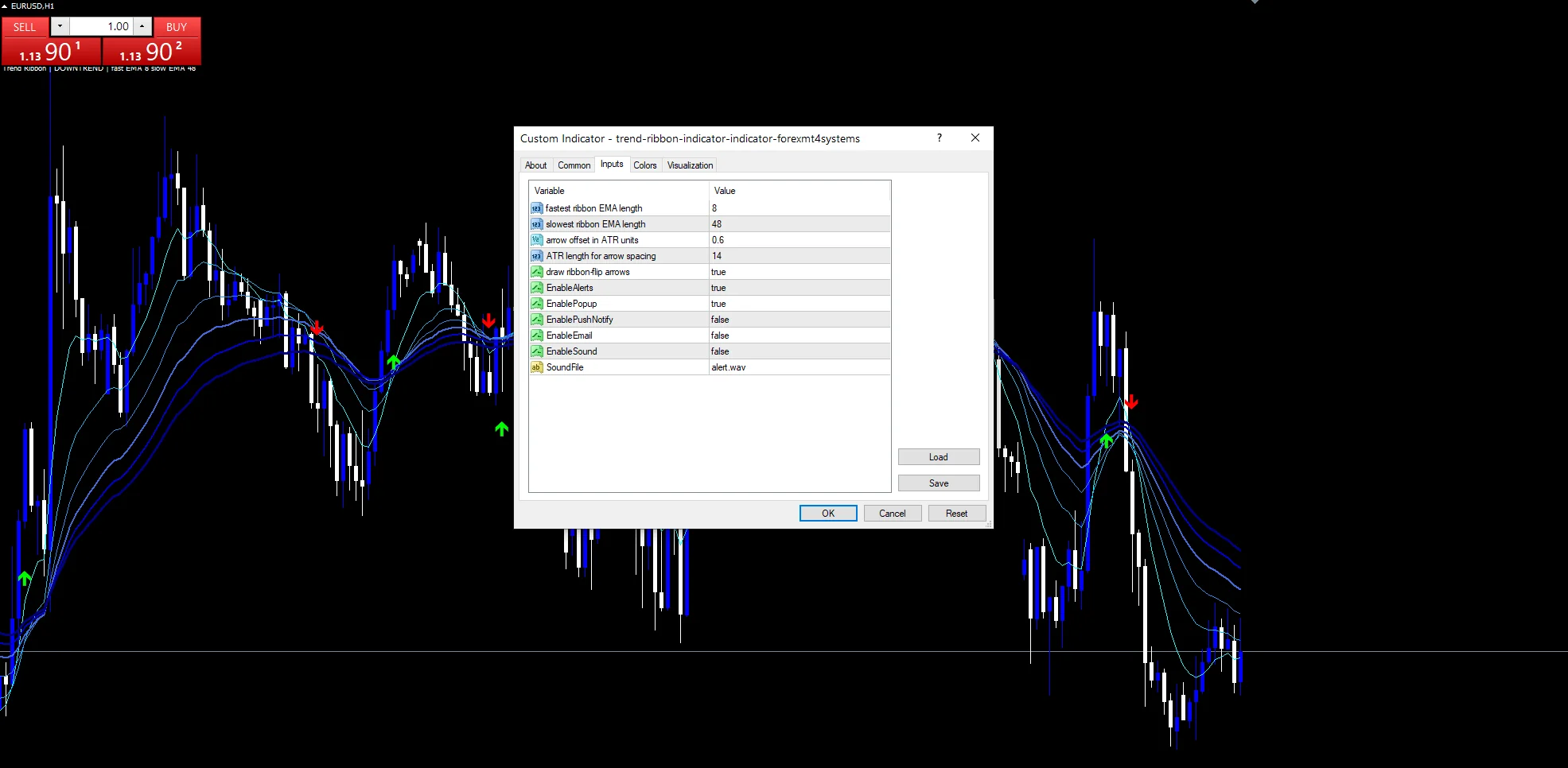
Every Trend Ribbon Indicator input
Core settings
| Setting | What it does | Default |
|---|---|---|
FastPeriod |
fastest ribbon EMA length. Length of the quickest ribbon line, `8`. | 8 |
SlowPeriod |
slowest ribbon EMA length. Length of the slowest, `48`. | 48 |
ATRPeriod |
ATR length for arrow spacing. Window behind mark spacing, `14`. | 14 |
Display settings
| Setting | What it does | Default |
|---|---|---|
ArrowOffsetATR |
arrow offset in ATR units. Range share used as the gap, `0.6`. | 0.6 |
ShowArrows |
draw ribbon-flip arrows. Draw the flip marks, `true`. | on |
Alert settings
| Setting | What it does | Default |
|---|---|---|
EnableAlerts |
Decides whether a flip is reported, `true`. | on |
EnablePopup |
A popup handles it, `true`. | on |
EnablePushNotify |
A handset can take it, `false`. | off |
EnableEmail |
Mail can take it, `false`. | off |
EnableSound |
(see inputs panel) | off |
SoundFile |
The desktop clip, `”alert.wav”`. | alert.wav |
Fitting the settings to a market
Forty-eight bars at the slow end wants a chart with steady trends. EURUSD H1 is the reference chart, where a flip comes every few days. On M5 the ribbon tangles often. On D1 a single fan can last a season.
What it misses
An outer-pair flip arrives late by design.
Pinched ribbons produce flips that fail fast.
Six lines add clutter to a busy chart.
Agreement between averages is not a forecast.
Copy the compiled Trend Ribbon Indicator file into your MQL4/Indicators folder, and the MT5 build into MQL5/Indicators, then restart the terminal and drag it onto a chart. The step-by-step guide with screenshots is at how to install MT4 and MT5 indicators.
Background reading on the method behind the Trend Ribbon Indicator: Moving Average Ribbon at Investopedia, Exponential smoothing on Wikipedia.
Download the Trend Ribbon Indicator for MT4 and MT5
The zip holds the compiled Trend Ribbon Indicator build for MT4 and MT5, plus a short README. Compiled files only, no source. Enter your email below and the download link arrives in your inbox.
Download this indicator free
Enter your email and the file is yours. You also get the full MT4 and MT5 library.
FAQ
Which lines decide a Ribbon Buy mark?
Only the quickest and the slowest. `Ribbon 1` crossing above `Ribbon 6` prints the buy; the four lines between them show the shape of the trend but play no part in the test.
How are Ribbon 2 to Ribbon 5 spaced out?
They sit at even steps between `FastPeriod` `8` and `SlowPeriod` `48`. That spacing is what makes the band open and close smoothly rather than in jumps.
What does a pinched ribbon mean?
All six lines agree on roughly the same price, which happens when a trend stalls. Flips from a pinched ribbon tend to reverse quickly, so they deserve less weight.
Can I keep the ribbon but drop the marks?
Yes. Setting `ShowArrows` to false hides the flip marks and leaves all six lines in place, which suits anyone who reads the fan by eye.
Are results guaranteed?
No. Trading involves risk. Results are not guaranteed; past performance is not indicative of future results. Use the Trend Ribbon Indicator as one input. Always backtest before trading live.
Category: this is part of our Trend collection. Browse more Trend for MetaTrader, or explore every MT4 indicator and MT5 indicator on the site.
External references
- Learn more about the underlying method in Foreign exchange hedge on Wikipedia.
- For wider market background, see Us Treasury Yields at StockCharts ChartSchool.

About the author
Written by Dominic Walsh, a Forex trader and MT4/MT5 indicator, Expert Advisor and script developer. Every tool on forexmt4systems.com is tested on live charts before release and ships with ready-to-use compiled MT4 (.ex4) and MT5 (.ex5) files. Learn more about the trader and developer behind this site.
How we build, test and correct every tool: Editorial & Testing Policy. Trading carries risk; see the disclaimer.