
Plenty of candles look like order blocks after the fact. The valid order block indicator asks for proof: a displacement body of 1.2 ranges that also closes beyond the previous bar’s extreme. Only then does it box the last opposite candle, mark it, and later grey the box once price trades back into it.
This build ships as a compiled .ex4 for MT4 and .ex5 for MT5; the screenshots below come from EURUSD H1.
| Platforms | MT4 (.ex4) + MT5 (.ex5) |
|---|---|
| Chart window | Main price chart |
| Plots | 2: Bullish OB, Bearish OB |
| Alerts | popup, push notification, email, sound |
| Inputs | 16 |
The visual side
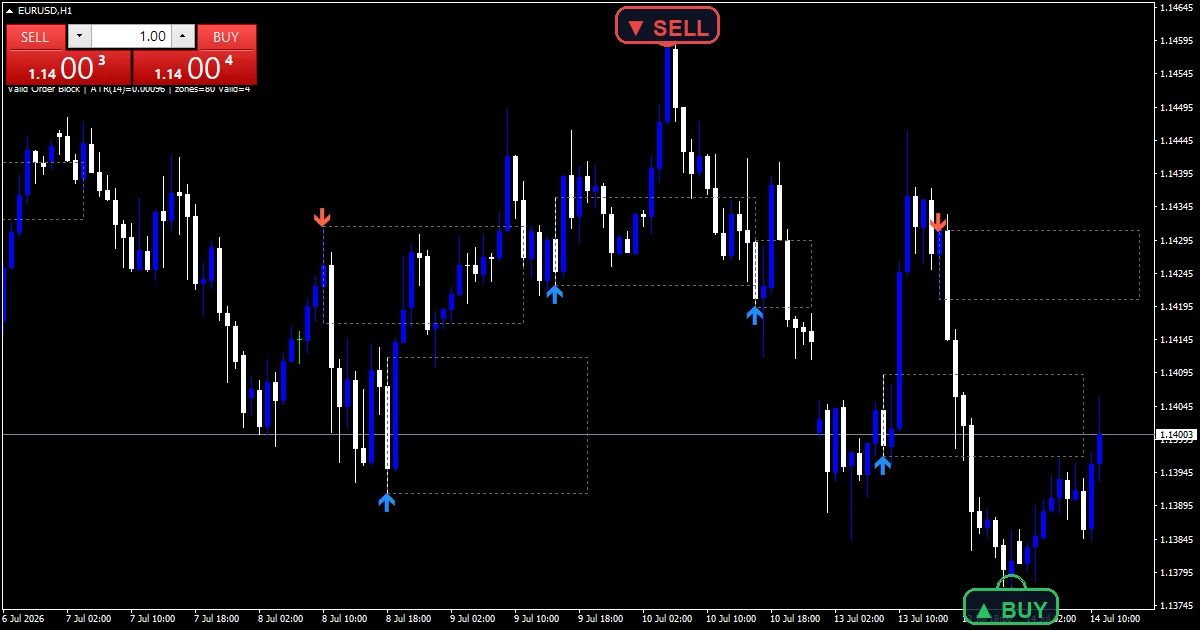
Dotted boxes and two marks on price.
`BullColor` `clrDodgerBlue` outlines demand blocks.
`BearColor` `clrTomato` outlines supply blocks.
`MitigatedColor` `clrDimGray` shows touched blocks.
`Bullish OB` prints dodger blue with arrow 233.
`Bearish OB` prints tomato with arrow 234.
- Bullish OB: arrow, dodger blue, arrow code 233
- Bearish OB: arrow, tomato, arrow code 234
What the file computes
Validation
An up body larger than `DisplaceMult` `1.20` ranges must also close above the previous bar’s high. Without that close, nothing gets boxed.
Block candle
The build looks back `OBLookback` `3` bars for the last down candle. Its full range becomes the demand block.
Mitigation
Once any later bar overlaps the block, `ShowMitigated` recolours it grey. Each box extends `ExtendBars` `24` bars to the right.
Making sense of the output
Blue boxes are valid demand.
Tomato boxes are valid supply.
Grey boxes show blocks price has returned to.
Marks sit on the block candle itself.
`MaxZones` `80` caps the tracked blocks.
`ArrowPadPips` `1.0` spaces the marks.
Alert channels in this build: popup, push notification, email and sound, one message per closed bar.
Two events report: a newly validated block and the first return into one. `EnableAlerts` controls both, and only the popup delivers at first.
Every Valid Order Block Indicator input
Core settings
| Setting | What it does | Default |
|---|---|---|
AtrPeriod |
ATR period for displacement scale. Range window, `14`. | 14 |
DisplaceMult |
displacement body vs ATR (lower = more zones). Validation body in ranges, `1.20`. | 1.20 |
OBLookback |
bars back to find the opposite candle. Bars searched for the block candle, `3`. | 3 |
ExtendBars |
how far right to extend each zone. Box length in bars, `24`. | 24 |
MaxZones |
active zone objects to retain. Blocks tracked at most, `80`. | 80 |
Display settings
| Setting | What it does | Default |
|---|---|---|
ShowMitigated |
recolour a block once mitigated. Grey touched blocks, `true`. | on |
BullColor |
Demand colour, `clrDodgerBlue`. | dodger blue |
BearColor |
(see inputs panel) | tomato |
MitigatedColor |
Touched colour, `clrDimGray`. | dim gray |
ArrowPadPips |
arrow offset from candle in pips. Mark gap in pips, `1.0`. | 1.0 |
Alert settings
| Setting | What it does | Default |
|---|---|---|
EnableAlerts |
Master alert switch, `true`. | on |
EnablePopup |
(see inputs panel) | on |
EnablePushNotify |
(see inputs panel) | off |
EnableEmail |
(see inputs panel) | off |
EnableSound |
(see inputs panel) | off |
SoundFile |
(see inputs panel) | alert.wav |
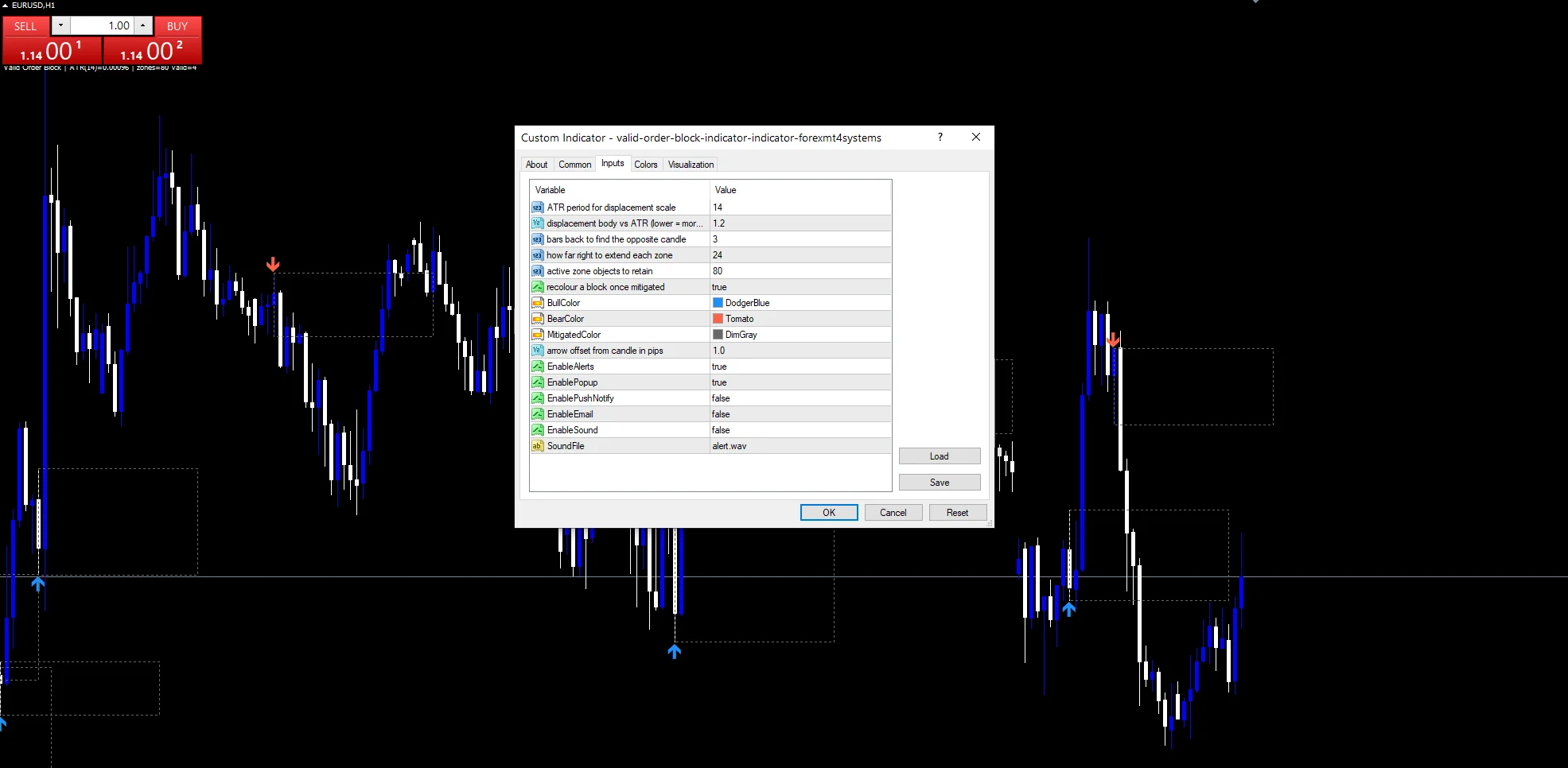
Fitting the settings to a market
Validated displacements appear a few times a day on hourly charts. EURUSD H1 is the reference chart. On M15 they come with every session push. On H4 each valid block stands out.
The weak spots
Validation still happens after the fact.
Full-range blocks include long wicks.
Grey boxes can still react later.
The popup is the only route on by default.
Copy the compiled Valid Order Block Indicator file into your MQL4/Indicators folder, and the MT5 build into MQL5/Indicators, then restart the terminal and drag it onto a chart. The step-by-step guide with screenshots is at how to install MT4 and MT5 indicators.
Download the Valid Order Block Indicator for MT4 and MT5
The zip holds the compiled Valid Order Block Indicator build for MT4 and MT5, plus a short README. Compiled files only, no source. Enter your email below and the download link arrives in your inbox.
Download this indicator free
Enter your email and the file is yours. You also get the full MT4 and MT5 library.
FAQ
What makes a Bullish OB valid here?
A later up body larger than 1.2 average ranges that also closes above the previous bar’s high. Without that close the build skips the candle, so it gets no box and no mark.
Why does a Bullish OB mark sit on an older candle?
The mark goes on the block candle, which formed before the displacement. It appears once the displacement bar closes, and from then on it never moves or disappears.
When does ShowMitigated turn a box grey?
When any bar after the block overlaps its range. The build also sends a mitigation message on the newest closed bar when alerts are on, so you hear about the first return.
What does DisplaceMult 1.20 trade off?
Lower values accept smaller pushes and box more candles. Higher values keep only the strongest displacements, which leaves fewer blocks on the chart, but each one is firmer.
Are results guaranteed?
No. Trading involves risk. Results are not guaranteed; past performance is not indicative of future results. Use the Valid Order Block Indicator as one input. Always backtest before trading live.
Category: this is part of our Smart Money collection. Browse more Smart Money for MetaTrader, or explore every MT4 indicator and MT5 indicator on the site.
External references
- Learn more about the underlying method in Larization on Wikipedia.
- For wider market background, see Mcclellan Oscillator at StockCharts ChartSchool.

About the author
Written by Dominic Walsh, a Forex trader and MT4/MT5 indicator, Expert Advisor and script developer. Every tool on forexmt4systems.com is tested on live charts before release and ships with ready-to-use compiled MT4 (.ex4) and MT5 (.ex5) files. Learn more about the trader and developer behind this site.
How we build, test and correct every tool: Editorial & Testing Policy. Trading carries risk; see the disclaimer.