
The wpr divergence indicator watches Williams %R for a disagreement with price. Two pivots on the line get paired up. If price made a lower low while the line made a higher one, a mark appears in the pane.
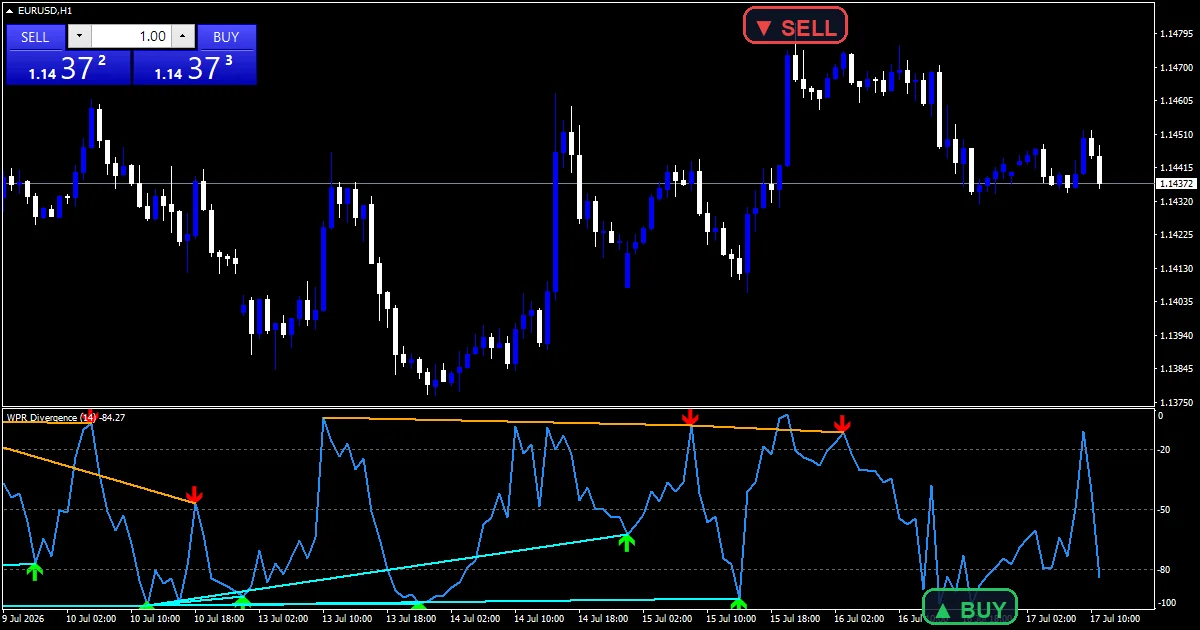
This build ships as a compiled .ex4 for MT4 and .ex5 for MT5; the screenshots below come from EURUSD H1.
| Platforms | MT4 (.ex4) + MT5 (.ex5) |
|---|---|
| Chart window | Separate window (levels -20 / -50 / -80) |
| Plots | 3: Williams %R, Bullish Divergence, Bearish Divergence |
| Alerts | popup, push notification, email, sound |
| Inputs | 15 |
What the Wpr Divergence Indicator shows
Williams %R runs in its own pane in dodger blue, bounded between -100 and 0.
Reference levels sit at -20, -50 and -80.
`Bullish Divergence` uses arrow 233 and `Bearish Divergence` uses 234.
`InpShowLines` adds a trend object joining the two pivots, aqua for bullish and orange for bearish.
- Williams %R: line, dodger blue, width 2
- Bullish Divergence: arrow, lime, width 2, arrow code 233
- Bearish Divergence: arrow, red, width 2, arrow code 234
How it all fits together
Pivots come first
`InpPivotBars` `5` confirms a pivot with five bars either side. The line has to beat all ten of them. That makes every pivot five bars late by design.
Then the pair gets tested
`InpMinGap` `5` and `InpMaxLookback` `120` bound how far apart the two pivots may sit. A pair inside that window goes to the comparison. `InpScanBars` `1500` limits how much history the scan covers.
Price and line must disagree
A bullish mark needs a lower price low against a higher line low. The bearish case mirrors it. Both readings come from the same two bars, so the comparison stays clean.
What each colour means
A mark sits `InpArrowOffset` `3.0` %R units away from the line, not from price.
The connector shows which two pivots produced the reading.
Aqua joins a bullish pair and orange joins a bearish one.
Levels at -20 and -80 give context, though the test ignores them.
Alert channels in this build: popup, push notification, email and sound, one message per closed bar.
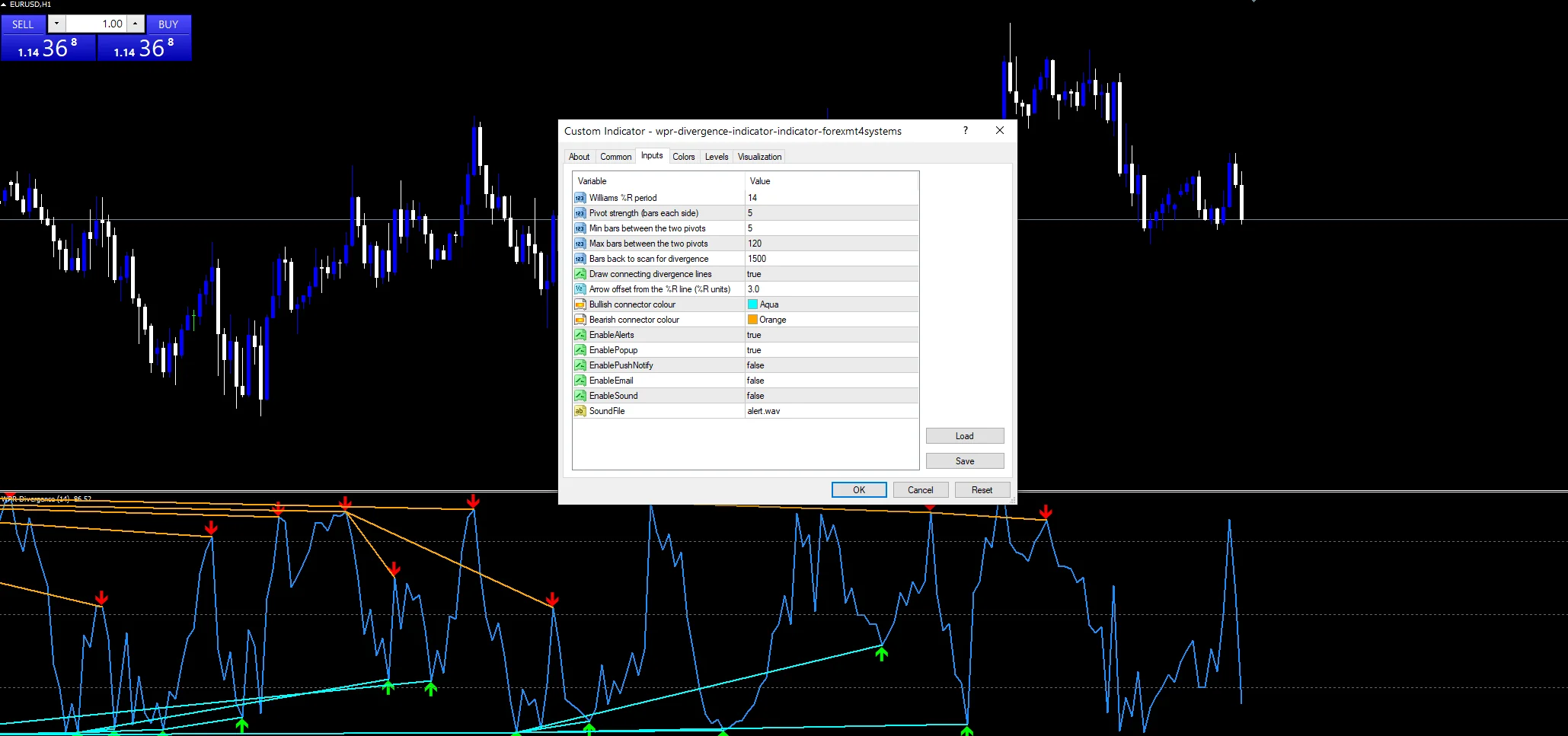
`EnableAlerts` arrives on with `EnablePopup` set true. `EnablePushNotify`, `EnableEmail` and `EnableSound` wait until you switch them. `SoundFile` names the clip. The test reads a closed bar and sends a single message per bar.
Every Wpr Divergence Indicator input
Core settings
| Setting | What it does | Default |
|---|---|---|
InpWprPeriod |
Williams %R period. Bars in the Williams %R window, default `14`. | 14 |
InpPivotBars |
Pivot strength (bars each side). Bars either side that confirm a pivot, default `5`. | 5 |
InpMinGap |
Min bars between the two pivots. Closest the two pivots may sit, in bars, default `5`. | 5 |
InpMaxLookback |
Max bars between the two pivots. Widest the two pivots may sit, in bars, default `120`. | 120 |
InpScanBars |
Bars back to scan for divergence. History the scan covers, default `1500`. | 1500 |
Display settings
| Setting | What it does | Default |
|---|---|---|
InpShowLines |
Draw connecting divergence lines. Draw the connector between paired pivots, default `true`. | on |
InpArrowOffset |
Arrow offset from the %R line (%R units). Gap between mark and line, in %R units, default `3.0`. | 3.0 |
InpBullLineColor |
Bullish connector colour. Connector colour on the bullish side, default `clrAqua`. | aqua |
InpBearLineColor |
Bearish connector colour. Connector colour on the bearish side, default `clrOrange`. | orange |
Alert settings
| Setting | What it does | Default |
|---|---|---|
EnableAlerts |
(see inputs panel) | on |
EnablePopup |
(see inputs panel) | on |
EnablePushNotify |
(see inputs panel) | off |
EnableEmail |
(see inputs panel) | off |
EnableSound |
(see inputs panel) | off |
SoundFile |
(see inputs panel) | alert.wav |
Placing it well
Divergence needs swings worth comparing. EURUSD H1 is the reference chart, where `InpMaxLookback` `120` reaches five days back. On M5 the pairs come thick and most mean little. Swing charts give fewer marks and cleaner ones.
The weak spots
Every pivot confirms five bars after the fact, so each mark arrives late.
A disagreement can run for a long stretch before price responds, or never resolve.
`InpScanBars` `1500` caps the history, so an older pair outside that window never gets tested.
Copy the compiled Wpr Divergence Indicator file into your MQL4/Indicators folder, and the MT5 build into MQL5/Indicators, then restart the terminal and drag it onto a chart. The step-by-step guide with screenshots is at how to install MT4 and MT5 indicators.
Background reading on the method behind the Wpr Divergence Indicator: Alternative public offering on Wikipedia, Correlation Coefficient at StockCharts ChartSchool.
Download the Wpr Divergence Indicator for MT4 and MT5
The zip holds the compiled Wpr Divergence Indicator build for MT4 and MT5, plus a short README. Compiled files only, no source. Enter your email below and the download link arrives in your inbox.
Download this indicator free
Enter your email and the file is yours. You also get the full MT4 and MT5 library.
FAQ
How late is an InpPivotBars 5 pivot?
Five bars, always. The line has to beat its neighbours on both sides, so the fifth newer bar is the earliest one that can confirm it. On EURUSD H1 that puts every mark five hours after the turn itself.
What does InpMaxLookback 120 bound?
How far apart the two pivots may sit. Anything wider than a hundred and twenty bars gets ignored. Narrow it and only nearby pairs count, which cuts the number of marks and usually lifts their relevance.
Why does InpArrowOffset use %R units?
Because the arrows live in the oscillator pane rather than on price. Three %R units is a fixed slice of a hundred-point range, so the gap looks the same on any instrument. A price offset would not travel that way.
What does InpShowLines draw?
A trend object between the two pivots behind a reading. Aqua joins a bullish pair and orange joins a bearish one. Set it false when the pane gets busy, and the arrows stay in place either way.
Are results guaranteed?
No. Trading involves risk. Results are not guaranteed; past performance is not indicative of future results. Use the Wpr Divergence Indicator as one input. Always backtest before trading live.
Category: this is part of our Oscillators collection. Browse more Oscillators for MetaTrader, or explore every MT4 indicator and MT5 indicator on the site.
External references
- Learn more about the underlying method in Alternative public offering on Wikipedia.
- For wider market background, see Correlation Coefficient at StockCharts ChartSchool.

About the author
Written by Dominic Walsh, a Forex trader and MT4/MT5 indicator, Expert Advisor and script developer. Every tool on forexmt4systems.com is tested on live charts before release and ships with ready-to-use compiled MT4 (.ex4) and MT5 (.ex5) files. Learn more about the trader and developer behind this site.
How we build, test and correct every tool: Editorial & Testing Policy. Trading carries risk; see the disclaimer.