
Entering an extreme zone only says a move has stretched. Leaving one says the stretching stopped. The better overbought oversold indicator marks that second event, which is the difference the name points at. Its reading smooths where each close sits inside a twenty-one bar range.
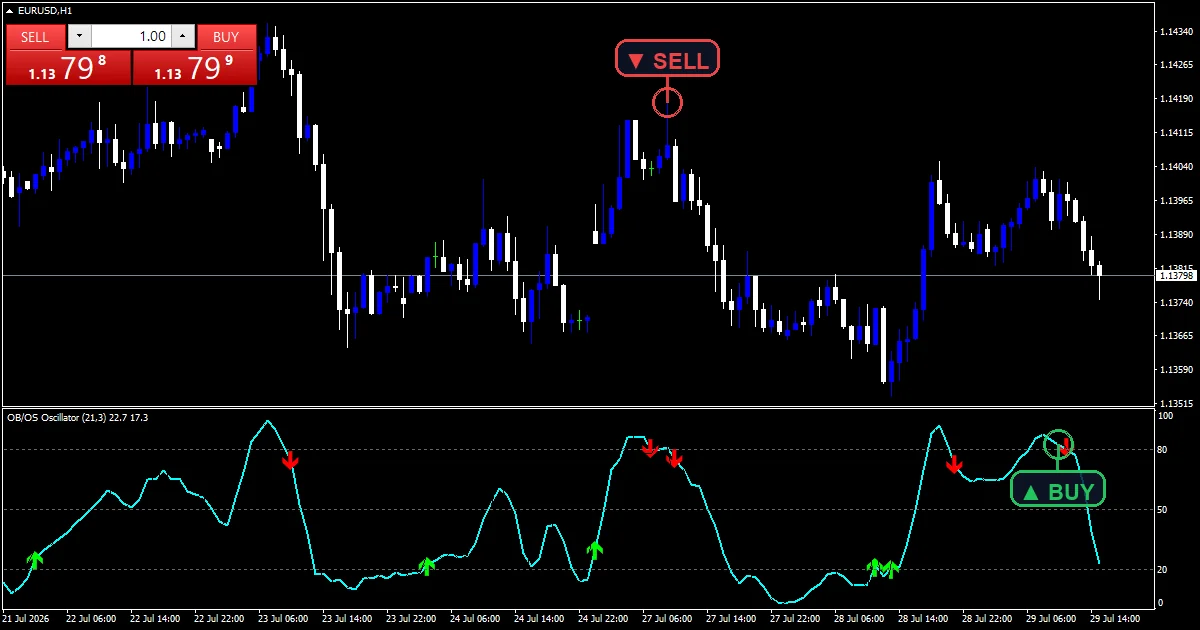
This build ships as a compiled .ex4 for MT4 and .ex5 for MT5; the screenshots below come from EURUSD H1.
| Platforms | MT4 (.ex4) + MT5 (.ex5) |
|---|---|
| Chart window | Separate window (levels 20 / 50 / 80) |
| Plots | 3: OB/OS Oscillator, Leave Oversold, Leave Overbought |
| Alerts | popup, push notification, email, sound |
| Inputs | 10 |
Plots, colours and placement
One line and two marks in the pane.
`OB/OS Oscillator` runs aqua at width 2.
`Leave Oversold` uses arrow 233 in lime.
`Leave Overbought` uses arrow 234 in red.
Levels sit at twenty, fifty and eighty.
The scale runs zero to one hundred and stays there.
- OB/OS Oscillator: line, aqua, width 2
- Leave Oversold: arrow, lime, width 2, arrow code 233
- Leave Overbought: arrow, red, width 2, arrow code 234
What feeds each plot
Position in the range
`InpPeriod` `21` bars give a highest high and a lowest low. Where the close sits between those two, as a percentage, is the raw reading.
One smoothing pass
Raw values jump on every bar. `InpSmooth` `3` averages them, which steadies the line without pushing it far behind price.
Leaving, not entering
The mark needs two bars. The previous one has to sit inside a zone and the current one outside it. Entering a zone prints nothing at all.
How to read it
Above `InpOverBought` `80.0` closes sit near the top of the range.
Below `InpOverSold` `20.0` they sit near the bottom.
Fifty is the middle of the window.
A mark says the reading has just left a zone.
The reading can stay inside a zone for a long run.
Twenty-one bars is a little longer than the usual fourteen.
Alert channels in this build: popup, push notification, email and sound, one message per closed bar.
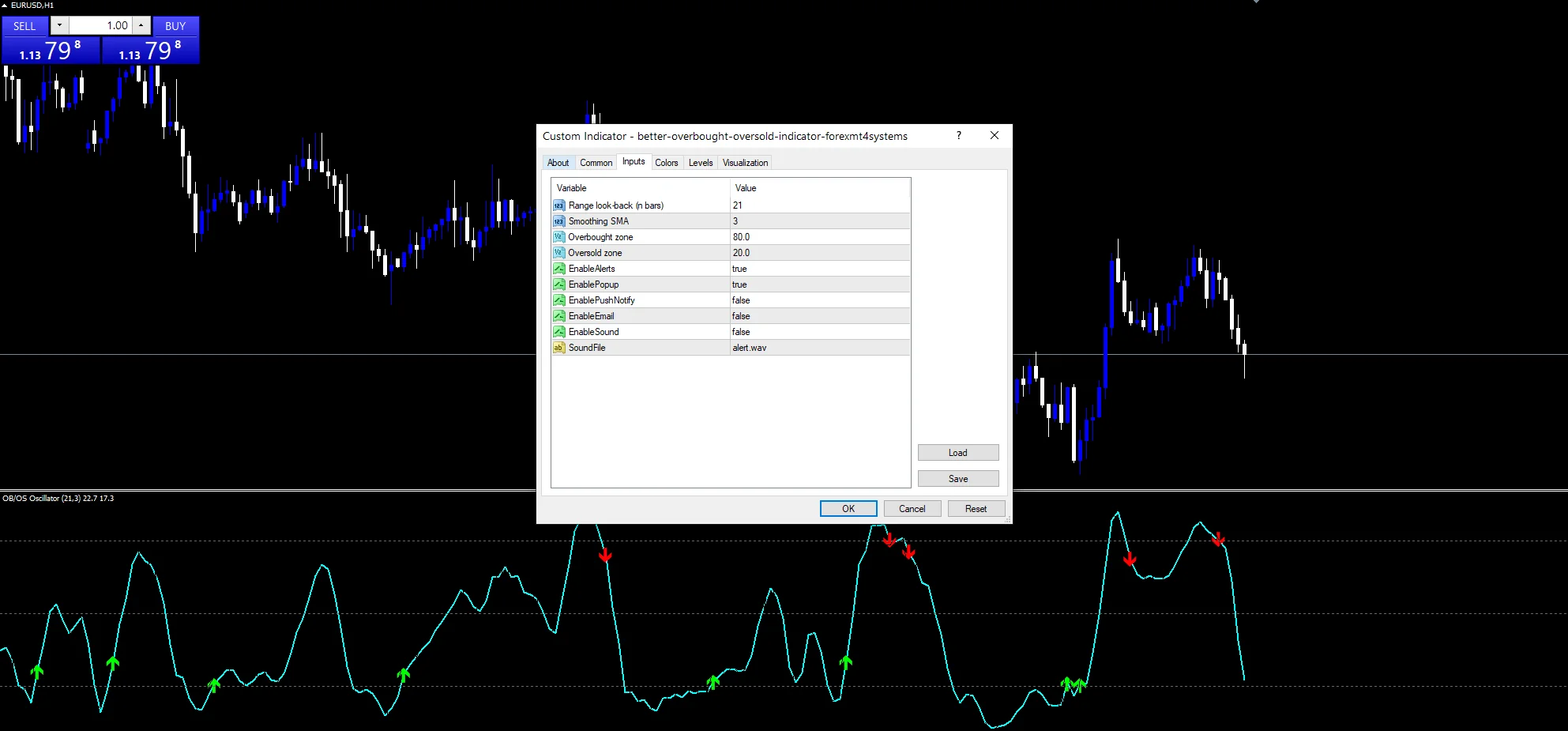
`EnableAlerts` covers the zone-exit alerts and starts true with `EnablePopup`. `EnablePushNotify` reaches a phone, `EnableEmail` posts mail and `EnableSound` plays `SoundFile`. Those three begin off, and exits report once a bar.
Every Better Overbought Oversold Indicator input
Core settings
| Setting | What it does | Default |
|---|---|---|
InpPeriod |
Range look-back (n bars). Bars in the range window, `21`. | 21 |
InpSmooth |
Smoothing SMA. Bars in the smoothing pass, `3`. | 3 |
InpOverBought |
Overbought zone. Upper zone edge, `80.0`. | 80.0 |
InpOverSold |
Oversold zone. Lower zone edge, `20.0`. | 20.0 |
Alert settings
| Setting | What it does | Default |
|---|---|---|
EnableAlerts |
Master switch, `true`. | on |
EnablePopup |
Box in the terminal, `true`. | on |
EnablePushNotify |
Buzz on a phone, `false`. | off |
EnableEmail |
Mail on a zone exit, `false`. | off |
EnableSound |
Cue on a zone exit, `false`. | off |
SoundFile |
Which clip plays, `”alert.wav”`. | alert.wav |
Where to run it
Twenty-one bars covers about a session on an hourly chart. EURUSD H1 is the reference chart. Zone exits come a few times a week there. On M5 the line crosses the zones all day. On daily bars each exit covers a month.
What this one cannot tell you
A bounded reading pins at an extreme through a trend.
Leaving a zone can happen mid-move rather than at a turn.
One outsized bar sets the range for twenty-one bars.
A single smoothing pass still leaves the line jumpy on fast charts.
Copy the compiled Better Overbought Oversold Indicator file into your MQL4/Indicators folder, and the MT5 build into MQL5/Indicators, then restart the terminal and drag it onto a chart. The step-by-step guide with screenshots is at how to install MT4 and MT5 indicators.
Download the Better Overbought Oversold Indicator for MT4 and MT5
The zip holds the compiled Better Overbought Oversold Indicator build for MT4 and MT5, plus a short README. Compiled files only, no source. Enter your email below and the download link arrives in your inbox.
Download this indicator free
Enter your email and the file is yours. You also get the full MT4 and MT5 library.
FAQ
Why does Leave Oversold mark an exit, not entry?
Because entering an extreme only says the move has stretched, and it can hold there for many bars. Leaving the zone marks where that stretching stops, which arrives later but says more.
What does InpPeriod 21 measure?
The highest high and the lowest low of the last twenty-one bars. It then places the close as a percentage between those two, so the reading describes position in the recent range and nothing else.
Is InpSmooth 3 enough smoothing?
Three bars is a deliberate compromise. It steadies the raw reading without the lag a longer pass adds. On a fast chart the line still moves sharply, which is the cost of staying responsive.
Can the reading sit above InpOverBought for long?
Yes, and that is the main thing to expect. In a sustained trend closes stay near the top of every window, so the line can hold above eighty for dozens of bars without any mark printing.
Are results guaranteed?
No. Trading involves risk. Results are not guaranteed; past performance is not indicative of future results. Use the Better Overbought Oversold Indicator as one input. Always backtest before trading live.
External references
- The core method is documented in Market saturation on Wikipedia.
- Additional market context is at Breakout at Investopedia.

About the author
Written by Dominic Walsh, a Forex trader and MT4/MT5 indicator, Expert Advisor and script developer. Every tool on forexmt4systems.com is tested on live charts before release and ships with ready-to-use compiled MT4 (.ex4) and MT5 (.ex5) files. Learn more about the trader and developer behind this site.
How we build, test and correct every tool: Editorial & Testing Policy. Trading carries risk; see the disclaimer.