
The line the zigzag indicator draws is the classic one. What this build adds sits in the Data Window: two hidden buffers reporting how large each completed leg was, in points and in bars. That turns a visual tool into something you can measure structure with.
This build ships as a compiled .ex4 for MT4 and .ex5 for MT5; the screenshots below come from EURUSD H1.
| Platforms | MT4 (.ex4) + MT5 (.ex5) |
|---|---|
| Chart window | Main price chart |
| Plots | 3: ZigZag, Swing (points), Swing (bars) |
| Alerts | popup, push notification, email, sound |
| Inputs | 11 |
A look at the plots
One drawn section plus two hidden buffers.
`ZigZag` joins pivot to pivot as a section.
`Swing (points)` reports leg size and draws nothing.
`Swing (bars)` reports leg length the same way.
Both surface only in the Data Window.
No arrows or markers appear.
- ZigZag: section
- Swing (points): hidden buffer
- Swing (bars): hidden buffer
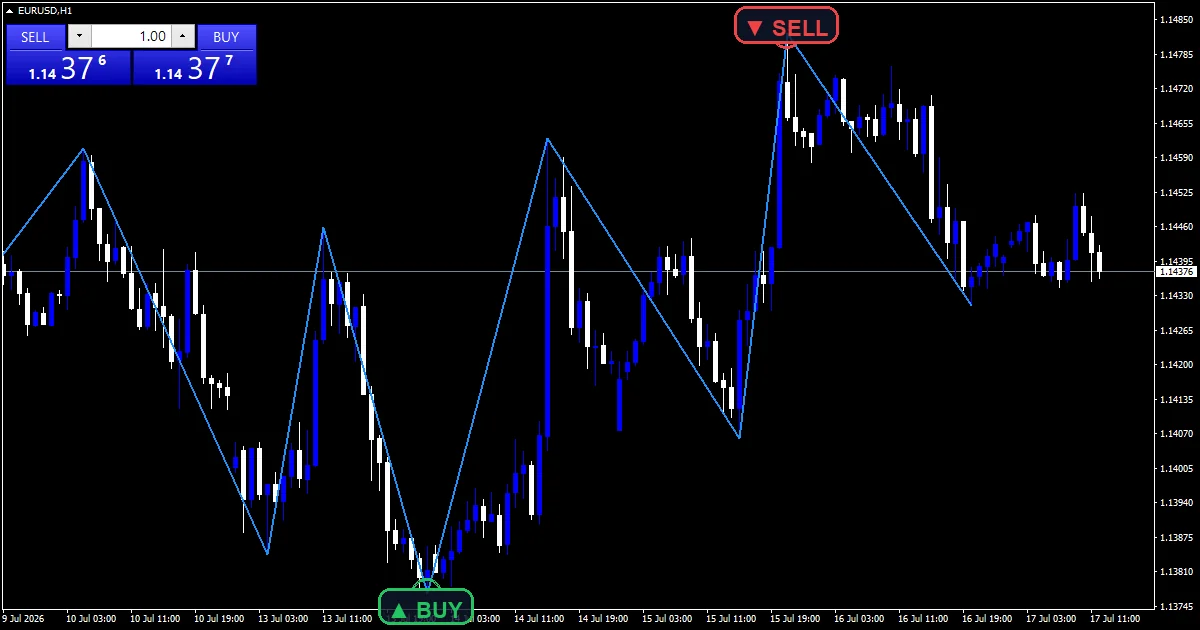
What happens on each bar
Finding an extreme
`Depth` `21` bars go into the search for a lowest low or highest high. That wide window puts pivots further apart than most swing tools manage.
Two filters
`Deviation` `5` sets how far price must move away from an extremum before it counts. `Backstep` `3` limits how far back a pivot may be revised.
Measuring the leg
Each new pivot closes one. The distance back to the previous pivot fills one hidden buffer, and the bar count between them fills the other.
How to read what it shows
Only completed legs carry a measurement.
The newest leg can still move until its pivot confirms.
`ShowSwingStats` fills the two hidden buffers.
Point size and bar count together describe leg shape.
A steep leg is large in points and short in bars.
`MaxBarsToScan` `3000` caps how much gets built.
Alert channels in this build: popup, push notification, email and sound, one message per closed bar.
Messages here follow a newly confirmed pivot. `EnableAlerts` governs whether any go out and arrives on with `EnablePopup`. Three routes stay dark: `EnablePushNotify` to your phone, `EnableEmail` out through the terminal, and `EnableSound` playing `SoundFile`.
Every ZigZag Indicator input
Core settings
| Setting | What it does | Default |
|---|---|---|
Depth |
Depth: bars scanned for a local extremum. Bars scanned for an extremum, `21`. | 21 |
Deviation |
Deviation: min move from the extremum (points). Points price must move away, `5`. | 5 |
Backstep |
Backstep: bars an extremum may be revised back. Bars a pivot may be revised back, `3`. | 3 |
Display settings
| Setting | What it does | Default |
|---|---|---|
MaxBarsToScan |
History bars to build (0 = all). Depth of the build, `3000`. | 3000 |
ShowSwingStats |
Show leg size (points/bars) in Data Window. Fill the two hidden buffers, `true`. | on |
Alert settings
| Setting | What it does | Default |
|---|---|---|
EnableAlerts |
Whether new-pivot messages go out, `true`. | on |
EnablePopup |
Shows one in a MetaTrader box, `true`. | on |
EnablePushNotify |
Sends one to your phone, `false`. | off |
EnableEmail |
Mails one out, `false`. | off |
EnableSound |
(see inputs panel) | off |
SoundFile |
Clip the pivot sound uses, `”alert.wav”`. | alert.wav |

Home chart
A twenty-one bar depth wants a chart where swings mean something. EURUSD H1 is the reference chart, where a leg spans a day or two. Drop to M5 and the legs are noise. Move to H4 and each one covers a fortnight.
Where the ZigZag Indicator struggles
The newest leg repaints until its pivot confirms.
A wide depth misses smaller structure entirely.
Three thousand bars of build costs real time.
Leg statistics describe the past, not the next leg.
Copy the compiled ZigZag Indicator file into your MQL4/Indicators folder, and the MT5 build into MQL5/Indicators, then restart the terminal and drag it onto a chart. The step-by-step guide with screenshots is at how to install MT4 and MT5 indicators.
Background reading on the method behind the ZigZag Indicator: Swing trading on Wikipedia, Swing Trading at Investopedia.
Download the ZigZag Indicator for MT4 and MT5
The zip holds the compiled ZigZag Indicator build for MT4 and MT5, plus a short README. Compiled files only, no source. Enter your email below and the download link arrives in your inbox.
Download this indicator free
Enter your email and the file is yours. You also get the full MT4 and MT5 library.
FAQ
What do the Swing (points) and Swing (bars) buffers hold?
The size and length of each completed leg. One records the distance in points between two pivots, the other the bar count between them, and both surface only in the Data Window.
Why is Depth 21 wider than the usual twelve?
To keep pivots meaningful. A wider scan finds fewer extremes, so the legs that survive describe real structure rather than every small wobble, at the cost of missing the smaller swings entirely.
Does the newest leg repaint?
Yes, and that comes with the method. Until a pivot has enough bars beyond it to confirm, the current leg can extend or move, which holds true for every zigzag ever written.
What does Backstep 3 prevent?
A pivot moving too far back. Without it the algorithm could keep relocating an extreme as new bars arrive, and three bars caps how much of that repositioning it may do.
Are results guaranteed?
No. Trading involves risk. Results are not guaranteed; past performance is not indicative of future results. Use the ZigZag Indicator as one input. Always backtest before trading live.
Category: this is part of our Support and Resistance collection. Browse more Support and Resistance for MetaTrader, or explore every MT4 indicator and MT5 indicator on the site.
External references
- For background on this concept, see Central counterparty clearing on Wikipedia.
- For broader market context, see Prings Special K at StockCharts ChartSchool.

About the author
Written by Dominic Walsh, a Forex trader and MT4/MT5 indicator, Expert Advisor and script developer. Every tool on forexmt4systems.com is tested on live charts before release and ships with ready-to-use compiled MT4 (.ex4) and MT5 (.ex5) files. Learn more about the trader and developer behind this site.
How we build, test and correct every tool: Editorial & Testing Policy. Trading carries risk; see the disclaimer.