
An inside bar is a pause; a small one is a tight pause. The small inside bar indicator dots every bar that sits inside the previous one and spans at most 70% of its range. It then marks it buy or sell depending on whether it closes above or below a 50-bar exponential average.
This build ships as a compiled .ex4 for MT4 and .ex5 for MT5.
| Platforms | MT4 (.ex4) + MT5 (.ex5) |
|---|---|
| Chart window | Main price chart |
| Plots | 4: Trend EMA, Buy, Sell, Small Inside Bar |
| Alerts | popup, push notification, email, sound |
| Inputs | 10 |
What the build actually draws
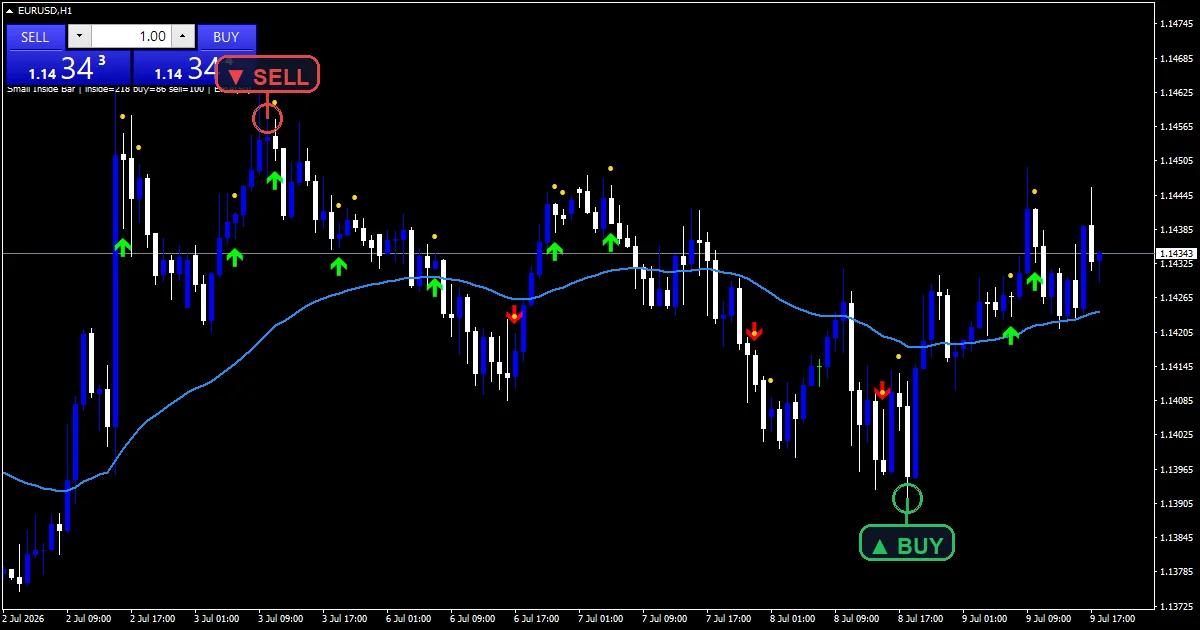
One line, dots and two marks on price.
`Trend EMA` traces dodger blue at width 2.
`Small Inside Bar` dots gold above qualifying bars.
`Buy` prints lime with arrow 233.
`Sell` prints red with arrow 234.
`ArrowGapPips` `3.0` spaces marks and dots.
- Trend EMA: line, dodger blue, width 2
- Buy: arrow, lime, width 2, arrow code 233
- Sell: arrow, red, width 2, arrow code 234
- Small Inside Bar: arrow, gold, width 1, arrow code 159
From price to plot
Inside
The bar’s high must sit below the mother bar‘s high and its low above the mother bar’s low.
Small
`SmallRatio` `0.70` caps the inside bar’s range at 70% of the mother bar’s range.
Direction
`EmaPeriod` `50` decides the side. A close above the line marks a buy, below it a sell. `MinBarsBetween` `3` spaces the marks.
What matters on screen
Gold dots show every small inside bar.
Lime marks, however, sit above the trend line.
Red marks, by contrast, sit below it.
Still, a mark is a pause, not a break.
So watch the mother bar’s range for the break.
Warm-up needs about fifty bars.
Alert channels in this build: popup, push notification, email and sound, one message per closed bar.
Each marked inside bar sends one message. `EnableAlerts` passes it on, with the popup the single route enabled out of the box.
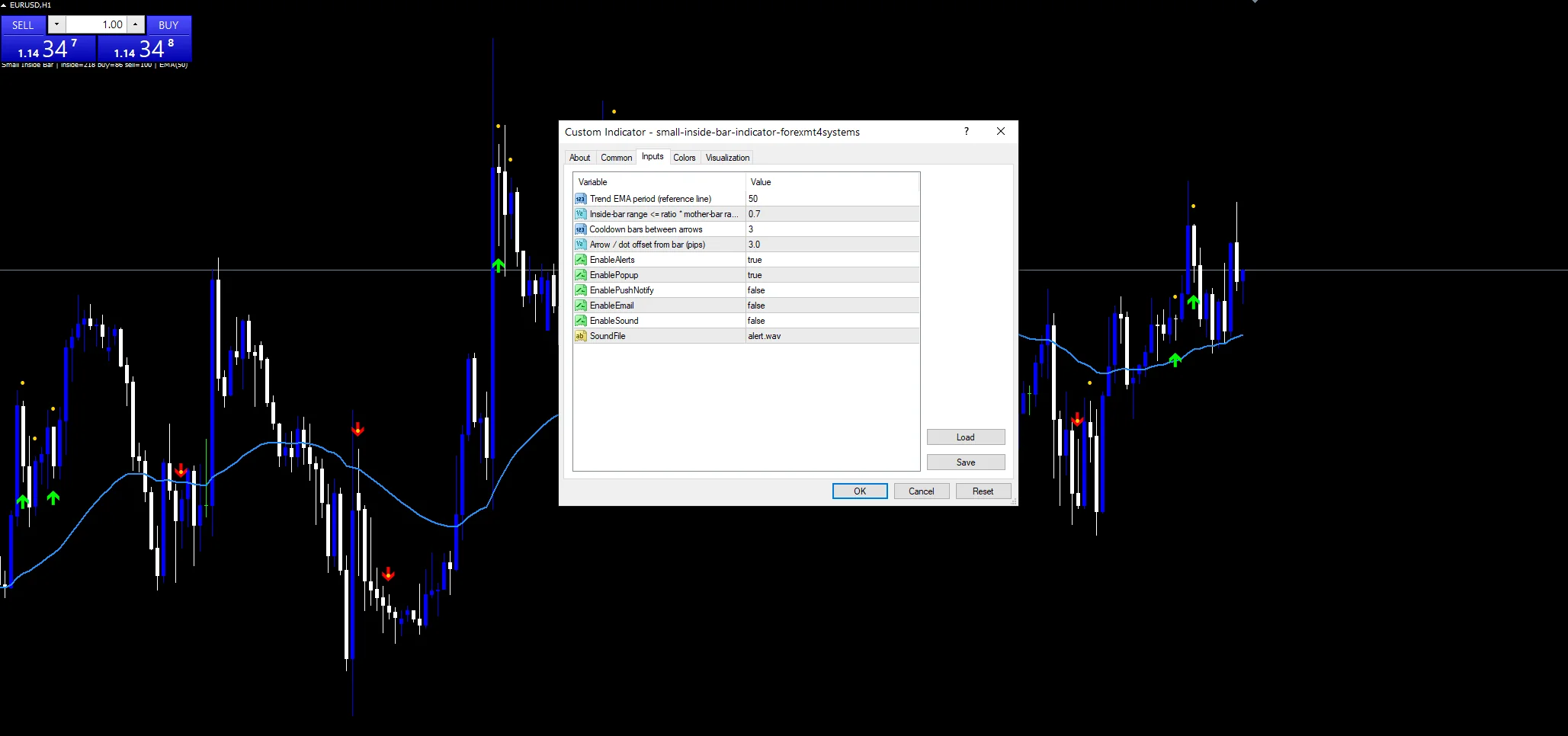
Every Small Inside Bar Indicator input
Core settings
| Setting | What it does | Default |
|---|---|---|
EmaPeriod |
Trend EMA period (reference line). Trend line length, `50`. | 50 |
SmallRatio |
Inside-bar range <= ratio * mother-bar range. Largest inside range versus mother, `0.70`. | 0.70 |
MinBarsBetween |
Cooldown bars between arrows. Bars between marks, `3`. | 3 |
Display settings
| Setting | What it does | Default |
|---|---|---|
ArrowGapPips |
Arrow / dot offset from bar (pips). Mark and dot gap in pips, `3.0`. | 3.0 |
Alert settings
| Setting | What it does | Default |
|---|---|---|
EnableAlerts |
Master alert switch, `true`. | on |
EnablePopup |
Popup, `true`. | on |
EnablePushNotify |
Mobile route, `false`. | off |
EnableEmail |
Email route, `false`. | off |
EnableSound |
Speaker, `false`. | off |
SoundFile |
Speaker clip, `”alert.wav”`. | alert.wav |
What to load it on
Small inside bars show up daily on hourly charts. EURUSD H1 is the reference chart. On M15 they appear through quiet sessions. On D1 they are the classic compression setup before a range break.
What it misses
The mark shows a pause, not a direction change.
Breaks of inside bars often fail both ways.
The 50 EMA side can flip quickly in ranges.
Only a popup reports until you change it.
Copy the compiled Small Inside Bar Indicator file into your MQL4/Indicators folder, and the MT5 build into MQL5/Indicators, then restart the terminal and drag it onto a chart. The step-by-step guide with screenshots is at how to install MT4 and MT5 indicators.
Download the Small Inside Bar Indicator for MT4 and MT5
The zip holds the compiled Small Inside Bar Indicator build for MT4 and MT5, plus a short README. Compiled files only, no source. Enter your email below and the download link arrives in your inbox.
Download this indicator free
Enter your email and the file is yours. You also get the full MT4 and MT5 library.
FAQ
What does SmallRatio 0.70 require?
The inside bar’s range must be no more than seventy percent of the mother bar’s range. Inside bars that nearly fill the mother bar are dotted out.
Why read the Buy side from a 50 EMA?
An inside bar has no direction of its own. The build borrows one from the trend line, so a pause above the line counts as a buy setup.
What is the gold Small Inside Bar dot for?
It marks every qualifying bar, including those blocked by the three-bar spacing rule. The arrows then show which of those dotted bars the build turned into signals.
How should a Small Inside Bar be traded?
Commonly by waiting for a close beyond the mother bar’s high or low. The mark only flags the compression; the build does not track the break.
Are results guaranteed?
No. Trading involves risk. Results are not guaranteed; past performance is not indicative of future results. Use the Small Inside Bar Indicator as one input. Always backtest before trading live.
Category: this is part of our Trend collection. Browse more Trend for MetaTrader, or explore every MT4 indicator and MT5 indicator on the site.
External references
- For background on this concept, see Stock market simulator on Wikipedia.
- For broader market context, see the investor corner at ESMA.

About the author
Written by Dominic Walsh, a Forex trader and MT4/MT5 indicator, Expert Advisor and script developer. Every tool on forexmt4systems.com is tested on live charts before release and ships with ready-to-use compiled MT4 (.ex4) and MT5 (.ex5) files. Learn more about the trader and developer behind this site.
How we build, test and correct every tool: Editorial & Testing Policy. Trading carries risk; see the disclaimer.