
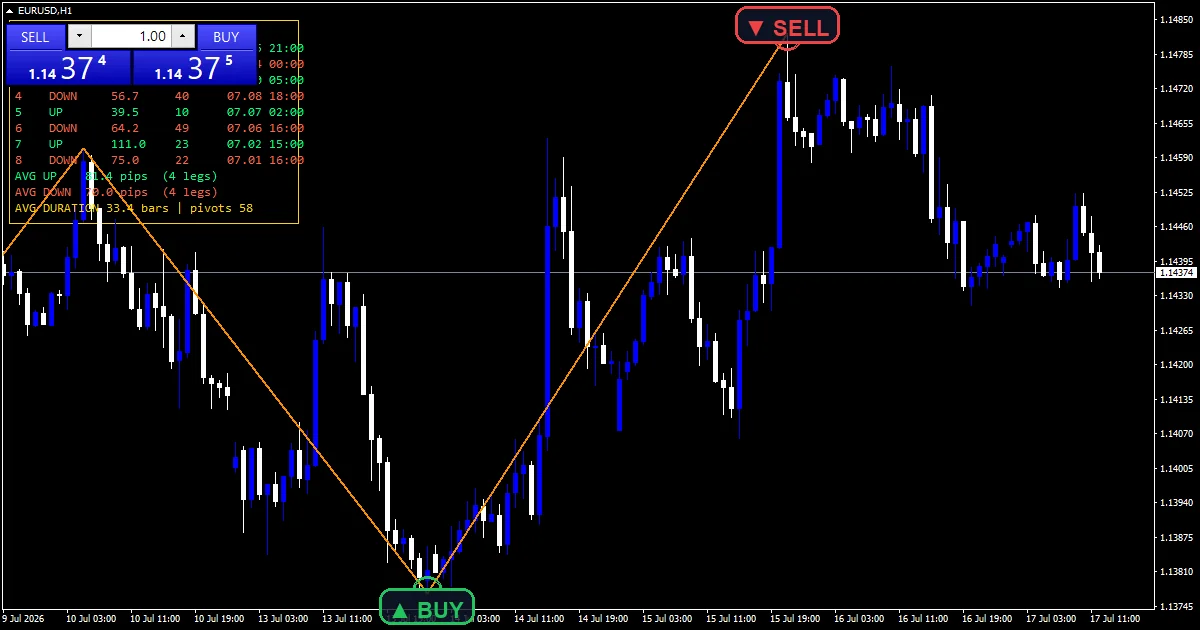
A zigzag shows swings; this one also measures them. The zigzag multi indicator joins swing highs and lows that sit at least 80 points apart, then prints a panel listing the last eight legs with their size in pips and length in bars, plus the average up leg, down leg and duration.
This build ships as a compiled .ex4 for MT4 and .ex5 for MT5; the screenshots below come from EURUSD H1.
| Platforms | MT4 (.ex4) + MT5 (.ex5) |
|---|---|
| Chart window | Main price chart |
| Plots | 1: ZigZag Swing |
| Alerts | popup, push notification, email, sound |
| Inputs | 22 |
What the file declares
A zigzag line and a statistics panel.
`ZigZag Swing` traces dark orange at width 2.
`ShowPanel` adds the leg table in the corner.
`UpLegColor` `clrSpringGreen` colours up legs.
`DnLegColor` `clrTomato` colours down legs.
`HeaderColor` `clrGold` colours the header.
- ZigZag Swing: section, dark orange, width 2
The method
Pivots
`Depth` `24` bars on each side confirm a swing. `Backstep` `4` keeps pivots at least four bars apart.
Filtering
A new swing must move `Deviation` `80` points from the last. A higher high replaces the previous high instead of adding a leg.
Statistics
`StatsLegs` `8` legs fill the table. Averages cover up legs, down legs and bars per leg.
What matters on screen
Each line segment is one leg.
The table lists legs newest first.
Average legs show typical swing size.
Average duration shows typical swing length.
The last leg can still extend.
`MaxBars` `2500` limits the scan.
Alert channels in this build: popup, push notification, email and sound, one message per closed bar.
A newly confirmed swing reports with the size of the leg it ended. `EnableAlerts` is the master switch, and only the popup delivers by default.
Every Zigzag Multi Indicator input
Core settings
| Setting | What it does | Default |
|---|---|---|
Depth |
Pivot half-width (bars each side). Bars on each side of a pivot, `24`. | 24 |
Deviation |
Min move between pivots (points). Smallest move between pivots in points, `80`. | 80 |
Backstep |
Min bars between pivots. Bars between pivots, `4`. | 4 |
StatsLegs |
Legs listed in the panel (N). Legs listed, `8`. | 8 |
Display settings
| Setting | What it does | Default |
|---|---|---|
ZzColor |
ZigZag line colour. Zigzag colour, `clrDarkOrange`. | dark orange |
ZzWidth |
ZigZag line width. | 2 |
ShowPanel |
Show swing-statistics panel. Show the leg table, `true`. | on |
PanelX |
Panel X (pixels). | 12 |
PanelY |
Panel Y (pixels). | 22 |
FontSize |
Panel font size. | 9 |
FontName |
Panel font. Panel font, `”Consolas”`. | Consolas |
HeaderColor |
Header text colour. | gold |
UpLegColor |
Up-leg text colour. | spring green |
DnLegColor |
Down-leg text colour. | tomato |
PanelBgColor |
Panel background colour. | black |
Alert settings
| Setting | What it does | Default |
|---|---|---|
MaxBars |
Max bars to scan. Bars scanned, `2500`. | 2500 |
EnableAlerts |
Master alert switch, `true`. | on |
EnablePopup |
Popup, `true`. | on |
EnablePushNotify |
(see inputs panel) | off |
EnableEmail |
(see inputs panel) | off |
EnableSound |
(see inputs panel) | off |
SoundFile |
(see inputs panel) | alert.wav |

Choosing a market
A 24-bar depth gives swings of a few days on hourly charts. EURUSD H1 is the reference chart. On M15 the same depth covers a session. On D1 each leg spans weeks.
Limits worth knowing
The newest leg can still redraw.
Averages depend on the depth setting.
Eighty points is small on volatile pairs.
Only the popup is on at the start.
Copy the compiled Zigzag Multi Indicator file into your MQL4/Indicators folder, and the MT5 build into MQL5/Indicators, then restart the terminal and drag it onto a chart. The step-by-step guide with screenshots is at how to install MT4 and MT5 indicators.
Related on forexmt4systems.com: Multi-Timeframe Strategy.
Background reading on the method behind the Zigzag Multi Indicator: Zig Zag Indicator at Investopedia, Swing trading on Wikipedia.
Download the Zigzag Multi Indicator for MT4 and MT5
The zip holds the compiled Zigzag Multi Indicator build for MT4 and MT5, plus a short README. Compiled files only, no source. Enter your email below and the download link arrives in your inbox.
Download this indicator free
Enter your email and the file is yours. You also get the full MT4 and MT5 library.
FAQ
What does Depth 24 decide?
How big a swing must be in bars. A high needs 24 lower bars on each side, so only swings of several days show on an hourly chart.
Why can the newest ZigZag Swing leg move?
Until the next opposite swing confirms, a new higher high replaces the last high. The final segment keeps stretching until the turn is locked in by a swing the other way.
What does the StatsLegs panel’s AVG DURATION line show?
The average number of bars per leg across the listed legs. It tells you how long a typical swing lasts on that chart and setting.
Is a Deviation of 80 points right for gold charts?
Usually not. Eighty points is eight pips on EURUSD but tiny on gold or indices, where it lets small wiggles through. Raise it until the legs match the swings you care about.
Are results guaranteed?
No. Trading involves risk. Results are not guaranteed; past performance is not indicative of future results. Use the Zigzag Multi Indicator as one input. Always backtest before trading live.
Category: this is part of our Volatility collection. Browse more Volatility for MetaTrader, or explore every MT4 indicator and MT5 indicator on the site.
External references
- For background on this concept, see Clearing (finance) on Wikipedia.
- For broader market context, see Negative Volume Index Nvi at StockCharts ChartSchool.

About the author
Written by Dominic Walsh, a Forex trader and MT4/MT5 indicator, Expert Advisor and script developer. Every tool on forexmt4systems.com is tested on live charts before release and ships with ready-to-use compiled MT4 (.ex4) and MT5 (.ex5) files. Learn more about the trader and developer behind this site.
How we build, test and correct every tool: Editorial & Testing Policy. Trading carries risk; see the disclaimer.