
An expert advisor turns a written trading rule into something a computer can follow. Ask a room of new traders what is an expert advisor, and half will answer robot, which works well enough as a starting point.
The longer answer matters far more. An expert advisor automates a process you already have, and it never invents one for you.
What Is an Expert Advisor in Plain Terms
MetaTrader calls its automated programs expert advisors. Each one attaches to a single chart and works only while that chart stays open.
Think of it as a very patient assistant. It reads prices, applies your rules and sends orders, and it never gets bored at three in the morning.
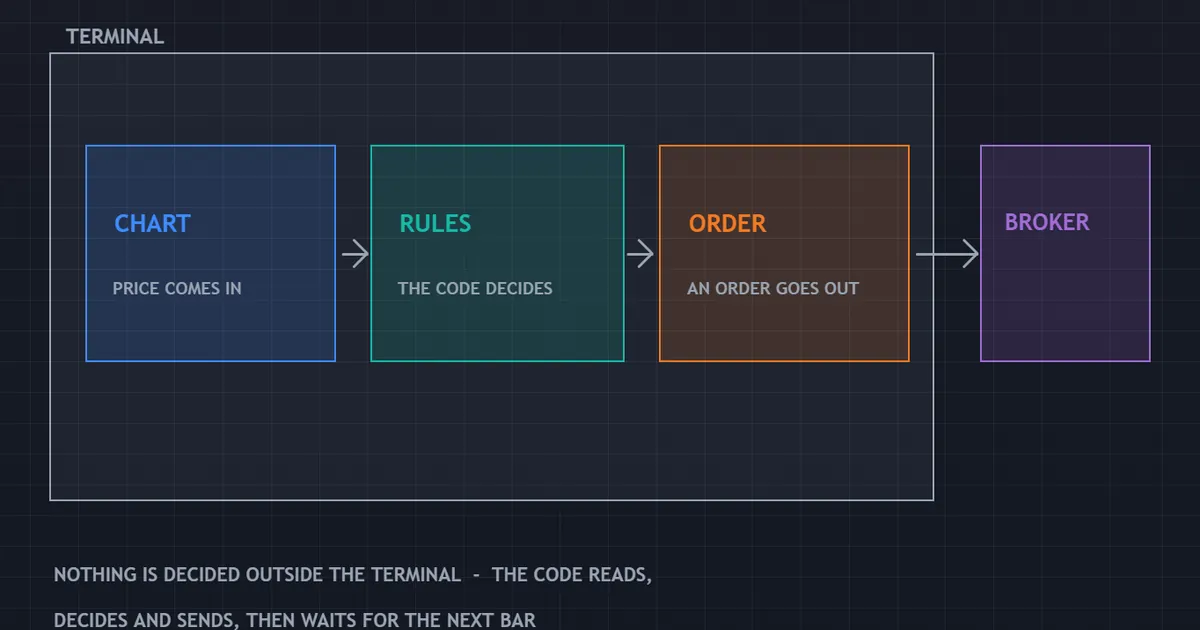
The panel above splits the job into its parts. Price arrives, the code decides, and the broker answers.
The Three Pieces That Make It Work
First comes the chart. It supplies the symbol, the timeframe and every fresh price the terminal receives.
Second comes the code. Your entry conditions, your exit conditions and your sizing formula all live inside it.
Third comes the link to your broker. Without that link, the program can calculate all day and place nothing.
Automation, Not Invention
Here sits the point most sales pages skip. Automation copies a decision process, and it cannot create an edge out of thin air.
If your rules lose money by hand, they will lose money faster on a machine. Speed multiplies whatever you feed it.
So the useful order of work runs one way. Build the process first, prove you can follow it, then hand the repetitive part to code.
Why the MetaTrader Name Confuses People
Other platforms use other words. Some call the same idea an algorithm, a bot, a script or a strategy.
All of them describe a program that reads market data and acts on rules. The MetaTrader label simply stuck, because MT4 reached retail traders early and stayed.
Our archive of MT4 indicators sits beside the same platform, though an indicator only draws. Drawing and ordering are separate jobs, and the folder each file needs differs too.
Expert Advisor, Indicator or Script: Three Separate Jobs
MetaTrader ships three kinds of add-on. Mixing them up wastes an evening, so the distinction deserves a minute.
| Type | What it does | Folder | Runs when |
|---|---|---|---|
| Expert advisor | Reads prices and can place, modify and close orders | Experts | Continuously, on every tick |
| Indicator | Draws lines, arrows or panels and places no orders | Indicators | Continuously, on every tick |
| Script | Performs one task on demand, then stops | Scripts | Once, when you drop it on a chart |
Why the Distinction Bites
An indicator dropped into the Experts folder will never appear where you expect. Nor will an expert advisor sitting among the indicators.
The Navigator panel sorts everything into those three headings. If a file refuses to show up, the folder explains it nine times out of ten.
They Often Work Together
Many programs read an indicator for their signal. The indicator draws the line, and the expert advisor reads the same values and acts.
That pairing explains a common setup error. Move the program without moving the indicator it depends on, and the code finds nothing to read.
How an Expert Advisor Handles a New Price
Every automated program follows one loop. Once you see the loop, the behaviour stops feeling mysterious.
- A price arrives. The terminal receives a tick and wakes the program.
- The code reads context. It checks recent bars, any open position and the account balance.
- Entry rules run. On most ticks nothing qualifies, so the program simply waits for the next one.
- An order takes shape. A qualifying signal produces a volume, a stop level and a target level.
- The broker replies. It fills the order, fills it at a different price, or rejects it outright.
- Management runs. Trailing stops, partial exits and time limits all update on the next tick.
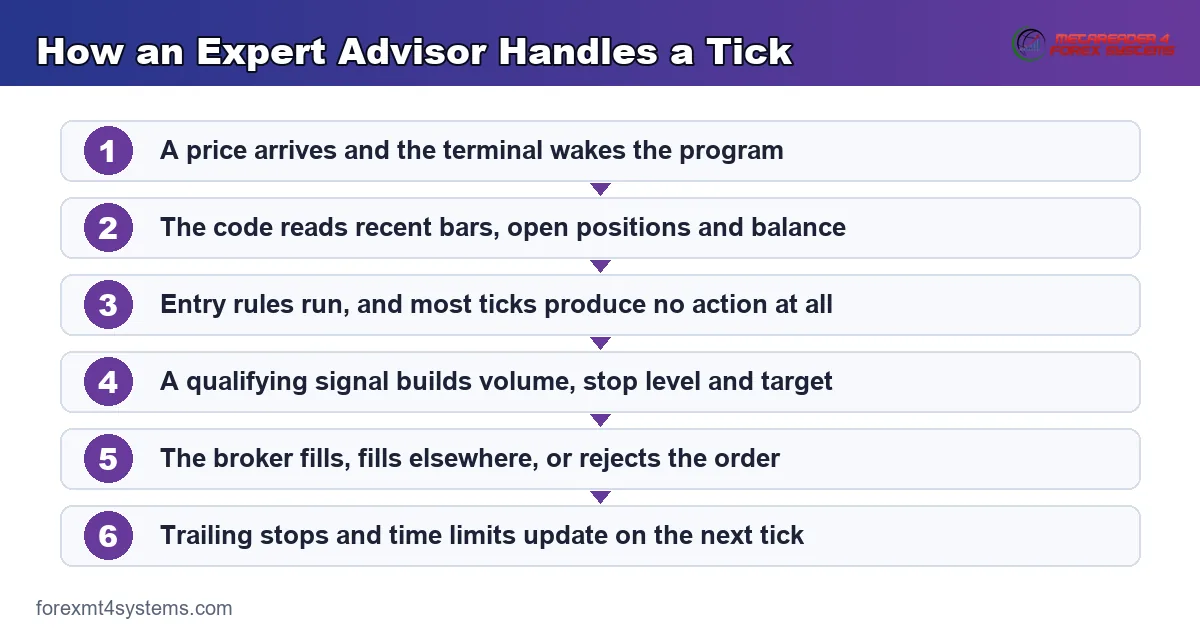
Notice step three. Doing nothing counts as the normal state, and a program that trades constantly usually carries rules that let far too much through.
Where the Files Live and Why the Terminal Matters
Installation trips up more beginners than the trading logic does. Luckily the path itself runs short.
The Experts Folder
Open your terminal, choose File, then Open Data Folder. Inside, the MQL4 or MQL5 directory holds a folder named Experts.
Compiled programs belong there. Restart the terminal afterwards, and the new name appears in the Navigator panel on the left.
Our downloads arrive as compiled files, ready to drop straight into that folder. Indicators belong in the Indicators folder instead, which catches plenty of people out on the first attempt.
Switching Automation On
Two switches decide whether anything trades at all. One sits on the terminal toolbar, and one sits inside the program’s own settings window.
A small face in the top right corner of the chart reports the result. Smiling means the program can act, while frowning means it cannot.
Check that face before you walk away. Traders lose whole sessions to a program that loaded correctly and never had permission to trade.
Why the Terminal Has to Stay Awake
An expert advisor only works while MetaTrader works. Close the platform, and every rule stops with it.
That matters most for exits. An entry that never fires costs you nothing, while a trailing stop that never updates can cost real money.
Traders answer this with a virtual private server. The terminal then lives on a machine that stays on, so your laptop lid can close without consequence.
The Input Settings That Actually Matter
Every program opens with a settings window. Most inputs are cosmetic, while a handful decide your whole experience.
Risk and Volume
Some programs ask for a fixed lot, and others ask for a percentage of the balance. Know which mode you are in before the first order.
Fixed lots keep exposure steady as the account grows or shrinks. Percentage sizing compounds in both directions, which cuts deeper during a losing run.
Stop and Target Distances
Distances usually appear in points rather than pips. On a five digit broker one pip equals ten points, so a stop of two hundred points means twenty pips.
Get that conversion wrong and your stop lands ten times too close. It ranks as the most common setup mistake traders report to us.
The Magic Number
The magic number tags every order a program places. It lets one program ignore trades belonging to another on the same account.
Give each program its own value. Two programs sharing a number will happily close each other’s positions.
Session and Spread Filters
A trading hours filter keeps the program out of thin markets. Set it in server time, which often differs from your local clock by several hours.
A maximum spread filter does similar work. It blocks entries when costs spike, which usually means a release just landed or the weekly open just arrived.
What an Expert Advisor Can and Cannot Do
Honest expectations save a great deal of grief. Split the job into two columns, and the picture clears up quickly.
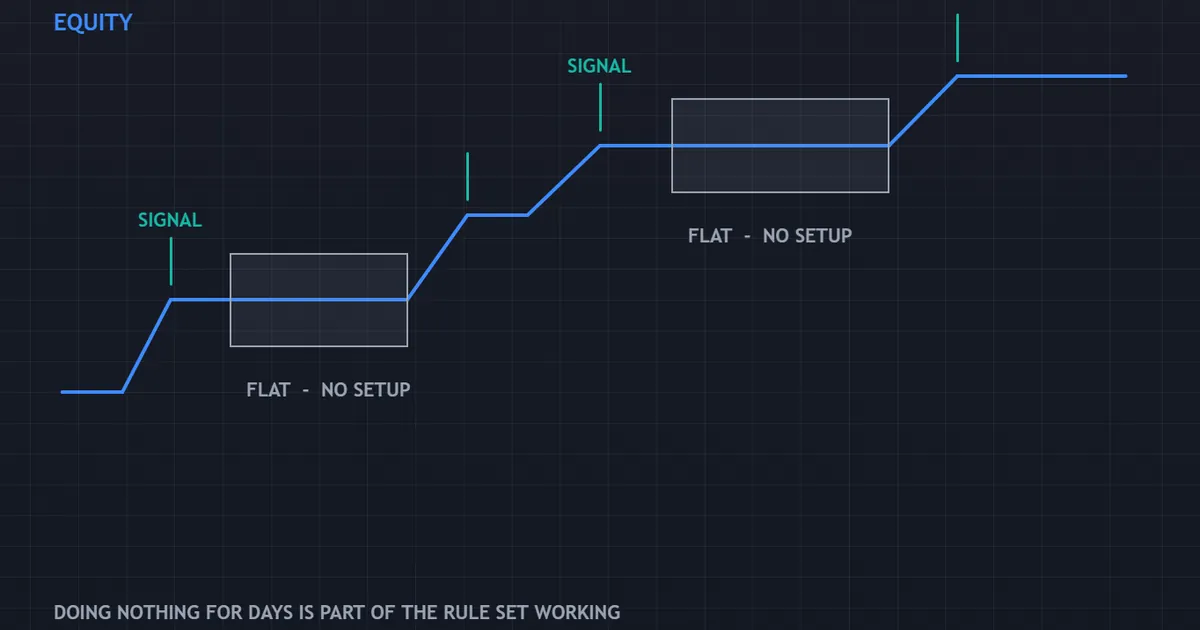
The equity panel above shows the shape automation tends to produce. Steps appear, then flat stretches arrive where the rules found nothing worth taking.
What the Program Handles Well
Consistency comes first. The same conditions produce the same action every time, without mood, fatigue or second thoughts.
Speed comes second. A stop moves the instant a bar closes, which no human hand can match across six charts at once.
Record keeping comes third. Every action lands in a log file, so your review works from real data rather than memory.
What Stays Your Job
Judgement stays with you. Deciding which rules deserve to run, and when to switch them off, sits well outside the code.
Risk stays with you too. The program applies the number you typed, and it holds no view on whether that number suits your account.
Market context stays with you as well. A quiet summer range and a central bank week look identical to a moving average.
The Limits Worth Repeating
No program predicts the next move. It applies a rule to data that has already printed, exactly as you would.
Nor does a program manage its own risk appetite. Our guide to risk per trade covers the number you must decide before the first order goes out.
One more limit deserves attention. A program cannot tell you that its own logic stopped suiting the market, and only your review will surface that.
Download the complete indicator database
Put these concepts on your charts. One email unlocks the full library of 1,380+ indicators with compiled MT4 and MT5 files, plus my TradingView scripts. No paywall, no spam, unsubscribe any time.
Get free access to my indicator database
One email unlocks 1,380+ free MT4, MT5 and TradingView indicators — the complete library. No single-tool download; you get the whole database.
Common Mistakes With Expert Advisors
Five habits cause most of the damage. Each one carries a plain fix.
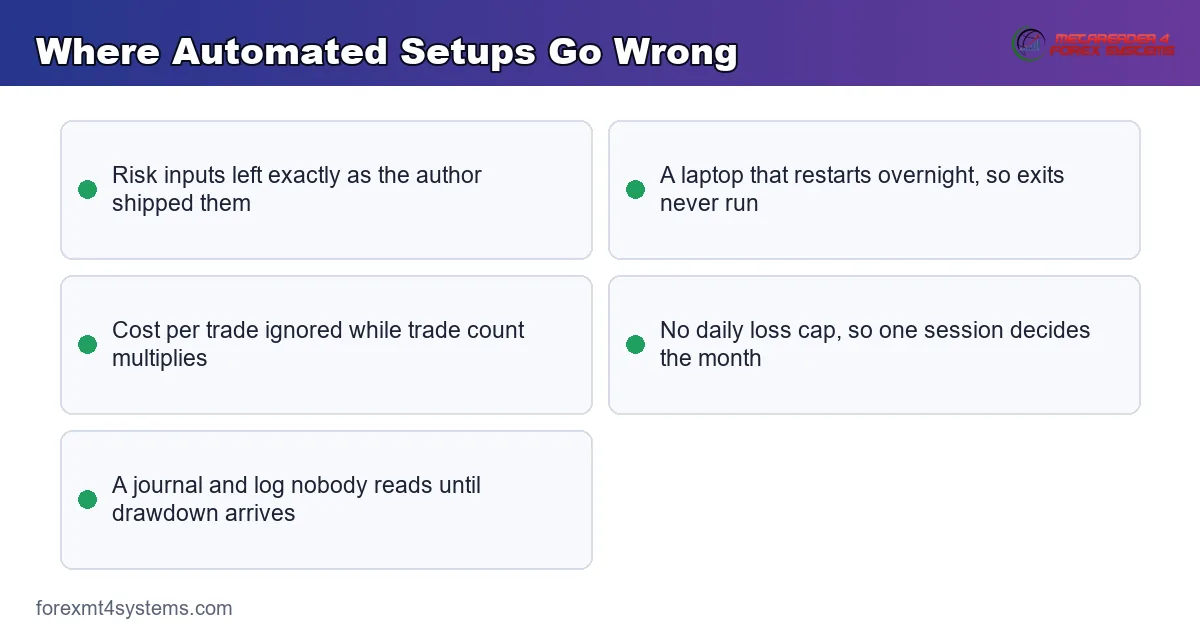
Leaving the Default Risk Settings
Default inputs suit the author’s account, never yours. Work your volume from your stop distance using our position size calculator before the first live order.
Running It Live Before Running It on Demo
A demo week costs nothing except patience. It catches wrong lot steps, wrong symbol names and wrong session filters, all of which surface within days.
Assuming the Terminal Never Sleeps
Laptops update themselves overnight. A machine that restarts at two in the morning leaves your positions unmanaged until you wake up.
Ignoring Cost per Trade
Automation multiplies trade count, and cost rides along with it. Our note on forex trading costs explains why a rule that works on the four hour chart can bleed on the five minute chart.
Skipping the Rules Your Firm Applies
Funded accounts often restrict automation. Read prop firm EA rules before you attach anything to a challenge account.
Quick Reference Before You Attach Anything
Run this list once per program. It takes about ten minutes and prevents most first week disasters.
| Check | What to confirm | Why it matters |
|---|---|---|
| File location | The compiled file sits in the Experts folder, not Indicators | The program will not appear in Navigator otherwise |
| Symbol name | Your broker’s suffix matches what the settings expect | Suffixes such as micro or pro break symbol lookups |
| Lot step | The volume the program requests matches your account minimum | Rejected orders leave you flat while the signal passes |
| Stop distance | Every entry carries a stop the moment it opens | An unprotected position can outlive your attention |
| Daily cap | A loss limit exists and the program respects it | One bad session should not decide your month |
| Uptime plan | A server or an always on machine hosts the terminal | Exits stop working the moment the platform closes |
Tick all six before funding anything. The list looks dull, and dull lists prevent expensive surprises.
Testing an Expert Advisor Before Money Moves
Four stages sit between a downloaded file and a funded account. Skipping any of them simply moves the discovery later.
Stage One: The Strategy Tester
The built in tester replays historical bars through the program. It answers one narrow question, namely whether the code behaves as the description claims.
Read the report for behaviour rather than for the balance line. Trade count, average holding time and the worst losing run tell you far more.
Stage Two: Demo Forward Testing
Run the program on a demo account fed by live prices. Two weeks catches symbol errors, session errors and volume errors that history never surfaced.
Forward testing also shows you the waiting. Many traders discover here that they cannot sit still while a program does nothing for days.
Stage Three: Minimum Size Live
Demo fills flatter reality. Real spread, real slippage and real rejections only appear once your own money moves.
So run the smallest volume your broker permits. The cost of that month stays tiny, and the information it buys does not.
Stage Four: Scale Slowly
Raise size in steps, and only after the live log matches the demo log. If the two disagree, that disagreement counts as the finding.
Keep a record of every change you make. Our free trade journal works as well for automated accounts as for manual ones.
Build Your Own or Use One Somebody Wrote
Both routes work, and they suit different people. The choice usually comes down to time rather than skill.
The Case for Writing Your Own
You know exactly what the rules do. Nothing hides in a setting you never read, and every change starts from something you understand.
The cost of that clarity is time. Learning enough MQL to build a safe order routine takes weeks, and the order handling matters more than the signal.
The Case for Using a Ready Program
Speed is the obvious benefit. You can test an idea this weekend rather than next quarter.
The trade off is transparency. Read the documentation closely, test every input, and treat anything you cannot explain as a reason to slow down.
Questions Worth Asking First
Ask what happens when the connection drops mid trade. Then find out whether the program ever adds to a losing position, and by how much.
Check how it sizes orders, and whether a daily loss cap exists. A program that cannot answer those three questions belongs on demo for a long while.
When an Expert Advisor Goes Wrong
Programs rarely fail loudly. They usually keep obeying rules that stopped suiting the market weeks earlier.
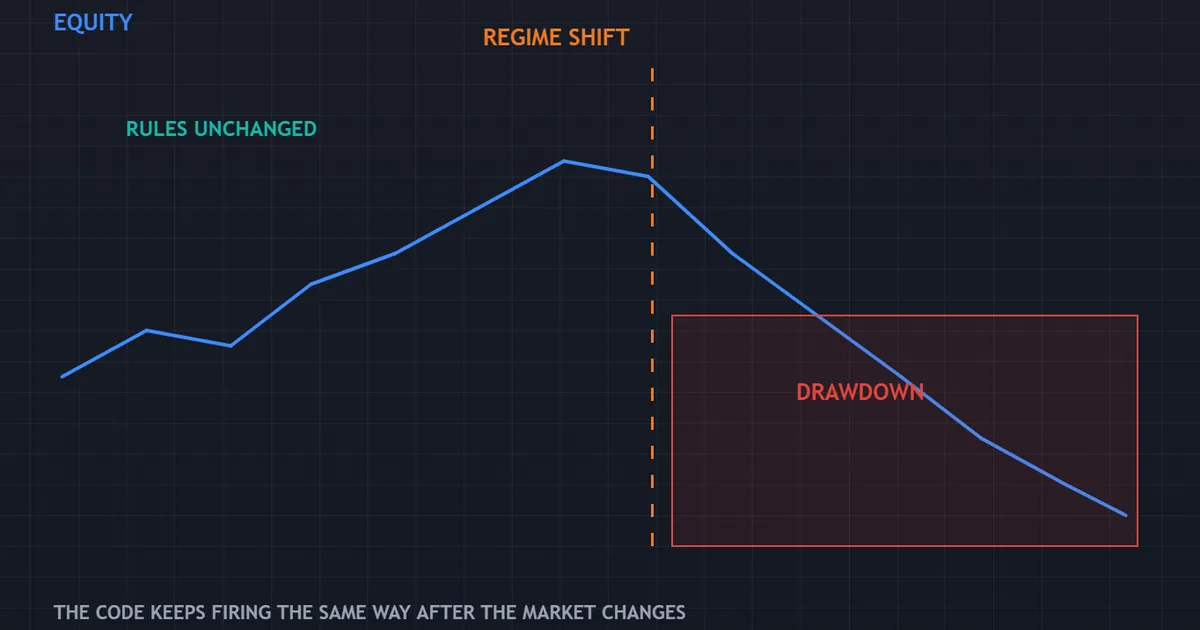
The failure panel above shows that pattern. Equity climbs steadily, conditions shift, the rules carry on unchanged, and the drawdown arrives without a single error message.
The Regime Problem
Markets change character. A rule built for calm ranges keeps firing when volatility doubles, because nothing in the code notices the difference.
Ranges also replace trends without warning. A breakout rule then collects a run of small losses, all of them technically correct.
So build a switch you can reach. Knowing when to stop a program matters as much as knowing when to start it.
The Silent Failure Modes
Connection drops top the list. The terminal reconnects, the program resumes, and a stop sat unmanaged in the gap.
Broker changes come next. A new symbol suffix, a new minimum volume or a new margin rule can stop orders without any visible warning.
Then come the quiet ones. A program that opens no trades for a fortnight might have perfect discipline, or it might have a filter that now blocks everything.
Reading the Log Instead of the Balance
Balance tells you what happened. The Experts tab and the journal tell you why, which is the part you can act on.
Check both weekly. Rejected orders, requote messages and volume errors all appear there long before they show up in your equity.
What Automation Does to Your Behaviour
The technical side collects all the attention. The behavioural side decides how long you keep the program running.
The Relief Phase
Handing rules to code removes hesitation. Entries you used to skip now happen, which alone changes many traders’ results.
That relief fades once the first losing run arrives. Watching a program lose feels different from losing by hand, because you cannot argue with it.
The Interference Phase
Most people then start interfering. They close positions early, disable the program for a morning, or change an input mid week.
Every one of those actions destroys the record. You now hold a mixture of two processes, and neither one tells you anything useful.
The Rule That Helps
Decide in advance what would make you stop. A drawdown figure, a run of consecutive losses, or a clear change in conditions all work.
Write that trigger down before you start. A stopping rule written calmly beats a decision made at the worst possible moment.
Related Concepts Worth Reading Next
Automation sits inside a wider topic. Three neighbours fill in the picture quickly.
Start with the evidence question, because it decides how much trust any program deserves. Our honest look at whether forex robots work covers backtests, curve fitting and what a track record can and cannot show.
Then compare automation with following another trader. Our guide to copy trading explains how allocation works and which risks travel with it.
Finish with the human side. Our notes on trading discipline rules matter here, because switching a program off mid drawdown is a behavioural decision rather than a technical one.
Building Automation Into a Sensible Routine
Knowing the mechanics changes nothing on its own. A short routine turns the knowledge into practice.
Write the Rule Before You Automate It
Put the entry, the exit, the stop and the size on one page. If you cannot write it plainly, no coder can build it either.
Then trade the rule by hand for twenty occurrences. That exercise usually exposes a missing condition nobody thought about.
Start Smaller Than Feels Sensible
Run the smallest volume your broker allows for the first month. The goal is behaviour, not return, and small size keeps your judgement clear.
Raise size only after the log matches your expectations. Anything else simply adds money to an untested process.
Review on a Fixed Day
Pick one day each week and keep it. Read the journal, count rejected orders and note anything the rules did that surprised you.
Then change at most one setting. Altering three at once teaches you nothing about which one mattered.
FAQ
Is an expert advisor the same thing as a trading robot?
In everyday use, yes. Expert advisor is simply the name MetaTrader gives to an automated program that can place and manage orders. Other platforms call the same idea a bot, an algorithm or an automated strategy, and the underlying job stays identical.
Do I need to write code to use one?
No. Running a compiled program takes a copy, a paste and a restart, and the settings appear as a normal input window. Writing your own rules does require code, though plenty of traders use ready made programs and adjust only the inputs they understand.
Can an expert advisor trade while my computer stays off?
Not on its own. The program lives inside MetaTrader, so closing the platform stops every rule, including exits on positions you already hold. Traders who need round the clock coverage rent a small virtual private server and run the terminal there instead.
Which folder does the file belong in?
Open the terminal, choose File, then Open Data Folder, then MQL4 or MQL5, then Experts. Drop the compiled program in that folder and restart the platform. Indicators use the Indicators folder next door, and mixing the two explains most missing file complaints.
How much should I risk on an automated account?
Use the same figure you would use by hand, then treat it as a ceiling rather than a target. Automation raises trade count, which raises how quickly a bad stretch compounds. Set a daily loss cap as well, and make sure the program obeys it rather than trusting yourself to intervene.
Can an expert advisor replace a trading plan?
No, and that confusion causes real losses. A program executes a plan you already wrote, so it makes a good process repeatable and a poor process expensive. Judge it on whether it followed your rules, not on last month’s balance, and keep reviewing the log yourself. Results are not guaranteed; past performance is not indicative of future results.
External references
- For background on this concept, see Black Box Trading at Investopedia.
- For broader market context, see Backtesting at Corporate Finance Institute.

About the author
Written by Dominic Walsh, a Forex trader and MT4/MT5 indicator, Expert Advisor and script developer. Every tool on forexmt4systems.com is tested on live charts before release and ships with ready-to-use compiled MT4 (.ex4) and MT5 (.ex5) files. Learn more about the trader and developer behind this site.
How we build, test and correct every tool: Editorial & Testing Policy. Trading carries risk; see the disclaimer.