
Every journal discussion arrives at the same fork. Spreadsheet or notebook, platform export or dedicated app, and the honest answer to what makes the best trading journal depends entirely on how you plan to read it back.
This page compares the four formats on things that actually matter. Setup cost, daily friction, how well records sort later, and whether the habit survives a rough week.
What the Best Trading Journal Format Has to Do
Format arguments usually start from features. Start from jobs instead, because a journal only has three of them.
One job captures a decision before any outcome exists. Another stores that capture somewhere you will actually open. And the third lets you count things later.

Above, the four formats sit side by side against those three jobs. No column wins outright, which explains why the debate never settles.
Three Jobs, Ranked
Counting matters most. A record you cannot sort turns into a diary, and a diary hands you stories rather than proportions.
Capture comes second, and storage a distant third. Cloud versus paper feels important and rarely changes an outcome.
The Job Most Formats Fail
Sorting fails most often. Free-typed notes, inconsistent setup names and mixed date formats all wreck a count without looking like damage.
So test any format with a single question. Can you produce a count of trades by setup in under a minute?
If the answer runs to “probably, after some tidying”, that format has already failed the job that pays you.
Cost Is the Weakest Argument
Price dominates most format debates and decides almost nothing. Free options count perfectly well, and paid options still need your judgement typed in by hand.
Weigh minutes instead of fees. A format that saves you four minutes a session earns its keep, and one that saves clicks you never minded does not.
Why We Do Not Crown a Product
Tools change, pricing changes, and features migrate between them every year. Naming a winner today would age badly and teach you nothing durable.
Fields and cadence outlast every app. Settle those two and any format on this page will serve you.
Four Formats and Their Trade-Offs
Each option below suits a different constraint. Read them against your own week rather than against a feature list.
- Spreadsheet. Sorts and counts immediately; costs you two minutes of typing per trade.
- Paper notebook. Fastest capture in the moment; nearly impossible to count at scale.
- Platform export. Fills and costs arrive automatically; carries none of your reasoning.
- Dedicated journal tool. Imports and summarises for you; charges a fee and fixes your field set.

Notice how each row trades one job against another. That pattern holds across every tool on the market.
| Format | Setup cost | Daily friction | Sorts later | Survives a bad week |
|---|---|---|---|---|
| Spreadsheet | Ten minutes of typing headers | Two minutes per trade | Excellent | Depends on discipline |
| Paper notebook | None | Under a minute | Poor | Usually yes |
| Platform export | Twenty minutes, once | Under a minute | Good, after cleaning | Yes, it runs itself |
| Dedicated tool | An hour plus a fee | Under a minute | Excellent | Yes, while you subscribe |
Read that table by column rather than by row. Whichever column names your current weakness points at the format worth trying next.
The Spreadsheet
A spreadsheet sorts, filters and counts with no setup beyond typing a header row. That one strength outweighs most of what it lacks.
Friction sits in the typing. Ten columns by hand takes two minutes, and nothing stops you leaving a cell blank on a bad day.
Watch for drift. Two spellings of one setup name split a bucket in half, so lock that column to a short dropdown list early.
The Paper Notebook
Paper wins on capture. Nothing beats a notebook for writing a reason at nine fourteen while an order sits ready.
Paper loses on counting. Sorting forty entries by session means reading forty pages, so most paper journals never get counted at all.
Use it as a front end. Write on paper during the session, then transfer those rows once a week into something sortable.
The Platform Export
Your terminal already records fills, sizes, costs and timestamps. Export that history and half the record arrives for free, with no typing errors in it.
What an export cannot hold is judgement. It never knows why you clicked, what would have ended the idea, or which setups you passed over.
Pair it with four hand-typed columns. Reason, setup name, execution score and mistake tag turn a statement into a journal.
The Dedicated Journal Tool
Purpose-built tools import the fills, tag them and draw the summaries without a formula in sight. That saves genuine time every month.
Costs run two ways. A subscription costs money, and a fixed field set costs flexibility when your plan changes.
Judge any tool on its export. Records you cannot download as a plain file belong to somebody else’s product roadmap.
The Minimum Viable Field Set
Rather than crowning a format, settle the field list first. Nine columns support every review worth running.

| Field | Written when | Why it survives the cut |
|---|---|---|
| Date and time | Before entry | Lets you group by session and by weekday |
| Instrument | Before entry | Separates cost profiles that differ wildly |
| Setup name | Before entry | The single most useful grouping column |
| Reason | Before entry | Records thinking that hindsight would rewrite |
| Invalidation | Before entry | Proves the risk existed as a price, not a hope |
| Risk | Before entry | Makes R meaningful and exposes sizing drift |
| Result in R | After exit | Compares trades across accounts and years |
| Execution score | After exit | Splits process quality from outcome |
| Mistake tag | After exit | Turns bad habits into a countable column |
Why Nine and Not Thirty
Nine fields fit inside two minutes. Thirty fields do not, and a form nobody completes produces columns nobody can count.
Partial data hurts more than missing data. A column filled on a third of your trades looks usable and quietly misleads every summary you build from it.
What to Leave to the Export
Skip anything your platform stores already. Entry price, exit price, lot size, commission and swap all download cleanly, so retyping them wastes your scarcest minutes.
Our worked trading journal examples show these nine fields completed on a winner, a loser and a setup passed over.
Free Text Has Exactly One Home
Keep one free-text column and no more. The note field absorbs anything unusual, and every other column stays constrained.
Constrained columns count. Free text does not, however carefully you write it.
Download the complete indicator database
Put these concepts on your charts. One email unlocks the full library of 1,380+ indicators with compiled MT4 and MT5 files, plus my TradingView scripts. No paywall, no spam, unsubscribe any time.
Get free access to my indicator database
One email unlocks 1,380+ free MT4, MT5 and TradingView indicators — the complete library. No single-tool download; you get the whole database.
Choosing by Constraint, Not by Feature List
Pick the format that removes your actual bottleneck. Most traders already know which job they keep failing.
| Your bottleneck | Format that fits | What you add to make it work |
|---|---|---|
| You forget to write anything at all | Paper notebook | A weekly transfer into a sortable sheet |
| You write plenty but never count it | Spreadsheet | Dropdown lists on setup name and mistake tag |
| Typing numbers eats your evening | Platform export | Four hand-typed judgement columns |
| You want summaries without formulas | Dedicated tool | A check that full export stays available |
| You trade rarely and review deeply | Spreadsheet | A screenshot link column per entry |
If Capture Keeps Failing
Move the record closer to the moment. Paper beside the keyboard beats an app two clicks away, every single session.
Then solve counting separately. A Sunday transfer of five rows takes four minutes and rescues the whole week.
If Counting Keeps Failing
Constrain your columns before adding any tool. Dropdowns on setup name and mistake tag fix more reviews than a subscription ever will.
Our free trade journal ships with those constraints already in place, so the count works from your first entry.
The Hybrid Most Traders End Up With
Ask experienced traders which format they use and the answer rarely names one thing. Two formats working together beats any single choice.
Paper In, Sheet Out
Write the pre-trade note on paper while the order waits. Three lines, twenty seconds, no window switching at the worst possible moment.
Then transfer once a week. Five or ten rows move into the sheet on Sunday, and counting becomes possible without touching your session.
Export In, Judgement by Hand
Pull the fills from your terminal for anything numeric. Prices, sizes, costs and timestamps land accurately, and nobody mistypes a decimal.
Then add the four judgement columns yourself. Reason, setup name, execution score and mistake tag never appear in an export, and they carry the whole review.
Where Hybrids Break
Transfers slip. A fortnight of unlogged paper turns into a chore, and chores get abandoned rather than caught up.
Cap the backlog at one week. If Sunday passes twice without a transfer, cut your field list rather than promising harder.
The One Extra Column Worth Having
Nine fields cover the count. One optional tenth earns its place for most traders, and it holds a screenshot.
Why an Image Beats a Description
A picture of the chart at entry settles arguments your memory would rather win. It shows what you actually saw, including what you missed.
Store a link rather than the file. Cloud folders, plain filenames, one image per entry, and the sheet stays small enough to open quickly.
Name the File Before You Take It
Use the date, the instrument and the setup name in that order. Sorted filenames then line up with sorted rows, and matching takes no effort.
Skip the annotation for now. Arrows and boxes added at review time work better than decorations drawn while a position runs.
When to Drop the Column
Traders who never open those images should stop taking them. An unused column costs seconds every session and returns nothing at all.
Common Format Mistakes
Five habits break a journal regardless of which format holds it. The panel gathers the warning signs.

Starting With a Template Built for Someone Else
Downloaded sheets arrive with forty columns aimed at a different method. Delete ruthlessly before your first entry, or the blanks will start on day three.
Mixing Money and R in One Column
Cash figures drift with account size and R does not. Keep them apart, or your yearly summary compares numbers that never meant the same thing.
Free-Typing the Setup Name
Nine spellings produce nine buckets holding one trade each. Lock that column to a short list and the count survives contact with a busy month.
Storing Records Only Inside One App
Products retire, subscriptions lapse, and accounts get closed. Export a plain file monthly so your history outlives whatever holds it today.
Rebuilding the Format Every Few Weeks
Each redesign resets your comparable history to zero. Change columns once a quarter at most, and note the date you changed them.
Keeping Two Half-Journals
Some traders run a sheet and an app at once, then complete neither. Pick the primary record, and treat everything else as a feeder into it.
Treating the Format as the Project
Building the sheet feels productive and counts as zero trades reviewed. Ship a rough version on Monday, then improve it from what the first review actually needed.
Migrating Without Losing Your History
Most traders change format at least once. Handle that move badly and your comparable history resets to zero.
Export First, Always
Download the old records as a plain file before touching anything new. Comma-separated files open everywhere and outlive every product that produced them.
Keep the Old Column Names
Resist renaming fields during a move. Same headers, same spellings, and last year’s rows still stack under this year’s without cleaning.
Note the Switch Date
Write the changeover date into your plan. Any summary crossing that line deserves a footnote, because collection habits shift with tools more than traders expect.
Then leave the new format alone for a quarter. Judging a setup takes a full review cycle, and three weeks tells you nothing.
A Two-Week Test Before You Commit
Do not decide this on paper. Run any candidate format for ten sessions and judge it on evidence.
What to Measure During the Test
Time yourself once. Count the seconds a full entry takes, then count how many entries you skipped across the ten days.
Skipped entries matter more than seconds. A format costing ninety seconds that never gets skipped beats one costing thirty that gets skipped twice a week.
Run One Review at the End
Then read the two weeks back. Group by setup, group by session, and see whether either count comes out cleanly.
If sorting demands cleaning, your columns need constraining rather than your tool replacing. That single finding saves most traders a subscription.
Decide Once, Then Stop Shopping
Format shopping feels like progress and delivers none. Commit for a quarter, then judge the choice on the reviews it made possible.
Review Cadence Decides the Format
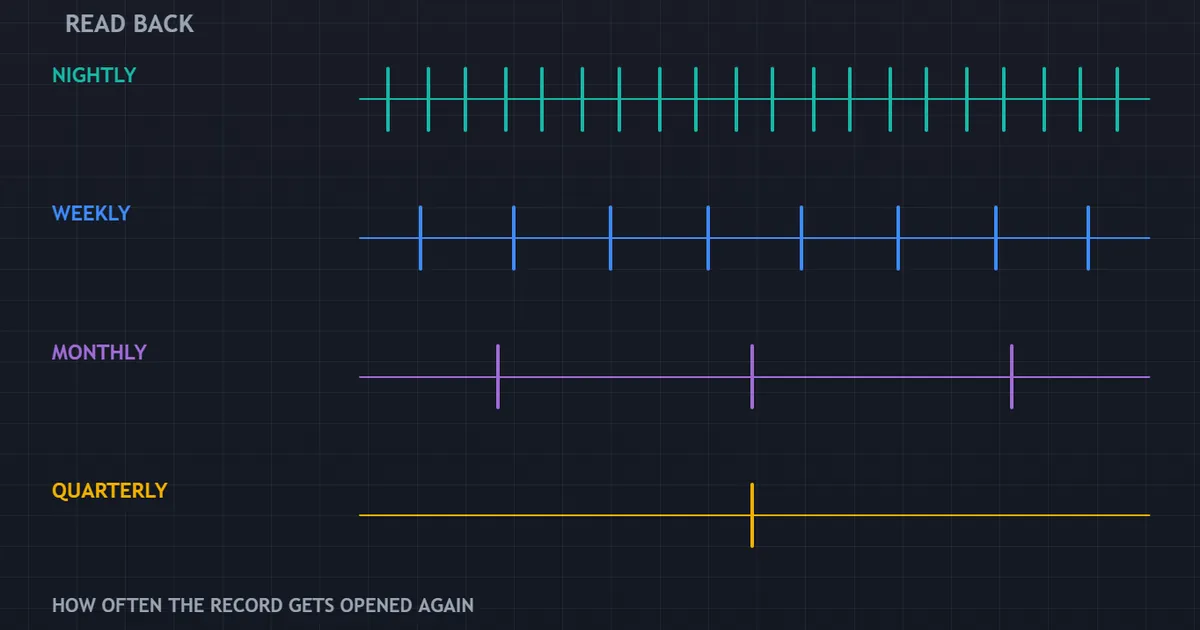
How often you read the record should drive the choice. A format that suits a nightly glance rarely suits a quarterly count.
Four Reading Rhythms
Nightly reading needs speed above all. Five rows, thirty seconds, no filtering required.
Weekly reading needs grouping. Sorting by setup and by session begins to demand real columns rather than paragraphs.
Monthly and quarterly reading needs counts. That stage rules paper out completely, because nobody tallies ninety handwritten pages twice.
Match the Format to the Read
Traders who only ever glance can stay on paper indefinitely. Nothing wrong sits in that choice, provided you accept the ceiling it comes with.
Traders who want proportions need columns. Our guide to reviewing your trades sets out what each cadence can realistically produce.
Quarterly Counts Need Clean Columns
Three months of rows only pay out when every column holds the same vocabulary. One renamed setup halfway through wrecks the tally quietly.
So freeze your lists at the start of a quarter. Improvements can wait thirteen weeks, and the count you get back will actually mean something.
Write the Cadence Into the Plan
Pick the days now and record them. Sunday evening for the week, first Saturday of the month for the count.
Formats fail quietly when nobody ever opens them. A diary date protects the habit better than any feature, and our list of trading discipline rules covers the commitments worth writing down.
Where the File Actually Lives
Storage sounds dull and settles one real question. Can you open the record on the day you need it?
One Copy Is No Copy
Keep the working file in cloud storage and take a monthly snapshot elsewhere. Years of rows deserve better than one laptop.
Paper needs the same care. Photograph filled pages at month end, because notebooks go missing far more often than folders do.
Plain Files Outlive Everything
Save each yearly snapshot as comma-separated text rather than a proprietary format. Spreadsheets change, apps retire, and a plain file still opens in twenty years.
Name every snapshot with its year. Sorting them takes seconds, and finding last spring’s rows never turns into an afternoon.
Open It Where You Trade
A journal on a machine you rarely use collects dust. Put it one click from your platform, on the same desk and the same screen.
Phone access helps during travel weeks. Nothing fancy, just enough for three lines before an order goes in.
What No Format Can Fix
Be blunt about the ceiling here. A journal cannot repair a strategy with no edge, whatever software holds the rows.
What a good format does instead is speed up the bad news. Thirty complete entries expose a broken method in weeks rather than years.
That speed has real value, and it feels nothing like encouragement. Clean execution across a losing month points at the method rather than at you.
Data Quality Beats Data Volume
Forty complete rows beat two hundred half-filled ones. Gaps never sit still, and they bias every count you draw from the sheet.
Missing entries cluster around bad days, which happen to hold your most useful lessons. So a patchy record flatters you by construction.
Sample Size Still Applies
Twenty rows tell you plenty about your habits and very little about your method. Read the execution column early, then leave the results column alone until the sample grows.
Run the numbers once forty rows exist. Our expectancy calculator turns a column of R results into a single figure you can track.
Related Guides Worth Reading Next
Two neighbours finish the picture. Take whichever gap looks wider from where you sit.
For the underlying case, our explainer on what a trading journal is covers what the record does and what it cannot claim.
For the habit itself, read how to keep a trading journal. Format choice matters far less than logging before the entry rather than after the exit.
Setup names come from somewhere, and our indicator library shows the tools most traders end up naming in that column.
FAQ
Is a spreadsheet good enough for a trading journal?
For most traders, yes. A spreadsheet sorts, filters and counts on day one with no subscription and no lock-in. Its weakness sits in the typing and in column drift, and both problems disappear once you add dropdown lists to the setup name and mistake tag.
Should I use paper or a screen?
Use paper when capture keeps failing, and a screen when counting keeps failing. Plenty of traders run both, writing the pre-trade note on paper during the session and transferring five rows into a sheet on Sunday. That split plays to the strength of each.
Can I just download my broker statement?
A statement gives you half the journal. Fills, sizes, costs and timestamps all arrive accurately, which removes the tedious typing. It carries none of your reasoning, so add four columns by hand: reason, setup name, execution score and mistake tag.
How many fields should the format hold?
Nine covers every review worth running, and three of those nine carry most of the weight. Reason, invalidation and mistake tag matter more than the rest combined. Anything your platform already stores belongs in the export rather than in your typing.
Do I need a paid journal tool?
Only if summaries without formulas save you enough time to justify the fee. Paid tools import fills and draw charts automatically, which suits high-frequency traders with hundreds of rows a month. Whatever you choose, check that a full plain-file export stays available before you commit any history to it.
Will a better format improve my trading?
It improves what you can see, which is a different claim. A sortable record shows which setups you actually take, how often you break your own rules, and where your costs land. Acting on that takes separate work, and no layout does that part for you. Results are not guaranteed; past performance is not indicative of future results.
External references
- For background on this concept, see Spreadsheet on Wikipedia.
- For broader market context, see Bookkeeping at Corporate Finance Institute.

About the author
Written by Dominic Walsh, a Forex trader and MT4/MT5 indicator, Expert Advisor and script developer. Every tool on forexmt4systems.com is tested on live charts before release and ships with ready-to-use compiled MT4 (.ex4) and MT5 (.ex5) files. Learn more about the trader and developer behind this site.
How we build, test and correct every tool: Editorial & Testing Policy. Trading carries risk; see the disclaimer.