
The VPVR indicator is TradingView’s Visible Range Volume Profile: a sideways histogram that shows how much volume traded at each price inside the part of the chart you can see. This guide settles three things. First, what the rows, the point of control (POC) and the value area mean. Second, what that volume is in forex, where there is no central exchange. Third, whether yesterday’s POC really pulls price back the next day. We measured that last one on 898 trading days, and the answer is less exciting than most videos suggest.
What the VPVR indicator is
A normal volume bar asks how much traded during a candle. A volume profile turns that sideways and asks how much traded at a price. So its bars grow out of the right edge of the chart, one row per price band.
VPVR is short for “Volume Profile Visible Range”. TradingView now lists it as Visible Range Volume Profile, and the legend on our charts reads “VRVP”. The words “visible range” matter. The profile only counts the bars on screen. Scroll left, zoom out or change the timeframe, and the rows redraw from a new set of bars.
The idea comes from Market Profile, the auction-based chart that J. Peter Steidlmayer developed as a trader at the Chicago Board of Trade. The Market profile article on Wikipedia covers that history. A volume profile keeps the core question but swaps time-at-price for volume-at-price.
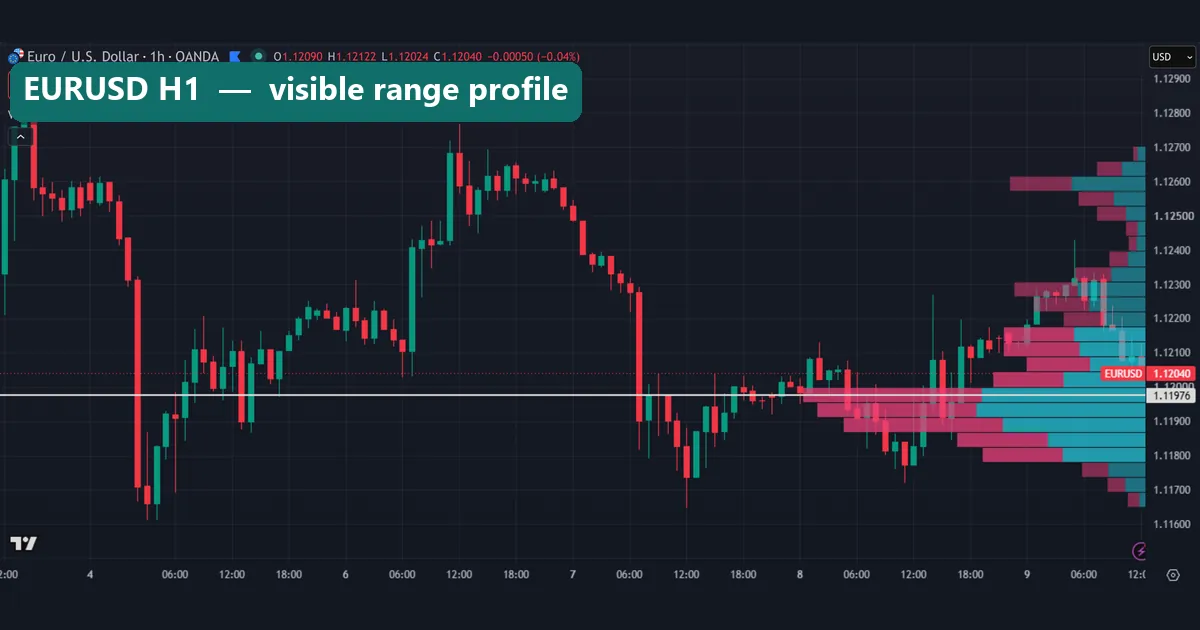
In our first image, the EURUSD hourly chart shows 24 rows on the right. The white line at 1.11976 marks the busiest row.
How the profile is built: rows, POC and value area
The mechanism is simple bookkeeping. First, the indicator takes the highest high and lowest low on screen. Next, it cuts that span into rows. With “Number of Rows” set to 24, each row is one twenty-fourth of the visible range. Then it hands each bar’s volume to the rows that bar touched. Finally, it adds up each row.
In the default Up/Down mode, each row has two colours. Teal is volume from bars that closed higher. Pink is volume from bars that closed lower. That split is a rough proxy, not real buying and selling, because a single bar holds both.
Three outputs come from the totals:
- Point of control (POC): the row with the most volume. TradingView draws it as a white line across the chart.
- Value area: the band of rows around the POC that holds 70% of the volume. The usual method starts at the POC and keeps adding the busier neighbouring row until the total reaches 70%. Rows inside it are drawn brighter.
- Low-volume rows: the thin bars outside the value area, where price passed quickly.
In formula form, the value area is the smallest run of rows around the POC where sum(row volume) >= 0.70 x total visible volume. TradingView explains its own version in its Visible Range Volume Profile help page at TradingView.
How we tested
We used two platforms. For the pictures, we loaded the built-in Visible Range Volume Profile on a TradingView web chart with OANDA data. We kept its defaults and took every shot on 9 October 2026. The charts cover EURUSD H1, XAUUSD H1, GBPUSD D1, EURUSD M15 and GBPJPY M15.
For the numbers, we used MetaTrader 4, build 1471, with Capital Point Trading history. We took M15 bars from June 2025 to August 2026 on EURUSD, GBPUSD, USDJPY and XAUUSD. For each server day, we built a 40-row profile from M15 tick volume. Each bar’s volume was spread evenly across its high-low range. The busiest row became that day’s POC.
Then we asked a plain question. Did the next day’s range cover that price? Because any level inside yesterday’s range gets revisited fairly often, we also tested two controls. One was a random price inside the previous day’s range. The other was the plain midpoint of that range. Our full method rules sit in the editorial testing policy.
One caveat applies to everything here. Forex has no central volume feed. MT4 and TradingView’s OANDA feed both show tick volume, the number of price changes in a bar. It tracks activity, but it is not the size of trades. The CopyTickVolume reference in the MQL5 documentation describes how MetaTrader stores it.
VPVR settings and what each one changes
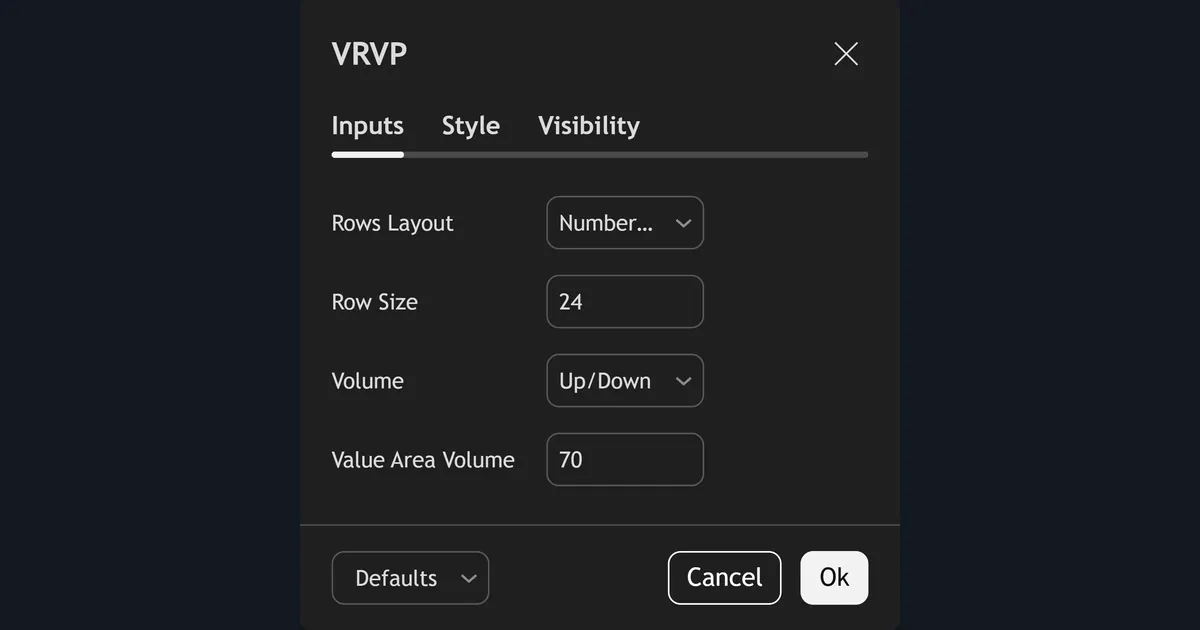
The settings panel has only four inputs on the Inputs tab. Our capture shows the defaults. Here is what each one does.
| Input | Default | Options | What changing it does |
|---|---|---|---|
| Rows Layout | Number Of Rows | Number Of Rows, Ticks Per Row | Fixes either the count of rows or the price height of each row |
| Row Size | 24 | Any whole number | More rows give finer detail but noisier peaks; fewer rows smooth the shape |
| Volume | Up/Down | Up/Down, Total, Delta | Up/Down splits each row by bar colour; Total shows one bar; Delta shows the difference |
| Value Area Volume | 70 | Percentage | Sets how much volume the highlighted band must hold |
Row size changes the POC more than people expect. With 24 rows on a 100-pip range, each row is about 4 pips tall. So the white line is the middle of a band, not an exact price. In contrast, a 0.5-pip row would split that band into small, jumpy peaks.
Reading the VPVR indicator on a chart
Start with the shape, not the line. A profile with one fat bulge means price spent the window rotating around one area. However, a profile with two bulges and a thin waist means the market accepted two areas and moved fast between them.
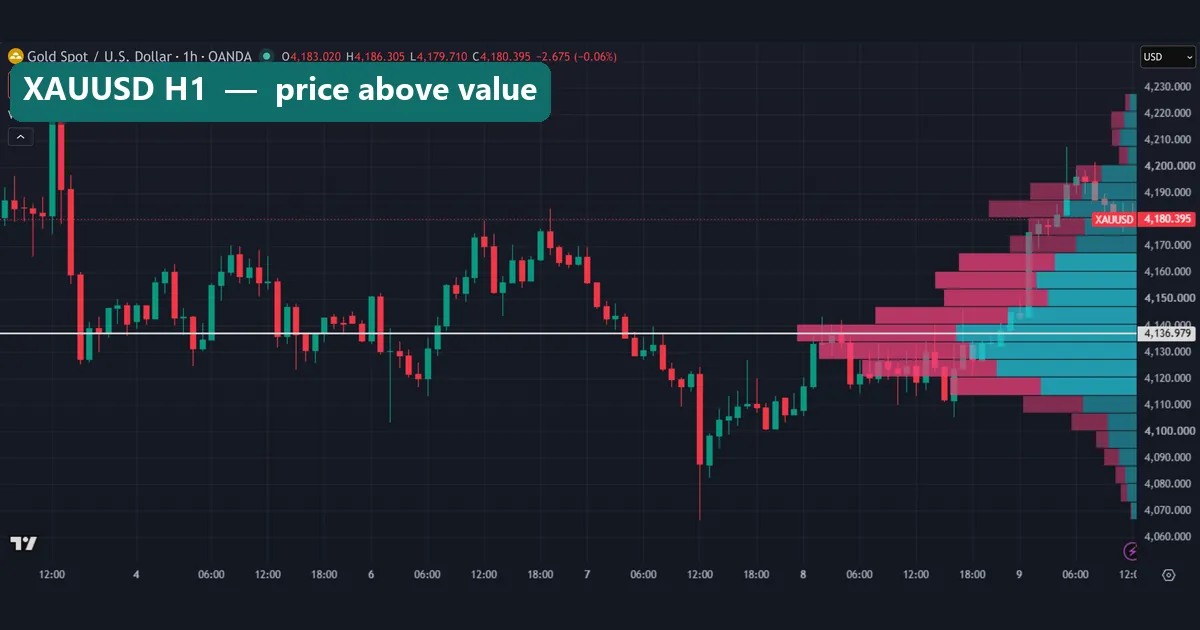
The gold hourly chart shows the first case. The POC sits at 4,136.979, and the brighter rows run from about $4,115 to about $4,165. Price spent much of 8 October inside that band. By the time of our capture, gold had climbed to $4,180.395, above the bright rows. In profile terms, price is trading outside the value area, in thinner rows.
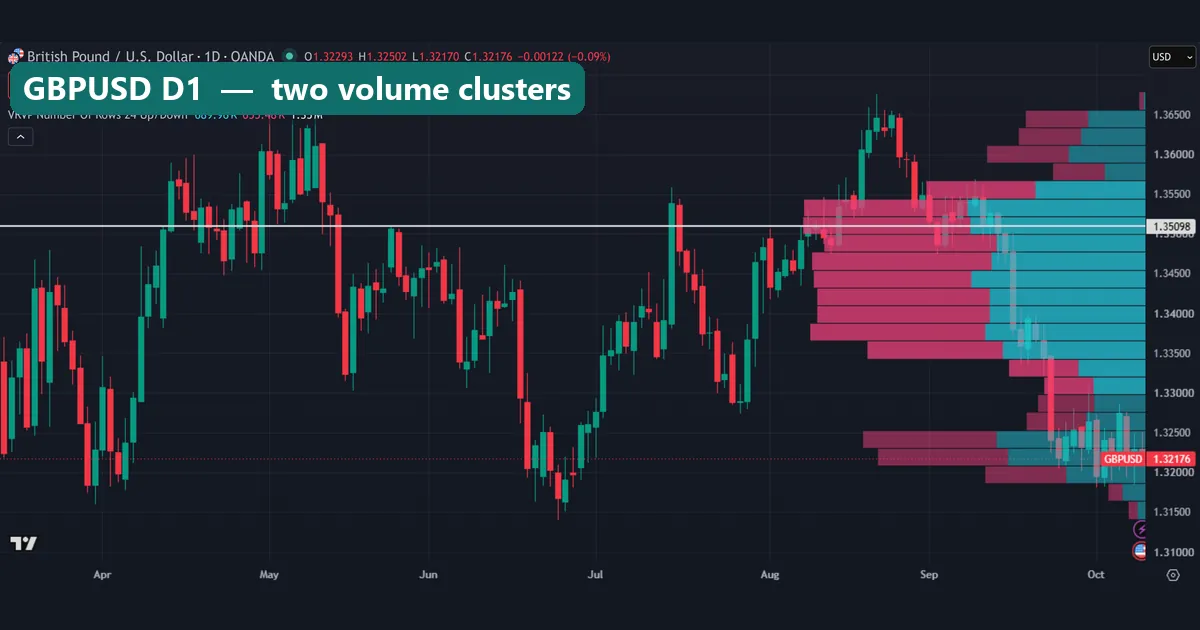
The GBPUSD daily chart shows the second case. Here the window holds about six months of daily bars. The POC sits at 1.35098, inside a wide bright band from roughly 1.3350 to 1.3550. Then there is a smaller, separate bulge near 1.3200 to 1.3250. Price was at 1.32176 at capture time, inside that lower cluster.
Also notice the legend totals: 1.35M here against 19.58K on the EURUSD hourly chart. The tool is the same, but the window is far longer. That is why the same pair can show very different POCs on different timeframes.
Worked example: the EURUSD POC from 7 October
Our test uses the previous day’s POC, so here is one day traced end to end. The MT4 server day for 7 October 2026 ran from 21:00 UTC on 6 October to 20:45 UTC on 7 October.
- High 1.12632, low 1.11646: a range of 98.6 pips.
- The busiest of our 40 rows put the POC at 1.11954.
- That is 30.8 pips above the low, and 18.5 pips below the range midpoint of 1.12139.
- The next day’s first M15 bar, at 21:00 UTC, already traded through 1.11954.
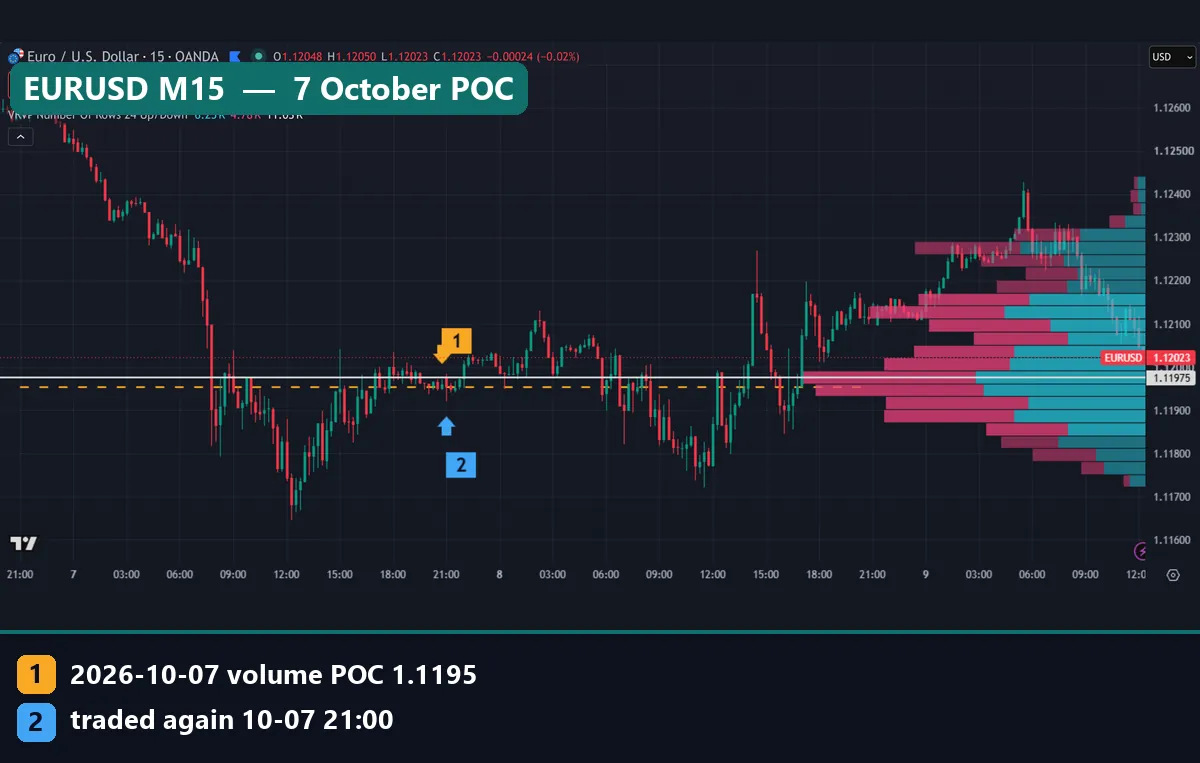
On the chart, the yellow dashed line is our POC (marker 1). The blue marker 2 shows the 21:00 bar that touched it. Notice the white VRVP line at 1.11975 sits just above our line. The difference is 2.1 pips, but it has a cause. TradingView’s profile covers every bar on screen, about two and a half days. Ours covers one server day only.
So did the POC “attract” price? It is tempting to say yes. Yet the next session opened only a few pips away. Price was sitting near the level when the day rolled over. In short, the touch came from proximity, not from any pull.
What our POC test found
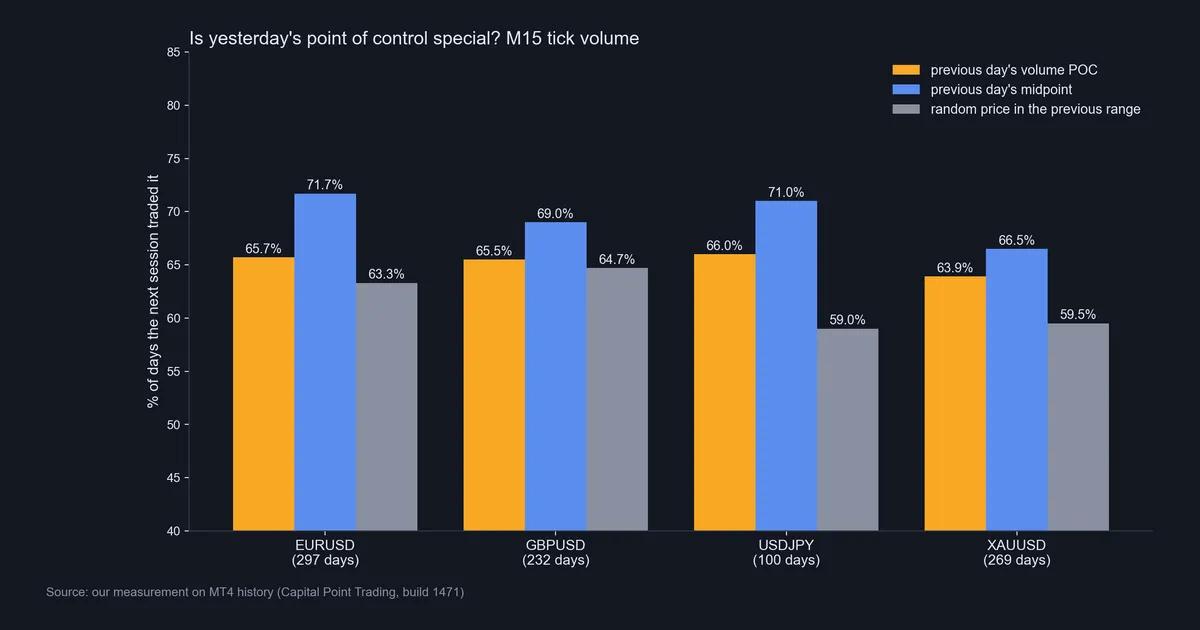
Across 898 days on four symbols, the previous day’s POC traded again the next day about two times in three. That sounds strong until you look at the controls next to it.
| Symbol | Days | Previous-day POC traded | Random price traded | Midpoint traded |
|---|---|---|---|---|
| EURUSD | 297 | 65.7% | 63.3% | 71.7% |
| GBPUSD | 232 | 65.5% | 64.7% | 69.0% |
| USDJPY | 100 | 66.0% | 59.0% | 71.0% |
| XAUUSD | 269 | 63.9% | 59.5% | 66.5% |
On EURUSD and GBPUSD, the POC beat a random price by only 2.4 and 0.8 points. On USDJPY and gold, the gap was wider, but those samples are small, and USDJPY has only 100 days. Meanwhile, the plain midpoint of yesterday’s range traded again more often than the POC on all four symbols.
The likely reason is geometry. The next session opens near yesterday’s close and overlaps yesterday’s range, so prices near the middle are the easiest to reach. The POC usually sits inside, so it shares that reach.
So our reading is narrow. A prior POC is a fair reference price, but on this data it was not a magnet. The midpoint got revisited more, and it needs no volume at all.
Download the complete indicator database
Put these concepts on your charts. One email unlocks the full library of 1,380+ indicators with compiled MT4 and MT5 files, plus my TradingView scripts. No paywall, no spam, unsubscribe any time.
Get free access to my indicator database
One email unlocks 1,380+ free MT4, MT5 and TradingView indicators — the complete library. No single-tool download; you get the whole database.
Where it fails
The first limit is the data. Tick volume counts price updates from one broker’s feed, so two brokers can show different profiles and POCs for the same hour. Nobody publishes the full traded volume in spot forex.
The second limit is the window. VPVR recalculates from whatever is visible. Two traders on the same chart can see different POCs just by zooming differently. That makes the level hard to test and easy to fit after the fact.
The third limit is resolution. With 24 rows, the POC is a band several pips tall on intraday charts and far wider on daily charts. Treating its line as a precise price adds false precision.
The fourth limit is our own result. The prior POC was revisited only slightly more often than random prices inside the range, and less often than the midpoint. We did not find evidence that the POC holds price or turns it.
A second case: GBPJPY and the moving POC
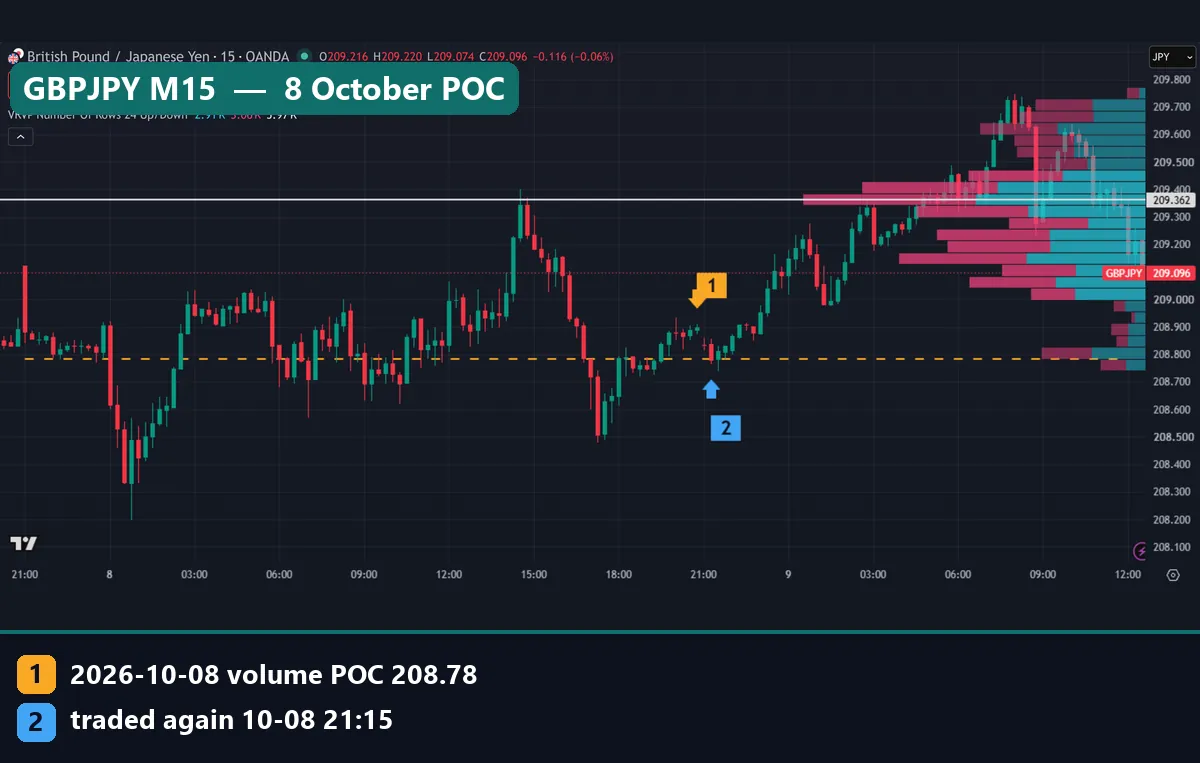
The GBPJPY M15 chart shows the same test on another day. On the server day of 8 October, the range ran from 208.198 to 209.400, about 120 pips. Our POC landed at 208.78, almost exactly on the range midpoint. The next day’s second bar, at 21:15 UTC, traded through it.
But look at the white VRVP line. It sits at 209.362, roughly 58 pips higher. The visible window includes the morning of 9 October, when price traded in the 209.2 to 209.7 area. That new activity moved the busiest row. So the “same” indicator gave two different answers, a few hours apart.
Not every day touches, either. USDJPY’s POC for 7 October was 158.403, but the 8 October high reached only 158.371: a miss of 3.2 pips.
Common mistakes with volume profiles
- Calling tick volume “institutional volume”. In forex, VPVR shows price activity on one feed. It cannot show who traded or how much.
- Trusting a POC from a random zoom. If the window was not chosen by a fixed rule, such as one session or one day, the level was chosen by your mouse.
- Treating every revisit as proof. Most prices inside yesterday’s range trade again. Without a control, a 65% touch rate means little.
- Reading Up/Down colours as buyers and sellers. The split comes from bar colour. A green bar still contains plenty of selling.
VPVR in TradingView vs our MT4 downloads
MetaTrader has no built-in volume profile, so MT4 users need a custom indicator. Our fixed range volume profile indicator builds a profile between two points you choose. That avoids the zoom problem, because the range stays put. The range volume profile indicator works on a set block of bars instead.
Other options on the site include the volume profile indicator for MT4 and MT5 and the current volume profile indicator, which tracks the session in progress. All of them use broker tick volume, like VPVR. Downloads are compiled files only. If you have not added a custom tool before, our guide on how to install MT4 and MT5 indicators covers the folders.
Where to go next
A profile is only as good as the levels around it. Start with our explainer on support and resistance, then compare the POC with a volume-weighted average in anchored VWAP vs VWAP.
For a closer look at volume inside each candle, read volume footprint charts on TradingView. Our page on daily trading volume in forex explains why there is no single volume figure. Also, volume spread analysis reads volume bar by bar rather than price by price.
Session timing shapes every daily profile, so forex trading sessions is worth a read too. Outside the site, StockCharts ChartSchool’s Volume-by-Price article covers the same idea on stock charts.
FAQ about the VPVR indicator
What does VPVR stand for?
It stands for Volume Profile Visible Range. TradingView now calls it Visible Range Volume Profile, and the chart legend shows “VRVP”.
What is the white line on the VPVR?
It is the point of control, the row with the most volume in the visible range. On our EURUSD hourly chart it sat at 1.11976.
What is the value area in a volume profile?
It is the band of rows around the POC that holds a set share of the volume, 70% by default. TradingView draws those rows brighter than the rest.
Is VPVR volume real volume in forex?
No. On OANDA and MT4 charts it is tick volume, the count of price changes. It reflects activity on one feed, not the size of trades across the market.
How many rows should I use?
The default of 24 is a fair start. More rows show finer detail but noisier peaks. Keep one setting while you test, so your levels stay comparable.
Does price return to yesterday’s POC?
Often, but not because of the POC. In our 898-day test it traded again on 63.9% to 66.0% of days. A random price in the range scored 59.0% to 64.7%, and the midpoint scored higher than the POC.
Can I use VPVR on MetaTrader 4?
Not as a built-in tool. You need a custom profile indicator, such as our fixed range or session-based versions, which use broker tick volume.
Is the VPVR indicator a buy or sell signal?
No. It maps where activity took place in the window you chose. Use it as context next to your own rules, and test those rules on your own data: results are not guaranteed; past performance is not indicative of future results.
Last updated: 9 October 2026.

About the author
Written by Dominic Walsh, a Forex trader and MT4/MT5 indicator, Expert Advisor and script developer. Every tool on forexmt4systems.com is tested on live charts before release and ships with ready-to-use compiled MT4 (.ex4) and MT5 (.ex5) files. Learn more about the trader and developer behind this site.
How we build, test and correct every tool: Editorial & Testing Policy. Trading carries risk; see the disclaimer.