
The volume footprint TradingView chart type splits every candle into price rows and prints how much volume traded at each row, divided into a buy side and a sell side. This guide settles three things. First, what the numbers inside each bar really count on a forex chart. Next, how to read them without fooling yourself. Last, where the tool stops being useful, because on spot FX it shows tick counts from one data feed, not exchange volume.
What the volume footprint on TradingView actually is
A normal candle tells you four prices but not where inside its range the trading took place. A footprint bar fills that gap. It cuts the candle into rows and writes numbers in each row.
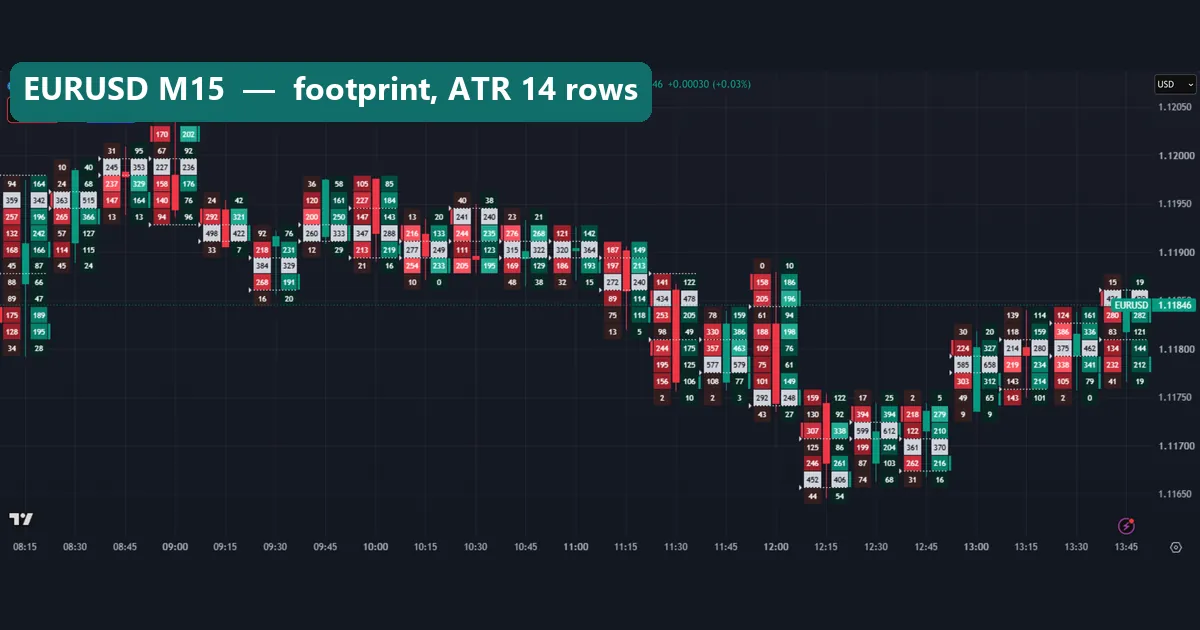
On our setting, each row holds two numbers. The left number is the volume TradingView counts as selling. The right number is the volume it counts as buying. So one 15-minute EURUSD bar can carry six to twelve pairs of numbers, stacked from its low to its high.
TradingView lists it as a chart type, next to candles, bars and Heikin Ashi, not as an indicator you add. You switch to it from the chart-type menu. According to TradingView’s help page on volume footprint charts, it is available on the higher paid plans. We do not quote plan prices here, because they change; check that page for the current list.
Compared with the candles in our TradingView chart guide, it is the same candle with a ledger inside.
How a volume footprint TradingView chart builds each bar
The build has three steps. First, the chart picks a row height. Then it sorts every small price update inside the bar into a row. Finally, it labels each update as buying or selling.
The label comes from price direction. TradingView’s help page explains the split in detail. In short, an update that trades up is counted as buying, and one that trades down is counted as selling. That is a rule about direction, not about who sent an order.
From those two columns, a few simple numbers follow:
row total = buy + sellfor each price row.bar total = sum of all row totals, which matches the bar’s volume.delta = total buy - total sellfor the whole bar.point of control (POC) = the row with the largest row total.
On our charts, the POC row is the one drawn in light grey. Also, a dotted outline wraps the rows that hold most of the bar’s volume. That is the bar’s value area. Cells with brighter red or green show where one side clearly outweighed the other at that price. Darker cells carried little volume.
Tick volume, not exchange volume
Here is the part most footprint tutorials skip. Spot forex has no central exchange. Trading happens over the counter, across banks, brokers and platforms. The BIS Triennial Survey of OTC foreign exchange turnover describes that market, and no single venue sees all of it.
So what does the footprint count on OANDA:EURUSD? It counts price updates from OANDA’s own feed. That is tick volume. MetaTrader uses the same idea, and the MQL5 documentation for CopyTickVolume shows that MetaTrader stores tick volume as its own series, separate from real volume.
So two brokers can show different footprint numbers for the same bar. Also, a big number means “the quote changed many times here”, not “big money traded here”. Still, it is a usable proxy for activity, just not exchange order flow.
If you want the broader picture of how volume behaves through a forex day, our daily trading volume in forex guide covers it.
How we tested
We captured six footprint charts on the TradingView web chart with OANDA data on 7 October 2026. The symbols were EURUSD, GBPUSD, XAUUSD and AUDUSD on M15, plus USDJPY and EURUSD on H1. Times on these charts are UTC. Every footprint used the same setting: row size from ATR 14, type “Buy and sell”.
Then we measured tick volume on MetaTrader 4, build 1471 (Capital Point Trading history). We used M15 bars for nine symbols from 2 June 2025 to 26 August 2026. For each symbol, we ranked bars by tick volume and compared that rank with the bar’s range and with its body. We also took the median tick volume per M15 bar for each hour of the day on EURUSD.
The MT4 data comes from a different feed than OANDA. So we use it to test how tick volume behaves, never to check single OANDA numbers. Our method rules are on the editorial testing policy page.
Footprint settings we used and what they change
The settings panel is short. However, two choices change the picture a lot: the row size and the display type. The table lists what we used and what each choice does.
| Setting | What we used | What it changes |
|---|---|---|
| Row size | ATR, length 14 | Sets row height from recent volatility, so a quiet pair and gold both get a readable number of rows. |
| Row size, manual | Not used | Fixes the row height in price ticks. Good for one symbol, awkward across many. |
| Type | Buy and sell | Shows sell on the left and buy on the right of each bar. |
| Type, delta | Not used | Shows one number per row: buy minus sell. |
| Type, volume | Not used | Shows one total per row, with no split. |
| Value area and POC | Default display | Draws the dotted value-area outline and the grey POC row. |
Start with ATR rows and “Buy and sell”. Then try delta for a cleaner look.
Reading the footprint on a chart
Read a footprint bar in three passes. First, find the grey POC row: where did most of the bar’s volume sit? Next, look at the dotted value area: is it near the high, the low or the middle? Then compare the two columns: which side was larger, and where?
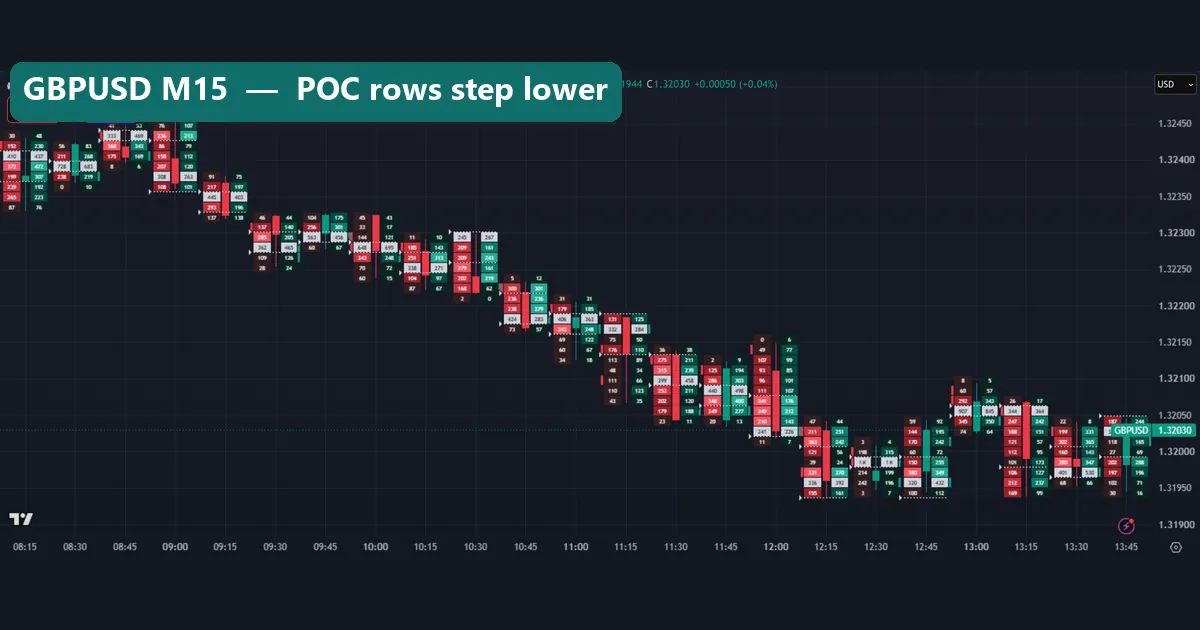
The GBPUSD M15 chart shows a steady slide from the morning into the early afternoon. Notice how the grey POC rows step lower along with price. Also, a few cells near 1.3200 print “1K”, which is how the chart shortens a four-digit count. That level drew more updates than the rows around it.
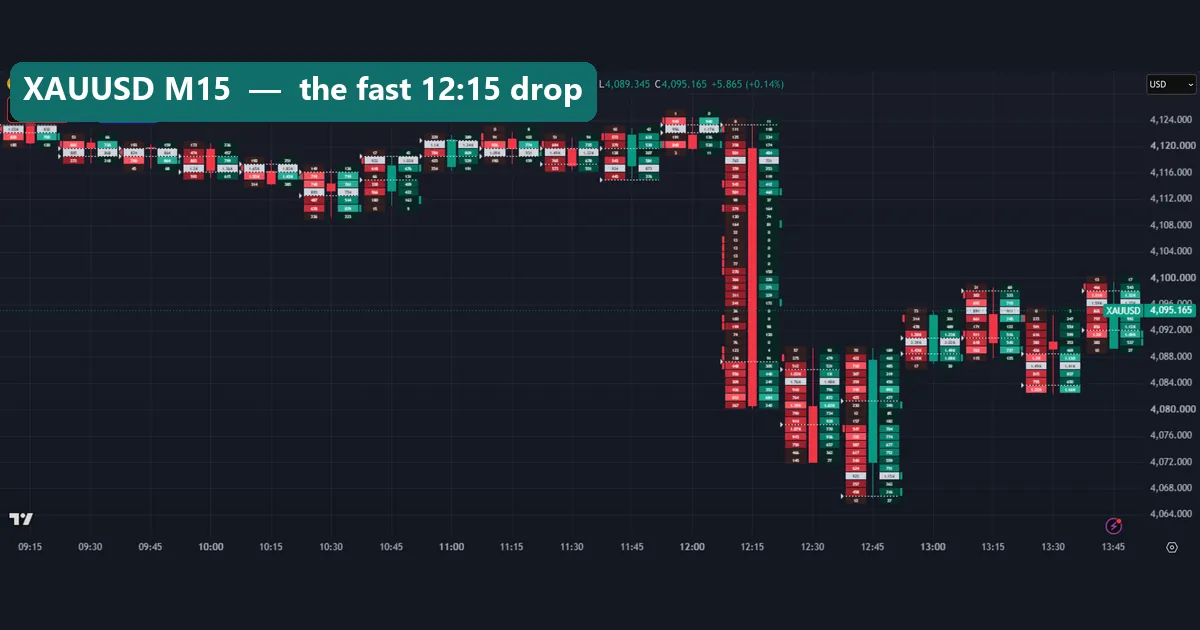
Gold looks different. The XAUUSD M15 chart has a long red bar at 12:15 that falls from above 4,120 to near 4,080, about $40. Inside it, many rows on the buy side print 0. That is a fast move: price skipped through those rows with almost no updates. A thin row like that is the footprint version of a liquidity void.
Worked example: two EURUSD bars on 7 October
Let us do the arithmetic on the first chart, EURUSD M15 on 7 October 2026. Every number below is printed inside the bars, so you can check it.
Take the red 12:15 bar. Its sell column reads 159, 130, 307, 125, 246, 452 and 44, from top to bottom. That adds up to 1,463. The buy column reads 122, 92, 338, 86, 261, 406 and 54, which adds up to 1,359. So the bar total is 2,822 and the delta is minus 104. The grey POC row is 452 by 406, near the bar’s low.
Now take the green 13:00 bar. Its sell column reads 30, 224, 585, 303, 49 and 9, for 1,200. Its buy column reads 20, 327, 658, 312, 65 and 9, for 1,391. So the total is 2,591 and the delta is plus 191. Its POC row, 585 by 658, sits in the middle of the bar.
What does that tell us? The 12:15 bar sold off, and its heaviest row was at the bottom. Then, 45 minutes later, a bar printed a positive delta with its weight in the middle. That is a description of what happened. It is not a signal, and the next bar could have gone either way.
Also note the size of these counts. The EURUSD header shows the last bar closing at 1.11846. A delta of 104 or 191 on totals near 2,700 is small. On this chart, most bars show buy and sell columns of similar size.
Does more tick volume mean a bigger move?
Our MT4 measurement asked a plain question. When an M15 bar carries a lot of tick volume, is it also a big bar? We ranked bars and used a Spearman rank correlation, where 1 means a perfect match and 0 means no link.
| Symbol | Volume vs range | Volume vs body | Median range, top 10% volume bars | Median range, all bars |
|---|---|---|---|---|
| EURUSD | 0.57 | 0.33 | 8.8 pips | 4.7 pips |
| GBPUSD | 0.44 | 0.25 | 11.0 pips | 6.4 pips |
| USDJPY | 0.69 | 0.40 | 15.4 pips | 5.4 pips |
| XAUUSD | 0.50 | 0.31 | $14.26 | $8.13 |
So tick volume tracks the size of the bar far better than its body. In other words, a busy bar is usually a wide bar, but not reliably a bar that closed far from its open. That fits what tick volume is: a count of quote changes. More movement means more updates, in both directions.
So a fat POC row tells you price spent time there, not which way the bar will finish.
When the footprint fills up
Footprint bars are only worth reading when they hold enough updates. A row of single digits says little. So we checked when EURUSD’s tick volume is high.
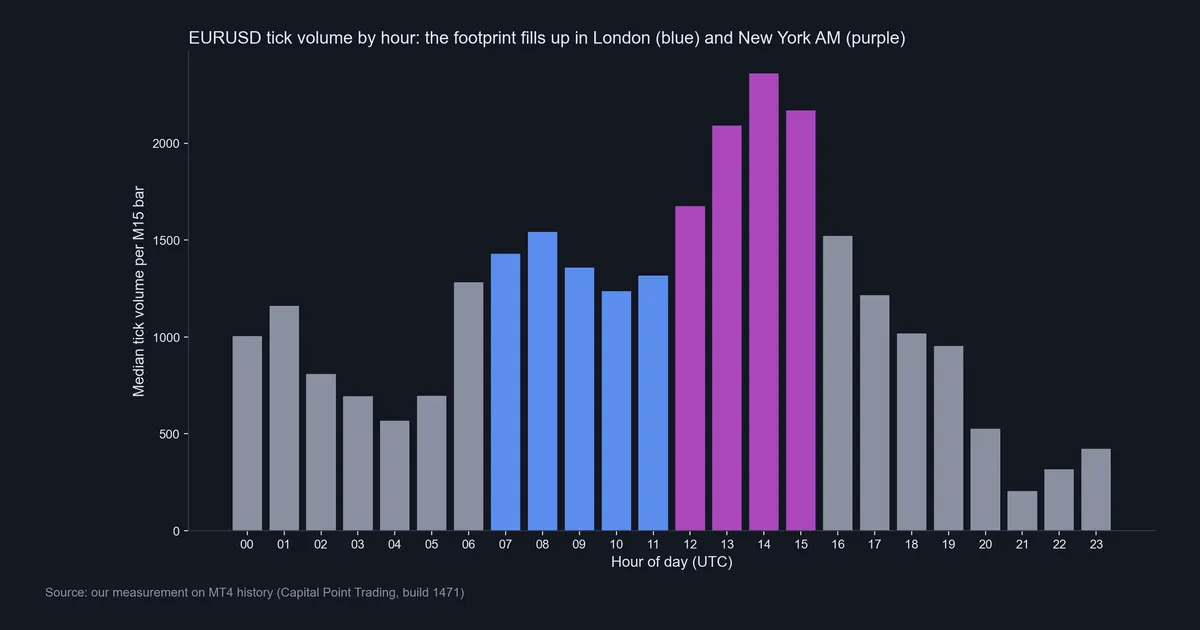
Our hourly chart of median tick volume per M15 bar shows a clear shape. Counts climb through the London session (blue, from 07:00 UTC). Then they peak in the first New York hours (purple). The tallest bar is 14:00 UTC, above 2,300. The lowest is 21:00 UTC, near 200.
Price range follows the same rhythm. Across our nine M15 symbols, the 14:00 UTC hour had a median range of 3.40 times a normal M15 bar. By contrast, 04:00 UTC had 1.42 times.
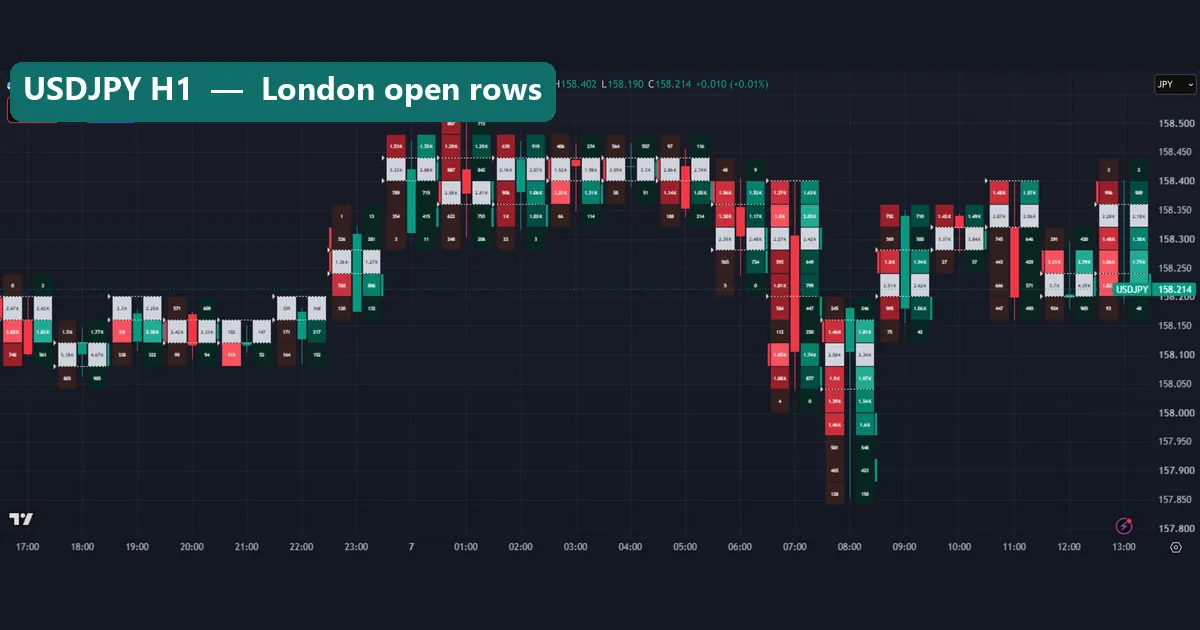
The USDJPY H1 footprint shows the result. The 07:00 and 08:00 bars on 7 October hold cells in the thousands, shown as 1.85K or 2.58K. Then the 08:00 bar stretches from about 158.20 down to near 157.85, the widest bar on the chart.
Download the complete indicator database
Put these concepts on your charts. One email unlocks the full library of 1,380+ indicators with compiled MT4 and MT5 files, plus my TradingView scripts. No paywall, no spam, unsubscribe any time.
Get free access to my indicator database
One email unlocks 1,380+ free MT4, MT5 and TradingView indicators — the complete library. No single-tool download; you get the whole database.
Where it fails
The footprint is a good microscope with a narrow lens. Here are its real limits on forex.
- It counts ticks from one feed. OANDA’s numbers are OANDA’s. A different broker shows different rows, and no feed sees the whole market.
- Buy and sell are guesses from direction. An uptick is labelled buying. That says nothing about whether a buyer or a seller started the trade.
- Volume tracks range, not direction. Our correlations to the bar body were 0.25 to 0.40. That is a weak link.
- Quiet hours are noise. In the late US session and early Asia, rows shrink to single digits, and a delta of five means nothing.
- Zoomed out, the numbers vanish. Past about 20 to 25 bars on screen, cells turn into coloured blocks.
- It costs a paid plan. The tool sits behind TradingView’s higher plans, per its help page.
- History is shorter. A footprint needs fine data, so very old bars may not have it.
Together, these limits make a forex footprint a context tool, never the only reason for a trade.
Zooming out: when the numbers disappear
The last two charts, with the same settings, show the scale problem.
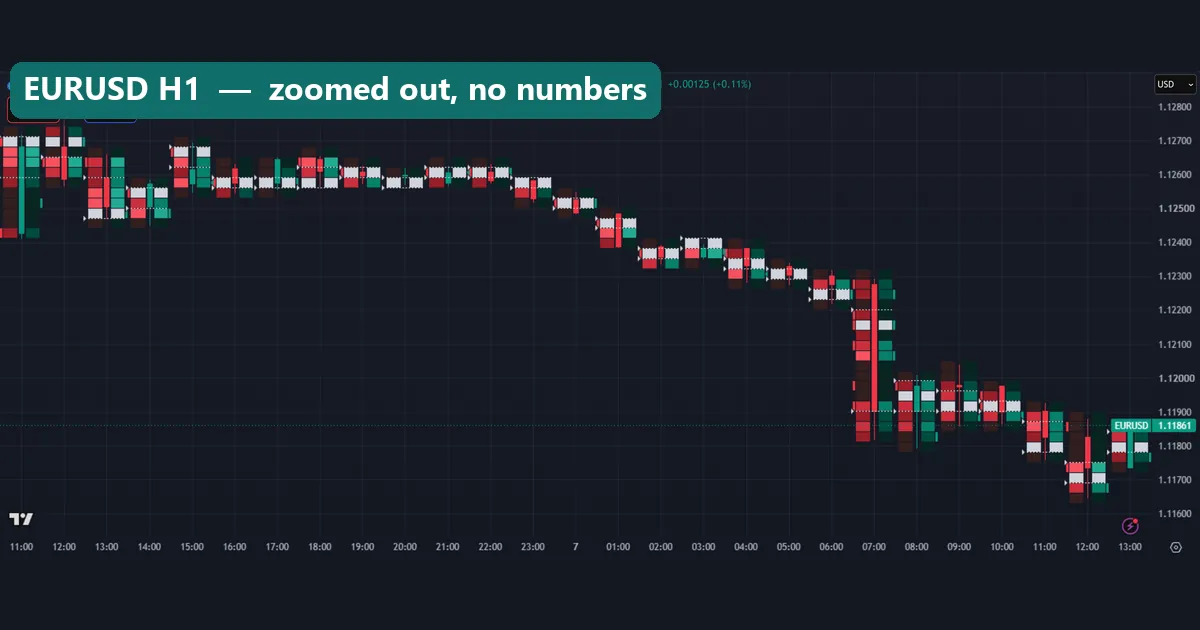
The EURUSD H1 chart has 26 bars on screen. Every cell is now too small for a number, so you see only colours. You can still spot the big 07:00 UTC drop on 7 October and the grey POC rows. But you can no longer count anything.
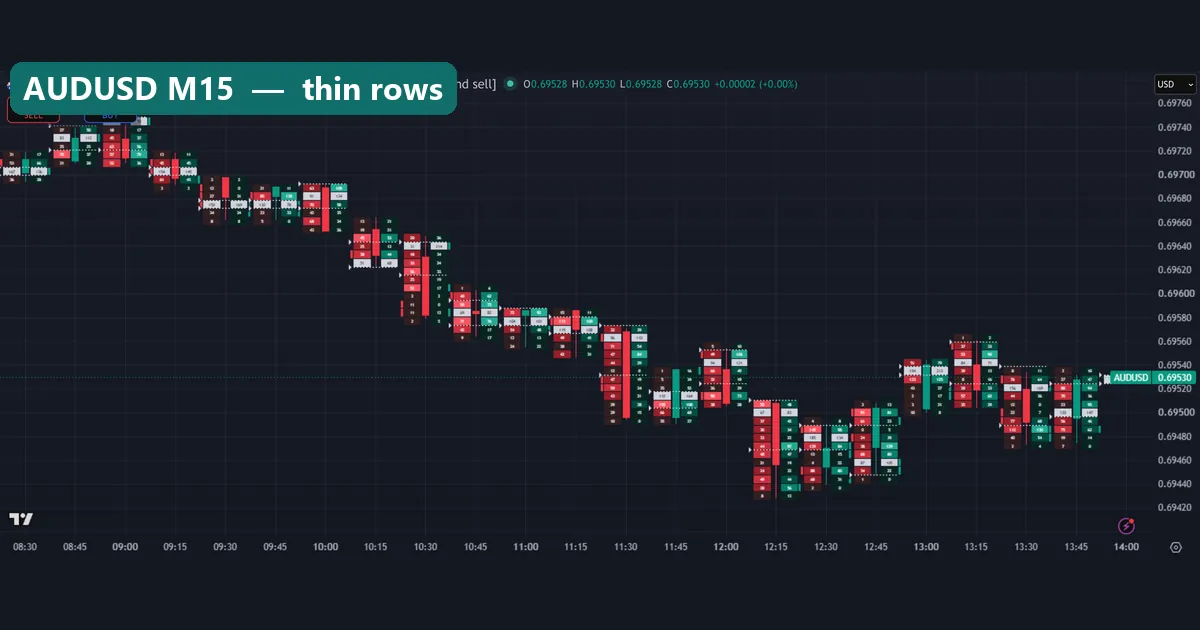
The AUDUSD M15 chart has the opposite problem. Here the numbers print, but most are two digits. AUDUSD drew far fewer updates in this window than EURUSD or gold. So each cell carries little weight, and a lopsided row may come down to a handful of quotes.
The fix for both: zoom in to roughly 15 to 22 bars, and favour liquid pairs in London and New York hours.
Four common mistakes
- Treating tick volume as contracts. A row of 600 on EURUSD is 600 quote updates on one feed. It is not 600 lots. Compare with the open interest versus volume guide to see what real exchange volume measures.
- Reading delta as intent. A positive delta means more upticks than downticks. It does not mean buyers are in control, and the next bar is free to reverse.
- Reading dead hours. A footprint at 21:00 UTC is thin. Our hourly chart shows why. Wait for London or New York if you want rows worth reading.
- Zooming out too far. Once the numbers turn into colour blocks, you are reading a candle chart with extra decoration.
Where to go next
If you trade from MetaTrader, our volume profile indicator builds the same “volume at price” idea over a whole session. The cumulative delta indicator keeps a running total of the delta we added up by hand. Then there is the buy sell volume indicator, which splits each bar’s tick volume in a sub-window.
For reading context, try our volume spread analysis guide and our pick of the best volume indicator for day trading. The hollow candlestick chart guide covers another TradingView chart type. Before trusting any intraday feed, read about TradingView real-time data. Finally, practise reading footprints bar by bar with TradingView market replay.
For background, order flow trading on Wikipedia explains the exchange-market ideas that footprints borrow. If you test footprint ideas in MT4, see our notes on tick data backtesting.
FAQ: volume footprint on TradingView
Is volume footprint free on TradingView?
No. TradingView’s help page lists it as a feature of its higher paid plans. Plans change, so check that page.
Does the footprint show real forex volume?
No. On spot FX, it shows tick volume from the data feed on your chart, such as OANDA. Tick volume counts quote changes, and no single feed sees the whole over-the-counter market.
How does TradingView decide what is buying and selling?
It uses price direction. An update that trades up counts as buying, and one that trades down counts as selling. It cannot see who started each trade.
What is the grey row inside each bar?
On our charts, it is the point of control: the row with the largest total of buy plus sell. In our EURUSD 12:15 example, it was the 452 by 406 row near the low.
What row size should I use?
We used ATR with length 14 on every chart. It adapts row height to each symbol, so every chart stays readable.
Which timeframe works best for a forex footprint?
We found M15 and H1 readable with 15 to 22 bars on screen. Lower timeframes thin out the rows, and wider views hide the numbers.
Can I get a footprint in MT4?
MT4 has no built-in footprint chart. Instead, our volume profile and buy sell volume indicators cover part of the idea using MT4 tick volume.
Can a footprint tell me where price goes next?
No. In our MT4 test, tick volume tracked bar range much better than bar direction, so treat the footprint as context only; results are not guaranteed; past performance is not indicative of future results.
Last updated: 8 October 2026.

About the author
Written by Dominic Walsh, a Forex trader and MT4/MT5 indicator, Expert Advisor and script developer. Every tool on forexmt4systems.com is tested on live charts before release and ships with ready-to-use compiled MT4 (.ex4) and MT5 (.ex5) files. Learn more about the trader and developer behind this site.
How we build, test and correct every tool: Editorial & Testing Policy. Trading carries risk; see the disclaimer.