
What is a forex vps? It is a small computer that lives in a data centre and runs your trading terminal for you. You connect to it from your own machine, set things up, then disconnect and leave it working.
So the question of what is a forex vps has a short answer and a longer one. The short answer is a rented always-on desktop. A longer answer covers uptime, distance to the broker, and the jobs it cannot do.
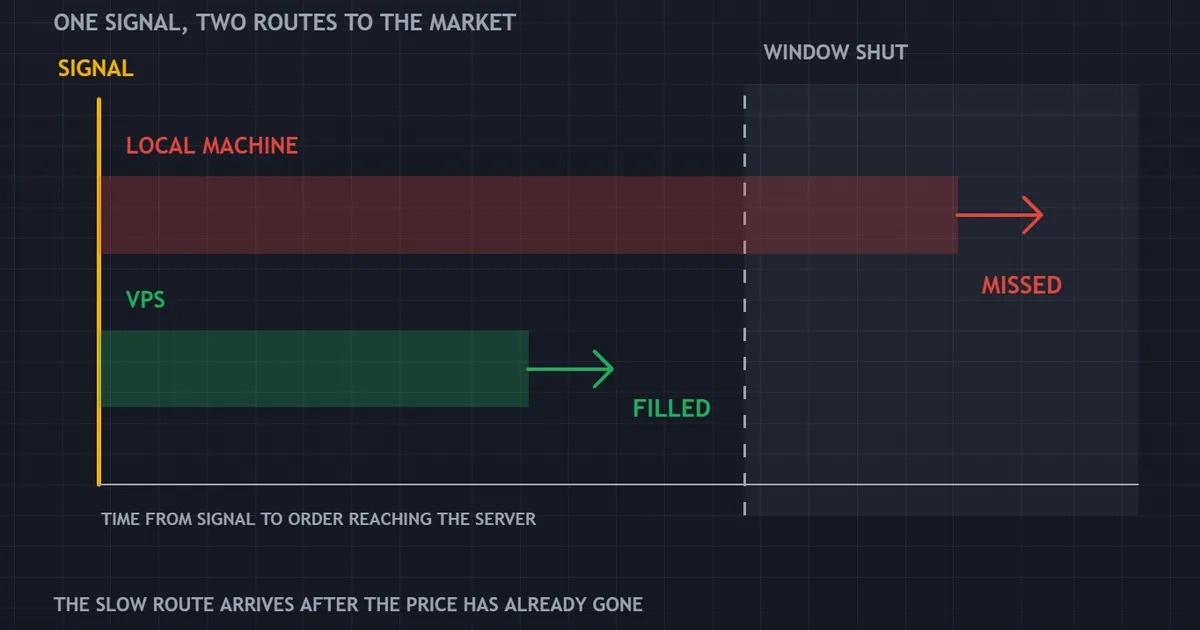
The panel above follows one signal down two paths. A local machine reacts late and misses the level. A hosted terminal reacts sooner and fills.
What Is a Forex VPS? A Plain Definition
Strip away the marketing and very little remains. A provider slices one large server into several virtual machines, then rents you one of them.
What You Actually Rent
Your slice has its own operating system, its own memory and its own disk space. It behaves like a plain desktop, except it sits in a rack rather than under yours.
You reach it with a remote desktop connection. The window on your screen shows a desktop hundreds of miles away.
Why Traders Use One
Terminals need to stay open. An expert advisor stops thinking the moment its chart closes, and a pending order still needs the platform running to manage the rest of the position.
A home computer sleeps, updates and reboots. A hosted machine does none of those things unless you ask it to.
What It Is Not
Renting a server changes nothing about your strategy. It moves where the software runs, and that is the whole of it.
Nor does it link you directly to any exchange. Your orders still travel to your broker, and your broker still decides how to fill them.
How a Hosted Terminal Changes the Order Path
Six stages sit between a price tick and a filled order. Hosting shortens two of them and removes one risk entirely.
- The broker publishes a price. Quotes leave the broker’s server toward every connected terminal.
- Your terminal receives the tick. Distance and connection quality decide how long that takes.
- Your rule evaluates. The expert advisor checks its conditions on the new tick.
- The order goes out. Instructions travel back along the same path.
- The broker fills or rejects. Price may have moved during the round trip.
- The result returns. Your terminal updates and the position appears.
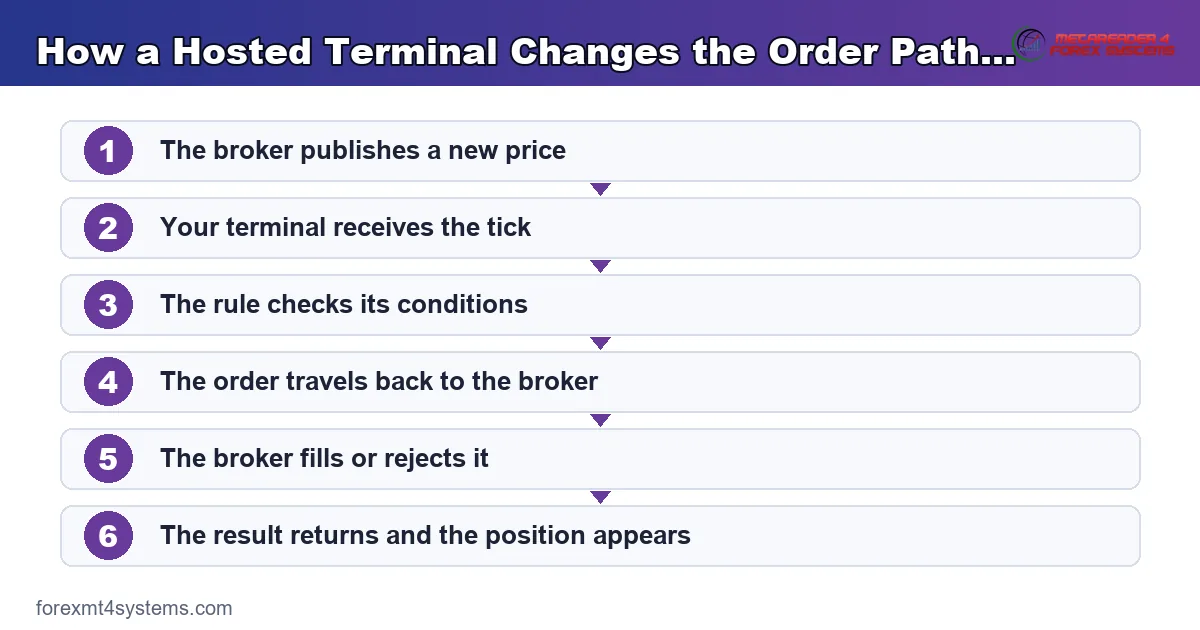
Stages two and four carry the travel time. Hosting the terminal near the broker cuts both, which shrinks the window where price can move against you.
The Three Problems Hosting Solves
People buy hosting for one of three reasons. Only one of them concerns speed.
Uptime
Home setups fail in dull ways. A router reboots, a power cut hits, or the machine installs an update at three in the morning.

The strip above shows a month of running on two rows. The local row carries two gaps marked as outages, while the hosted row runs unbroken.
Each gap costs whatever the rule would have done during it. That cost cannot be measured, which makes it easy to ignore.
Latency
Distance takes time. A signal travelling from a home connection across an ocean needs far longer than one crossing a data centre floor.
Shorter travel means fewer surprises at the fill. Our note on slippage in trading explains what happens in that gap.
Independence From Your Desk
A hosted terminal keeps running while you close the laptop and travel. That freedom matters more than most people expect.
It also separates work from trading. Your own machine can crash without touching a live position.
Home Machine Against Hosted Server
Set the two side by side and the trade-offs become clear. Neither option wins on every line.

The comparison above covers uptime, latency, cost and control. Read it before spending anything, because plenty of traders need nothing more than the machine they already own.
Where Home Wins
Home costs nothing extra. Files sit where you left them, and you can install anything you like without a second thought.
Screen space helps too. Chart work on a big monitor beats chart work through a remote window every time.
Where Hosting Wins
Hosting wins on continuity. Power, cooling and network run on backup systems that a home office cannot match.
It also wins on distance when your broker sits far away. That single factor decides most of the benefit.
Download the complete indicator database
Put these concepts on your charts. One email unlocks the full library of 1,380+ indicators with compiled MT4 and MT5 files, plus my TradingView scripts. No paywall, no spam, unsubscribe any time.
Get free access to my indicator database
One email unlocks 1,380+ free MT4, MT5 and TradingView indicators — the complete library. No single-tool download; you get the whole database.
Latency, Distance and Diminishing Returns
Speed talk gets exaggerated quickly. A little context stops you overpaying.
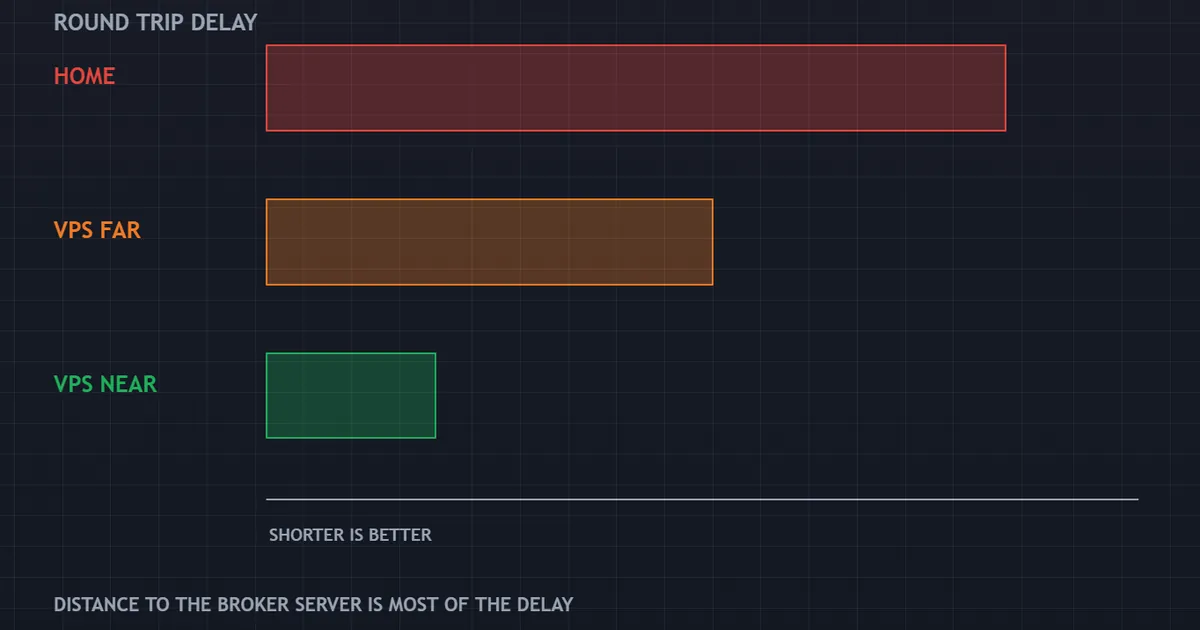
The ladder above shows three bars: a home connection, a distant server and a nearby one. Each step down shortens the round trip, though the gain between the last two shrinks noticeably.
What the Numbers Mean
Round trip time gets measured in milliseconds. A home line to an overseas broker often runs well over a hundred, while a server in the right city can sit in single digits.
That difference matters for a rule targeting a few pips. It matters far less for a rule holding trades for two days.
The City Is the Point, Not the Brand
Providers advertise speed, yet geography does most of the work. A server near your broker’s matching engine beats a faster machine on the wrong continent.
Ask your broker where its servers sit. Then pick a hosting location in the same city, and ignore the marketing.
Where Extra Speed Stops Helping
Below a certain point, other things dominate. Broker processing, liquidity and spread all add delay that no hosting plan touches.
So chasing the last millisecond rarely pays for a retail account. Get close, then stop.
How to Measure Your Own Latency
Guesswork wastes money here. Three simple checks give you a real number.
Read the Terminal Itself
Most platforms display a ping figure beside the connection status in the corner. Watch it during a busy session rather than a quiet one.
Write the number down at home first. You now have a baseline to beat.
Test Before You Commit
Ask the provider for a trial, then install the platform and read the same figure. A drop from three digits to single digits shows a real gain.
A drop from thirty to twenty-five does not. Save the money in that case.
Measure Fills, Not Just Ping
Ping measures the network alone. What matters is the difference between the price your rule wanted and the price it got.
Track that difference across a few dozen trades before and after. Numbers settle arguments that opinions cannot.
Who Actually Needs Hosting
Four groups gain something real. If you fall outside all four, keep your money.
Anyone Running an Expert Advisor
Automated rules must stay online to work at all. A closed terminal misses every signal in the gap, and no log records what it missed.
Our guide to expert advisors covers what these programs do while the chart stays open.
Anyone Copying Another Account
Copiers need both ends connected. A dropped link on your side means the source enters and you do not, so the two records diverge from that moment on.
Our page on trade copiers explains the routing behind that.
Anyone Trading Sessions They Sleep Through
A rule built for the Tokyo open needs a machine awake at that hour. Check when your strategy actually trades with our forex market hours tool.
Time zones settle this quickly. If the session sits at the wrong end of your night, hosting solves a real problem.
Anyone With an Unreliable Connection
Some homes simply have poor internet. Frequent drops during the London open cost more than a modest monthly fee.
Count the disconnections in your terminal log over a fortnight. If the list runs long, the decision has already made itself.
Who Does Not Need One
Three groups can safely skip it. Marketing pushes hosting at everybody, and that is not honest.
Manual Traders at the Screen
Someone placing a few trades a week by hand gains almost nothing. You sit at the machine anyway, and your stops rest on the broker’s server.
Swing and Position Traders
Holding trades for days makes a hundred milliseconds irrelevant. Our overview of position trading covers why timing pressure falls away at that horizon.
Anyone Still Testing
Demo work and backtesting run perfectly well at home. Wait until a rule earns live money before renting anything for it.
Testing also benefits from a fast local machine. A tester runs quicker on your own hardware than on a modest rented slice.
How to Choose a Provider
Six checks separate a sensible choice from a regrettable one. Price sits last for a reason.
| Check | What good looks like | Warning sign |
|---|---|---|
| Location | Same city as your broker’s servers | Only a country named, or nothing at all |
| Uptime record | A published figure with a stated period | Vague promises about reliability |
| Memory | Enough for every terminal you plan to run | A minimum plan that barely boots the platform |
| Reboot policy | Notice before maintenance windows | Restarts with no warning at all |
| Support hours | Cover for the sessions you trade | Weekday office hours in one time zone |
| Trial terms | A short trial or a monthly rolling plan | Long contracts paid upfront |
Sizing the Plan
One terminal running a couple of charts needs very little. Four terminals, several dozen charts and a copier need noticeably more memory.
Start small and upgrade later. Providers move you up in minutes, and paying for headroom you never use is simply waste.
Free Hosting From a Broker
Many brokers offer hosting once your balance or volume reaches a threshold. That deal can be excellent, since the server usually sits beside their own.
Read the volume condition carefully though. A requirement that pushes you to trade more than your plan allows costs more than any rental fee.
Setting It Up Without Losing a Week
Most problems arrive in the first hour. Five habits avoid them.
Install Only What You Need
A trading server should run the terminal and nothing else. Every extra program adds a reason for the machine to misbehave.
Turn Off Automatic Restarts
Updates that reboot at random will close your terminal. Schedule them for the weekend instead, and check the setting after the first month.
Set the Terminal to Start Itself
Add the platform to the startup folder and enable automated trading in its settings. A reboot then returns you to a working state without you noticing.
Confirm the Charts Reopen
Restart the machine deliberately once. Then check that every chart, template and program came back exactly as before.
Watch the Journal for a Week
Errors surface in the terminal log long before they surface in the balance. Read it daily at first, then weekly once things settle.
A Week in the Life of a Hosted Terminal
The routine matters more than the specification. Here is what a working week looks like.
Sunday Evening
The market opens and the server has been idle all weekend. Log in, check the terminal reconnected, and confirm the automated trading button still shows green.
Spreads run wide at the open, so many rules sit out the first hour. Check that yours behaves as you intended.
Midweek
Nothing needs doing on a normal day. Glance at the open positions once, read the journal for errors, then close the remote window.
Resist the urge to watch. A remote desktop tempts people into fiddling, and fiddling ruins more records than outages do.
News Days
Volatility widens spreads and lengthens broker processing. Hosting shortens your travel time, and it cannot shorten theirs.
Expect worse fills anyway. Plan around the calendar rather than trusting the wiring to absorb it.
Friday Close
Decide what stays open over the weekend. Gaps ignore your terminal entirely, so the position size matters far more than the hosting.
Take a copy of your settings while you are there. A saved template turns a rebuild into a five minute job.
Common Mistakes After the Move
Five errors show up again and again. Each one has a quick fix.
Leaving the Terminal Logged Out
Closing the remote window is fine, but logging the platform out is not. Disconnect from the desktop rather than shutting anything down.
Running Two Copies of the Same Rule
People migrate, then forget the home terminal is still running. Two copies of one program can double the position or fight over the same ticket.
Shut the old one down properly. Then confirm only one connection shows in your account history.
Ignoring the Server Clock
Data centres often run a different time zone from your broker. A rule filtering by hour then trades the wrong session entirely.
Check the platform clock, not the desktop clock. Our note on forex trading sessions covers which hours actually matter.
Skipping the Restart Test
Everything works until the first reboot. Force one deliberately in a quiet hour and watch what comes back.
Treating It as Set and Forget
Servers drift. Disks fill, providers patch, brokers change symbol names, and a terminal can sit connected while doing nothing at all.
Book fifteen minutes a week. That habit catches almost every problem before it costs anything.
What Hosting Cannot Fix
Clear limits keep expectations honest. Four things stay exactly as they were.
A Rule Without an Edge
Running a losing strategy without interruption produces losses without interruption. Our article on whether forex robots work covers that point at length.
Broker-Side Delay
Once your order reaches the broker, hosting has done its job. Processing time, requotes and liquidity all sit beyond your reach.
Spread and Commission
Costs do not shrink because the terminal moved. A rule that fails on cost at home fails on cost in a data centre.
Gaps and Weekend Risk
Price can jump over your stop whether or not the terminal watched it happen. Hosting keeps the platform alive, and it changes nothing about the market.
Costs and Whether They Are Worth It
Fees vary widely, so compare them against something concrete rather than against nothing.
Compare Against Missed Trades
Estimate what one missed signal costs your strategy on average. Then ask how many outages your setup produced last quarter.
Two missed trades a month often exceed a modest hosting fee. One missed trade a year does not.
Compare Against Slippage
Shorter travel time reduces the average gap between decision and fill. For a rule trading fifty times a week, a fraction of a pip per trade adds up quickly.
Log the Difference
Record your fills before and after the move. Our trade journal gives you somewhere to keep both sets, and the comparison answers the question properly.
Do Not Buy Speed You Cannot Use
Premium tiers sell low latency to traders who hold positions for days. Match the plan to the strategy, then browse the MT4 indicator library when you want to improve the rule instead of the wiring.
Alternatives Worth Considering
Hosting is not the only route to an always-on setup. Three options come up.
A Spare Machine at Home
An old computer left running solves the sleep problem for nothing. Power cuts and router reboots remain, so this suits mild cases only.
A General Cloud Server
Ordinary cloud providers rent the same thing, often cheaper. You handle the setup yourself, and locations rarely match broker addresses as neatly.
Broker-Side Automation
Some tools run on the broker’s own infrastructure rather than your terminal. Availability varies, and the range of what you can run stays narrow.
Hosting Built Into the Platform
Both MetaTrader versions offer a virtual hosting service inside the terminal itself. You rent it from the platform, then migrate your charts and programs with a couple of clicks.
Setup takes minutes rather than an evening, which suits people who dislike remote desktops. The trade-off is less control, since you cannot install anything else on it.
A Small Machine Built for the Job
Cheap low-power computers run a terminal happily and cost nothing to leave on. Add a small backup battery and you have covered the two most common home failures.
That route suits one terminal and a stable connection. It does nothing for distance, so latency stays wherever your home line puts it.
FAQ
Does a forex VPS make an expert advisor profitable?
No, and nothing about hosting touches the quality of a rule. It keeps the terminal online so the rule can act on every signal, which removes a source of missed trades. A strategy without an edge simply loses more consistently once it stops being interrupted.
How much memory does one terminal need?
Less than most plans advertise, though the number climbs with charts and indicators. A single platform with a handful of charts runs comfortably on a modest allocation, while several terminals with dozens of charts need real headroom. Start at the low end, watch the usage for a week, then upgrade if the machine struggles.
Where should the server be located?
As close to your broker’s trade servers as you can manage. Ask the broker directly for the city, since that single detail affects round trip time more than any other choice. A nearby location beats a faster machine sitting on the wrong continent.
Can I run several accounts on one server?
Usually yes, provided the memory allows it. Each terminal needs its own installation folder, and each one adds load, so watch the machine during busy sessions. Check your broker’s rules too, because some restrict how many terminals may connect from a single address.
What happens if the provider reboots the machine?
Your terminal closes unless you prepared for it. Put the platform in the startup folder, leave automated trading enabled, and test the whole sequence with a deliberate restart. Providers that announce maintenance windows in advance make this far easier to manage.
Is hosting worth it for a small account?
It depends on what the account actually does rather than on its size. A small balance running an automated rule overnight has a genuine reason, while a small balance traded by hand on a laptop has none. Weigh the monthly fee against the trades your setup missed last quarter, and answer from your own records. Results are not guaranteed; past performance is not indicative of future results.
External references
- For background on this concept, see Virtual Private Server on Wikipedia.
- For broader market context, see Program Running in the MQL5 Documentation.

About the author
Written by Dominic Walsh, a Forex trader and MT4/MT5 indicator, Expert Advisor and script developer. Every tool on forexmt4systems.com is tested on live charts before release and ships with ready-to-use compiled MT4 (.ex4) and MT5 (.ex5) files. Learn more about the trader and developer behind this site.
How we build, test and correct every tool: Editorial & Testing Policy. Trading carries risk; see the disclaimer.