
An RSI color code is a simple key: red when the RSI is above 70, green when it is below 30, and grey for everything in between. This guide settles what each color means, how the line behind it is calculated, and what happened next on 23 FX pairs when the color changed. The short answer from our data: the colors describe where price has been, but they did not reliably say where it would go.
What an RSI color code actually means
The Relative Strength Index is a momentum oscillator that moves between 0 and 100. A color-coded RSI adds one thing to it: a fill or line color that depends on which zone the value sits in. So the color adds no new information, only speed of reading.
The most common scheme has three zones. First, red marks readings above 70, which most traders call overbought. Next, green marks readings below 30, called oversold. Then grey covers the wide middle band from 30 to 70. Some versions flip the colors, so check the legend first.
TradingView’s built-in RSI uses its own palette. It draws a purple RSI line, a yellow RSI-based moving average, and a shaded band between 30 and 70. In our captures, the area above 70 gets a faint green tint and the area below 30 a faint red one. That is the reverse of the red-high, green-low scheme above.
How the RSI calculates the value behind the color
J. Welles Wilder introduced the RSI in 1978, and the math has not changed. The indicator compares the size of recent up closes with the size of recent down closes over a lookback period, usually 14 bars.
The formula has two steps:
RS = average gain / average lossover the periodRSI = 100 - 100 / (1 + RS)
Wilder smoothed both averages with his own method. Each new average keeps 13/14 of the old value and adds 1/14 of the new bar’s gain or loss. See the derivation in the relative strength index article on Wikipedia.
A color-coded RSI then runs one extra test on each bar. If the value is above the upper level, it paints red. If it is below the lower level, it paints green. Otherwise, it paints grey. So a color change is just a threshold cross. So a move from 69.9 to 70.1 turns the bar red, though momentum barely changed.
How we tested the RSI color zones
We measured how often each color appears and what price did after a color change. We used the MetaTrader 4 history held in our test terminal (Capital Point Trading, MetaTrader 4, build 1471). The daily sample covers 23 FX pairs from 12 June 2018 to 24 August 2026, which gives 37,173 daily bars. The hourly sample covers EURUSD, GBPUSD and USDJPY from 22 December 2025 to August 2026, plus XAUUSD from 1 July 2025. That adds 18,727 H1 bars.
Our rule was plain. We computed a 14-period Wilder RSI on closes. Then we tagged red above 70, green below 30 and grey in between. After each color change, we checked one thing: was the close five bars later above the close on the signal bar? Next, we compared that share with the base rate for all bars.
For the chart examples, we used the TradingView web chart with OANDA data, captured on 7 and 8 October 2026. All results are before spread, swap and commission. We did not measure the size of moves, only their direction. Our method is set out in the editorial testing policy.
RSI settings that decide the colors
Only a few inputs change what color you see. The table lists the TradingView defaults we used, plus the common color levels.
| Setting | Default we used | What it changes |
|---|---|---|
| RSI Length | 14 | Shorter lengths swing more, so colors change more often. |
| Source | Close | The price the RSI reads. Close is the standard. |
| Upper level (red zone) | 70 | Raise it to 80 and red shows up far less often. |
| Lower level (green zone) | 30 | Drop it to 20 and green becomes rare. |
| Middle line | 50 | A reference only. It does not change the color. |
| Smoothing type | SMA | Sets the type of the yellow RSI-based MA. |
| Smoothing length | 14 | Sets how slowly the yellow MA follows the RSI. |
| Calculate Divergence | Off | Adds divergence labels. It does not affect colors. |
For tuning ideas by trading style, see our guide to the best RSI indicator settings. Also note that MetaTrader 4’s built-in RSI draws a single line with no zone colors. You add the 30 and 70 levels yourself in the Levels tab.
Reading the colors on a chart
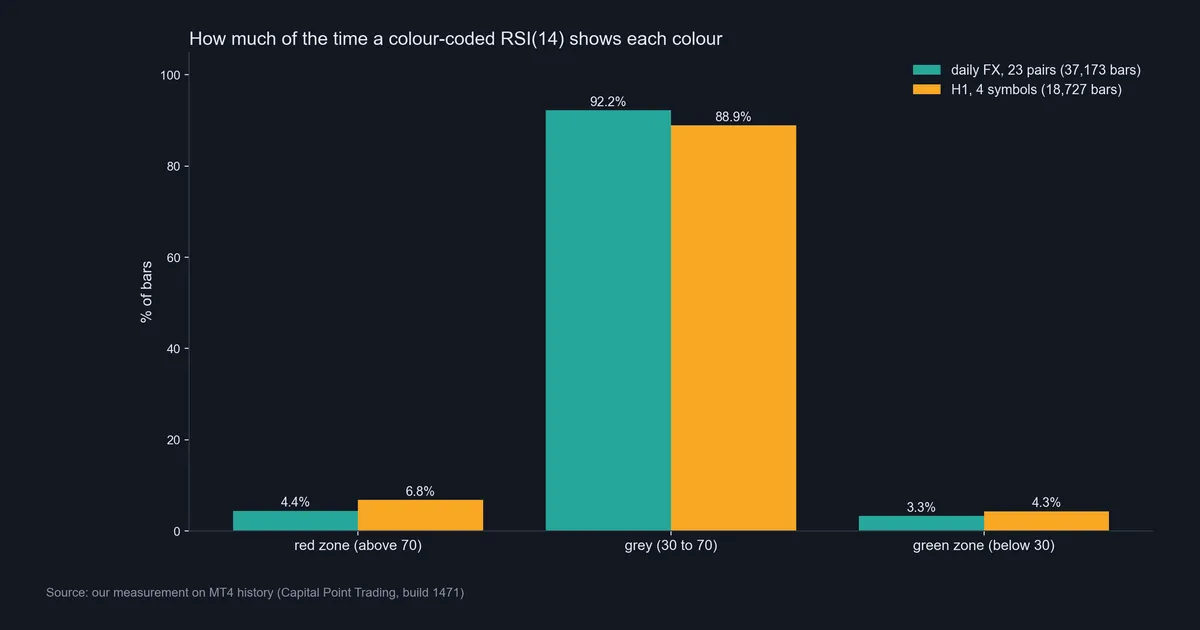
A colored RSI is easy to read because most of the time it shows nothing special. On our daily FX sample, the RSI sat in the grey zone on 92.2% of bars. It was red on only 4.4% and green on 3.3%.
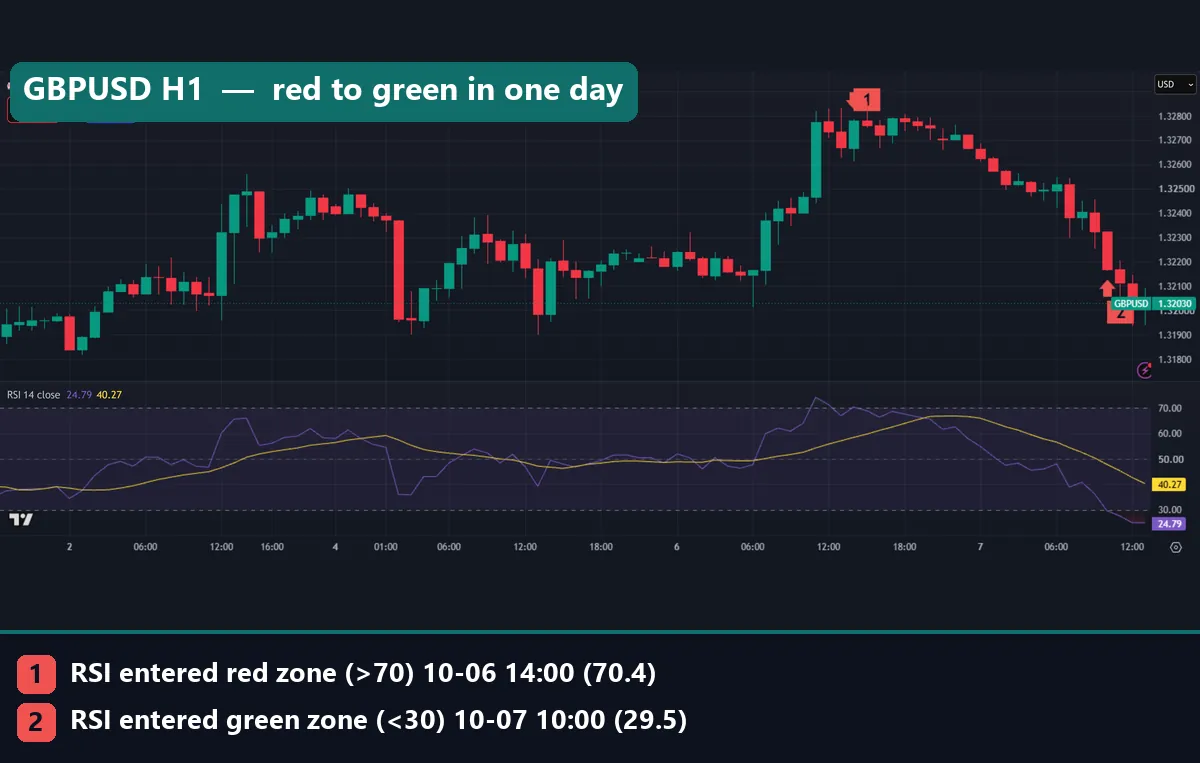
The GBPUSD hourly chart shows how fast the colors can swap. The RSI turned red at 14:00 UTC on 6 October 2026, at 70.4, with a close of 1.32781. Then it slid into green by 10:00 UTC on 7 October, at 29.5, with a close of 1.3217. That is red to green inside one trading day. At the time of capture, the RSI read 24.79 while the yellow MA sat at 40.27.
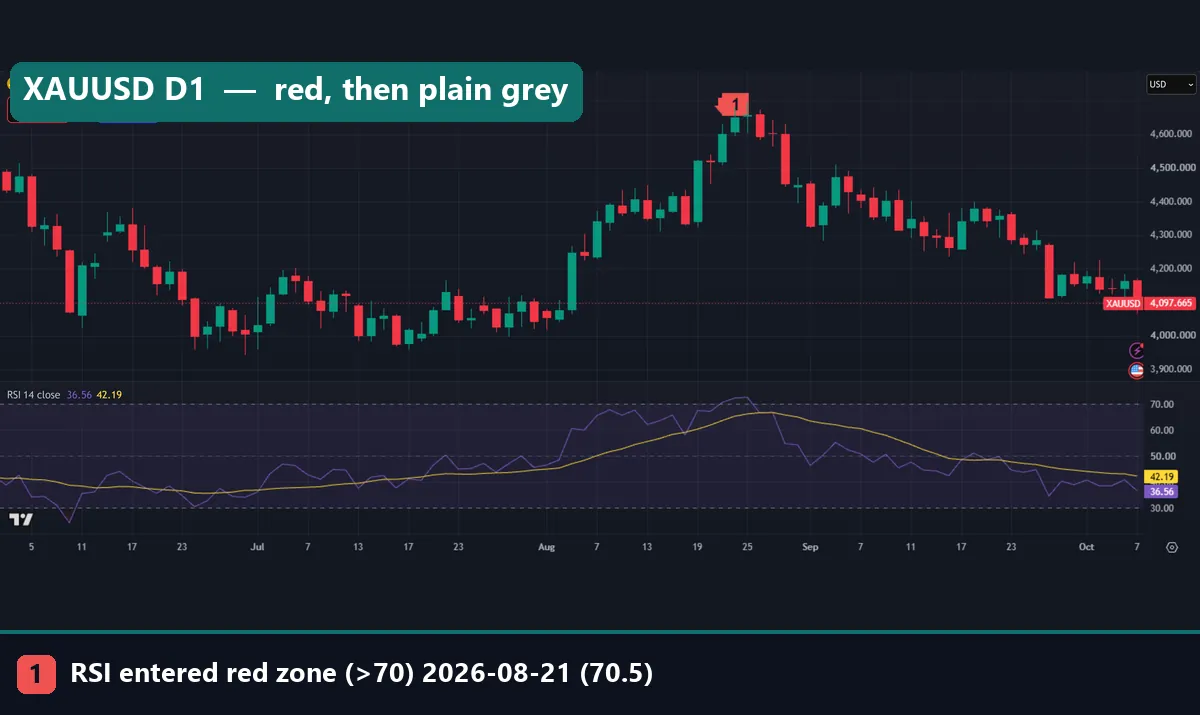
Gold on the daily chart tells a slower story. The RSI turned red on 21 August 2026 at 70.5, with a close of $4,602.99. It then fell back into grey and stayed there. By 7 October, gold closed at $4,097.665 and the RSI read 36.56. Still, it never turned green on this chart. Our gold RSI chart guide covers how the oscillator behaves on XAUUSD in more depth.
Worked example: EURUSD daily, August to October 2026
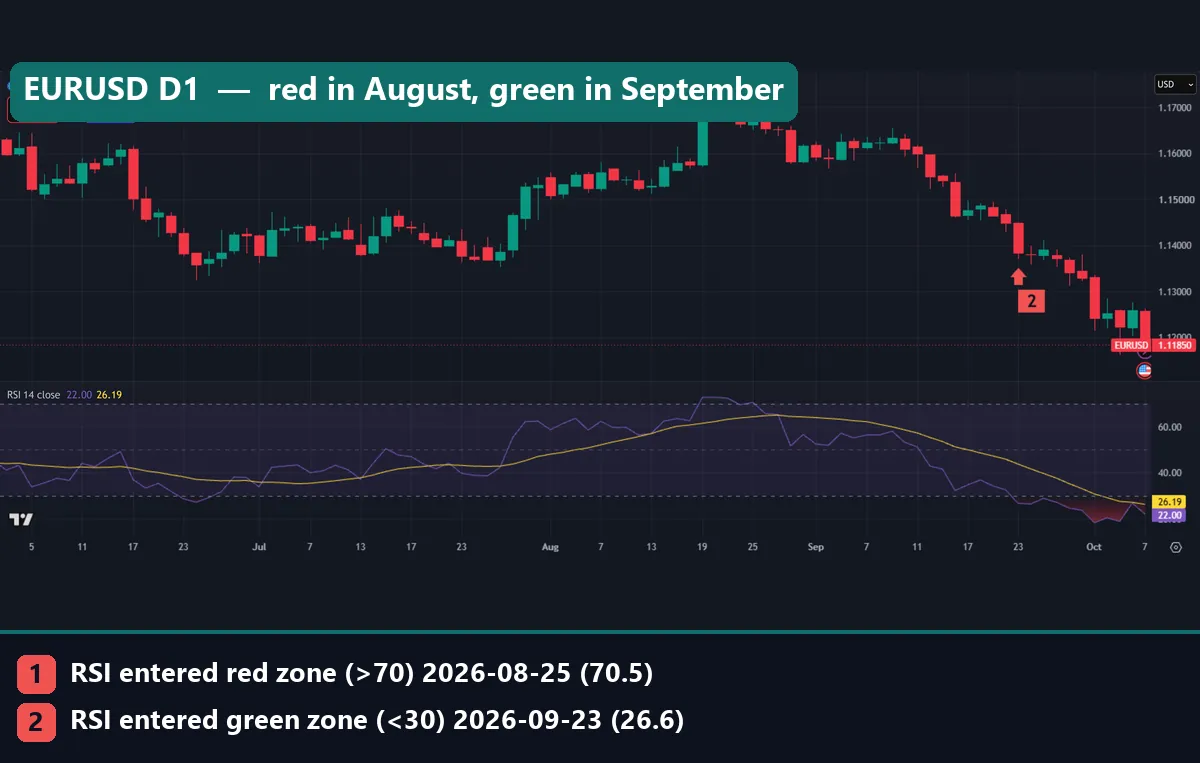
The opening chart follows EURUSD on the daily timeframe. Here is the sequence, using the closes on the bars where the color changed.
- On 19 August 2026, the RSI crossed above 70 to 72.7. The day closed at 1.16774, so the RSI turned red.
- Then it dipped back to grey and turned red again on 25 August at 70.5. That close was 1.16745, almost the same price.
- Next, price drifted lower through September. On 23 September, the RSI fell to 26.6 and turned green, with a close of 1.1384.
- Finally, on 7 October, the chart shows a close of 1.11850 with the RSI at 22.00. So the color was still green.
From the green signal close at 1.1384 to 1.11850 is 199 pips lower. So the RSI flagged oversold, yet price kept falling for two more weeks. Green marked a falling market, not a bottom.
Also, the two red bars printed six days apart at nearly the same price. The red phase did come before the September decline, but one example proves nothing, so we ran the larger test below.
What our numbers show about color changes
The first data chart shows how rare the colors are. On H1, red appeared on 6.8% of bars, green on 4.3% and grey on 88.9%.
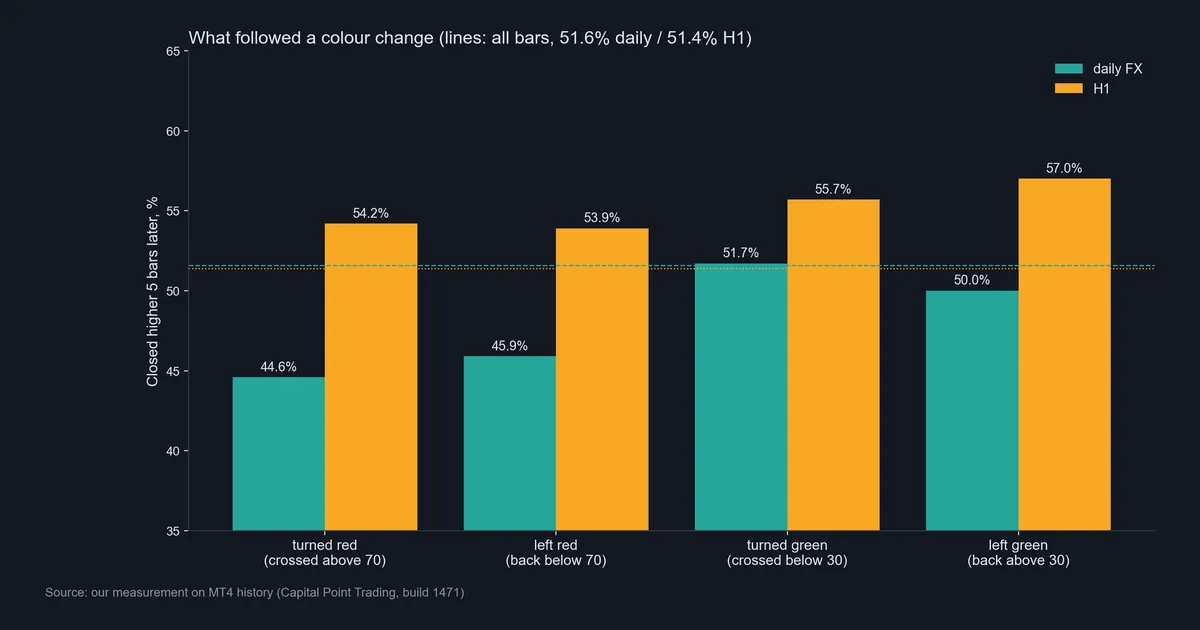
The second chart is the real test. On daily FX, 51.6% of all bars closed higher five bars later. After the RSI turned red, only 44.6% did, across 493 events. After it left red, 45.9% did. So on daily pairs, a red phase was followed by a lower close more often than average. But green showed no edge at all. After turning green, 51.7% closed higher, which matches the base rate. After leaving green, 50.0% did.
The hourly sample pointed the other way. There, the base rate was 51.4%. Yet every color change was followed by a higher close more often: 54.2% after turning red, 53.9% after leaving red, 55.7% after turning green and 57.0% after leaving green. So on H1, entering the red zone did not lead to weakness.
In short, the two timeframes disagree. These are small tilts on a few hundred events, measured on direction only, so they are not a trading rule.
Download the complete indicator database
Put these concepts on your charts. One email unlocks the full library of 1,380+ indicators with compiled MT4 and MT5 files, plus my TradingView scripts. No paywall, no spam, unsubscribe any time.
Get free access to my indicator database
One email unlocks 1,380+ free MT4, MT5 and TradingView indicators — the complete library. No single-tool download; you get the whole database.
Where it fails
The RSI color code fails in clear ways, and our data shows most of them.
- Trends keep the color on. In a strong trend, the RSI can stay red or green for days. Our EURUSD example stayed green while price fell another 199 pips.
- Colors flicker near the levels. Because a color change is a hard threshold, a reading of 69.8 then 70.3 then 69.6 produces three color flips. EURUSD turned red twice in six days for this reason.
- Green had no edge on daily FX. In our 418 green-zone entries, the five-bar result matched the base rate almost exactly.
- The current bar repaints. On a live bar, the RSI moves with every tick. So the color can change several times before the bar closes. Only the closed-bar color counts.
The StockCharts ChartSchool RSI article makes a related point. Our guide to RSI false signals lists more of these traps.
Changing the colors and levels on TradingView
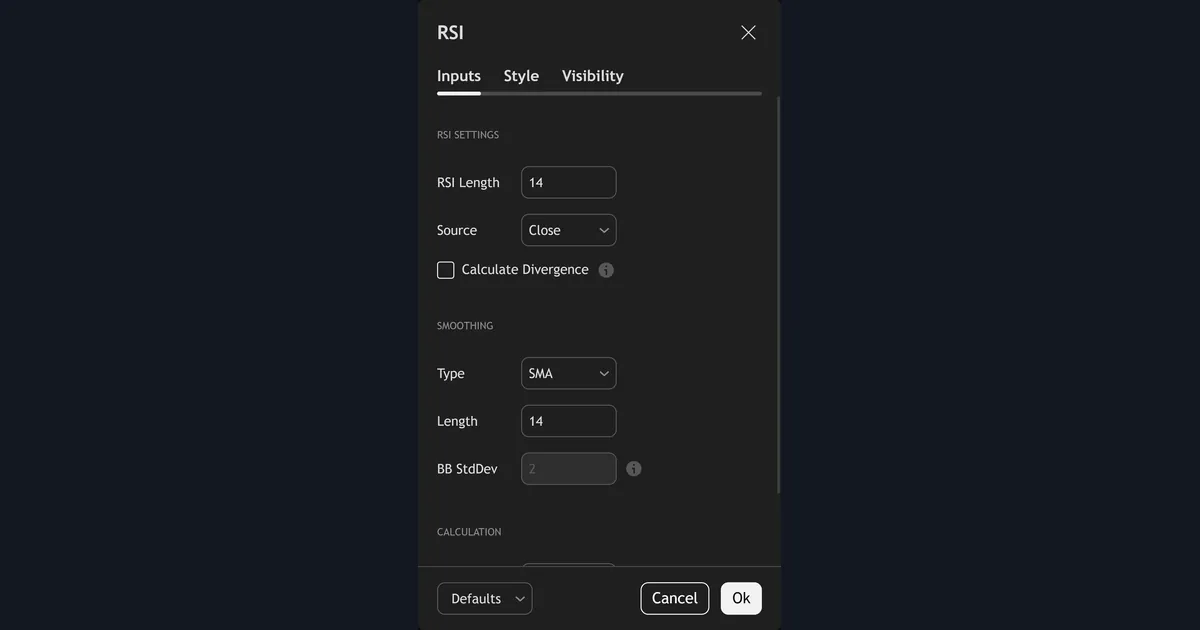
The Inputs tab of TradingView’s RSI holds the RSI Length, the Source, the divergence switch and the smoothing settings. The BB StdDev field is greyed out by default. It only becomes active when the smoothing type uses Bollinger Bands. The colors and the 70, 50 and 30 lines sit on the Style tab instead.
So if you want a red-high, green-low scheme, you change the fills on the Style tab. You can also move the levels there. For example, some traders use 80 and 20 on fast charts so that colors appear less often. TradingView documents each input on its RSI help page at TradingView.
The yellow line is a moving average of the RSI itself, not of price. Our guide to the RSI-based MA explains how it works and when the cross of the two lines matters. Also, MetaTrader users can read how the platform computes the value in the iRSI function reference in the MQL5 documentation.
A red stint on USDJPY H1 that went nowhere
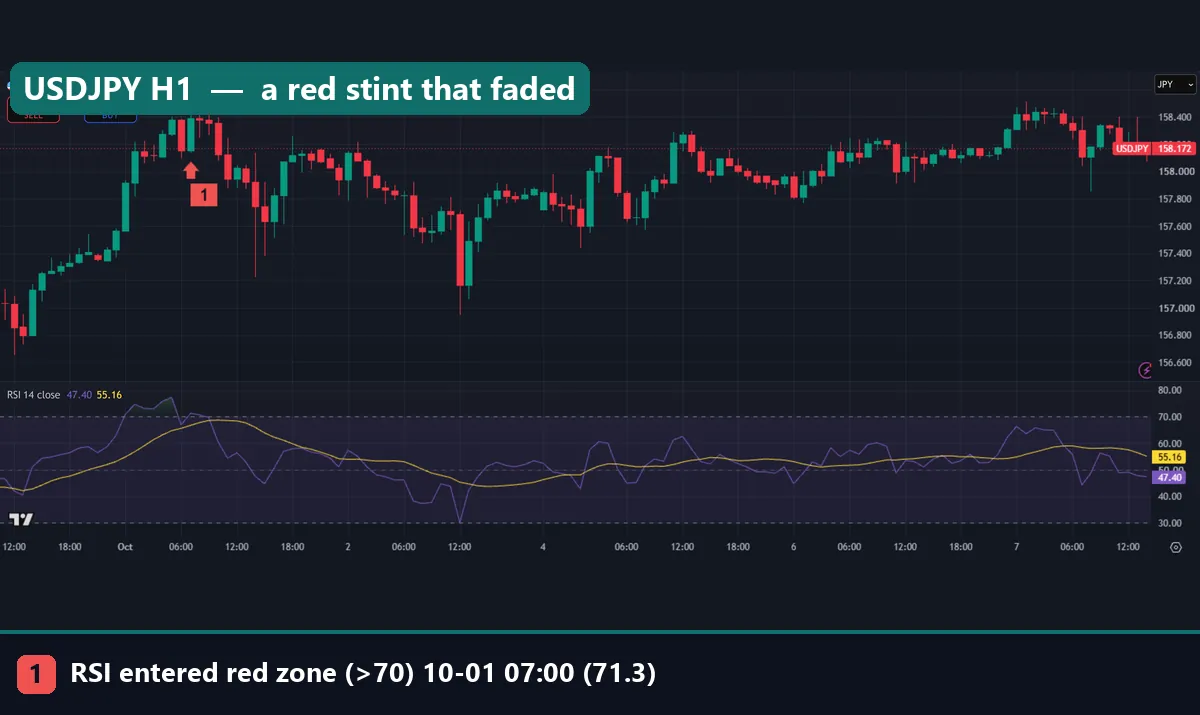
This hourly USDJPY chart shows a red phase with no clear follow-through. The RSI turned red at 00:00 UTC on 1 October 2026, at 70.8, with a close of 157.916. Then it turned red again at 07:00 UTC at 71.3, with a close of 158.392. You can see the short green-tinted bump above the 70 line at the left of the RSI pane.
After that, price chopped sideways for most of a week. At capture, USDJPY closed at 158.226 and the RSI read 50.29, right on the middle line. So the red zone neither marked a top nor kicked off a rally. It simply faded back to grey.
Common mistakes with a color-coded RSI
Most errors come from reading the color as an order.
- Selling every red bar. Red means the recent closes were strong. On our H1 sample, a turn to red was followed by a higher close 54.2% of the time, above the base rate. So red alone is not a reason to sell.
- Buying the first green bar. Green on daily FX matched the base rate. Our EURUSD example kept falling for two weeks after it turned green.
- Trusting a live-bar color. The color on the bar that is still forming can change before the close. So wait for the bar to finish.
- Ignoring which scheme you use. TradingView’s tints and community color schemes do not agree. Then a green fill can mean overbought on one chart and oversold on another.
Instead, read the number and the trend together. Our RSI divergence guide shows how the oscillator and price can disagree in a way a single color cannot show.
Where to go next
If you want to see colors on the price bars themselves, try our RSI candles indicator. For alerts at the levels, the RSI overbought oversold indicator marks the crosses for you. Both build on the plain RSI indicator for MT4 and MT5.
For a multi-pair view, our RSI heat map guide turns readings across many symbols into one grid. To understand what the zones mean in plain terms, read what overbought and oversold mean. Next, the RSI buy and sell signals guide covers how traders combine the RSI with other tools. And if you compare oscillators, see RSI vs stochastic.
FAQ: RSI color code questions
What do the colors on an RSI mean?
In the common scheme, red means the RSI is above 70, green means it is below 30, and grey means it sits between them; check the legend, because some tools swap red and green.
What colors does TradingView’s built-in RSI use?
It draws a purple RSI line, a yellow RSI-based moving average and a shaded band from 30 to 70, and in our captures the area above 70 had a green tint while the area below 30 had a red one.
How often is the RSI red or green?
On our 37,173 daily FX bars, the RSI was red 4.4% of the time and green 3.3%, while on 18,727 H1 bars it was red 6.8% and green 4.3%.
Does a red RSI mean price will fall?
Not reliably: on daily FX a turn to red was followed by a higher close five bars later 44.6% of the time against a 51.6% base rate, but on H1 the same event was followed by a higher close 54.2% of the time.
Does a green RSI mean price will rise?
On our daily FX sample, no: a turn to green was followed by a higher close 51.7% of the time, which is the same as the 51.6% base rate for all bars.
Can I change the RSI color levels from 70 and 30?
Yes, both TradingView and MetaTrader 4 let you move the levels, and setting them to 80 and 20 makes the colors appear less often.
Does the RSI color repaint?
The color on the bar that is still forming can change with every tick, but once the bar closes its RSI value and color stay fixed.
Should I trade on RSI color changes alone?
Our tests found no consistent edge from color changes on their own, measured on direction only and before costs, so treat the color as context rather than a signal; results are not guaranteed; past performance is not indicative of future results.
Last updated: 8 October 2026.

About the author
Written by Dominic Walsh, a Forex trader and MT4/MT5 indicator, Expert Advisor and script developer. Every tool on forexmt4systems.com is tested on live charts before release and ships with ready-to-use compiled MT4 (.ex4) and MT5 (.ex5) files. Learn more about the trader and developer behind this site.
How we build, test and correct every tool: Editorial & Testing Policy. Trading carries risk; see the disclaimer.