
Prop firm rules decide whether a funded account survives or closes, so they deserve a slow read before you pay any fee. This guide walks the whole rule surface in plain terms, and it stays firm-neutral throughout.
Every firm writes prop firm rules a little differently. Still, the same families turn up again and again, so learning them once lets you read any rule book fast.
Why Prop Firm Rules Exist
A firm puts its own capital behind people it has never met. So it needs limits that cap the damage one trader can do in a single bad week.
The rules also act as a filter. Because steady traders earn the firm more over many months, the limits reward patience and punish a wild swing.
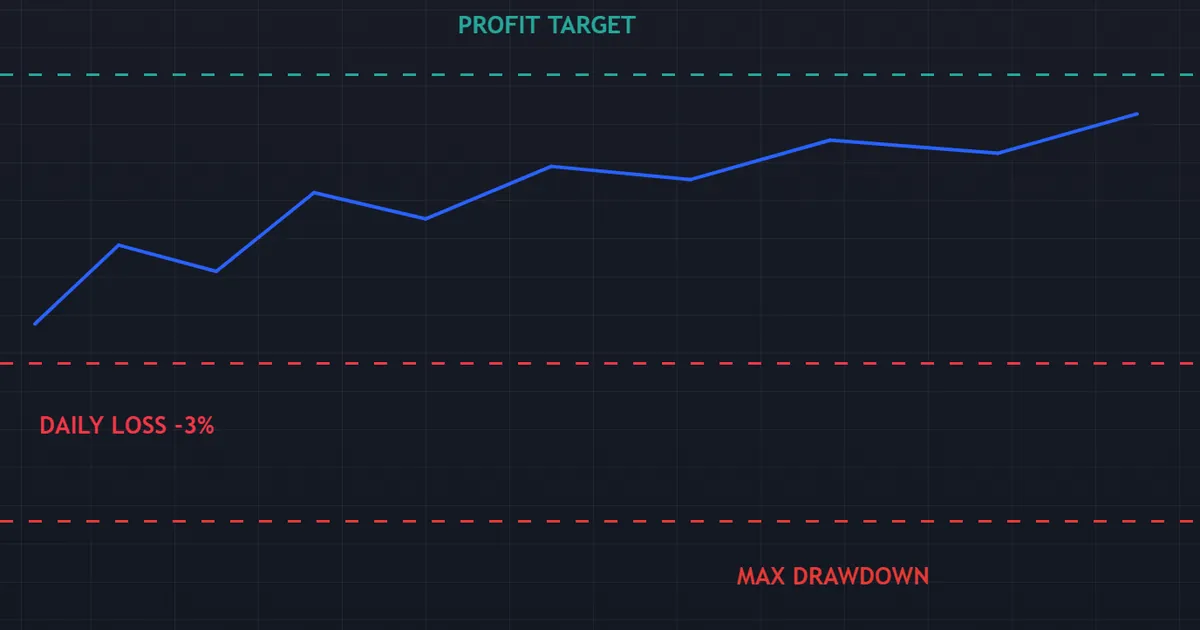
So read the rule book as a risk framework, not a hurdle. Most limits simply write down the discipline a careful trader already keeps.
Think about the firm’s position for a moment. It cannot watch every order, so it encodes its risk appetite as numbers and lets the platform enforce them. That design keeps the process fast and impersonal, which cuts both ways for you.
How the Business Model Shapes the Rules
Firms earn from evaluation fees, from their share of a funded trader’s profit, and from arrangements around spread or commission. So the rule book reflects two goals at once.
It must screen out reckless traders quickly, since one runaway account costs the firm real money. It must also keep good traders in the program for years, because a durable trader pays the firm far more than a fee ever will.
Read the limits with that tension in mind. A rule that feels harsh usually exists to stop a specific failure the firm has already seen many times.
Two Families of Rules
Split any rule book into two halves. One half caps your losses, while the other shapes how you trade.
Loss rules cover the profit target, the maximum drawdown and the daily loss limit. Behavior rules cover trading days, consistency, exposure caps, holding windows and automation.
So a breach can arrive from losing too much, or from trading in a way the firm forbids. Both close the door, and a slow read avoids both.
Traders tend to memorize the loss half and skim the behavior half. That imbalance explains a surprising share of failed evaluations, since a perfectly profitable month can still fall foul of a clause about holding times or software.
The Core Prop Firm Rules, Step by Step
Walk the loss rules in the order they bite. Learn these six items, and most of any rule book falls into place.
- Profit target. A percentage gain you must reach to pass a phase, commonly a single-digit share of the starting balance.
- Maximum drawdown. The hard floor beneath the account. Touch it, and the account closes for good.
- Daily loss limit. A cap on what you may lose within one trading day. It resets as the day rolls over.
- Minimum trading days. A floor on how many days you must trade, so one lucky session cannot pass you.
- Time limit. A deadline on the phase, though many programs now run without any clock.
- Consistency rule. A cap on how much of your total profit may come from a single day or trade.
So the first three numbers govern survival. The last three govern the shape of the profit you show the firm.
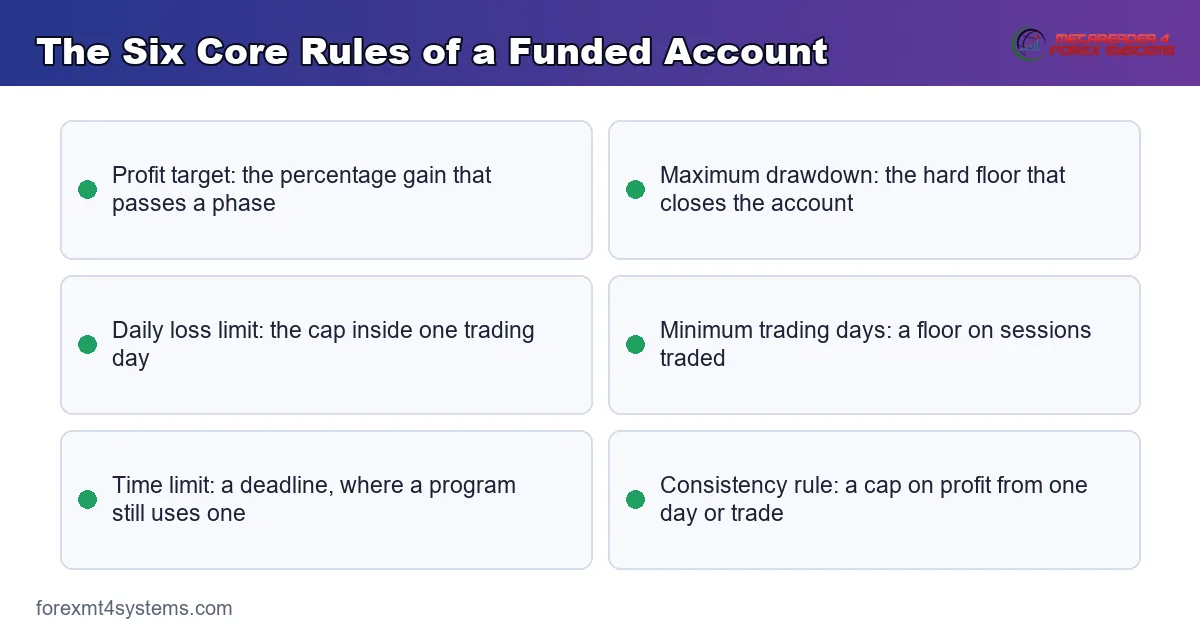
Write all six on a sticky note before your first session. Because a breach rarely announces itself, the numbers belong in your head rather than in a browser tab.
How the Six Numbers Interact
None of these limits works alone. The daily cap sets your session budget, the maximum drawdown sets your total budget, and the profit target sets the distance you must cover.
Divide the drawdown by the daily cap for a rough count of bad days you can afford. Two or three usually separates a workable program from a punishing one.
Then compare that count with the minimum day requirement. If the rules demand ten sessions and your budget covers only two bad ones, the margin for error is thin.
How the Loss Rules Play Out in Practice
Numbers on a page feel harmless. At the desk, though, they decide your position size and your stopping point.
So work backwards from the tightest limit. Whichever rule bites first sets your real risk budget for the session.
Sizing to the Daily Cap
Suppose a firm caps your daily loss at 3 percent of the starting balance. If you risk 1 percent per trade, two full losses still leave you clear of the cap.
Push that risk to 2 percent, and a single losing pair of trades ends your day. So the daily cap quietly sets a ceiling on sensible position size.
A sizing tool removes the arithmetic. Our free prop firm position size calculator turns a drawdown limit into a lot size, so you never guess at the desk.
Do the sum once per account, not once per trade. Because the cap rarely changes mid-phase, a single reference figure taped beside the screen covers every session.
Reading the Drawdown Type
The maximum drawdown comes in two flavors, and the gap between them is wide. A static floor sits a fixed distance below your starting balance and never moves.
A trailing floor follows your equity high upward. So after a profitable run, the floor rises behind you, and a giveback can breach a limit that felt distant an hour earlier.
Our note on prop firm drawdown rules unpacks both types side by side. Check which one applies before you place a single order.
Watch for a third variant too. Some firms recalculate the trailing floor only on the daily close, which gives intraday swings a little more room than a tick-by-tick version.
The Profit Target Sets the Pace
The target looks like the goal, yet it works better as a pacing guide. A single-digit gain over a month asks for a steady drip rather than a heroic session.
Divide the target by a realistic number of sessions. That gives you a daily figure small enough to reach without stretching your risk.
Because the loss rules cap the downside so tightly, the target is usually the easier half of the pass. Discipline, not ambition, tends to decide the outcome.
A Worked Example of the Rule Stack
Put the numbers together on one account. Picture a fifty thousand dollar funded account, a 3 percent daily cap and a 6 percent trailing floor.
You risk half a percent per idea and take three ideas a day. So your worst plausible day costs 1.5 percent, half the daily cap.
Two rough days in a row would cost 3 percent of the balance. That still leaves half the trailing floor intact, so the account lives to trade the next week.
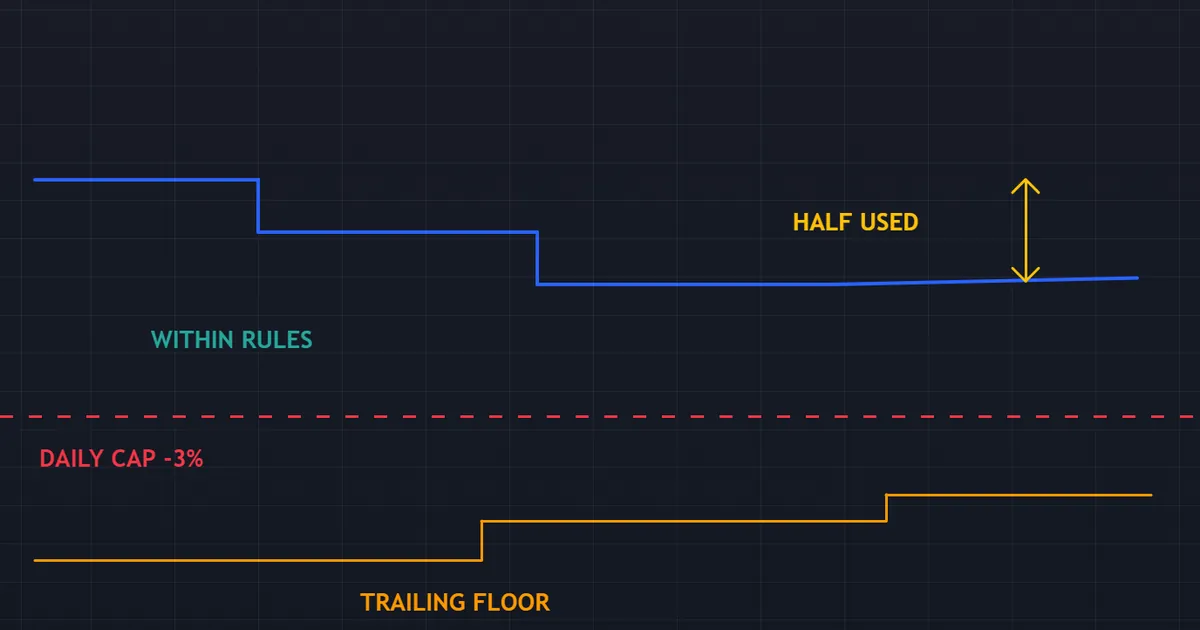
The same account behaves very differently at other risk settings. Compare three sizing choices against the same run of three losing ideas.
| Risk per idea | Three losers cost | Daily cap of 3 percent | Outcome |
|---|---|---|---|
| 0.5 percent | 1.5 percent | Half consumed | Day continues, floor untouched |
| 1.0 percent | 3.0 percent | Fully consumed | Day stops exactly at the cap |
| 1.5 percent | 4.5 percent | Over the cap | Daily rule breach |
Where the Room Runs Out
Now double the risk to 1 percent per idea. Three losing ideas cost 3 percent, and the daily cap triggers on the same afternoon.
Repeat that twice, and the trailing floor arrives. So the same strategy, at twice the size, turns a survivable week into a closed account.
Notice that nothing about the method changed. Only the size moved, which explains why sizing carries more weight than any entry signal in a funded program.
Run the same table for your own account before you trade it. Seeing the breach row written down does more for discipline than any promise you make to yourself.
Download the complete indicator database
Put these concepts on your charts. One email unlocks the full library of 1,380+ indicators with compiled MT4 and MT5 files, plus my TradingView scripts. No paywall, no spam, unsubscribe any time.
Get free access to my indicator database
One email unlocks 1,380+ free MT4, MT5 and TradingView indicators — the complete library. No single-tool download; you get the whole database.
The Behavior Rules Most Traders Skim
Loss limits get all the attention. Behavior rules end just as many accounts, though, because traders skim them and assume the obvious.
So read this half of the book twice. It covers when you may trade, how your profit must look, and what software may touch the account.
Minimum and Maximum Trading Days
Many evaluations set a floor on trading days, often a handful of sessions. The rule stops a trader from hitting the target with one oversized position.
A few programs also cap the calendar with a deadline. Because a clock pushes traders into hurried size, a program without one usually suits a steady style better.
Check how a firm defines a trading day as well. One closed position may count, while a firm elsewhere asks for a minimum volume before the day registers.
Consistency and Exposure Caps
A consistency rule caps the share of total profit that may come from your best day or best trade. So one jackpot session can block a payout even when the total looks healthy.
Exposure caps work in parallel. They limit lot size per trade, total open lots, or how much risk you may carry across correlated pairs at once.
Our guide to the prop firm consistency rule works through the arithmetic. A consistency rule calculator checks a payout request before you send it.
Weekend and News Holding Windows
Some firms forbid holding a position over the weekend. Gaps open on the Sunday reopen, and a gap can leap straight past a stop.
Others restrict trading around high-impact releases for much the same reason. Read our note on prop firm news trading rules to plan the calendar around those windows.
A minimum holding time sometimes joins these clauses. Firms add it to discourage trades that last a few seconds, since those look more like an execution game than a strategy.
Automation and Prohibited Strategies
Nearly every firm names techniques it will not accept. The usual list covers latency arbitrage, tick scalping, high-frequency methods, and copy trading across several funded accounts.
Rules-based automation often passes, subject to conditions. Our note on prop firm EA rules sorts the categories firms restrict from those they usually allow.
The common thread is intent. Firms object to methods that exploit the platform rather than the market, so anything leaning on feed delays or mirrored accounts sits on the wrong side of the line.
Rules by Phase: Evaluation Versus Funded
Most programs run at least two stages, and the rule set rarely stays identical across them. So treat each stage as a fresh contract.
The evaluation tests you on simulated capital under a published rule set. The funded stage repeats that test with real payouts attached.
What Usually Tightens
Payout conditions appear at the funded stage, and a consistency rule often arrives beside them. Some firms also narrow the news window or add a minimum holding time per trade.
So a habit that sailed through the challenge can still fail a payout review. Read the funded agreement line by line the day it lands in your inbox.
What Usually Loosens
Profit targets often disappear once you reach the funded stage, since the firm now wants longevity rather than a sprint. Deadlines tend to vanish too.
Scaling rules replace them. Post a modest gain across several payout cycles, and many firms lift the account size on a published ladder.
Common Prop Firm Rules Mistakes and Fixes
The same handful of errors ends account after account, and each one has a simple fix. The compare panel below sets the loss rules beside the behavior rules, since mistakes cluster on both sides.
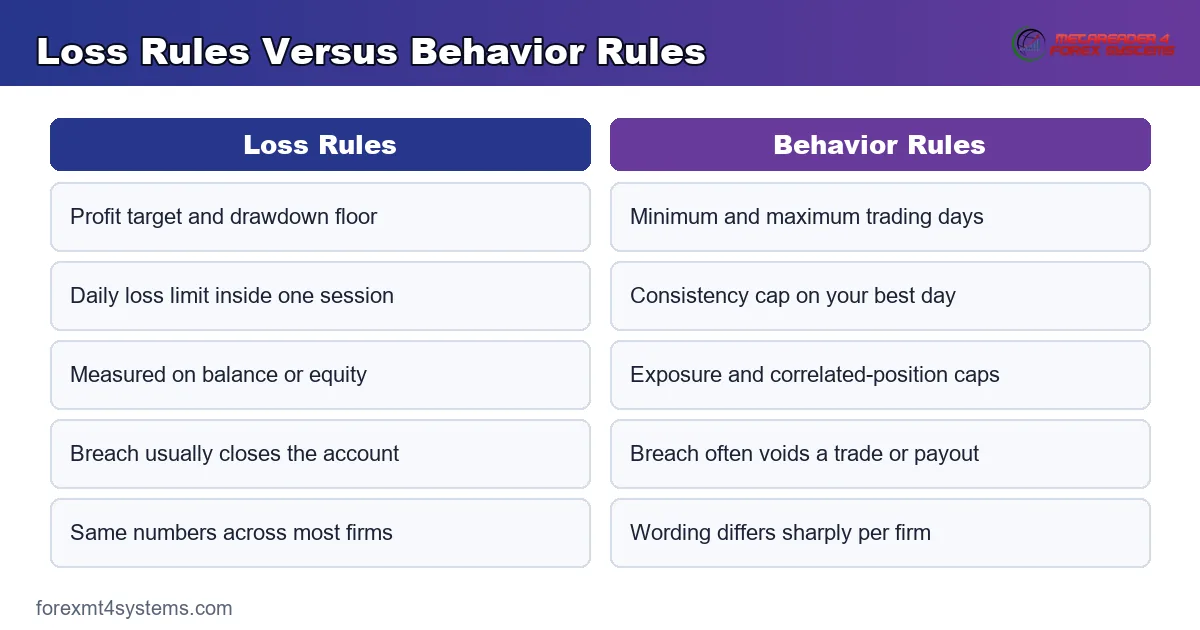
Treating a Trailing Floor Like a Static One
This slip tops the list. Traders bank a run, relax, then give some back and breach a floor that climbed behind them. So recheck the floor after every winning session, and write the new number down.
Oversizing to Hit the Target Faster
A big position shortens the road to the profit target. It shortens the road to a breach far more, though, so keep risk small and let the target arrive over several weeks. Patience costs nothing here.
Counting Balance Instead of Equity
Many limits watch equity, which moves with your open trades. A floating loss can trip a daily cap while your closed balance still looks fine. So watch the equity line, and treat unrealized losses as real.
Ignoring the Minimum Day Count
Traders sometimes hit the target early, then stop trading. The phase never completes, because the day count sits unfinished. So plan a light session on each remaining day, and keep the risk tiny.
Running Software Without Asking
An unapproved script can void results even when it trades sensibly. So ask support in writing before you attach anything to the platform, and keep the reply on file for any later review.
Skimming the Rule Book
Most breaches trace back to a rule the trader never read. So print the book, mark every number, and reread it after any rule update the firm announces.
How to Read a Rule Book in Ten Minutes
A rule book runs long, and much of it reads as boilerplate. Four searches pull out nearly everything that matters.
- Search for the word drawdown, then note every figure and whether the floor trails.
- Search for the word daily, then record the reset moment and the firm’s time zone.
- Search for prohibited or forbidden, then list every technique the firm names.
- Search for payout, then note the cycle, the minimum and any consistency clause.
- Search for the word days, then confirm any minimum session count or deadline.
So ten minutes of searching replaces an hour of reading. Save those notes with the date, because firms revise terms without much fanfare.
Prop Firm Rules Quick Reference
Run this list before you buy any evaluation. It takes five minutes and often saves a fee.
- Profit target: what percentage, and on which balance?
- Maximum drawdown: static or trailing, and tracked on balance or equity?
- Daily loss limit: what percentage, and from which starting point?
- Reset time: when does the daily figure roll over, and in which time zone?
- Trading days: any minimum, and any deadline?
- Consistency: what share may one day contribute?
- Exposure: any lot cap, or limits across correlated positions?
- Holding: weekend positions allowed, and news windows restricted?
- Software: which automation needs approval first?
- Payouts: what cycle, and what minimum before a withdrawal?
Save the answers in a note beside your platform. Because rules shift between account types, recheck them whenever you upgrade.
Pitfalls and What Ends Accounts
A few edge cases catch even careful traders. The chart below tracks an equity path that pierces the drawdown floor and closes the account.
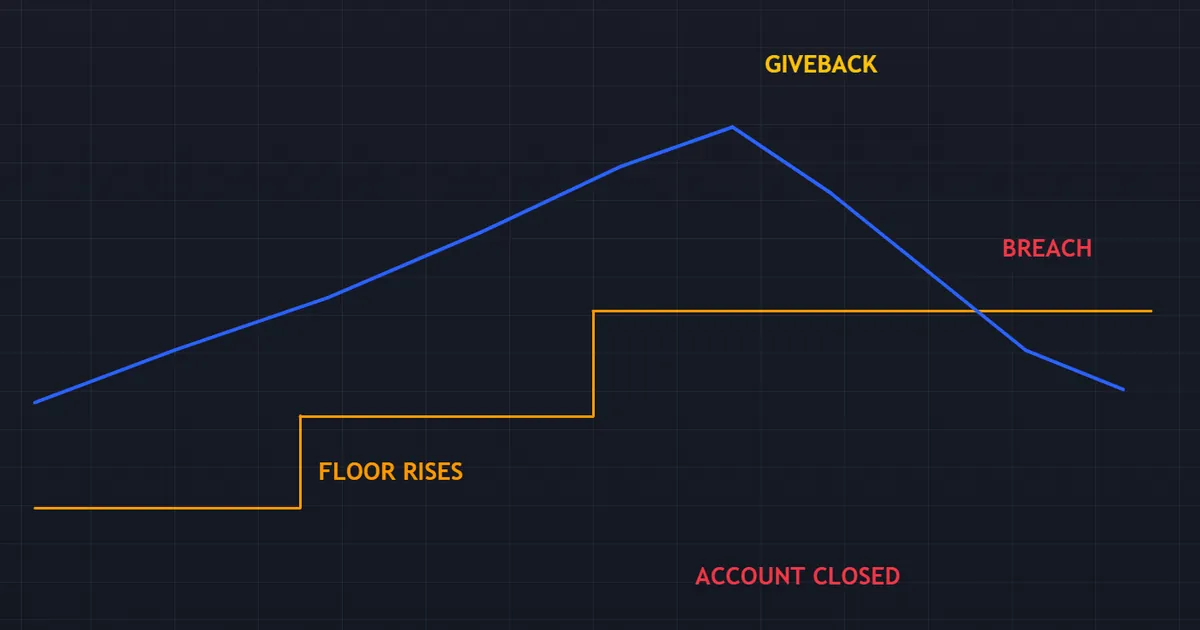
Study the shape of that failure. The path climbs, stalls, then slides through a floor that had crept upward during the climb.
Time Zones and Daily Resets
The daily limit resets on the firm’s clock, not yours. A late-evening trade in your city may land in the firm’s next day, or in the one just closing.
So convert the reset moment into your local time once, then mark it on your platform. Trades that straddle the boundary deserve extra care.
Swap and Commission Drag
Overnight financing and commission count toward your loss figures at most firms. So a position held for a week can drift toward a limit without any adverse price move.
Swing traders feel this most. Because the drag accumulates quietly, it pays to subtract an estimate of the week’s costs from your available room before you size a longer hold.
Slippage on Thin Liquidity
A stop fills where the market allows, not where you drew it. Around a release or a session gap, that difference can push a planned loss past the daily cap.
So leave a buffer between your planned loss and the limit. A trader who plans to use every last basis point of the cap has no room left when a fill arrives wide.
Rules Differ Between Phases
Several firms loosen or tighten the limits once you reach the funded stage. So reread the book at each promotion rather than trusting your memory of phase one.
One Breach Usually Ends It
Hard limits rarely offer a second chance. Because the maximum drawdown closes the account outright, treat it as a wall rather than a warning line.
Soft Breaches Delay Rather Than Close
Not every rule carries the same penalty. A consistency clause or a news window often voids a trade or defers a payout, while the account itself keeps running.
So sort the rules into hard and soft before your first session. Knowing which mistakes end the account tells you where to concentrate your attention.
Related Concepts to Study Next
Prop firm rules put risk management into hard numbers, so the next reading hour belongs in that corner of the library. The limits simply put an edge on habits every sound trader already keeps.
Start with our primer on what is a prop firm if the model itself looks new. Then fix your sizing with our guide to risk per trade, and learn to respect the session cap with our note on the daily loss limit.
FAQ
What are the main prop firm rules?
Nearly every program sets a profit target, a maximum drawdown and a daily loss limit. Most add behavior rules too: minimum trading days, a consistency cap, exposure limits, holding restrictions and a policy on automation. Read all of them before you pay.
Which rule ends the most accounts?
The maximum drawdown closes accounts most often, especially where it trails your equity high. Traders bank a run, then give part of it back and pierce a floor that rose behind them. The daily loss limit ends most of the rest.
How do static and trailing drawdown differ?
A static floor sits a fixed distance below your starting balance and never moves. A trailing floor follows your equity or balance high upward and never falls. So the trailing version tightens exactly as you start to profit.
Do prop firms restrict news trading?
Some do and some do not. Firms that restrict it point to slippage and gap risk around high-impact releases, since a stop may fill far from its level. Check the policy and the exact window before you trade a release.
Can I run an automated system on a funded account?
Often yes, subject to conditions, and sometimes no. Firms commonly forbid latency arbitrage, tick scalping, high-frequency methods and copy trading across accounts. Ask support in writing about your specific system, then keep the answer on file.
Do the rules change once I get funded?
Usually yes, in both directions. Profit targets and deadlines often fall away, while payout conditions, consistency clauses and holding restrictions frequently appear. So read the funded agreement as a new document rather than a copy of the challenge terms.
Do prop firm rules make passing likely?
No, most participants breach a rule before they ever reach a payout. The rules test discipline as much as skill, so small risk and a careful read of the book give you the best chance. Results are not guaranteed; past performance is not indicative of future results.
External references
- For background on this concept, see Risk Management at Corporate Finance Institute.
- For broader market context, see Regulatory Compliance on Wikipedia.

About the author
Written by Dominic Walsh, a Forex trader and MT4/MT5 indicator, Expert Advisor and script developer. Every tool on forexmt4systems.com is tested on live charts before release and ships with ready-to-use compiled MT4 (.ex4) and MT5 (.ex5) files. Learn more about the trader and developer behind this site.
How we build, test and correct every tool: Editorial & Testing Policy. Trading carries risk; see the disclaimer.