
Backtesting software free of charge already sits inside two platforms most traders have: the MetaTrader 4 Strategy Tester, plus the TradingView Strategy Tester and Bar Replay. This guide settles which free tool fits which job, what our own runs looked like, and which traps turn good numbers into nothing. One TradingView test made 570 trades and earned 19 cents. That result taught us more than any profitable report.
What free backtesting software is
Backtesting means running a fixed set of trading rules over past prices and recording every trade the rules would have taken. The software does the bookkeeping.
Free tools come in two forms. The first is automated: you load a strategy written in code, pick a date range, and the tester replays history in seconds. MT4’s Strategy Tester runs Expert Advisors written in MQL4. TradingView’s Strategy Tester runs strategies written in Pine Script. The second form is manual. TradingView’s Bar Replay hides the bars to the right of a chosen date, so you trade candle by candle without seeing the future.
Both forms answer the same question: what did these exact rules do on past prices? Neither answers what they will do next month. For the basics behind that gap, start with our explainer on what backtesting is and what it can prove.
How a strategy tester works
Every tester follows the same loop. It reads one bar, or one simulated tick, at a time. Then it checks the entry and exit rules, fills any orders at the modelled price and moves on. At the end it builds a report from the trade list.
Two numbers on that report matter most to us. The first is profit factor:
Profit factor = gross profit / gross loss
A value above 1.0 means winners outweighed losers, before anything the tester left out. The second is the share of profitable trades:
Profitable trades % = winning trades / total trades x 100
Neither number shows the size of the edge on its own. A test can show many winners and still lose money, because a few large losers outweigh them. So we always read the two together, next to trade count and drawdown. Our guide to what counts as a good profit factor covers the ranges we treat as noise.
The fill price is the weak link. MT4 builds ticks from bar data unless you import real tick history. TradingView fills on bar prices by default. The Strategy Testing page in MetaTrader 4 Help explains the MT4 side in detail.
How we tested
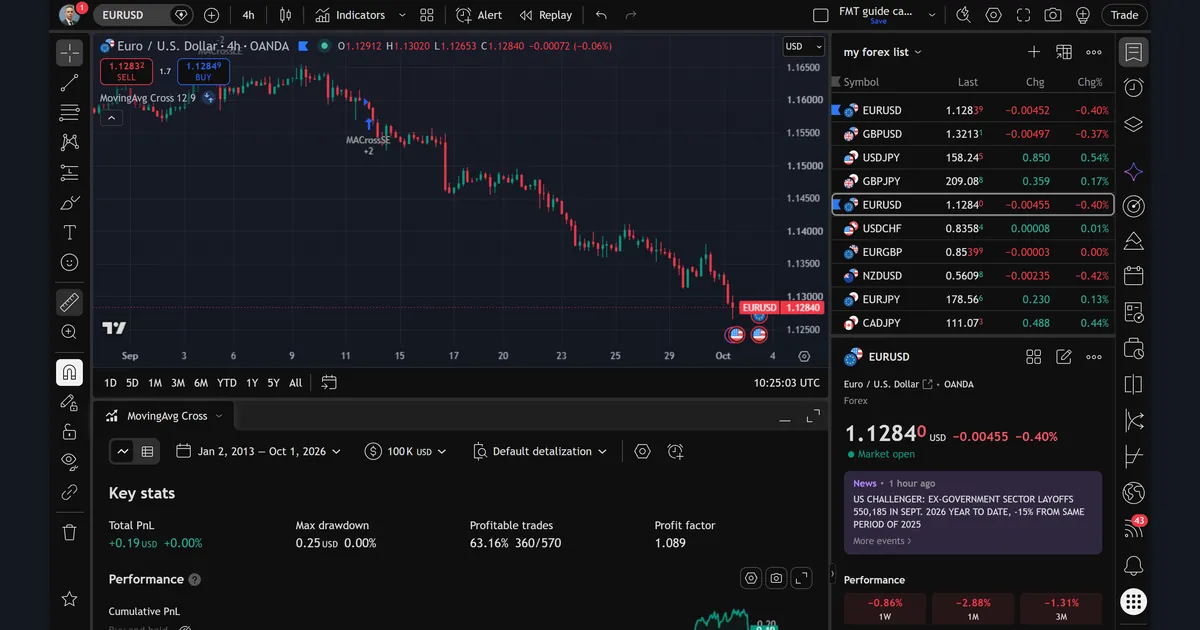
We ran both free tools on 1 October 2026 and kept every screenshot. On the TradingView web chart we loaded the built-in “MovingAvg Cross” strategy on OANDA EURUSD, 4-hour timeframe. The test window ran from 2 January 2013 to 1 October 2026. We left every property at its default, on purpose, to show what a new user sees first.
On the MetaTrader 4 side we used the site owner’s terminal, MetaTrader 4, build 1471. The three backtest cards come from Expert Advisors we publish: one on GBPUSD H1 and two on USDJPY H4. Each card is an in-sample run. In plain terms, we optimised the inputs on about 18 months of history and then reported results on that same history, with the open-prices model. In-sample figures flatter a strategy. So read them as a check that the code trades as designed, not as a forecast.
Our full method sits in the editorial testing policy.
Backtesting software free: the settings to check first
These fields change the result before a single rule fires.
| Setting | Where | What it changes | What we do |
|---|---|---|---|
| Order size | TradingView strategy properties | Money results; at 1 unit of EURUSD a pip is worth almost nothing | Match the size to a real account |
| Commission and slippage | TradingView strategy properties | Cost per trade; left empty, every trade is free | Enter our broker’s real figures |
| Initial capital | TradingView tester toolbar (100K USD in our run) | Percent return and percent drawdown | Use the account size we would trade |
| Model | MT4 Strategy Tester | How price moves inside each bar | Every tick for intrabar stops; open prices for bar-close EAs |
| Spread | MT4 Strategy Tester | Cost on every entry; “Current” uses the spread at test time | A fixed value near the normal spread |
| Use date, From and To | MT4 Strategy Tester | The test window | Hold back recent months for a later check |
| Period | MT4 Strategy Tester | The timeframe the EA runs on | The timeframe the EA was built for |
| Visual mode | MT4 Strategy Tester | Draws trades on a chart while running | Off for runs, on for spot checks |
Our page on transaction costs in backtests shows how spread and commission grow with trade count.
Reading the TradingView Strategy Tester report
The first image shows the Key stats panel for MovingAvg Cross on EURUSD 4h. Total PnL reads +0.19 USD. Max drawdown reads 0.25 USD. Profitable trades show 63.16%, or 360 of 570. Profit factor is 1.089.
Next, switch the panel to List of trades. We trust that view most, because every summary number comes from it.
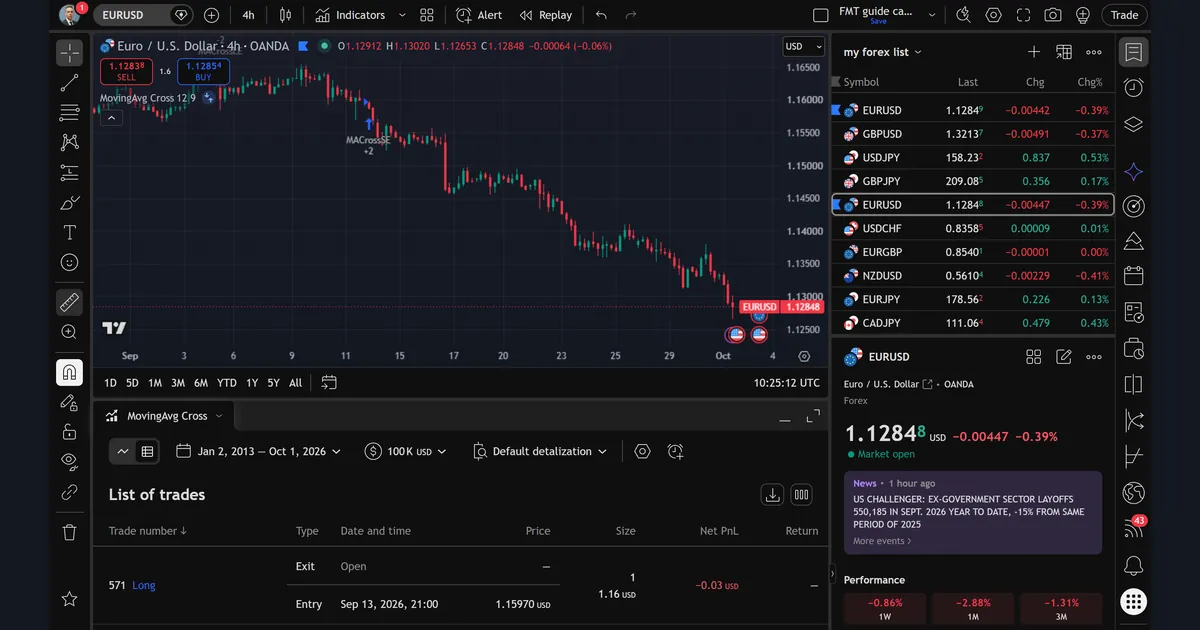
The top row is trade 571, a long entry on 13 September 2026 at 21:00, filled at 1.15970. It is still open, so the exit row says “Open”. The size column reads 1, and the open loss is -0.03 USD. That size is the real story of this test, and the worked example below shows why.
Also note the trade number. The report counts 570 closed trades, and the list adds one open trade on top.
Setting up the MT4 Strategy Tester
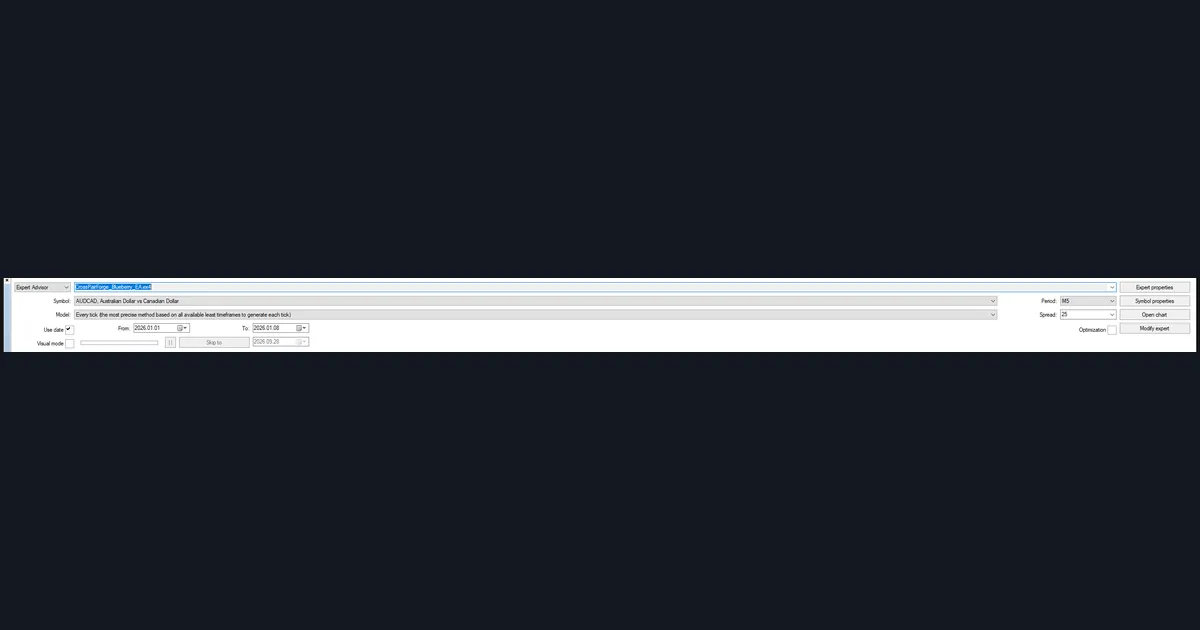
The third image shows the MT4 tester panel as we left it before a run. The Expert Advisor field holds CrossPairForge_Blueberry_EA.ex4. The symbol is AUDCAD on M5. The model is “Every tick”, which MT4 calls the most precise method. Use date is ticked, with a window from 2026.01.01 to 2026.01.08. Spread is set to 25 points, and Visual mode and Optimization are both off.
That one-week window is a quick function check, not a verdict. We use short runs to confirm that orders open, stops sit where the code says, and the journal shows no errors. Our MT4 Strategy Tester walkthrough covers each field in order. Also, the Expert Advisor install guide shows where the .ex4 file has to sit before the tester can find it.
The Model field deserves the most care. “Every tick” simulates price inside each bar from lower-timeframe data. “Open prices only” checks the rules once per bar, at the open. An EA with tight stops inside the bar will look wrong under open prices. Our notes on MT4 modelling quality go further.
Worked example: 570 trades for 19 cents
Here is the arithmetic behind the TradingView result. The test took 570 trades across almost 14 years of EURUSD 4h data. Of those, 360 closed in profit and 210 did not. The profit factor of 1.089 means gross profit beat gross loss by under 9%. Yet total PnL was only +0.19 USD on a 100K USD starting balance.
The reason is the order size. The strategy traded 1 unit of EURUSD per trade, the default we left in place. At 1 unit, a one-pip move is worth 0.0001 USD. So a 50-pip winner earns half a cent. The ratios in the report still reflect the rules, but the money column says almost nothing. Drawdown shows 0.00% for the same reason.
Next, compare the share of winners with the profit factor. 63.16% of trades won, but the profit factor sits barely above 1.0. So the average loser must have been larger than the average winner.
Finally, the report has no costs unless you add them. A thin edge across 570 trades is exactly where spread and commission bite hardest. Before reading any figure, open the strategy properties and set order size, commission and slippage to match a real account.
What our MT4 backtest cards show
The next two images are cards built from real MT4 Strategy Tester reports of EAs we publish. Both use the open-prices model, both are optimised in-sample, and both balance axes start near 10,000.
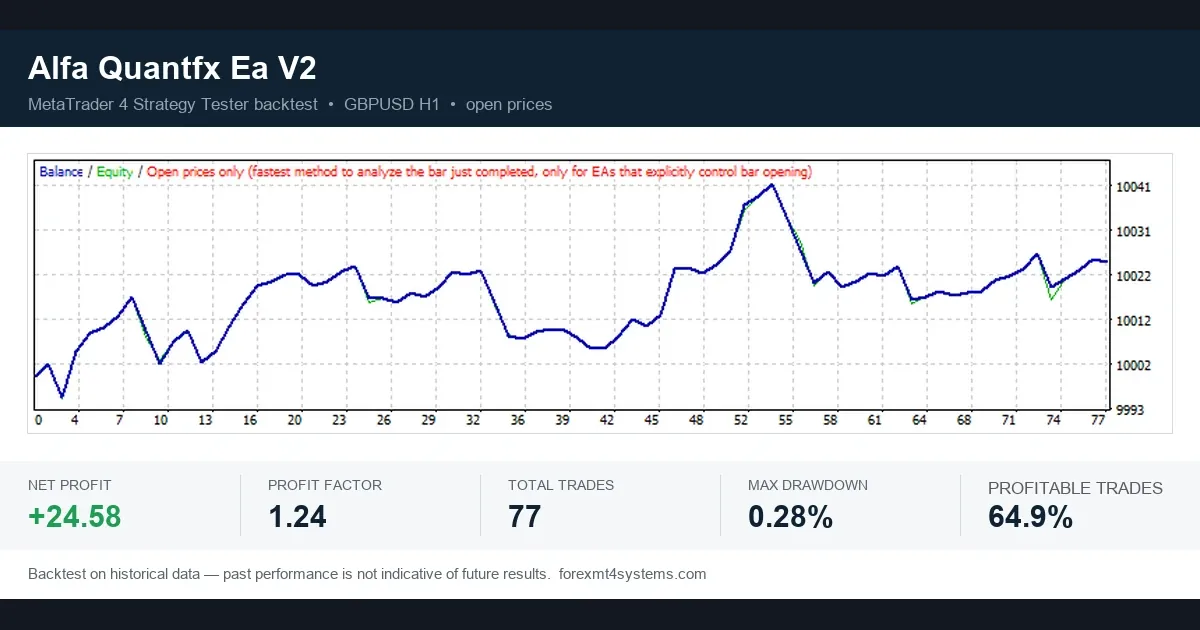
Alfa Quantfx EA V2 on GBPUSD H1 closed 77 trades. Net profit was +24.58, profit factor 1.24 and max drawdown 0.28%. Profitable trades reached 64.9%. The curve looks tidy, but 77 trades is a small sample. A few different outcomes could move it a long way.
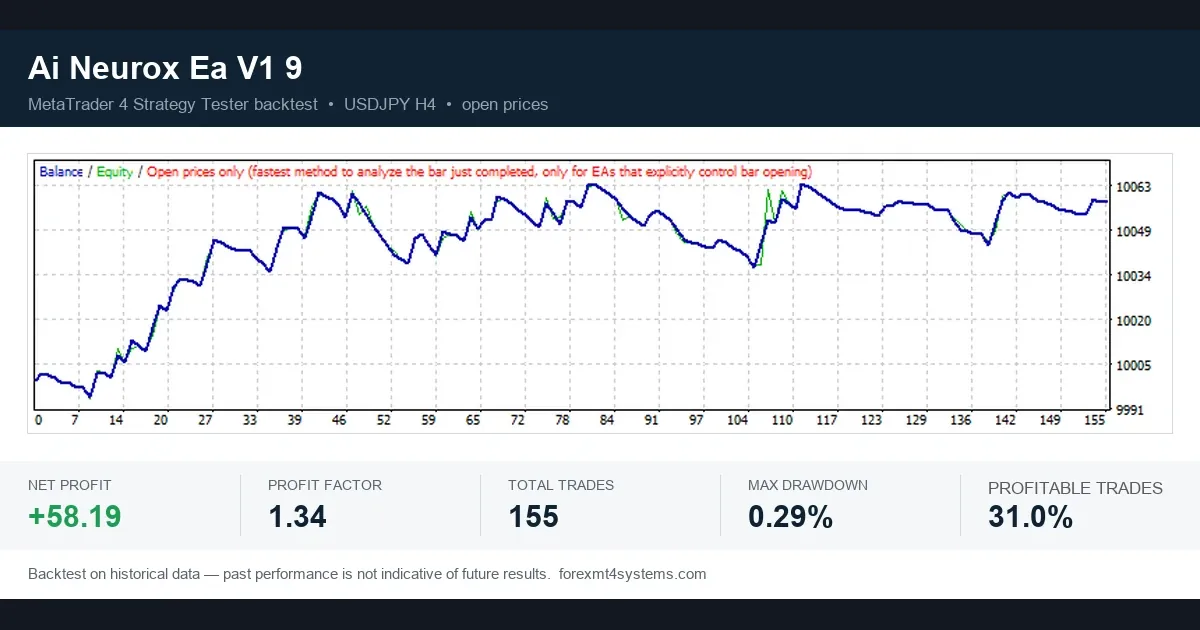
Ai Neurox EA V1 9 on USDJPY H4 shows the opposite shape. Only 31.0% of its 155 trades were profitable. Even so, profit factor reached 1.34 and net profit +58.19, with 0.29% max drawdown. On average its winners were larger than its losers.
Two cautions apply to both cards. First, every figure is in-sample, so the inputs were chosen because they fit this history. Second, both net profits are under 1% of the starting balance. The cards show that the code trades as designed; they do not prove an edge. Our checklist on how to evaluate a forex EA covers what we look at next.
Download the complete indicator database
Put these concepts on your charts. One email unlocks the full library of 1,380+ indicators with compiled MT4 and MT5 files, plus my TradingView scripts. No paywall, no spam, unsubscribe any time.
Get free access to my indicator database
One email unlocks 1,380+ free MT4, MT5 and TradingView indicators — the complete library. No single-tool download; you get the whole database.
Where this fails: the limits of free testers
Free testers do one job well: they show what fixed rules did on past bars. They do several other jobs badly, and we have hit each of these limits ourselves.
- Fills are idealised. Neither tool knows the real slippage on a news candle.
- Tick data is synthetic. MT4’s “Every tick” model builds ticks from lower-timeframe bars. If a stop and a target both sit inside one candle, the tester has to guess which came first.
- History is short. The 18 months behind our cards cover a limited set of market conditions. A trend system can look fine in one year and fail in the next.
- Optimisation is cheap. MT4 can test thousands of input sets. With enough tries, some set fits any history. That is curve fitting, and the tester will not warn you.
- Manual replay is slow and biased. Bar Replay depends on you. You may half remember where price went.
- Defaults mislead. Our 570-trade run shows how one default can hide a result entirely.
The article on overfitting on Wikipedia explains the statistics behind the fourth point. Our own guide to curve fitting in trading shows it on price data.
Manual testing with TradingView Bar Replay
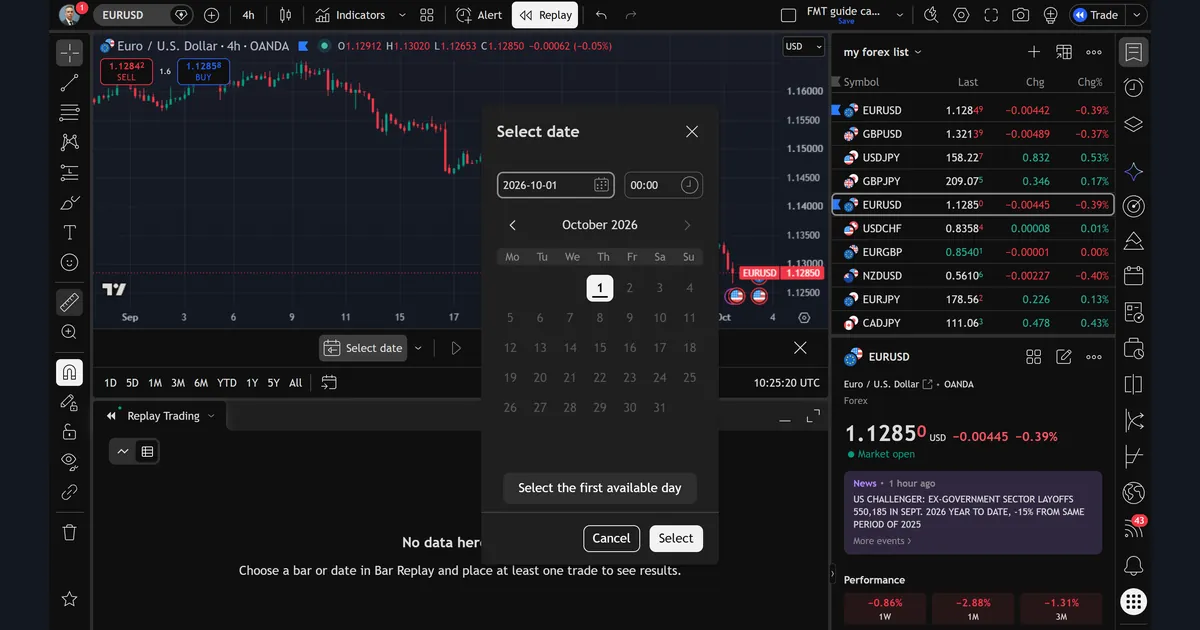
The sixth image shows the Bar Replay “Select date” dialog on the same EURUSD 4h chart. The date box reads 2026-10-01 and the time box reads 00:00. There is also a button labelled “Select the first available day”. Behind the dialog, the Replay Trading panel says “No data here” until you choose a date and place at least one trade.
Bar Replay suits rules that are hard to code. In replay, you pick a start date, step forward one bar at a time and place each trade by hand. The Replay Trading panel then shows the results.
We use it for two things. First, we check that a coded strategy’s entries look sensible on a real chart. Second, we practise a manual setup before any money is at stake. Still, it is slow, and a few dozen trades prove little. TradingView’s own guide to Bar Replay at TradingView Support lists the controls. Our page on where to backtest compares it with other options.
Out-of-sample and forward testing
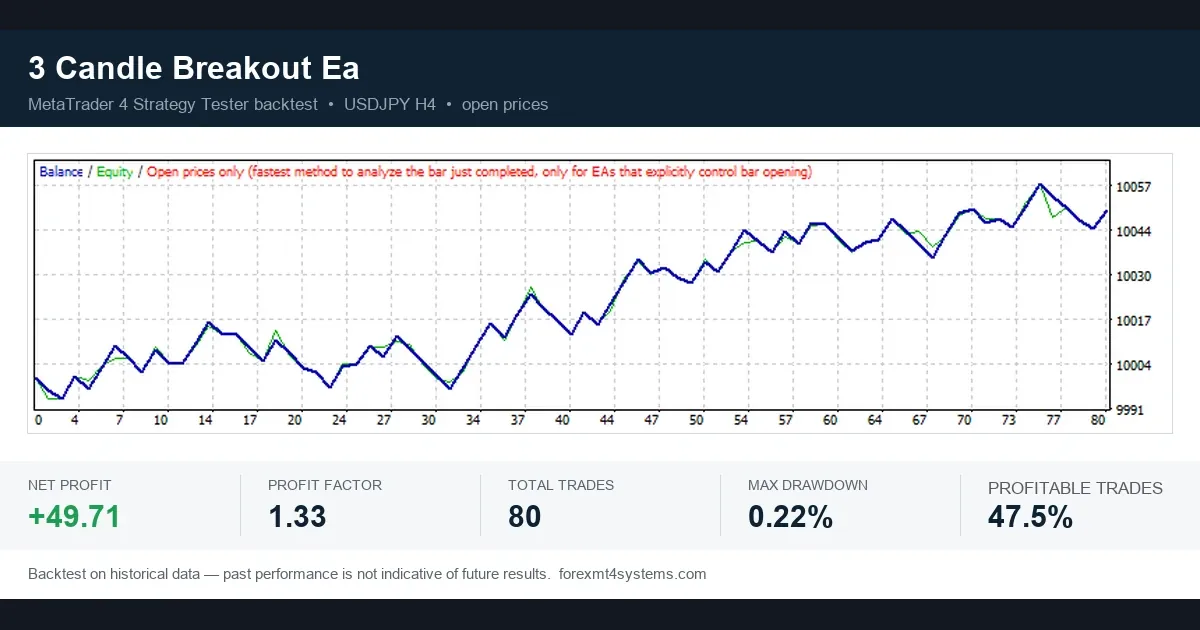
The seventh image is our third card: 3 Candle Breakout EA on USDJPY H4, open-prices model. It closed 80 trades with net profit +49.71, profit factor 1.33 and max drawdown 0.22%. Profitable trades reached 47.5%.
That curve is in-sample, like the others. So the next test is the one that counts. Out-of-sample testing runs the frozen inputs on dates the optimiser never touched. In MT4 you do this with the Use date fields. First, optimise on the early part of the history. Then run once on the later part without changing anything. If the profit factor collapses, the first result was fit to noise.
Forward testing goes one step further. You run the EA on a demo account in real time, with real spreads and real delays. The MQL5 reference page on testing trading strategies at MQL5.com explains how the MetaTrader tester simulates price. You can read the EA’s details on the 3 Candle Breakout EA page. Also, our guides to walk-forward analysis and backtesting vs forward testing set out the method step by step.
Four common backtesting mistakes
- Reading money before properties. Our 570-trade run earned 0.19 USD because the order size was 1 unit. So check order size, capital and costs first.
- Trusting a small sample. 77 or 80 trades can swing on a few outcomes. Our note on backtest sample size explains how many trades we want before forming a view.
- Picking the wrong model. Open prices suits EAs that act once per bar. But when stops or targets can trigger inside a bar, use every tick, or the results drift away from reality.
- Calling an optimised run a result. In-sample numbers describe a past fit. Instead, hold back recent data and test on it once.
Our longer list of backtesting mistakes adds several more.
Where to go next
If you are new, follow our guide on how to backtest a trading strategy from rules to report. Then read about tick data backtesting once open-prices runs stop being enough. To see crossover signals on an MT4 chart, try our moving average cross indicator. Spread matters at every step too, so our explainer on spread in forex is a good next read.
In short, both free tools are good enough to reject weak ideas fast. But neither can approve a strategy on its own.
FAQ
Is the MT4 Strategy Tester really free?
Yes. It comes built into MetaTrader 4, and we did not need any extra licence to run the tests in this guide. You do need price history in the terminal, which a demo account login provides.
Can I backtest on TradingView without paying?
We ran this guide’s tests with TradingView’s built-in tools. Plan features change, so check TradingView’s current plan page before relying on a set history depth.
Why did my TradingView backtest show almost no profit?
Check the order size first. Our MovingAvg Cross run traded 1 unit per trade by default, so 570 trades returned only +0.19 USD even with a profit factor of 1.089.
Which MT4 model should I pick?
Use open prices only for EAs that act once on each new bar. Use every tick when stops, targets or entries can trigger inside a bar, and accept that it runs slower.
How many trades does a backtest need?
There is no magic number, but more is better. Our cards show 77, 80 and 155 trades, and we treat all three as too small to prove an edge on their own.
Is a high share of profitable trades a good sign?
Not by itself. Our TradingView run had 63.16% profitable trades and a thin 1.089 profit factor, while one EA card had 31.0% profitable trades and a 1.34 profit factor.
Is Bar Replay a real backtest?
It is a manual one. It hides future bars and records the trades you place, but it depends on your discipline, and it is slow, so samples stay small.
Can a good backtest predict future results?
No. A backtest shows what fixed rules did on past data, and out-of-sample and forward tests are still needed; results are not guaranteed; past performance is not indicative of future results.
Last updated: 1 October 2026.

About the author
Written by Dominic Walsh, a Forex trader and MT4/MT5 indicator, Expert Advisor and script developer. Every tool on forexmt4systems.com is tested on live charts before release and ships with ready-to-use compiled MT4 (.ex4) and MT5 (.ex5) files. Learn more about the trader and developer behind this site.
How we build, test and correct every tool: Editorial & Testing Policy. Trading carries risk; see the disclaimer.