
The best beginner forex trading platform is the one that shows you clean charts, lets you test ideas and warns you when price moves, without burying you in menus. This guide compares the two charting platforms we use every day, MetaTrader 4 and TradingView, on exactly those jobs. It settles which one suits which kind of beginner. It does not compare brokers, and it will not tell you where to open an account.
One disclosure first. We build MT4 and MT5 indicators and publish TradingView scripts, so we are not a neutral party. That is also why we know both platforms well. So every claim below comes from our own screens, dated and labelled.
What a trading platform actually is
A trading platform is the software you look at the market through. It draws price charts, runs indicators and, if you connect an account, sends orders. However, the platform and the broker are two different things. The broker holds your money and fills your trades. The platform is only the window and the control panel.
MetaTrader 4 is a desktop terminal from MetaQuotes. Brokers license it and hand it to their clients. The official MetaTrader 4 platform page at metatrader4.com lists 9 timeframes, 30 built-in technical indicators and 23 analytical objects. Its programs are written in MQL4.
TradingView is a charting website and app. You open it in a browser, and it pulls data from many feeds at once: forex, metals, indices, stocks and crypto. Instead of MQL4, its indicators are written in Pine Script.
MetaTrader 5 is the newer MetaQuotes terminal. According to the MetaTrader 5 platform page at metatrader5.com, it offers 21 timeframes, 38 built-in indicators and a built-in economic calendar. We did not screenshot MT5 for this guide. Our page on the difference between MetaTrader 4 and 5 covers that pair in detail.
How MT4 and TradingView work differently
The biggest difference is where things live. MT4 is a client on your own computer. It connects to a broker’s trade server, stores price history as local files and runs indicators on your machine. So when the terminal is closed, nothing runs. Your indicators stop, and your MT4 alerts stop too.
TradingView works the other way round. Your charts, layouts and watchlists sit in your account online. Then you log in from any browser and the same layout appears. Also, alerts are handled by TradingView itself, as the introduction to alerts in the TradingView help center explains. So an alert can reach you while your laptop is off.
Data follows the same split. For example, MT4 shows the prices of the one broker you log in to. By contrast, TradingView shows the feed you pick, such as OANDA for gold in our captures. As a result, two charts of the same pair can differ by a few points. Neither is wrong; they are different sources.
How we tested both platforms
We ran this comparison on 28 September 2026. On the desktop side we used MetaTrader 4, build 1471, in our Capital Point Trading terminal on Windows. That terminal was not connected to a live trade server, so its history ends in August 2026. Therefore every MT4 number below is stored history, not a live quote.
On the web side we used the TradingView web chart, logged in, with the OANDA XAUUSD feed on the 4-hour timeframe. There, prices were live during the session, between 11:11 and 11:13 UTC.
We looked at five jobs a beginner needs: reading a chart, adding an indicator, reading exact candle values, testing an idea and setting an alert. We also checked two extras, symbol comparison and the economic calendar. We opened the alert dialog but pressed Cancel, so no alert was created. Our method follows the site’s editorial testing policy.
The best beginner forex trading platform checklist
Here is how the two compare on the jobs we tested. Each cell comes from what we saw on screen, not from vendor claims.
| Beginner need | MetaTrader 4 (build 1471) | TradingView (web chart) |
|---|---|---|
| Clean price chart | Yes, plain black chart by default | Yes, but many side panels open at once |
| Add RSI in a sub-window | Yes, RSI(14) with 30 and 70 lines | Yes, RSI 14 on close with 30 and 70 lines |
| Exact candle values | Data Window, five decimals | Legend line above the chart |
| Test an automated strategy | Strategy Tester built in | Not tested here |
| Price alerts | Terminal must stay open | Handled online by TradingView |
| Compare two symbols | Not tested here | Compare dialog on the top toolbar |
| Economic calendar | Not in MT4 (MT5 has one) | Calendar panel on the right |
| Where it runs | Windows desktop app | Any browser, plus apps |
Notice that no row settles it alone. Instead, the right pick depends on which rows matter to you.
Reading MT4: the Strategy Tester and the Data Window
MT4’s strongest beginner feature hides under View, then Strategy Tester. It replays history bar by bar and runs an Expert Advisor on it. So you can see how a set of fixed rules would have behaved before you risk a cent.
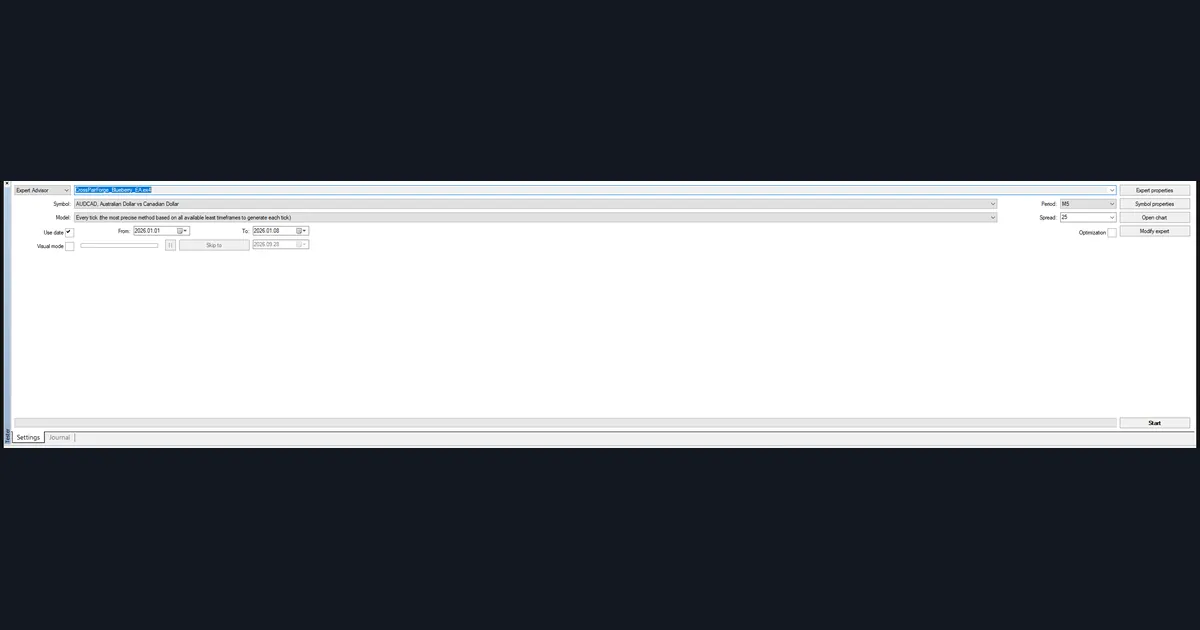
Our panel shows the parts you set. First comes the Expert Advisor selector, here one of our own test EAs. Next come the symbol, AUDCAD, and the period, M5. Then the model reads “Every tick”, which MT4 calls its most precise method. The date range runs from 2026.01.01 to 2026.01.08. Visual mode is off, and Start sits at the bottom right. Our guide to the MT4 Strategy Tester walks through each field.
The second feature is humbler but just as useful. The Data Window prints the exact values of the candle under your mouse.
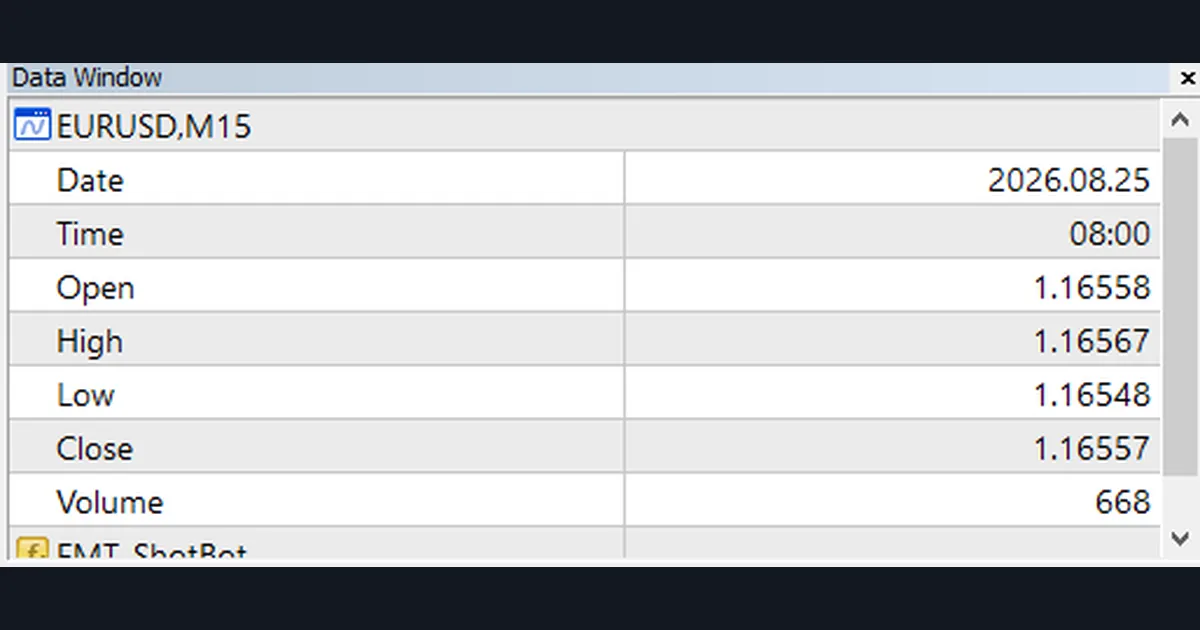
Here it shows EURUSD M15 for 2026.08.25 at 08:00. Open is 1.16558, high 1.16567, low 1.16548 and close 1.16557. Volume reads 668. In short, you never have to guess a price from the axis.
Worked example: one RSI reading on each platform
We added the same study to both platforms, the 14-period RSI. RSI compares average gains with average losses: RSI = 100 - 100 / (1 + average gain / average loss). Readings above 70 are often called overbought, and readings below 30 oversold.
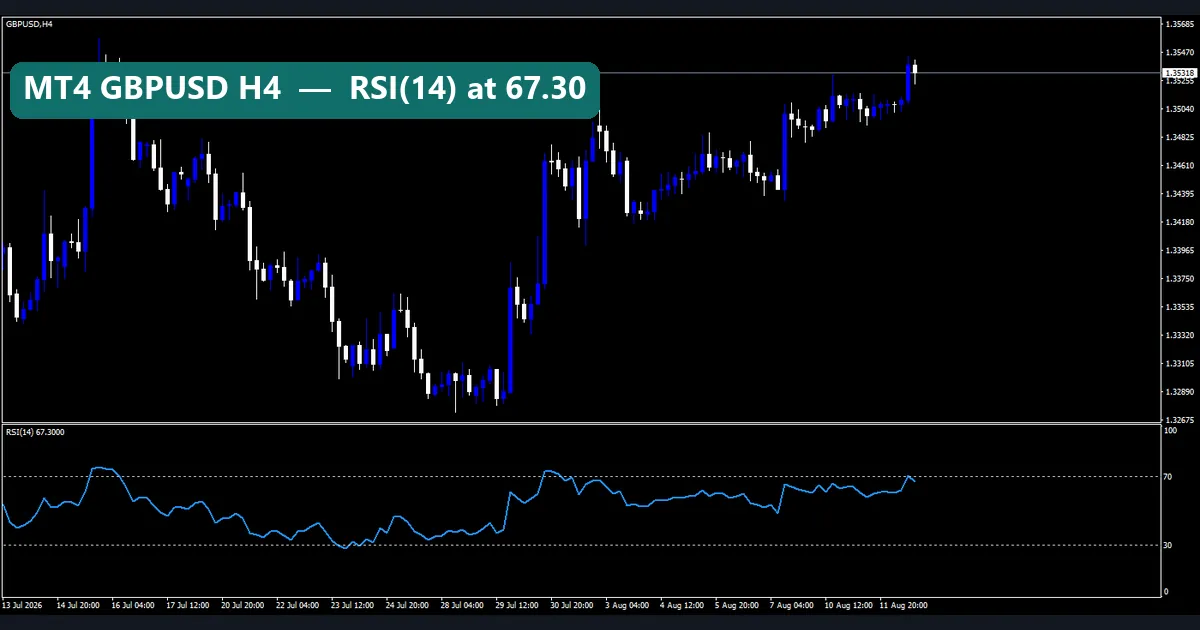
On MT4, our first image shows GBPUSD H4 from 13 July to 11 August 2026. The last price line reads 1.35318, and the RSI(14) label reads 67.3000. So momentum is strong, but the line sits just under the 70 level. A beginner can read that in two seconds.
On TradingView, the XAUUSD 4-hour chart in the next image tells a different story. The legend shows open 4,144.535, high 4,160.430, low 4,140.775 and close 4,152.660. Meanwhile, the RSI 14 close reads 25.33, below the 30 line. The watchlist puts XAUUSD at 4,152.630, down 132.340 or 3.09% on the day.
What does this teach? Both platforms computed the same formula and labelled it clearly. Neither reading is a signal on its own. Still, the Data Window check is easier on MT4, while the one-glance daily change is easier on TradingView. For a deeper read on the study, see our guide to RSI buy and sell signals, or try the RSI indicator for MT4.
TradingView: the layout and the alert dialog
TradingView puts a lot on one screen. That is its charm and its trap.
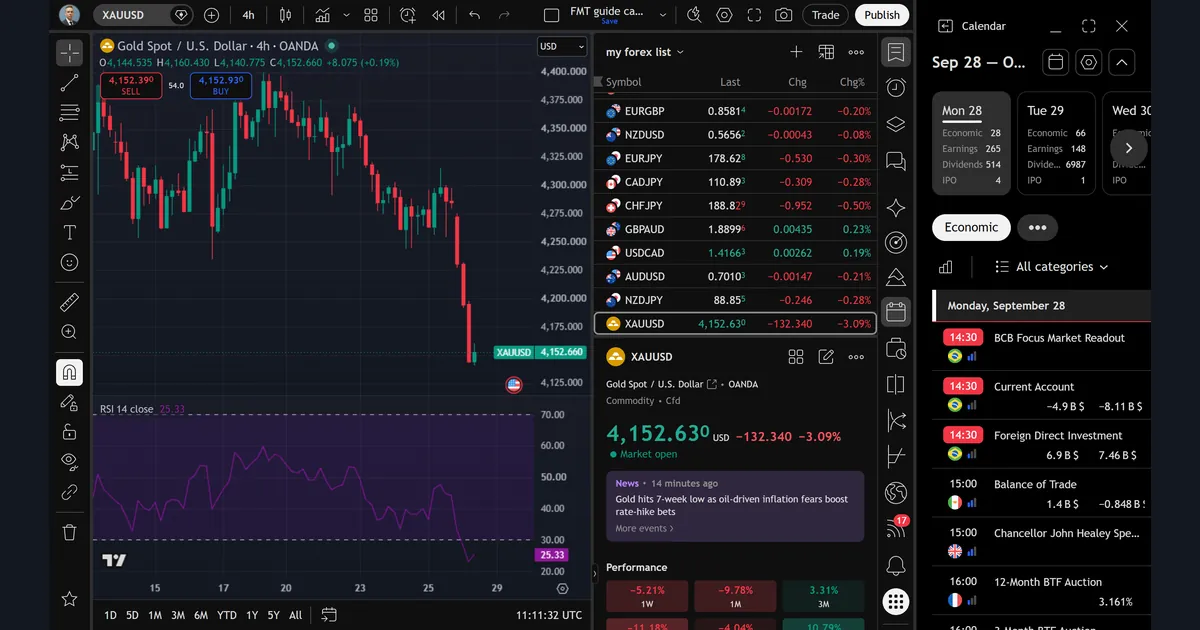
On the left sits the drawing toolbar. In the middle, the chart and the RSI pane. To the right, a watchlist called “my forex list” with EURGBP, NZDUSD, EURJPY, GBPAUD, USDCAD, AUDUSD and more. Below it, a symbol card and a news item. Finally, the calendar panel takes the far right. Also note the SELL and BUY boxes at the top left of the chart. They appear because TradingView can link to a broker. We did not connect one.
Alerts are where TradingView shines for beginners. You click the alarm clock icon and a dialog opens.
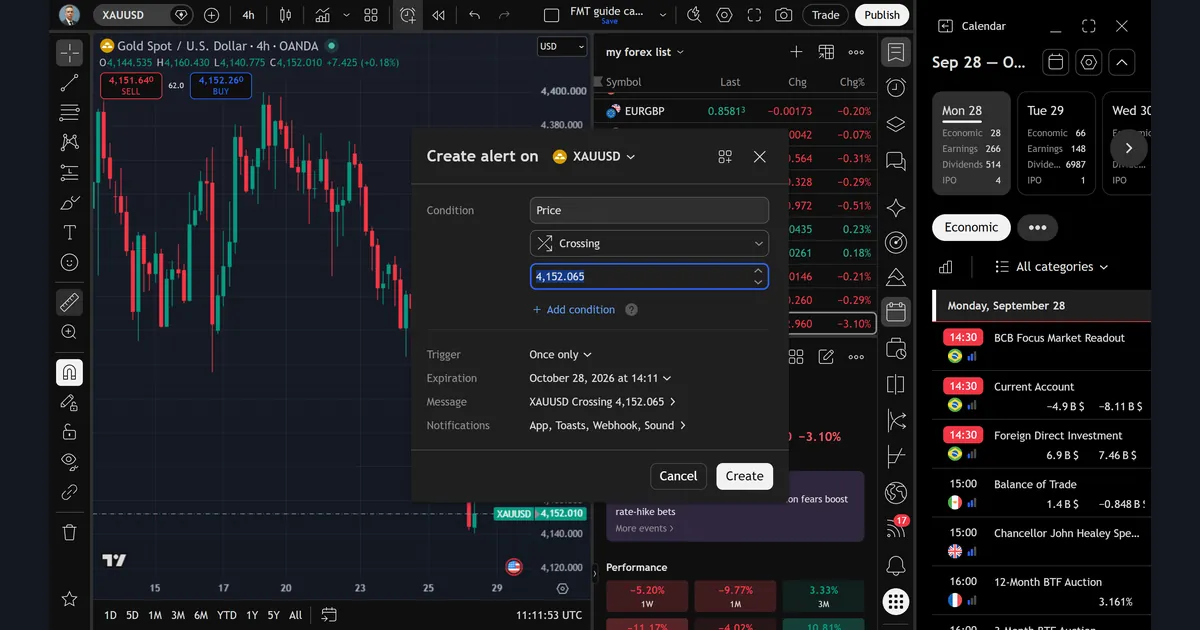
Our dialog read: condition Price, Crossing, 4,152.065. The trigger was set to Once only, and the expiration to October 28, 2026 at 14:11. The default message read “XAUUSD Crossing 4,152.065”. Notifications listed App, Toasts, Webhook and Sound. We then pressed Cancel. In short, four fields and one button cover what most new traders need. Our Session Sniper Map TradingView indicator is one script built to sit on this kind of layout.
Download the complete indicator database
Put these concepts on your charts. One email unlocks the full library of 1,380+ indicators with compiled MT4 and MT5 files, plus my TradingView scripts. No paywall, no spam, unsubscribe any time.
Get free access to my indicator database
One email unlocks 1,380+ free MT4, MT5 and TradingView indicators — the complete library. No single-tool download; you get the whole database.
Where it fails: the limits of each platform
MT4 fails first on reach. It is a Windows desktop program, so on a Mac you need extra software. Next, its alerts and indicators only run while the terminal is open. Also, MT4 has no built-in economic calendar, and its look has barely changed in years. Finally, the Strategy Tester only runs Expert Advisors, so a manual idea needs coding first. Even then, the result depends on the quality of your history, as our page on MT4 modelling quality explains.
TradingView fails in other ways. First, the screen gets crowded fast. Our own capture had a watchlist, a symbol card, news and a calendar all open at once. That is a lot for a beginner who should be reading price. Second, some features sit behind paid plans, and those plans change, so check TradingView’s own pricing page. Third, the data feed may differ from the broker you trade with.
Both share one bigger limit. Neither platform makes trading safer. The CFTC’s forex fraud advisory at cftc.gov warns about sellers who promise easy returns. Good software does not change the odds. A plan does, which is why our trading rules for beginners come before any platform choice.
Comparing symbols and reading the calendar
Two TradingView extras help beginners build context. First, the Compare button overlays a second symbol on your chart.
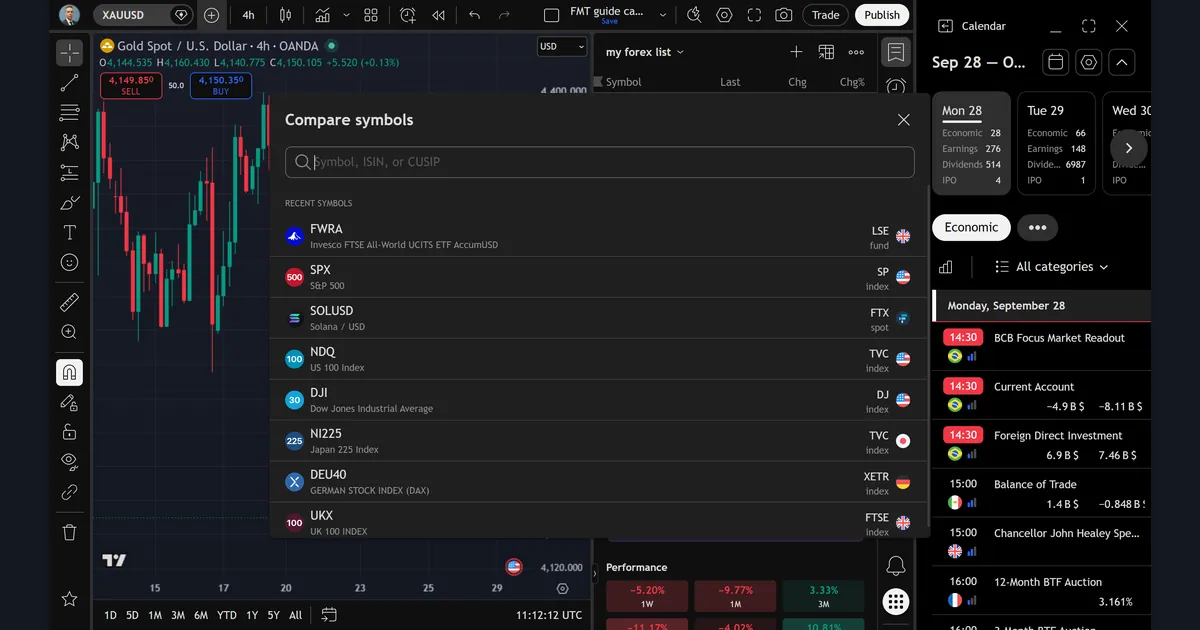
The dialog has one search box for a symbol, ISIN or CUSIP. Below it, recent symbols include SPX, NDQ, DJI, NI225, DEU40 and UKX. So you can lay the S&P 500 over gold, for example, and see whether they moved together. MT4 has no one-click equivalent that we tested.
Second, the calendar panel lists scheduled data releases.
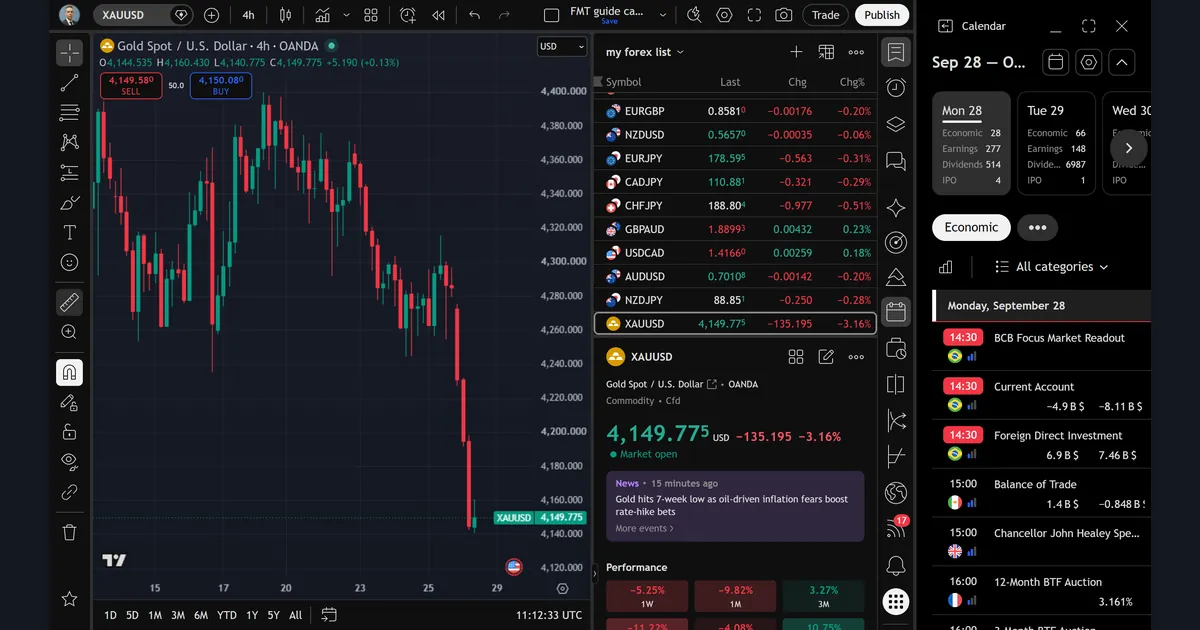
For Monday 28 September it counted 28 economic events. The first rows read 14:30 BCB Focus Market Readout, then Current Account at -4.9B against a previous -8.11B. At 15:00 came Balance of Trade at 1.4B against -0.848B. News like this can move price fast, so it pays to know the times. Our guide on how to read an economic calendar explains the columns, and our own economic calendar page lists the week ahead.
Which platform suits which beginner
Pick MT4 if your broker offers it and you want to test rules. The Strategy Tester is free inside the terminal. Also, the huge library of MQL4 indicators, including our own, plugs straight in. Our guide to installing MT4 and MT5 indicators shows the steps.
Pick TradingView if you mainly want to learn chart reading. It runs in a browser, keeps your layouts online and sends alerts without a running terminal. So it suits a beginner who checks charts from several devices.
Many traders end up using both. For example, they chart and set alerts on TradingView, then place trades in MT4. That split is fine, as long as you know the two price feeds can differ. Either way, start on a demo account first; our page on demo vs live trading covers the switch.
Common mistakes when choosing a platform
- Choosing by looks. A modern screen feels easier. However, what matters is whether you can read a candle, set an alert and test a rule.
- Stacking indicators on day one. Both platforms let you add dozens. Instead, start with one, such as RSI, and learn what it measures.
- Trusting a backtest blindly. A Strategy Tester run on one week of M5 data proves very little. Our note on backtesting mistakes lists the usual traps.
- Mixing up platform and broker. The platform is software. So check the broker’s regulation separately, on the regulator’s own register.
Where to go next
If you are brand new, start with how to trade forex as a beginner. Then read the Expert Advisor vs indicator page before you open the Strategy Tester. Next, browse our list of the best MT4 indicators, or the Market Regime Detector TradingView indicator if you chose TradingView.
For official detail, the MetaTrader 4 platform page at metatrader4.com and the MetaTrader 5 platform page at metatrader5.com list each terminal’s features. Also, the TradingView help center explains alerts step by step. Finally, the CFTC advisory is worth five minutes before you fund any account.
FAQ
Is MT4 or TradingView better for a complete beginner?
It depends on the job. TradingView is easier for learning to read charts and setting alerts. MT4 is better if you want to test fixed rules in the Strategy Tester or use MQL4 indicators with your broker.
Can I use TradingView and MT4 together?
Yes. Many traders chart on TradingView and trade in MT4. Just remember the two may use different price feeds, so levels can differ by a few points.
Does MT4 run on a Mac?
MT4 is built for Windows. On a Mac you need extra software or a web or mobile version from your broker, and each has fewer features than the desktop terminal.
Do MT4 alerts work when my computer is off?
No. MT4 alerts and indicators run inside the terminal, so it must stay open. TradingView alerts are handled online, so they can still fire while your laptop is closed.
Should I start with MT4 or MT5?
Both come from MetaQuotes. MT5 adds more timeframes, more built-in indicators and an economic calendar, but MT4 indicators do not run on it. Use whichever your broker offers, then read our MT4 vs MT5 comparison.
Can I backtest on TradingView?
TradingView runs strategy scripts written in Pine Script, but we did not test that feature for this guide. In our test, only MT4’s Strategy Tester was checked.
Is a demo account enough to learn a platform?
For learning the software, yes. A demo teaches menus, orders and alerts without real money. It does not teach how you react to real losses, so move up slowly.
Will a better platform make me a better trader?
No. A platform only shows the market and sends orders. Your plan, risk limits and discipline decide the outcome, and results are not guaranteed; past performance is not indicative of future results.
Last updated: 28 September 2026.

About the author
Written by Dominic Walsh, a Forex trader and MT4/MT5 indicator, Expert Advisor and script developer. Every tool on forexmt4systems.com is tested on live charts before release and ships with ready-to-use compiled MT4 (.ex4) and MT5 (.ex5) files. Learn more about the trader and developer behind this site.
How we build, test and correct every tool: Editorial & Testing Policy. Trading carries risk; see the disclaimer.