
A forex trading bot is a program that reads the chart and places trades on your account without you clicking a button. On MetaTrader 4 and MetaTrader 5 it is called an Expert Advisor, or EA. This guide settles three things: what a bot really does, how to run one safely, and how to judge one honestly from its backtest. We use four real Strategy Tester runs of EAs we publish, and one EA description that shows a risk you should learn to spot.
What a forex trading bot actually is
Strip away the marketing and a bot is a list of rules. If this condition is true, open a trade. If price hits this level, close it. It checks those rules on every tick or bar, then sends orders through the terminal.
People call the same thing a forex robot, an auto forex trader or an automated forex trading system. On MetaTrader the file is an EA: a compiled .ex4 for MT4 or .ex5 for MT5. Our guide on what an Expert Advisor is covers the file types in more depth.
A bot is not an indicator. An indicator draws lines and arrows, but you still decide and click. An EA acts on its own. We explain the difference in Expert Advisor vs indicator.
A bot also has no judgement. It cannot read the news or notice that its edge has gone, so it keeps following its rules.
How a forex trading bot places trades
Every MT4 EA follows the same loop. First, the terminal calls the EA when a new tick arrives. Next, the EA reads prices and its indicator values. Then it checks its entry rules. If they pass, it calls a trade function such as OrderSend with a symbol, a lot size, a stop loss and a take profit. Finally, the broker fills the order or rejects it.
Each order carries a magic number. This is an ID the EA stamps on its own trades. The EA then manages only orders with that number, so it leaves your manual trades alone. The OrderMagicNumber entry in the MQL4 Reference shows how the ID is read back.
Our own standard for the EAs we publish has three parts. Every trade gets a stop loss when it opens. Magic numbers keep each EA apart from your other trades. And no EA hides a martingale, which means raising the lot size after a loss to win it back.
To judge the result, the Strategy Tester reports a profit factor:
Profit factor = gross profit / gross loss
A value above 1.0 means the winners added up to more than the losers in that test. It says nothing about the next test. Our note on what a good profit factor is puts the number in context.
How we tested
We ran each EA in the MetaTrader 4 Strategy Tester on the site owner’s terminal: Capital Point Trading MetaTrader 4, build 1471. The test window ran from 1 January 2025 to 23 July 2026, so about 18 months of history. Every run used the “open prices only” model. It checks the rules once per bar, so it is fast but rough.
The four cards in this guide cover USDCAD H1, USDJPY H4, EURUSD H4 and USDJPY H1. The balance axis on each card starts near 10,000 in account currency. Our method is set out in the editorial testing policy.
Here is the honest part. We tried a small grid of stop, target and filter values for each EA, then kept the best run. So every card is an in-sample result. The settings were picked on the data the card shows, which flatters the curve. Also, the trade counts are small, from 18 to 120 trades. A sample that size proves very little. Read our notes on curve fitting and backtest sample size before you trust any card, ours included.
Bot settings that decide your risk
Most EAs expose dozens of inputs, but a handful decide how much you can lose. These are the input names our EAs use. If an EA lacks one of these controls, treat that as a warning.
| Input | What it controls | What to check |
|---|---|---|
| Lots / RiskPercent | Fixed lot size, or lot size from a share of the balance | Start with the smallest lot your broker allows |
| StopLossPips | Distance from entry to the stop loss | Must be above zero; zero often means no stop at all |
| TakeProfitPips | Distance from entry to the profit target | Compare it with the stop to see the reward to risk |
| MagicNumber | ID stamped on the EA’s own orders | Use a different number on every chart |
| MaxOpenTrades | Cap on positions the EA holds at once | A high cap can stack risk on one pair |
| MaxSpreadPoints | Skips entries when the spread is wide | Matters at the daily rollover and on news |
| Slippage | Price deviation the EA accepts on a fill | Too wide accepts poor fills on fast moves |
Our page on Expert Advisor risk settings walks through each one with examples.
Reading a bot in the MT4 terminal
Before you attach any EA, open its properties and read the About tab. Most authors describe the logic there in a line or two.
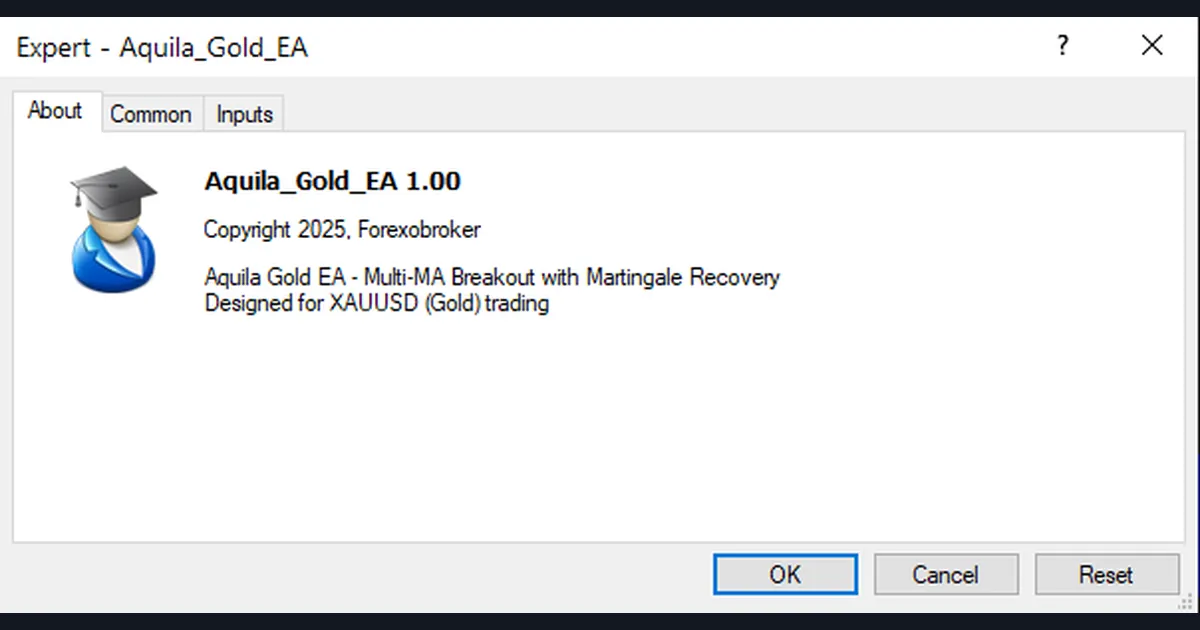
The dialog above shows a gold EA whose own description reads “Multi-MA Breakout with Martingale Recovery”. The first half is the entry: a breakout filtered by several moving averages. The second half is the risk. “Martingale recovery” means the EA raises its lot size after a loss, so one winner can pay back the losing streak.
The maths is simple and harsh. Suppose the lot doubles after each loss, starting at 0.01. After six losses in a row the next trade is 0.64 lots, which is 64 times the first one. A long streak can empty the account fast. Our standard bans hidden martingale; here, at least, the author names it. Our guides to the martingale strategy in forex and grid trading vs martingale show how these losses build.
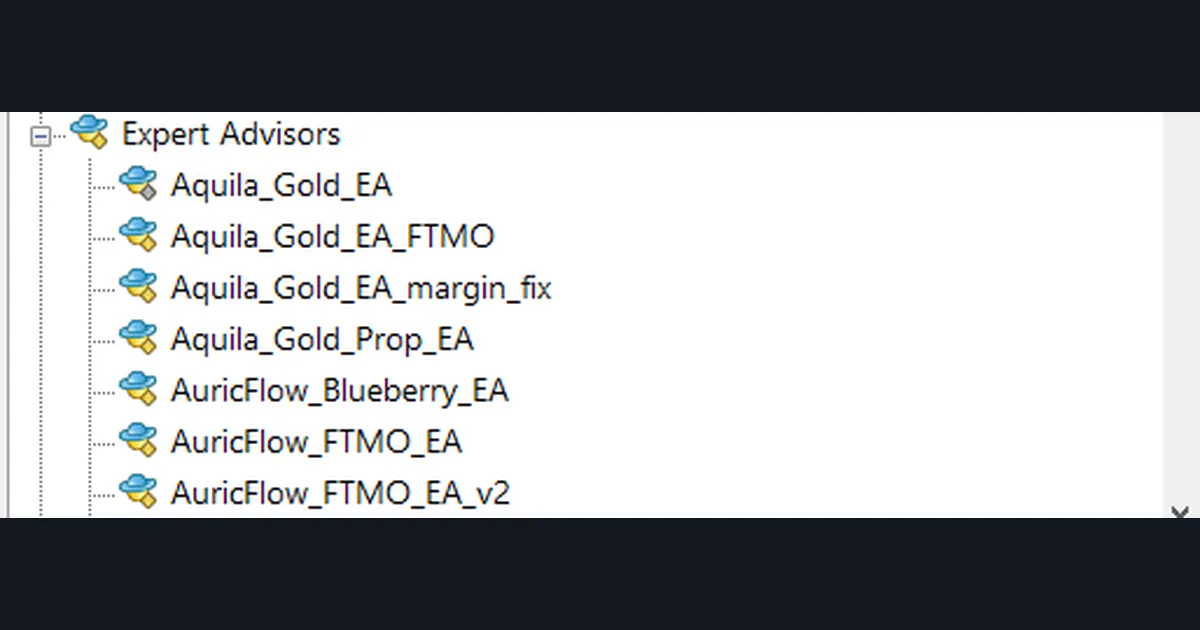
Next, check the Navigator panel. Here it lists seven EAs, including several versions of the same name with suffixes such as “FTMO”, “Prop” and “margin_fix”. Suffixes like these hint that the logic or sizing changed. So read the About tab of the exact file you plan to run, not its sibling.
Worked example: reading one backtest card
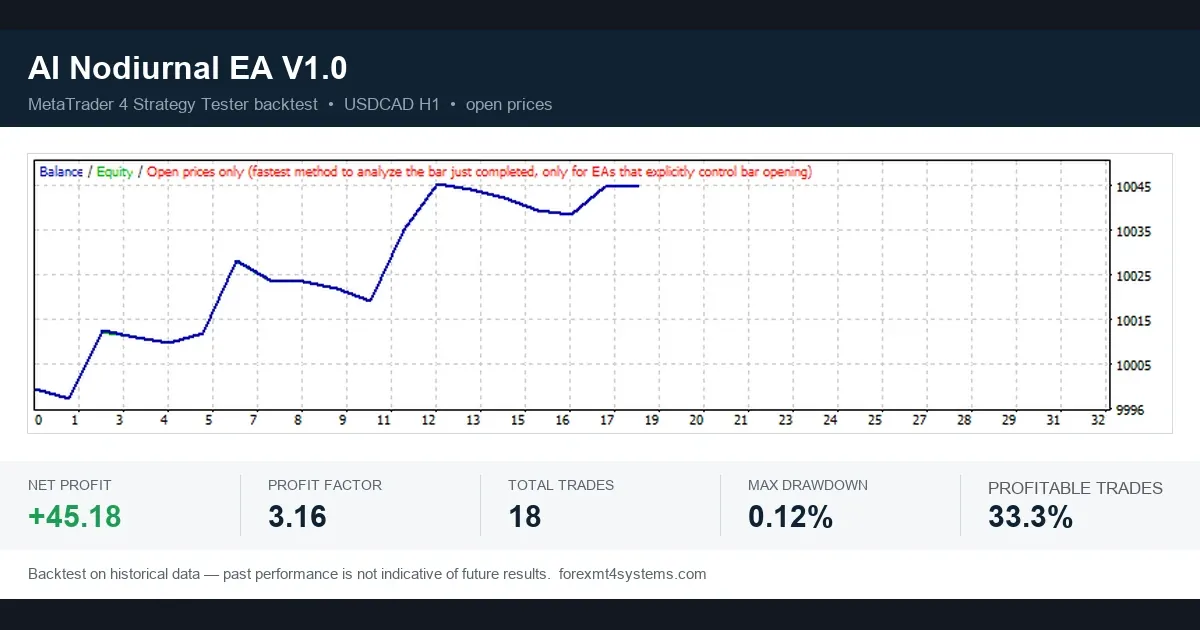
Take the first card, the AI Nodiurnal EA V1.0 on USDCAD H1. It shows a net profit of +45.18, a profit factor of 3.16, 18 total trades, a maximum drawdown of 0.12% and 33.3% profitable trades.
First, size the profit against the balance. The axis starts near 10,000, so +45.18 is about 0.45% over roughly 18 months. That is a small move, not a money machine.
Second, count the trades. 33.3% of 18 trades is 6 winners and 12 losers. So the EA lost twice as often as it won.
Third, work out how it still made money. With a net of 45.18 and a profit factor of 3.16, gross losses come to about 20.92 and gross profits to about 66.10. Divide by the trade counts and the average winner is about 6.3 times the average loser. In short, the EA lives on a few large winners.
That shape has a cost: long losing runs. Lose two of those six winners on fresh data and the result looks very different. So the right reading is “promising enough to forward test on demo”, not “ready for live money”. Our page on how to evaluate a forex EA lists more checks.
How to switch a forex trading bot on safely
An EA on a chart does nothing until two switches allow it. The first is the AutoTrading button on the main toolbar, shown below. When it is off, no EA in that terminal can send orders.
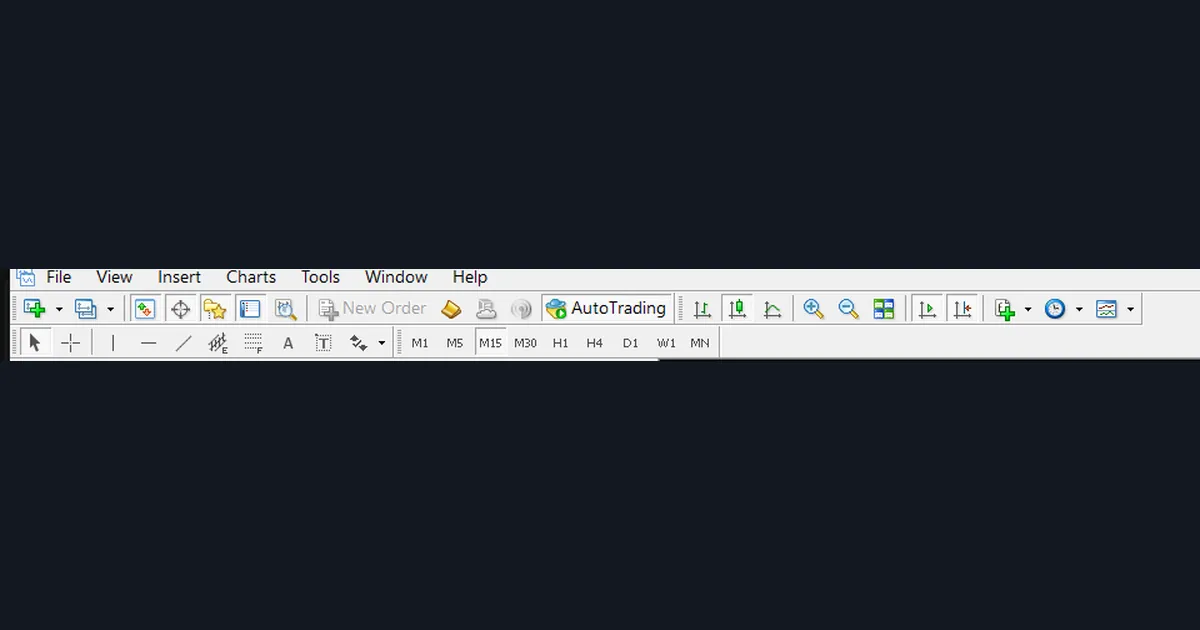
The second switch is per EA. In the properties dialog, the Common tab has an “Allow live trading” box. If it is unticked, that EA can run its logic but cannot trade. Both switches must be on before a single order goes out. The Expert Advisors page in the MetaTrader 4 Help describes both settings.
Then follow this order:
- Install the file as shown in our guide on how to install MT4 and MT5 Expert Advisors.
- Run it on a demo account first, for weeks rather than days.
- Use the smallest lot size and confirm every trade shows a stop loss.
- Give each chart its own magic number.
- Only then think about a small live account.
A VPS is optional. It keeps the terminal online when your PC is off, but it does not make a weak EA better. See what a forex VPS is before you pay for one.
Comparing four backtest cards side by side
Four cards side by side show how much the numbers move between EAs, symbols and timeframes.
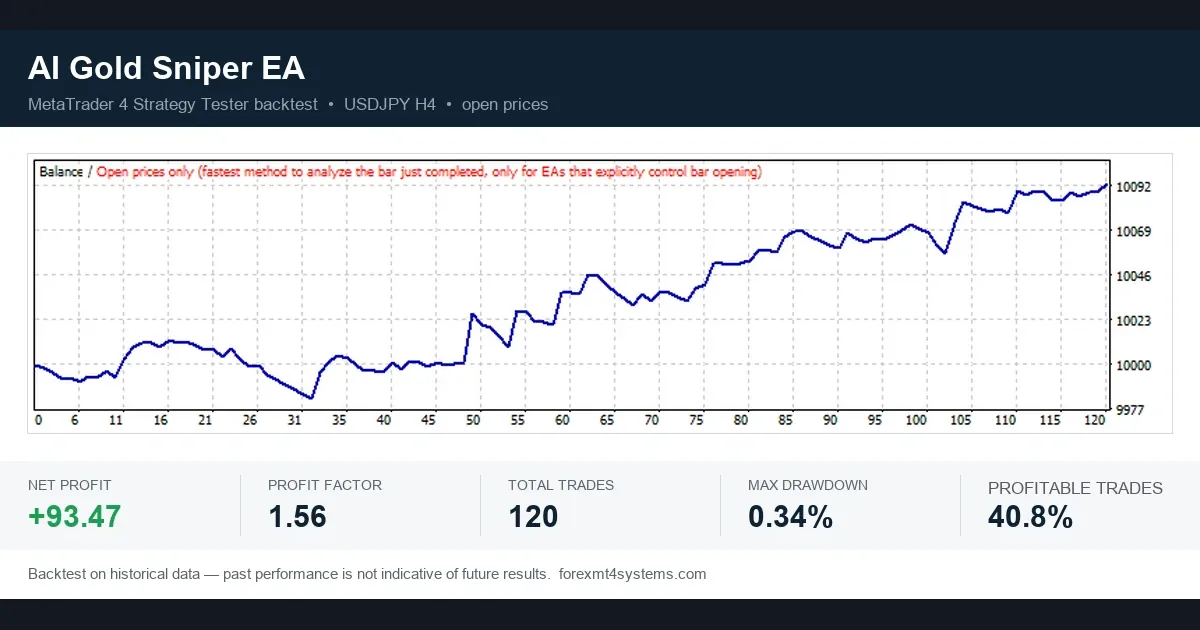
| EA | Symbol and timeframe | Net profit | Profit factor | Trades | Max drawdown | Profitable trades |
|---|---|---|---|---|---|---|
| AI Nodiurnal EA V1.0 | USDCAD H1 | +45.18 | 3.16 | 18 | 0.12% | 33.3% |
| AI Gold Sniper EA | USDJPY H4 | +93.47 | 1.56 | 120 | 0.34% | 40.8% |
| Ai Tradingvision Gpx Ea | EURUSD H4 | +21.12 | 1.36 | 23 | 0.28% | 39.1% |
| Albatross Ver4 Ea | USDJPY H1 | +16.87 | 1.64 | 51 | 0.12% | 68.6% |
Notice the name of the second EA. It says “Gold”, yet its best run is on USDJPY H4. A name is a label, not a description. The inputs and the tester report are the facts.
Also notice that the highest profit factor sits on the smallest sample. The AI Gold Sniper card has a modest profit factor of 1.56, but it has 120 trades. That makes it the least fragile of the four, though still in-sample. If you read the MT4 Strategy Tester report yourself, look at the trade count before anything else.
Download the complete indicator database
Put these concepts on your charts. One email unlocks the full library of 1,380+ indicators with compiled MT4 and MT5 files, plus my TradingView scripts. No paywall, no spam, unsubscribe any time.
Get free access to my indicator database
One email unlocks 1,380+ free MT4, MT5 and TradingView indicators — the complete library. No single-tool download; you get the whole database.
Where it fails
A backtest hides most of these limits.
- In-sample fit. Our cards picked the best settings on the same data they show. A fresh period will look worse, sometimes much worse.
- Open-prices model. It ignores what price did inside each bar. A stop and a target hit in the same bar can be scored the wrong way.
- Costs and fills. Live spreads widen at the rollover and on news. Slippage and requotes do not show up the same way in a test.
- Regime change. A breakout EA tuned on a trending year can bleed in a range.
- Technical breaks. A lost connection, a restarted PC or a broker symbol suffix can stop an EA without warning.
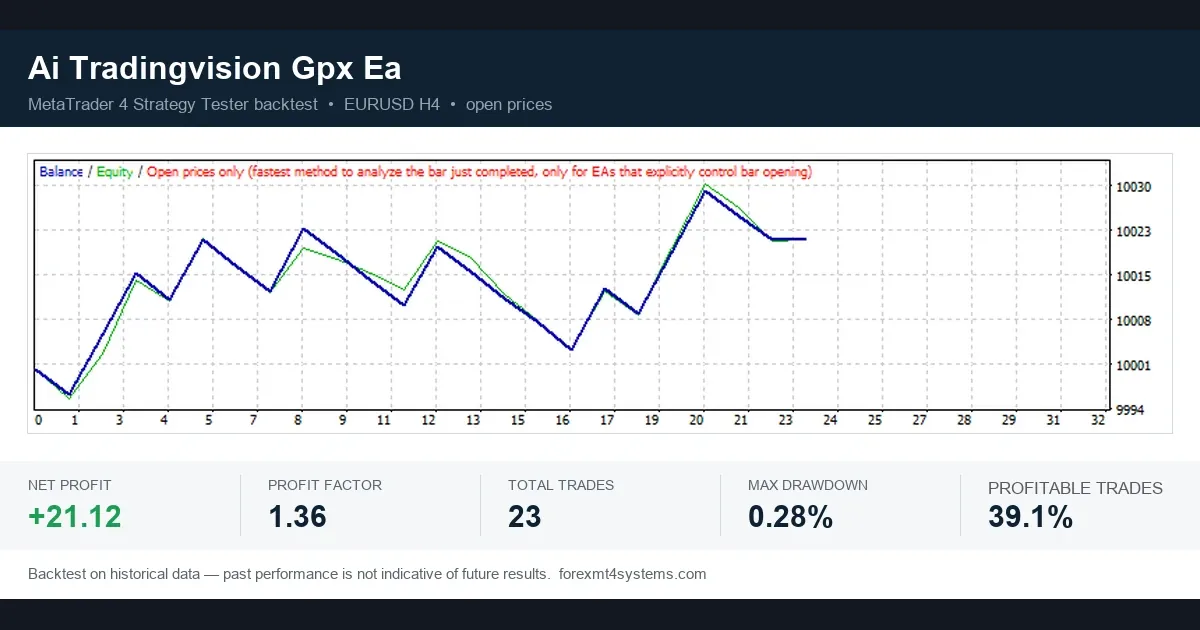
The Tradingvision Gpx card above shows the problem with small samples. Its 23 trades swing up and down, and the curve gives back most of each gain before the next one. A few different trades would change the final number a lot.
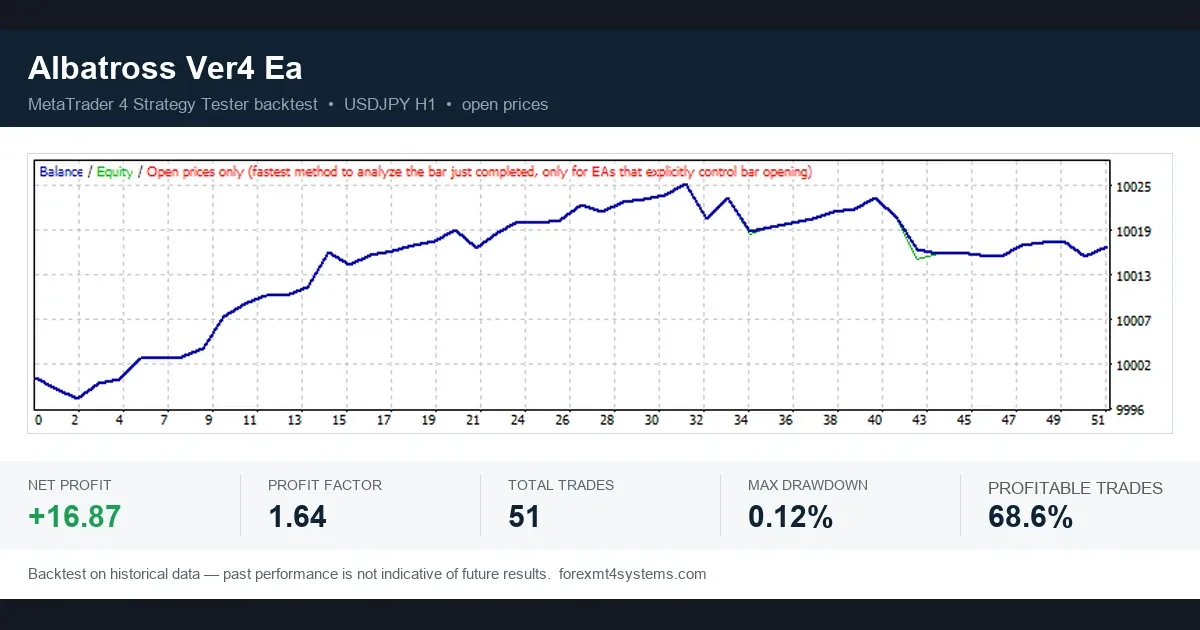
The Albatross card has the opposite profile: 68.6% profitable trades. Yet its profit factor is only 1.64. Late in the run the balance gives back part of its gain, and the green equity line dips below the balance near trade 43. A high share of winners does not protect you if the losers are larger. Our page on whether forex robots work covers these patterns in more depth.
Bot scams: what regulators warn about
The US Commodity Futures Trading Commission has a customer advisory on AI trading bots at CFTC.gov. It warns about bots sold with huge claimed returns. It also describes a case in which a promoter created fake customer balances using MetaTrader demo accounts.
That last point matters. A screenshot of a MetaTrader account proves nothing on its own, because a demo account looks like a live one. So treat these as red flags:
- Fixed monthly return claims, or claims that the bot almost never loses.
- No stop loss in the inputs, or a lot size that grows after losses.
- No full tester report, only a curve image.
- Pressure to deposit with one named broker or to recruit friends.
Our article on AI trading bots looks at the “AI” label in particular.
Common mistakes with a forex trading bot
- Going live on day one. Run the EA on demo first and check each trade against its rules.
- Trusting the curve, not the count. A smooth line from 18 trades is weaker evidence than a rough line from 120. Read the trade count first.
- Running two EAs with one magic number. Then each bot may manage or close the other’s trades. Give every chart its own ID.
- Ignoring the About tab. Authors often state the risk in plain words, as the martingale example shows.
Where to go next
If you want to test an EA yourself, start with the MT4 Strategy Tester guide and then walk-forward analysis, which tests settings on data they were not tuned on. On a funded account, read running EAs at prop firms first. For the stop loss side, see how to use a stop loss.
For outside reading, the MQL4 Reference and the MetaTrader 4 Help linked above cover the platform side. The CFTC advisory covers the fraud side. For the maths of doubling after losses, read the martingale system explainer at Investopedia.
FAQ about a forex trading bot
Is a forex trading bot the same as an Expert Advisor?
On MetaTrader, yes. A forex robot, an auto forex trader and an EA all mean a program that trades by itself under fixed rules.
Can a bot trade while my computer is off?
No. The terminal must be running and connected. That is why some traders use a VPS, which keeps MetaTrader online around the clock.
Why does my EA not place any trades?
Check the AutoTrading button first, then the “Allow live trading” box on the Common tab. Then read the Experts tab of the terminal log for errors.
What is a magic number in an EA?
It is an ID the EA stamps on its own orders. It lets the EA manage only its trades, so give each chart a different number.
How do I spot martingale in an EA?
Read the About tab and the inputs. Words like “recovery”, “multiplier” or “lot factor” usually mean the lot size grows after a loss.
How many trades should a backtest have?
A few dozen trades prove very little. Our cards range from 18 to 120 trades, so we treat them as a starting point, not as proof.
Does a high share of profitable trades mean a good bot?
Not by itself. The Albatross card shows 68.6% profitable trades but a profit factor of only 1.64, because the losers are larger than the winners.
Will a bot that backtests well make money live?
It might not. Our cards are in-sample tests on about 18 months of data, and live spreads, slippage and market changes all differ from a test. Forward test on demo first, because results are not guaranteed; past performance is not indicative of future results.
Last updated: 1 October 2026.

About the author
Written by Dominic Walsh, a Forex trader and MT4/MT5 indicator, Expert Advisor and script developer. Every tool on forexmt4systems.com is tested on live charts before release and ships with ready-to-use compiled MT4 (.ex4) and MT5 (.ex5) files. Learn more about the trader and developer behind this site.
How we build, test and correct every tool: Editorial & Testing Policy. Trading carries risk; see the disclaimer.